dsh-prompt-ErrorNotes-desk
1015677515/dsh-prompt-errornotes-desk
Speichert vom Agenten selbst gemeldete Fehler in einer kategorisierten Lernbibliothek und injiziert sie in jedem Durchlauf erneut in den system prompt. Vor dem Speichern bestätigt oder bearbeitet der Nutzer jeden Entwurf. Zwei Gesprächskopfzeilen-Panels bearbeiten globalen und sitzungsspezifischen Prompt.
Installation
dsh plugin --profile web add github:1015677515/dsh-prompt-errornotes-deskREADME
dsh-prompt-ErrorNotes-desk
本项目由 DeepSeek Harness 的 AI 智能体独立开发。
对话标题栏里的两个小面板:编辑提示词、维护错误经验库。
English | 中文
它做什么
| 面板 | 作用 |
|---|---|
| 提示词 | 编辑跨对话的全局提示词,以及本次对话的提示词(新对话会延续)。面板顶部显示哪一半当前正在生效。 |
| 错误库 | 按分类归纳反复犯的错误:每条一个简短类型 + 一句教训,归入三档分类之一。最近 10 条(条数可自己设)会被注入系统提示词,让后续对话以极低的 token 成本吸取教训。agent 按格式汇报「我犯了个错误:错误经过:… 教训:…」时会被自动捕获成待确认草稿。 |
第二个面板的意义:一个反复犯同类错误的 agent,会在自己的上下文里收到一份简短的、按分类归好的提醒,成本远低于重新踩一遍坑再发现。
点面板以外的空白处会自动关闭(按 Esc 也可以)。
界面预览
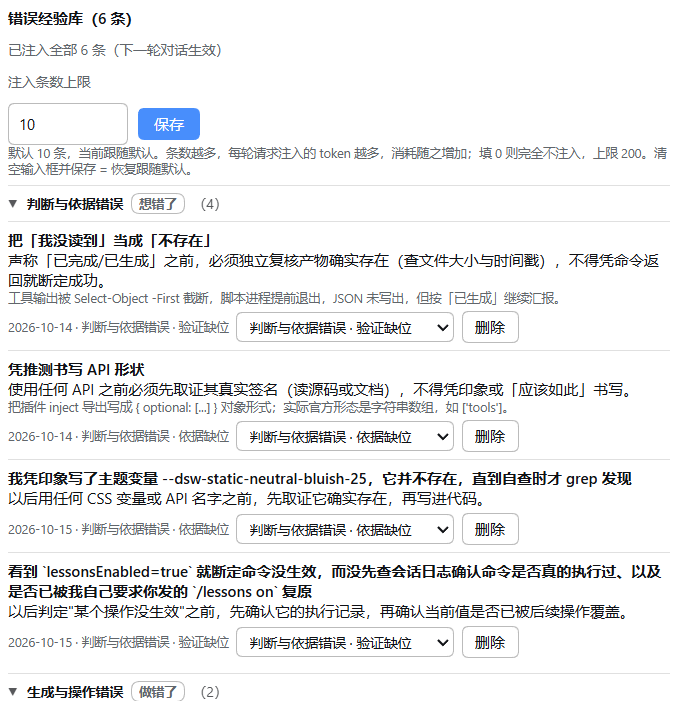
错误经验库 —— 按分类折叠,每条带下拉框可改类;顶部显示注入条数,底部是自动捕获的待确认草稿:
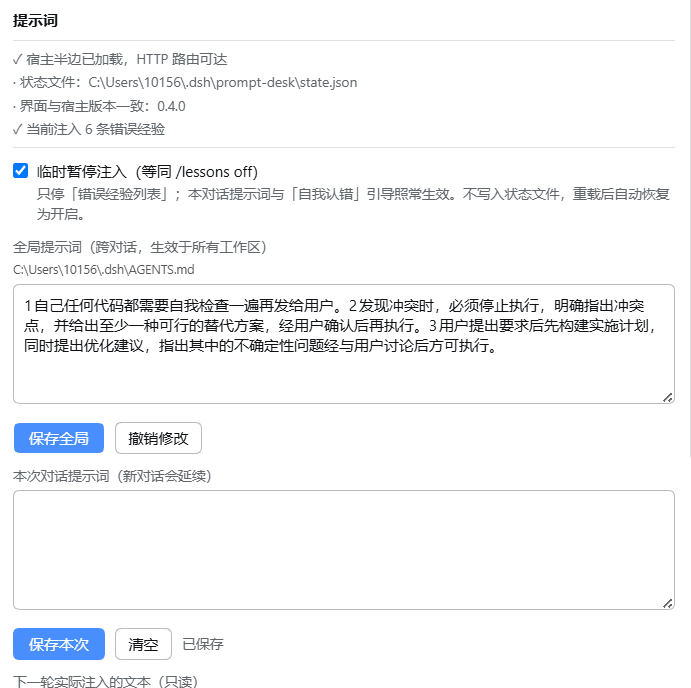
提示词 —— 顶部自检状态与「临时暂停注入」,中间是全局与本次对话提示词,底部是实际注入文本的预览:
安装
本插件目前只发布在 GitHub(未发布到 npm)。
完整的安装步骤、验证方法与常见问题见 INSTALL.md。下面是最短路径。
方式一:应用内安装(推荐)
设置 → 插件 → 安装,在输入框里填 GitHub 短地址:
github:1015677515/dsh-prompt-ErrorNotes-desk
也可以填完整网址:
https://github.com/1015677515/dsh-prompt-ErrorNotes-desk
安装界面提示「输入插件的包名、GitHub 仓库地址或本地目录路径」,上面两种都是它接受的写法。
不需要自己写 commit SHA。 填不带版本后缀的短地址即可:市场会先把默认分支的 HEAD 解析成 40 位 commit SHA,再把 github:owner/repo#<sha> 这种已固定的形式交给 pnpm。这样 lockfile 里记录的是可追溯的提交,安装后版本号能正常显示。
⚠️ 反过来要注意:不要自己写
#HEAD,也不要让安装源停留在会移动的分支上。源码里写明,HEAD 形态的 tarball「installs perfectly and then reports no version forever」——能装上,但版本栏会一直是空的,之后也检测不到更新。
方式二:本地目录
已经克隆到本地时,直接填目录路径(安装界面会提示「本地目录」):
A:\大肥鱼工作区\dsh-prompt-ErrorNotes-desk
开发时这样最方便:local 安装默认以目录链接(Windows 上是 Junction)接入,改完源码刷新页面即可,不必重装。
方式三:手动写进 profile
# cordis.patch.yml of your bundle
- insert:
    - id: prompt-desk
      name: dsh-prompt-ErrorNotes-desk
装好后需要重启 DSH:浏览器半边会热重载,但宿主半边(负责往系统提示词注入)要重启才会加载新的模块代次。
环境要求
| 依赖 | 要求 |
|---|---|
| DSH | >=0.2.0-rc.1 |
| Node | ^22.19.0 || >=24.0.0 |
| HTTP 服务 | 必需。宿主半边注册 GET|POST /prompt-desk/state,浏览器半边靠它读写。没有 HTTP 服务的 profile 会加载插件但保持不活动,而不是报错 |
无第三方运行时依赖;浏览器半边只用页面已提供的 react,没有构建步骤。
它会动你的哪些文件
全局提示词就是 DSH 自己那个 $DSH_HOME/AGENTS.md —— 也就是官方 dsh-agent-instructions 插件本来就会读的同一个文件。本插件不另存副本:两个都自称「全局提示词」的文件必然会漂移,而且只有一个真正会送达模型。
| 数据 | 位置 |
|---|---|
| 全局提示词 | $DSH_HOME/AGENTS.md |
| 本次对话提示词、错误库、面板开关 | $DSH_HOME/prompt-desk/state.json |
写入是原子的(先写 .tmp 再改名),崩溃不会截断你的提示词。浏览器半边完全不碰文件系统——所有读写都在宿主半边,所以不会写到 $DSH_HOME 之外。
注入是怎么工作的
本次对话提示词、以及最近 10 条错误经验,通过 ctx.systemPrompt.section() 注入,顺序值 10200(DEPLOYMENT_PERSONA_SUFFIX),即排在工具文档之后。
text传的是函数,所以改完下一轮对话就生效——不用重启,也不用重新注册。- 只注入类型 + 教训。存下来的
detail解释了事情经过,但它是 token 最贵、最不具行动性的一项,所以只留在面板里。 - 条数上限是为了不让经验库变成 token 黑洞:完整列表始终在面板里可读,提示词里也会说明当前只显示了其中一部分。
注入条数可以自己设
在错误库面板里直接填(最方便):面板里有一个「注入条数上限」输入框,填好点「保存」即可,下一轮对话生效。
| 字段 | 默认 | 含义 |
|---|---|---|
injectLimit | 10 | 注入系统提示词的错误经验条数上限。0 = 一条都不注入(会话提示词不受影响);最大 200,填更大也会被夹到 200 |
优先级:面板里填的值优先;清空输入框并保存(或点「恢复默认」)就回到"跟随插件配置"。
下面两种改法改的是默认值(面板没填时用它):
- 设置 → 插件 → 插件配置(宿主从本插件的
Configschema 生成这个表单) - 写进 profile 的
cordis.patch.yml:
- id: prompt-desk
  name: dsh-prompt-ErrorNotes-desk
  config:
    injectLimit: 20      # 只接受非负整数
只接受非负整数:负数、小数、非数字会被拒绝(面板里会提示;schema 会给出具体原因,例如 expected number >= 0 but got -5)。
个别精简宿主可能不提供
@deepseek-ai/schemastery(设置表单由它生成)。那种情况下功能不受影响:面板里的输入框和 patch 的config都照常工作,只是设置里不会出现这个字段。
错误经验库怎么分类
每一条都归到三个一级分类之一。面板按分类折叠展示,每条右侧的下拉框可以随时改类:
| 一级分类 | 含义 | 二级分类 |
|---|---|---|
| 判断与依据错误 | 想错了 | 验证缺位(没核实就下结论)、依据缺位(凭推测代替取证) |
| 生成与操作错误 | 做错了 | 语法生成(模板串、转义、拼接)、工具与编码(选错工具或破坏编码) |
| 其他 | 暂未归类 | —(本身就是终点,不再细分) |
分类是按补救手段分的,不是按症状:每个二级分类都对应一个"下次换个做法"的具体动作,这样它才是可执行的,而不是描述性的。
- 老条目(v1 没有分类字段)会统一落在其他,在面板里用下拉框手工归档即可。插件不会按文本猜分类——猜错比不猜更糟。
- 分类 slug 写入时校验:手改状态文件写进一个不存在的分类,会被归到其他,不会污染面板。
自动采集:agent 汇报「我犯了个错误」,它记下来
开启错误库导出时,插件会在系统提示词里附一段固定的认错引导(实际注入的全文,逐字):
## 自我认错
发现自身错误时,**必须**主动用下面这一行汇报:
我犯了个错误:错误经过:<当时实际发生了什么> 教训:<以后怎么做,一句可执行的规则>
两个标签缺一不可、顺序固定,且必须写在同一行;缺任一标签或换行都不会被捕获。分类由用户在面板里选。
错误经过与教训都要简洁,各控制在 20 字以内。
宿主半边监听助手的输出流,发现这个句式就把一条草稿放进面板顶部的「待确认」区,并在错误库按钮上显示数字徽标。草稿不会自动进库——必须点「采纳」;采纳前可以改措辞、选分类,或者直接「丢弃」。
- 两个标记都认:
我犯了个错误(引导里示范的那个)与我发现了个错误。命中多个时,取最靠前的、能解析成功的那一个。 - 标记必须位于行首(前面只允许空白、列表符号
- * +、有序列表序号或>)。这一条是为了挡住"在句子里提到标记"——讨论本功能、引用代码、摘录文档时,标记常常出现在句子中间,那不是认错。 - 不合法的那一处会被跳过,而不是放弃整条消息。这是很容易踩坑的一条:如果一条消息里先提到标记(引用它、演示格式、讨论本功能),再写出真正的认错,真正的认错仍然会被捕获——早先的实现只检查最靠前的那一个,一旦它在行中就整条放弃,结果是"边解释格式边认错"这种最常见的写法静默丢失。现在会继续往后找,直到找到合法的认错为止。
错误经过:与教训:是硬边界,且顺序固定、必须在同一行。这是取代旧|分隔符的关键改动:分隔符太容易在散文里被引用(曾有一句话里写着"(忘了写|)",结果在错误的位置切开,产生了垃圾草稿),而两个标签很难被无意复现。- 必须写在同一行:解析只看标记所在的那一行,所以「教训」换到下一行会静默丢弃——不会有任何报错,你也不会看到草稿。这是最容易踩的一条。
- 旧格式不再捕获:
我犯了个错误:xxx|yyy(用|分隔、无标签)不会再产生草稿,请用双标签格式。 - 20 字是建议,不是硬限制。代码只校验「错误经过」在 4~200 字之间;教训没有长度校验。写超了照样会被捕获,只是注入了 token 会多一些。
- 一条消息最多产生一条草稿(取最先解析成功的那一处);同一句话重复出现只算一次;队列上限 20 条,旧的先丢。
- 捕获到的内容若带尖括号(模型把模板本身回显出来)、以代码标点开头、或「错误经过」短于 4 字 / 长于 200 字,都会被直接丢弃——否则会记下"错误经过 =
<当时实际发生了什么>"这类垃圾。
认错引导和错误经验列表由同一个开关控制:引导的存在就是为了喂这个库,库不注入时还留着引导,等于让 agent 对着空气认错。
两个开关,位置刻意分开
有两个都会"停止注入错误经验"的开关。它们作用范围不同,所以放在提示词面板的上下两端,而不是挨在一起:
| 开关 | 位置 | 停什么 | 是否持久 |
|---|---|---|---|
临时暂停注入(等同 /lessons off) | 面板顶部 | 只停错误经验列表;本次对话提示词与「自我认错」引导照常生效 | 否,重载后自动恢复为开启 |
| 错误库导出到系统提示词 | 面板底部 | 停错误经验列表 + 自我认错引导 | 是,写进 state.json |
也可以在对话框里直接敲命令:
/lessons off     关闭(全局生效,跨对话)
/lessons on      恢复
/lessons         不带参数则翻转当前状态
/lessons是全局开关,且重载后复位——它的定位是"这一轮探索先别拿旧教训烦我"。要长期关掉,用面板底部的导出开关。参数写错会返回用法提示,不会静默翻转。
你随时能看见"模型到底看到了什么"
- 注入预览:提示词面板里常驻一段等宽文本,就是插件对系统提示词的完整贡献,逐字发给模型。它和真实注入走同一个构建函数,所以两者不会各自漂移——这正是它存在的意义(只给一个"N 条"的统计数字,用户无法判断措辞对不对)。
- 安装自检:提示词面板顶部一行状态,报告宿主半边是否加载、HTTP 路由是否可达、状态文件在哪、当前注入几条、有没有待确认、以及界面与宿主的版本是否一致。版本不一致时会提示刷新页面——界面 bundle 和宿主是从两个地方加载的,重建后其中一个常常领先一个版本。
设计取舍
- 面板刻意用不透明底。 用
--dsw-static-neutral-bluish-*而不是--dsw-alias-bg-layer-*:液态玻璃主题插件(例如dsh-plugin-wallpaper-engine)会把后者重写成半透明膜,用它绘制的地方会透出壁纸,文字变得难读。 - 磁盘上的状态一律不信任。 每个字段读入时都校验,手改坏或写了一半的文件会退回默认值,而不是每次请求抛
TypeError。 - 样式与注册都是 effect,所以卸载插件(或 HMR 重载)会移除样式表与两个插槽注册。
已对安装的宿主逐条取证
以下都是读源码确认过的,不是假设:
- 插件的
inject导出是字符串数组(如['tools']),没有{optional: [...]}对象写法。可选服务用ctx.inject([...], cb)获取,这样它不会拦住插件的激活。 webServer.register({ kind, path, handler })返回一个 disposer。PromptSection.text的类型是string | ((context: AssembleContext) => string)。conversation.session.header.utilities是list类型、session作用域的插槽;其组件收到的 props 是{ sessionId, useSessions }。- 暗色主题的属性名是
data-ds-dark-theme。 AssembleContext只有两个字段:{ scope?: ScopeKey; signal?: AbortSignal }——没有本轮用户消息,也没有激活工具集。所以本插件不做上下文匹配;text每次 assembly 都会被求值。systemPrompt.section()的text在每次 assembly 时求值:SystemPrompt.assemble里是typeof section.text === 'function' ? section.text(context) : section.text。ScopeKey是object(不透明类型),而命令回调拿到的是invocation.agent.id(字符串)。两者之间没有取到可靠的映射,所以/lessons做成全局开关,而不是会话级。- 事件
agent/assistant-stream的载荷是{ agent, frame };frame.chunk是StreamChunk(text-delta带text字段),frame.outcome.kind为'committed' | 'abandoned'。 commands服务提供register(definition: CommandDefinition): () => void;CommandDefinition形如{ name, description, input?, recordInput?, handler };CommandResult是{ kind: 'success', text? } | { kind: 'error', text }。- 运行时已验证(2026-10-15,desktop profile):注册在插件全局
ctx上的监听器确实能收到Scoped<Agent>派发的agent/assistant-stream。实测方式:在真实对话里输出一条认错句式,它被正确解析为待确认草稿并写入state.json(source: "auto")。
运行时验证记录
上面那节是读源码得出的结论;下面这些是在真实 profile 里跑出来的,两者分开列,因为读源码不能替代跑一遍:
| 验证项 | 结果 |
|---|---|
| 宿主半边加载 | 插件成功激活,GET /prompt-desk/state 与 /prompt-desk/pending 均返回 200 |
| v1 → v3 状态迁移 | 真实状态文件被升到 version: 3,老条目获得稳定 id 与分类字段 |
| 自我认错自动采集 | 在真实对话里输出认错句式,被解析为待确认草稿(source: "auto"),独立复现两次 |
| 采纳草稿 + 改类 | 经面板采纳并改到「依据缺位」,正确落库、保留 source: "auto"、铸了新的唯一 id(未复用草稿 id) |
| 临时暂停(面板入口) | 生产 POST 实测:false 后错误列表归零、认错引导保留;另一个独立请求复读仍为 false(证明是进程级共享状态) |
/lessons off / on | 会话日志出现 command/run → command/done,返回 kind: "success",回显文字与预期一致 |
已知的边界:
/lessons必须单独成行(parseCommand的正则锚定在行首^/)。写在句子中间或末尾不会被当作命令,而是普通消息文本。
许可证
MIT
English
Developed independently by an AI agent running on DeepSeek Harness.
Two small panels in the DeepSeek Harness conversation header: edit prompts, keep an error-experience library.
中文 | English
What it does
| Panel | What it does |
|---|---|
| Prompt | Edits the cross-conversation global prompt and a per-session prompt that carries into the next conversation. Shows which half is currently reaching the model. |
| Error library | Recurring mistakes grouped by category — a short type plus a one-sentence lesson each, filed under one of three top-level categories. The most recent 10 (a configurable number) are injected into the system prompt, so a later turn can absorb them cheaply. A message reporting 「我犯了个错误:错误经过:… 教训:…」 is captured automatically as a draft awaiting confirmation. |
The point of the second panel: an agent that keeps repeating the same class of mistake gets a short, categorised reminder of it in its own context, at a token cost far below re-discovering the mistake.
Clicking anywhere outside an open panel closes it (Escape works too).
Screenshots
Error library — collapsible category groups, a per-row dropdown to re-file an entry, the injection count on top, and automatically captured drafts awaiting confirmation:
Prompt — the self-check line and the temporary pause on top, the global and per-session prompts in the middle, and a preview of the exact injected text at the bottom:
Install
This plugin is published on GitHub only (not on npm).
Full steps, verification and FAQ: INSTALL.md. The short path follows.
Option 1 — from inside the app (recommended)
Settings → Plugins → Install, then paste the GitHub shorthand:
github:1015677515/dsh-prompt-ErrorNotes-desk
The full URL works too:
https://github.com/1015677515/dsh-prompt-ErrorNotes-desk
The install field accepts a package name, a GitHub address, or a local directory path — both forms above are accepted.
You do not need to write a commit SHA yourself. The shorthand without a version suffix is enough: the market resolves the default branch's HEAD into a 40-character commit SHA first, then hands pnpm the pinned github:owner/repo#<sha> form. The lockfile therefore records a traceable commit and the installed version shows up correctly.
⚠️ The reverse matters too: do not write
#HEADyourself, and do not leave the source on a moving branch. The source says a HEAD tarball "installs perfectly and then reports no version forever" — it installs, but the version column stays empty and updates are never detected.
Option 2 — a local directory
When you already have a clone, point at the directory (the install field labels this "local directory"):
A:\大肥鱼工作区\dsh-prompt-ErrorNotes-desk
This is the convenient path while developing: a local install is wired in as a directory link (a Junction on Windows), so editing the source takes effect on a page refresh — no reinstall.
Option 3 — write it into the profile by hand
# cordis.patch.yml of your bundle
- insert:
    - id: prompt-desk
      name: dsh-prompt-ErrorNotes-desk
Restart DSH afterwards. The browser half hot-reloads, but the host half — the one that injects into the system prompt — only picks up a fresh module generation on restart.
Requirements
| Dependency | Requirement |
|---|---|
| DSH | >=0.2.0-rc.1 |
| Node | ^22.19.0 || >=24.0.0 |
| HTTP server | Required. The host half registers GET|POST /prompt-desk/state; the browser half reads and writes through it. A profile without an HTTP server loads the plugin and it stays inactive rather than failing |
No third-party runtime dependencies; the browser half uses only the react the page already provides, and there is no build step.
What it does to your files
The global prompt is the harness's own $DSH_HOME/AGENTS.md — the same file the official dsh-agent-instructions plugin already loads. This plugin keeps no second copy: two files both claiming to be "the global prompt" would drift, and only one of them would actually reach the model.
| Data | Location |
|---|---|
| Global prompt | $DSH_HOME/AGENTS.md |
| Session prompt, error library, panel visibility | $DSH_HOME/prompt-desk/state.json |
Writes are atomic (.tmp sibling + rename), so a crash cannot truncate your prompt. The browser half never touches the filesystem — all I/O lives on the host half, so nothing can write outside $DSH_HOME.
How the injection works
The session prompt and the most recent 10 error entries are contributed through ctx.systemPrompt.section() at order 10200 (DEPLOYMENT_PERSONA_SUFFIX), i.e. after the tool documentation.
textis a function, so an edit takes effect on the next turn — no restart, no re-registration.- Only type + lesson is injected. The stored
detailexplains the incident but is the most token-expensive and least actionable field, so it stays in the panel. - The cap keeps the library from becoming a token sink: the full list stays readable in the panel, and the prompt says when it is showing a subset.
The number of injected entries is yours to set
Set it right in the error-library panel (the convenient way): the panel has a "注入条数上限" field — type a number, press 保存, and it takes effect on the next turn.
| Field | Default | Meaning |
|---|---|---|
injectLimit | 10 | Cap on how many error entries reach the system prompt. 0 injects none (the session prompt is unaffected); 200 is the ceiling, and anything larger is clamped to it |
Precedence: a value entered in the panel wins. Emptying the field and saving (or pressing 恢复默认) puts it back on "follow the plugin config".
The two routes below set the default (what applies while the panel field is unset):
- Settings → Plugins → plugin config (the host builds that form from this plugin's
Configschema) - The profile's
cordis.patch.yml:
- id: prompt-desk
  name: dsh-prompt-ErrorNotes-desk
  config:
    injectLimit: 20      # non-negative integers only
Only a non-negative integer is accepted: a negative, fractional or non-numeric value is refused (the panel says so; the schema gives a specific reason such as expected number >= 0 but got -5).
A stripped-down host may not provide
@deepseek-ai/schemastery— the package that renders the settings form. Nothing breaks in that case: the panel's field and the patch'sconfigboth keep working; the field simply does not appear in Settings.
How the library is categorised
Every entry belongs to one of three top-level categories. The panel shows them as collapsible groups, and each row carries a dropdown so an entry can be re-filed at any time:
| Category | Means | Sub-categories |
|---|---|---|
| 判断与依据错误 | thought it wrong | 验证缺位 (concluded without checking), 依据缺位 (substituted a guess for evidence) |
| 生成与操作错误 | did it wrong | 语法生成 (template strings, escaping, concatenation), 工具与编码 (wrong tool, or broke the encoding) |
| 其他 | not yet filed | — (a destination in its own right, not a parent) |
The split is by remedy, not by symptom: each leaf names a concrete thing to do differently next time, which is what makes it actionable instead of merely descriptive.
- Entries predating categories (a v1 file has no category field) land in 其他 and are filed by hand with the dropdown. The plugin never guesses a category from the text — guessing wrong is worse than not guessing.
- Slugs are validated on write: a hand-edited file naming a category that does not exist lands in 其他 rather than polluting the panel.
Automatic capture: "我犯了个错误" gets recorded
With export enabled, the plugin appends a fixed confession cue to the system prompt (the injected text, verbatim):
## 自我认错
发现自身错误时,**必须**主动用下面这一行汇报:
我犯了个错误:错误经过:<当时实际发生了什么> 教训:<以后怎么做,一句可执行的规则>
两个标签缺一不可、顺序固定,且必须写在同一行;缺任一标签或换行都不会被捕获。分类由用户在面板里选。
错误经过与教训都要简洁,各控制在 20 字以内。
The Host watches the assistant's output stream; on seeing that phrasing it puts a draft into the 待确认 queue at the top of the panel and shows a count badge on the 错误库 button. A draft never enters the library by itself — you press 采纳, and you may rewrite the wording and pick a category first, or discard it.
- Either marker is accepted:
我犯了个错误(the one the cue demonstrates) and我发现了个错误. When several match, the earliest one that parses cleanly wins. - The marker must start its line (only whitespace, a list bullet
- * +, an ordered-list number, or>may precede it). The rule exists to reject sentences that merely mention the marker — a discussion of this feature, a code sample, or a documentation excerpt usually carries it mid-sentence, which is not a confession. - A rejected occurrence is skipped, not fatal to the message. This is the easiest trap of all: if a message mentions the marker first (quoting it, showing the format, discussing this feature) and then confesses for real, the real confession is still captured. An earlier version only inspected the earliest occurrence, so a mid-sentence mention made it give up on the whole message — the commonest way to write a confession ("explain the format, then confess") was lost silently. The search now continues past rejected candidates until one parses.
错误经过:and教训:are hard boundaries, and their order is fixed and must be on one line. This is what replaced the old|separator: a separator character gets quoted in prose (one real sentence contained "(忘了写|)", which split in the wrong place and produced two junk drafts), while two labels are very hard to reproduce by accident.- The whole confession must be on one line. The parser only reads the line the marker sits on, so a lesson moved to the next line is dropped silently — no error, and no draft for you to see. This is the easiest rule to trip over.
- The old format is no longer captured:
我犯了个错误:xxx|yyy(separator, no labels) produces no draft. Use the two-label format. - The 20-character limit is guidance, not enforcement. The code only checks the incident is 4–200 characters; the lesson has no length check at all. Writing longer still gets captured — it just costs more tokens once injected.
- One message yields at most one draft (the first occurrence that parses); the same sentence repeating counts once; the queue is capped at 20, oldest dropped.
- A capture is dropped when it contains angle brackets (the model echoing the template itself), begins with code punctuation, or has an incident field shorter than 4 or longer than 200 characters — otherwise it would record an entry whose incident is literally
<当时实际发生了什么>.
The cue and the library are gated by the same switch: the cue exists to feed the library, so leaving it on with the library un-injected would ask the agent to confess into nothing.
Two switches, deliberately at opposite ends
Two controls both stop error entries reaching the model. They differ in scope, so they sit at the top and bottom of the prompt panel rather than side by side:
| Switch | Where | Stops | Persisted |
|---|---|---|---|
临时暂停注入 (equivalent to /lessons off) | panel top | only the error list; the session prompt and the confession cue stay in force | no — resets to on after a reload |
| 错误库导出到系统提示词 | panel bottom | the error list and the confession cue together | yes, written to state.json |
The same pause is reachable from the composer:
/lessons off     pause (global — every conversation)
/lessons on      resume
/lessons         toggle
/lessonsis global and resets on reload — it exists for "stop nagging me with old lessons during this exploration". To turn the feature off for good, use the export switch at the bottom of the panel. A mistyped argument returns usage instead of silently toggling.
You can always see what the model actually reads
- Injection preview: a monospace block in the prompt panel showing the plugin's entire contribution, sent verbatim. It is produced by the same builder the assembler calls, so the two cannot drift — which is the whole point (a bare "N entries" count says nothing about the wording).
- Install self-check: one status line at the top of the prompt panel reporting whether the Host half loaded, whether the HTTP route is reachable, where the state file lives, how many entries are injected, whether anything awaits confirmation, and whether the panel and the Host are on the same version. A mismatch tells you to refresh — the bundle and the Host are loaded by different machinery, so after a rebuild one is routinely a version ahead.
Design notes
- Opaque surfaces on purpose. The panels use
--dsw-static-neutral-bluish-*rather than--dsw-alias-bg-layer-*: a liquid-glass theme plugin (such asdsh-plugin-wallpaper-engine) rewrites those aliases into translucent films, so anything painted with them lets the wallpaper show through and the text becomes hard to read. - State on disk is never trusted. Every field is validated on read, so a hand-edited or half-written file degrades to defaults instead of raising a
TypeErroron each request. - Styles and registrations are effects, so unloading the plugin (or an HMR reload) removes the stylesheet and both slot registrations.
Verified against the installed harness
These were checked in source rather than assumed:
- Plugin
injectexports are string arrays (['tools']); there is no{optional: [...]}object form. Optional services are taken withctx.inject([...], cb)so they do not gate activation. webServer.register({ kind, path, handler })returns a disposer.PromptSection.textis typedstring | ((context: AssembleContext) => string).conversation.session.header.utilitiesis alist, session-scoped slot; its components receive{ sessionId, useSessions }.- The dark-theme attribute is
data-ds-dark-theme. AssembleContexthas exactly two fields:{ scope?: ScopeKey; signal?: AbortSignal }— no current user message and no active tool set. The plugin therefore does no context matching;textis evaluated on every assembly.systemPrompt.section()'stextis evaluated per assembly:SystemPrompt.assembledoestypeof section.text === 'function' ? section.text(context) : section.text.ScopeKeyisobject(opaque), while a command handler receivesinvocation.agent.id(a string). No reliable mapping between the two was found, so/lessonsis a global switch rather than a per-session one.- The
agent/assistant-streampayload is{ agent, frame };frame.chunkis aStreamChunk(text-deltacarriestext), andframe.outcome.kindis'committed' | 'abandoned'. - The
commandsservice exposesregister(definition: CommandDefinition): () => void;CommandDefinitionis{ name, description, input?, recordInput?, handler };CommandResultis{ kind: 'success', text? } | { kind: 'error', text }. - Verified at runtime (2026-10-15, desktop profile): a listener registered on the plugin's global
ctxdoes receiveagent/assistant-stream, whose dispatch isScoped<Agent>. Verified by emitting a confession in a real conversation: it was parsed into a pending draft and written tostate.jsonwithsource: "auto".
Runtime verification log
The section above is what reading the source established; the list below is what was actually run in a real profile. They are kept apart because reading source is not a substitute for running it:
| Check | Result |
|---|---|
| Host half loads | The plugin activated; GET /prompt-desk/state and /prompt-desk/pending both returned 200 |
| v1 → v3 state migration | A real state file was upgraded to version: 3, with legacy entries gaining stable ids and category fields |
| Automatic capture | A confession emitted in a real conversation was parsed into a pending draft (source: "auto") — reproduced twice independently |
| Accept a draft + re-file it | Accepted through the panel and re-filed to 依据缺位: persisted correctly, kept source: "auto", and minted a fresh unique id rather than reusing the draft's |
| Temporary pause (panel entry) | Measured over a production POST: after false the error list dropped to zero while the confession cue stayed; an independent follow-up request still read false, proving it is process-wide shared state |
/lessons off and /on | The session log shows command/run → command/done returning kind: "success", with the expected reply text |
A known boundary:
/lessonsmust be on its own line (parseCommand's pattern is anchored at the start,^/). Written mid-sentence or at the end of a longer message it is ordinary prose, not a command.
Licence
MIT
Ähnliche Plugins
hindsight (coding-agents)
vectorize-io/hindsight
OpenViking (dsh-memory-plugin)
volcengine/openviking
ReMe (dsh)
agentscope-ai/reme
ReMe (typescript)
agentscope-ai/reme