dsh-mac-notify
carbenelee/dsh-mac-notify
Native macOS notifications for DSH: task completion, failures, approval requests, questions and plan reviews. A small bundled helper app lets banners use the DSH icon and opens DSH on click; the notification tone can be any audio file.
Installation
dsh plugin --profile web add github:carbenelee/dsh-mac-notifyREADME
dsh-mac-notify
Native macOS notifications for DeepSeek Harness (DSH): a banner appears when a task completes, fails, needs your approval, or needs an answer — so you do not have to babysit the window.
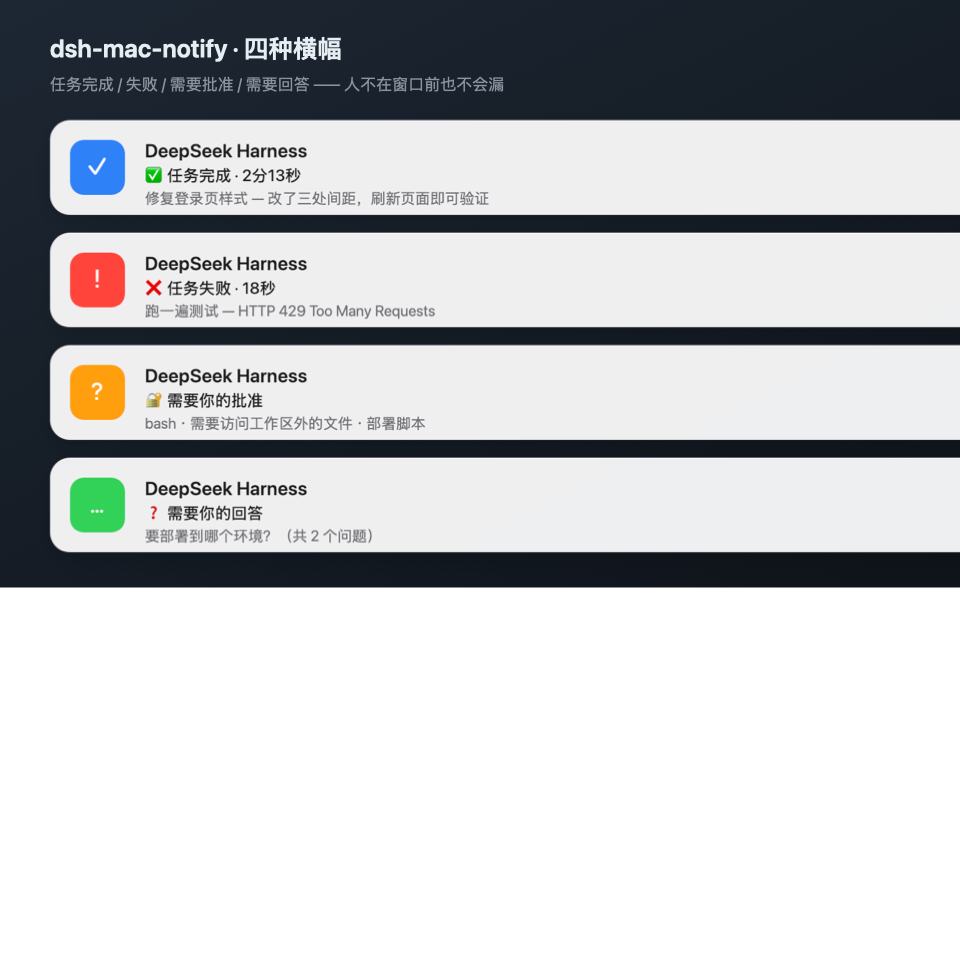
macOS only. The package declares
dsh.bundle.platforms: ["darwin"], so Windows and Linux hosts skip the bundle instead of installing a plugin that can never fire.
What it notifies
| Moment | DSH event | Banner |
|---|---|---|
| ✅ Task complete | turn/end → completed | duration + your prompt (+ last answer line) |
| ❌ Task failed | turn/end → error / max-tokens | error message + task |
| 🔐 Approval needed | approval/request | tool name + reason |
| ❓ Answer needed | user-questions/request | the question text (count when several) |
| 📋 Plan awaiting review | user-questions/request with plan-review | dedicated subtitle |
| ⏸ Task blocked | turn/end → blocked | off by default |
Subagent turns are silent by default: every subagent ends turns constantly and would spam you; only the session you are watching announces itself.
Install
Desktop app (DeepSeek Harness.app)
The desktop profile is managed exclusively by the Electron app, so dsh plugin --profile desktop ... is refused. Use Plugins → Install in the sidebar with:
link:/absolute/path/to/dsh-mac-notify     # local checkout
github:CarbeneLee/dsh-mac-notify          # straight from GitHub
The desktop app ships HMR, so the bundle usually mounts without a restart; quit and reopen the app only if no banner appears.
Web profile / custom profiles (CLI)
dsh plugin --profile web add dsh-mac-notify                    # from npm (recommended)
dsh plugin --profile web add github:CarbeneLee/dsh-mac-notify  # or straight from GitHub
The default backend is auto: Electron, then the native helper, then terminal-notifier, then osascript. On first mount the plugin builds DSHNotifier.app in the background if it is missing (Xcode Command Line Tools required, a few seconds); until it finishes, notifications still arrive through osascript with the Script Editor icon. Set DSH_MAC_NOTIFY_NO_BUILD=1 to opt out.
Manual wiring
Add the dependency and the bundle to ~/.dsh/profiles/<profile>/package.json:
{
  "dependencies": { "dsh-mac-notify": "link:/path/to/dsh-mac-notify" },
  "dsh": { "profile": { "bundles": ["...", "dsh-mac-notify"] } }
}
Then install inside the profile with the pnpm the app ships:
cd ~/.dsh/profiles/desktop
node "/Applications/DeepSeek Harness.app/Contents/Resources/runtime/primary-runtime/dependencies/pnpm/bin/pnpm.mjs" install
Verify
- System notifications first, no plugin needed:
node scripts/notify-demo.mjs - With the plugin mounted, ask "send a test notification" — the model calls
mac_notify_testand returns the active backend and config. - Set
debug: trueto append every delivery to~/.dsh/dsh-mac-notify/debug.log.
Configure
Overrides live in the profile's cordis.patch.yml:
- id: dsh-mac-notify
  config:
    appName: DeepSeek Harness
    notifyOnComplete: true
    notifyOnError: true
    notifyOnApproval: true
    notifyOnQuestion: true
    suppressWhenFocused: false
    backend: osascript
    completeSound: Glass
    debug: false
| Field | Default | Meaning |
|---|---|---|
enabled | true | master switch |
appName | DeepSeek Harness | banner title, and the app name used for focus suppression |
bundleId | com.deepseek.dsh | app activated on click |
locale | auto | zh / en, auto reads LANG |
notifyOnComplete | true | task complete |
notifyOnError | true | failure / output limit |
notifyOnApproval | true | approval requests |
notifyOnQuestion | true | questions, choices, plan review |
notifyOnBlocked | false | blocked turns |
includeSubagents | false | include subagent turns (noisy) |
suppressWhenFocused | false | skip while the DSH window is frontmost |
completeSound | Glass | macOS sound name |
errorSound | Basso | |
approvalSound | Ping | |
questionSound | Ping | |
completeSoundFile | "" | audio file for the tone; wins over the named sound |
errorSoundFile | "" | |
approvalSoundFile | "" | |
questionSoundFile | "" | |
backend | auto | see below |
helperPath | "" | helper binary, defaults to $DSH_HOME/dsh-mac-notify/DSHNotifier.app/... |
command | "" | command for backend: command |
minIntervalMs | 300 | throttle for burst notifications |
maxBodyChars | 220 | body budget |
maxLabelChars | 70 | task label budget |
debug | false | write debug.log |
Sound names are the system ones (Glass, Ping, Basso, Submarine, Hero, …); "" is silent.
Reuse another app's tone (WeChat / QQ)
*SoundFile accepts anything afplay can play (caf / aiff / wav / mp3), so the notification can sound exactly like WeChat:
mkdir -p ~/.dsh/dsh-mac-notify/sounds
cp /Applications/WeChat.app/Contents/Resources/notify.caf \
   ~/.dsh/dsh-mac-notify/sounds/wechat-notify.caf
- id: dsh-mac-notify
  config:
    completeSoundFile: "~/.dsh/dsh-mac-notify/sounds/wechat-notify.caf"
    errorSoundFile: "~/.dsh/dsh-mac-notify/sounds/wechat-notify.caf"
    approvalSoundFile: "~/.dsh/dsh-mac-notify/sounds/wechat-notify.caf"
    questionSoundFile: "~/.dsh/dsh-mac-notify/sounds/wechat-notify.caf"
Copy the file into your own directory instead of referencing the app bundle, so an app update cannot break it. Each event may use its own tone; empty falls back to the named system sound.
Backends
| backend | Notes |
|---|---|
helper (recommended) | posts through the bundled DSHNotifier.app: the banner wears DSH's own icon, and clicking it activates DeepSeek Harness. Build it once with sh scripts/build-helper.sh |
osascript | display notification, zero dependencies, works from any macOS process; Notification Center attributes it to Script Editor and the banner is not clickable |
electron | native Electron notification: attributed to DeepSeek Harness, click activates the app. Only works where the plugin host can load the electron module — the shipped DSH desktop build (Electron 44) does not expose it to plugins, so this backend falls back (see the debug log) |
terminal-notifier | if brew install terminal-notifier is present; supports grouping |
command | pipe to your own command; the payload arrives as DSH_NOTIFY_TITLE/SUBTITLE/BODY/SOUND/GROUP |
auto (default) | Electron → helper → terminal-notifier → osascript |
command example (webhook, noti, a script of yours):
backend: command
command: 'curl -s -X POST -H "Content-Type: application/json" -d "{\"text\":\"$DSH_NOTIFY_BODY\"}" https://example.com/hook'
Icon and click behaviour (helper backend)
macOS draws a notification's icon from the bundle that posted it: AppleScript shows Script Editor, and terminal-notifier 3.x dropped -appIcon because the system forbids overriding it. The repo therefore ships a tiny native app, DSHNotifier.app:
- it borrows DeepSeek Harness's
icon.icns, so the banner shows the DSH whale mark; - clicking the banner launches it, it brings DeepSeek Harness to the front and quits immediately (no dock icon, no background process);
- the first notification asks once for permission ("DeepSeek Harness wants to send you notifications") — allow it in System Settings → Notifications.
Build it once (Xcode Command Line Tools required):
sh scripts/build-helper.sh # installs to ~/.dsh/dsh-mac-notify/DSHNotifier.app
then enable it:
- id: dsh-mac-notify
  config:
    backend: helper
Deep-linking to one session is not possible yet: DSH registers the
dsh://scheme but the desktop app has no URL handler, so a click can only raise the app, leaving it on the page it was last showing.
Troubleshooting
- No banner: System Settings → Notifications → allow Script Editor (osascript backend) or DeepSeek Harness (electron backend); check Focus / Do Not Disturb.
- Nothing after install: restart the desktop app; confirm
dsh-mac-notifyis indsh.profile.bundlesof~/.dsh/profiles/desktop/package.json. - Completion works, approvals do not: approvals only exist under the
askpolicy; the banner is emitted regardless of whether an answerer takes the request. - Privacy: banner text also shows on the lock screen. It contains the first line of your prompt, tool names and question text — lower
maxBodyCharsor switch events off if that matters.
How it works
Host-only, zero runtime dependencies; it reads no files and opens no sockets:
approval/request       ──┐
user-questions/request ──┼──► compose banner ──► sender.send() ──► Notification Center
session/event turn/end ──┘                        ├─ electron Notification
                                                  ├─ terminal-notifier
                                                  ├─ osascript
                                                  └─ custom command
- Listeners register with
{ global: true, prepend: true }, send the banner, then hand the request back withnext()— approval outcomes are never changed, and a failing notification can never block a task. - Each turn remembers the first human prompt and the last answer, which become the banner text.
- Delivery is fire-and-forget; errors only reach the debug log.
Development
npm test                      # 18 node:test cases, no DSH required
node scripts/notify-demo.mjs  # send a real notification
dsh/index.js    event routing + wording
dsh/notify.js   backends (osascript / electron / terminal-notifier / command)
dsh/config.js   defaults and validation
dsh/text.js     clamping and duration formatting
test/           node:test suite
Limitations
- macOS only; other platforms skip silently.
osascriptbanners have no click action; usebackend: electronfor click-to-activate.- Profile changes hot-apply through HMR; a restart is the fallback when a re-composition is refused.
- Notifications carry no window identity: every session in the profile shares one stream.
License
MIT
Ähnliche Plugins
dsh-web (dsh-ssh)
zhu1090093659/dsh-web
dsh-web (dsh-remote-web-ui)
zhu1090093659/dsh-web
dsh-purge
kingcharleslzy-ai/dsh-purge
dsh-web-ui (dsh-ssh)
zhu1090093659/dsh-web-ui