dsh-video-vision
destinhue/dsh-video-vision
Five tools for reading a video as raw material rather than as something to watch. video_outline maps a whole file as text and draws nothing at all: 4-60 equal windows, each with its cut count, speech share, intensity bar and tags, then the windows worth opening and the exact start/end for the call that follows -- zero image tokens. video_probe returns metadata and a reading plan without decoding frames. video_storyboard turns a window into one contact sheet plus a text index binding every cell to its timecode, cut count and frame time; cells whose text would be illegible at that scale are marked zoom, and dedupe global folds a picture that comes back after a cut. video_zoom re-renders 1-9 cells from a short window at a larger scale. video_read decodes only keyframes, OCRs each screen, and returns an outline plus \[mm:ss] text -- the path for lectures, slide decks and screen recordings, where the words are the content. It also reads a file with sound and no picture as a transcript (subtitle track, then DSH_ASR_CMD, then a transcript file you pass; long audio is cut at 45 s onto silence), composes six changed frames into one sheet when a file has no readable text at all, and can write the result out as SRT, WebVTT or text. Cuts, dissolves and one-frame flashes are found in a single ffmpeg pass; from ten minutes up a file is analysed on its keyframes only, 2.7x faster on a two-hour lecture; and a cell is never shrunk below a fifth of the source, so a 1440p sheet spends the same tokens on fewer, bigger cells. OCR is the engine Windows ships, tesseract with line boxes, or DSH_OCR_CMD. It takes a B station link (bilibili.com/video/BV..., a bare BV id, an av id or a b23.tv short link) wherever it takes a file: up to 300 seconds is read from the CDN in place with nothing written to disk, longer videos are downloaded once and cached within a 4 GB / 24 video budget, play URLs are cached for ten minutes, and a link that is not a single video says what it is. Needs ffmpeg, uses ffprobe when present, and has no other runtime dependencies. It is a wire-compatible reimplementation of SAOS-3624/dsh-video-storyboard: it registers the same video_probe / video_storyboard / video_zoom tool names, so the two cannot be enabled together.
Installation
dsh plugin --profile web add github:destinhue/dsh-video-visionREADME
dsh-video-vision
Look at a video instead of being told about one: one addressable storyboard
grid per view, tuned for deepseek-v4.1-flash vision. Drop-in replacement for
dsh-video-storyboard / dsh-video-understand — the same three tool names and
argument shapes as those, plus two answers they do not have: a text map of the
whole file that draws nothing, and a transcript for a file that has sound but no
picture.
video_probe       metadata + a reading plan, no frames decoded
video_outline     the whole file as rows of text — 0 images, 0 vision tokens
video_storyboard  one contact sheet + a text index binding every cell to a timecode
video_zoom        1-9 large cells over a short window
video_read        the whole video as timestamped TEXT — for lectures, slides, screen recordings

Input can be a file path, a direct media URL, or a **B站 link** (`bilibili.com/video/BV…`, a bare
BV id, an `av` id, or a `b23.tv` short link) — the video is downloaded to a cache once and read like
any other file.
Picture paths are for film, sport, gameplay, anything where the picture is the
content. When the content is text on the screen, video_read wins outright: a
two-hour lecture becomes 7.7k characters of [mm:ss] text plus an outline of its
eleven worked examples, which the model can quote, search and rewrite into notes —
where a 1024-token contact sheet is unreadable at that size. It costs 87 s for two
hours of video, 5.6 s for a 95-second subtitled clip, and 1.3 s for a 36-second one.
Design notes with the measurements behind every decision: docs/DESIGN.md. Measured behaviour, per-clip tables and error margins: docs/EVIDENCE.md.
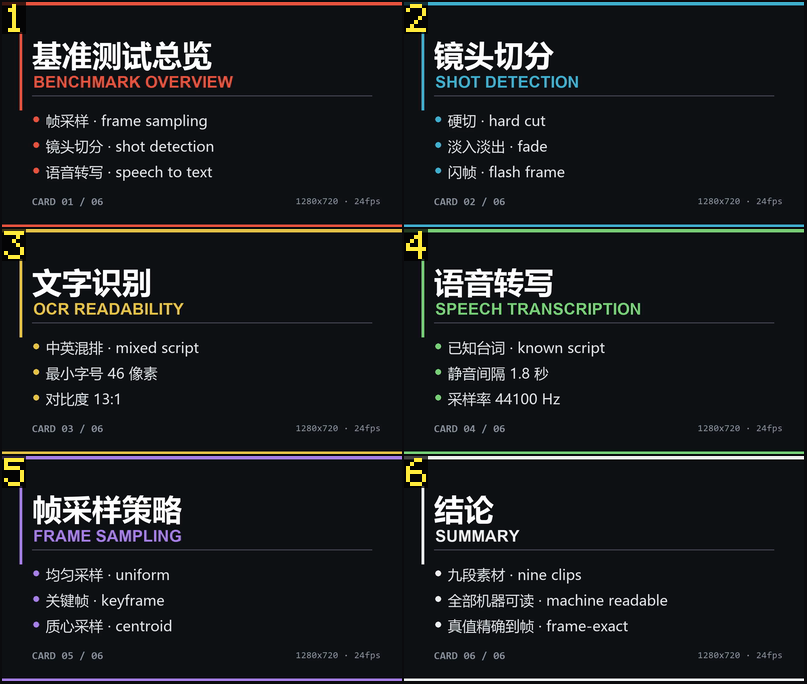 Clip D: six slides that differ only in their text block. Six cells, 359 vision tokens, every bullet readable. |
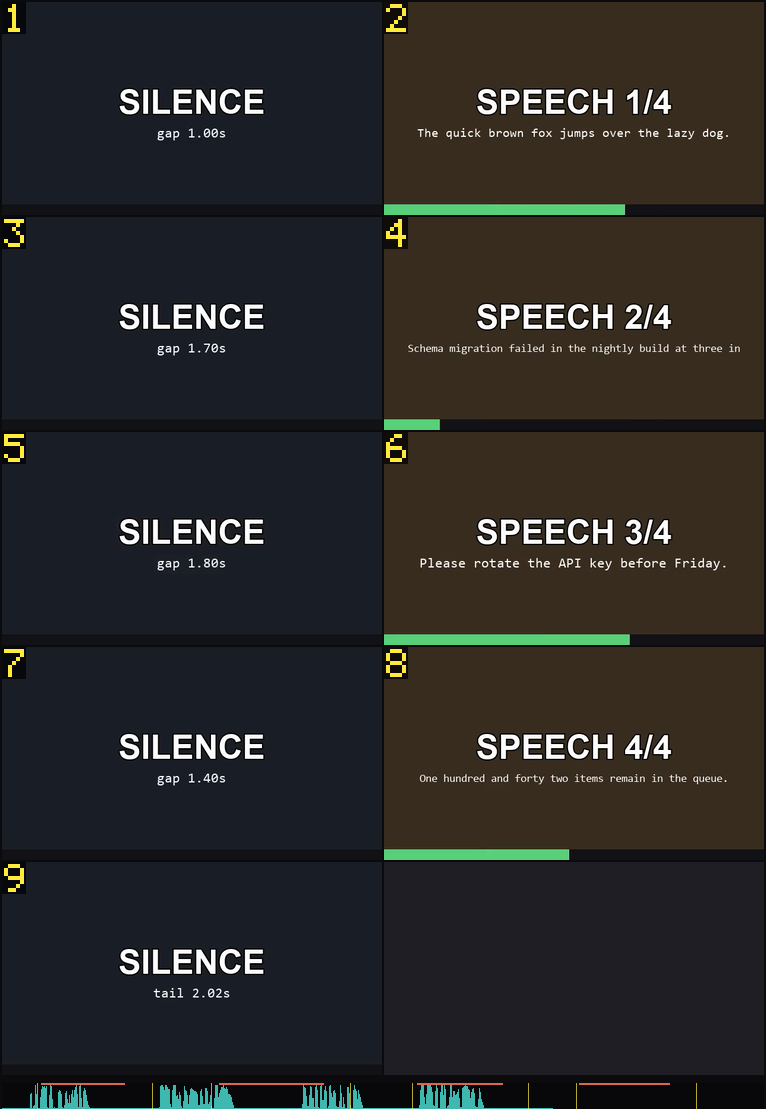 Clip G: nine cells plus an audio band — teal envelope, orange speech spans, yellow cut ticks. One image, 542 tokens. |
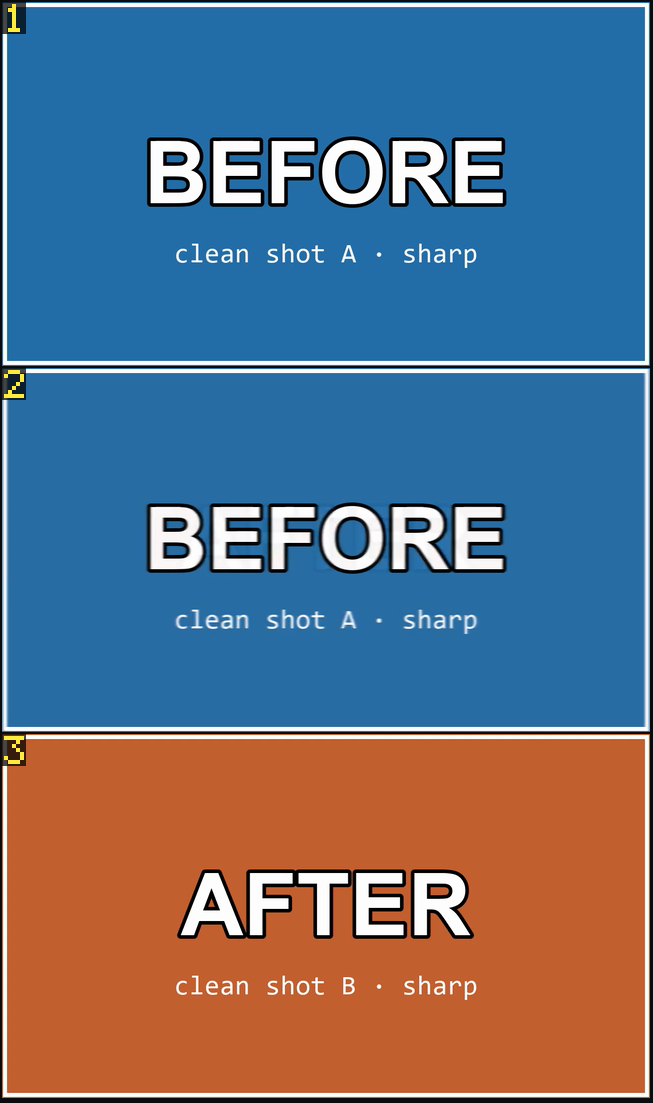 video_zoom over a 1 s crossfade: before, mid-transition, after — three cells at full width. |
|
Why it is better
It sees cuts a luma-only detector cannot. Every frame is reduced to a 12x7
grid of luma and chroma block means in a single ffmpeg pass, so a cut between
two shots of identical brightness — a day scene to a differently graded day
scene — is still a cut. Jumps are then classified five ways: cut, partial
(a slide changing only its text block), overlay (a caption appearing),
light (a lamp switching on) and noise; only the first two become cells.
Flashes and fades are not shots. A one-frame white flash restores the picture within three frames and is rejected; a dissolve is recognised as a transient — a plateau of change that stops afterwards — so it yields one boundary instead of a burst of tiny shots, while a slow pan yields none.
The sheet is sized per cell, not per sheet. The host bills an image by area
(tokens = gridH*(gridW+1)+2, 1024 cap). Ten cells in a 1.25 Mpx sheet cost
exactly what four cost, so the budget buys more moments at smaller cells until
cells stop being legible — six cells get ~350 tokens, twenty get ~1000, and a
cheap clip stays cheap.
Cells are earned, not evenly spaced. One cell per shot is the floor; extra cells go only to shots that are long enough and have a frame 2.5x further from every chosen frame than the "same picture" threshold. A static talking head never earns a second cell; a 30 s pan spreads over four.
A cutless stretch is planned by what changed inside it. A lecture, a screen share, a board being written on: one shot for eleven minutes, and the whole point is what appeared minute by minute. Past 90 s the planner switches question — from "how far apart are these pictures" to "did any part of the frame gain something new" — measured on the same 12×7 block grid, one cell per change, 30 s apart at most, capped at 24. A 19-minute window goes from four cells to twenty-two at the same 1 024-token budget.
Decoding is batched. Six cell extractions share one ffmpeg process (several inputs, one output each), three processes in flight — a 20-cell sheet costs 2-4 process launches instead of 60.
The cheapest look is a look at nothing. video_outline cuts the file into
equal windows and answers in rows — cuts, speech share, an eight-character
intensity bar, a tag — then names the three windows worth opening and the exact
start/end to open them with. It costs zero vision tokens and under a
second for a short clip: the point is to decide where to spend a sheet, which
is the one thing a contact sheet cannot tell you about a two-hour lecture.
A cell is never a smear. auto used to fill a 1.76 Mpx sheet with 28 cells
whatever the source size, so a 4K file got 28 pictures of 77 px tall. The sheet
keeps its budget and now spends it on fewer, bigger cells — no cell smaller than
a fifth of the source height: 720p 28, 1080p 21, 1440p 11, 4K 5 — at the same
~1 024 tokens, and it says so when the rail binds.
Ten minutes in, it reads the keyframes. A long file is analysed on its
keyframes when they are at least a second apart: 2.7× faster on a two-hour
lecture, with a note naming what a shorter change would hide and
DSH_SCAN_KEYFRAMES=off to undo it. Short windows and short files decode every
frame exactly as before.
No prose in results. Reading instructions live in the tool description,
which sits in the cached prompt prefix and is paid once; the result itself is
only the index and the image. textOnly + cellRange pages a long film at zero
image cost, and repeat calls are cached.
Numbers
Nine clips, frame-exact ground truth, one machine, driven directly as a module
(bench/final.mjs). Protocol, per-clip tables and threats to validity:
docs/EVIDENCE.md.
| value | |
|---|---|
| wall clock, cold | 634 ms (581-648 ms over runs) |
| wall clock, cached | 411 ms (370-411 ms) |
| moments shown | 67 cells |
| vision tokens | 3 648 |
| tokens per shown moment | 54.5 |
| cut F1 (micro, 0.5 s) | 0.872 |
| cut recall / precision | 1.000 / 0.774 |
| shot coverage | 0.963 |
| text in the result | 477 chars |
| a 2-hour lecture, read as text | 87 s, 53 screens, 7.7k chars |
| a 36-second card clip, read as text | 1.3 s, 6 screens |
| a 95-second subtitled clip, read as text | 5.6 s, 11 screens |
| a 40-second clip, mapped as text | 0.9 s, 8 windows, 0 vision tokens |
| a 70-second gameplay clip, mapped | 2.6 s, 24 cuts in 8 windows |
| a B站 link, probe only (no download) | 226 ms |
The text map is the one number that is zero by construction: video_outline
returns no image at all, so it can run over a whole file before any sheet is
paid for.
On a 13-minute film one call returns one image: 28 cells at 331x186, 1 024 tokens, 6.2 s, ~1 353 tokens of context including the index. Full table in EVIDENCE.md.
Where this plugin is weak is stated there rather than rounded away: a 1 s crossfade is reported as one dissolve boundary and scored as a false positive against a ground truth that calls it zero cuts, and two clips in the corpus change their whole frame between sections, so they read as cuts. Real-world spot checks with screenshots of what was actually readable: docs/REAL-WORLD.md.
Install
The plugin has no runtime dependencies. It needs ffmpeg, and uses ffprobe
when present (without it, metadata is parsed from the ffmpeg -i banner).
cd /path/to/dsh-video-vision
node bin/install.mjs                 # patch ~/.dsh/profiles/desktop, then restart DSH
node bin/install.mjs --dry-run       # show what it would change, touch nothing
node bin/install.mjs --remove        # uninstall
The script does the three things by hand that a pnpm install would do — add
"dsh-video-vision": "link:<abs path>" to the profile's dependencies, append
the package to dsh.profile.bundles, and junction the package into the profile's
node_modules. It is idempotent; --copy vendors a snapshot instead of linking.
Either way the app must be restarted afterwards: cordis.patch.yml inserts
the plugin into the harness tree at boot, which is what makes the tools appear.
ffmpeg
Resolution order (first hit wins): $DSH_FFMPEG_PATH, $DSH_VIDEO_FFMPEG,
$FFMPEG_PATH, the package's own vendor/bin, ffmpeg-static /
@ffmpeg-installer in node_modules, WinGet Links, C:\ffmpeg\bin, scoop shims,
the npm roaming prefix, /usr/local/bin, an imageio-ffmpeg wheel inside
~/.dsh/dsh-runtimes/*/, then plain ffmpeg on PATH.
$DSH_FFPROBE_PATH / $FFPROBE_PATH do the same for ffprobe.
Any ffmpeg from 4.x up works: the frame reader asks the binary for its version
once and uses -fps_mode passthrough (5.1 and later) or -vsync 0 (older),
retrying with the other spelling if the build rejects the first.
Verify a machine end to end (no video needed — it builds one):
node bin/selfcheck.mjs --smoke          # 21 checks, builds its own clip
node bin/selfcheck.mjs --smoke --host   # 40 checks: validates all five tools against the
                                        # installed Harness's schema engine
node --test test/                       # 314 tests, no network, hermetic temp dirs
--host runs the exact assertions ctx.tools.register runs, then calls every
tool once and validates the result the way the runtime does. Run it with
Electron's node (ELECTRON_RUN_AS_NODE=1) — plain node cannot read inside
app.asar. This is not ceremony: a tool that returns { text: {…} } instead of
{ text: "…" } is rejected by the host with "value.text" must be a string,
and nothing local notices until a user calls it.
Use
Map it first — it costs nothing
video_outline input:"dsh-video-vision-promo.mp4" windows:8 top:3
dsh-video-vision-promo.mp4 · 00:57 · 13 cuts · speech 97% · 8 windows of 00:07
note: text only — nothing was drawn, so this answer costs no image tokens; ask video_storyboard for a window once this says which one
   1  00:00-00:07  ▄███████  cuts 0  speech  93%  dark talk
   2  00:07-00:14  ████████  cuts 2  speech 100%  dark busy
   3  00:14-00:21  ████████  cuts 1  speech 100%  dark busy
   4  00:21-00:28  ████████  cuts 3  speech 100%  busy talk
   5  00:28-00:35  ████████  cuts 2  speech 100%  dark busy
   6  00:35-00:42  ████████  cuts 1  speech 100%  dark busy
   7  00:42-00:50  ████████  cuts 2  speech 100%  dark busy
   8  00:50-00:57  ██████▇▁  cuts 2  speech  86%  dark busy
watch first: 4 (00:21-00:28, 3 cuts, speech 100%) · 2 (00:07-00:14, 2 cuts, speech 100%) · 5 (00:28-00:35, 2 cuts, speech 100%)
next: video_storyboard start=21 end=28 for the pictures, video_read start=21 end=28 for the words
(That is an untouched run over this package's own 57-second promo clip: 1.9 s, no image, no vision tokens.)
Each row is one window: cuts, the share of it that is speech, an intensity bar
(eight slices, height = cuts, motion, speech and loud events), and at most two
tags — dark, static, text, quiet, busy, talk. static and text
are not the same answer: a clip whose frame barely moves while its captions keep
swapping is tagged text, and the answer says so in a note: and points at
video_read instead of leaving a model to conclude the file is empty.
watch first ranks by how much changes on screen first and how much is said
second; next carries those numbers into the call that actually opens a window.
Nothing is decoded twice: the same analysis pass serves the storyboard of the
chosen window.
| argument | meaning |
|---|---|
input | file path, direct URL, or B站 link |
windows | 4–60 equal slices (default 24) |
top | how many windows to name in watch first (1–8, default 3) |
One sheet of pictures
video_storyboard input:"C:\clips\pv.mp4"
pv.mp4 · 0:00:40.00 · 1280x720 · 30fps · 9 cuts · median shot 4.00s
sheet 1 · 2x5 grid · 942x1328 · 10 cells · window 00:00.00-00:40.00
cols: cell · pos · span · (cuts) · frame@
1 r1c1 00:00.00-00:04.00 @00:01.98
2 r1c2 00:04.00-00:07.68 @00:05.85
...
audio: speech 42% · -18.2 dBFS · loudest 0:41.20 · 3 silences · 12 onsets
transcript: subtitle-track · 18 segments
The image arrives in the same tool result. r2c1 is row 2, column 1 from the
top-left; the number burned into each cell is the cell index.
| argument | meaning |
|---|---|
input | file path, or a direct http(s) URL that ffmpeg can fetch |
start / end / duration | read one window instead of the whole file |
detail | low (≤6 cells) · auto (≤20, default) · high (≤28) |
cells | force an exact count (1–24) |
pick | sharp (default) or middle |
dedupe | shots (default) folds repeats inside a shot · global folds them across cuts too |
textOnly | text index only: no image, no decode |
cellRange | with textOnly, [first, last] to list |
video_zoom takes the same window arguments plus cells (1–9) and at; a
single cell is returned at full resolution.
Which cells need a closer look
A dense sheet is small per cell, so a subtitle line or a line of code can shrink into a smear while the cell still looks like a perfectly good picture. The index tells you instead of leaving you to guess:
cols: cell · pos · span · (cuts) · frame@ · zoom
zoom: 3/22 cells carry detail finer than the sheet can show at 6.4x — cells 4, 9, 17 are marked, the rest read fine as they are
4  r2c1 00:12.00-00:28.00 @00:19.80 zoom
Each cell is decoded at twice the cell size for the measurement, so this costs
nothing extra to read and adds no image tokens. Cells with no fine detail — a
black frame, a flat title card, letterbox bars — are never marked; when every
cell is too small the line says so once and suggests detail:"low" for bigger
cells. DSH_VIDEO_ZOOM_MARKERS=0 turns it off.
Reading a lecture
video_read input:"C:\clips\lecture.mp4"
# lecture.mp4 — read as text · 53 screens · 975 keyframes · 87 s

## outline
00:45 1.1
17:20 例题3
41:05 例题5
56:16 例题6
74:00 例题8

[00:45–01:44] 1.1 归纳证明 事实上,数学归纳法的使用是很灵活的…
[17:20–18:54] 例题 3 .A、B 二人玩如下游戏:初始时有两堆硬币,各 2ⁿ 个…
For a long video it decodes only keyframes (-skip_frame nokey), clusters
them by picture change, OCRs the slide area of each cluster once, then merges
screens that say the same thing. Near-identical slides are collapsed from both ends: OCR noise
makes exact matching useless, so sameness is a character-bigram similarity test.
Lines that appear on most screens are dropped as furniture — that is how the recorder's own header goes away without this plugin knowing which recorder it was. When a video has almost no readable text, it says what it found and names the likely causes (handwriting, a phone pointed at a screen, no slides at all) — and then returns pictures instead of an empty document: six changed frames are decoded and composed into one sheet, with a note saying these are the evidence the file carries. A screenshot recorder pointed at a whiteboard is read that way rather than refused.
A file with sound and no picture is read too. video_read checks for a video
stream before doing anything else, and an mp3, m4a or wav becomes a transcript:
the transcriptFile you pass first, else the container's subtitle track, else
DSH_ASR_CMD. With none of the three it refuses with the three ways
out in one sentence. video_probe on the same file reports the codec and returns
plan: null; video_storyboard and video_zoom say "there is no picture to
sample; video_read transcribes audio".
Pass out to keep the answer as a file — .srt or .vtt is a subtitle file,
anything else is [mm:ss] text lines, parent directories are created, and the
last note reports the path and the count:
video_read input:"C:\clips\lecture.mp4" out:"C:\notes\lecture.srt"
Short videos are read by sampling instead of by keyframe: under fifteen minutes one frame every 1.2 s is decoded once, gated on a 0.4 % picture change, and the frames that pass are the exact frames OCR reads — so a fixed layout whose only change is the subtitle line yields one screen per line, not one screen for the whole clip. Longer videos keep the keyframe path, where decoding, not OCR, is the cost.
What gets thrown away is the recorder, not the lecture: a tab strip is a short line near the top edge, a status bar is a short line at the bottom, a chat panel is a screen made of very short lines, and a frame where the teacher is writing by hand OCRs into a pile of two-character stubs with no sentence in it. Those tests are geometric, so they work whatever app the recording came from.
Measured on a real 1:59:54 lecture at 2560x1440: 87 s for 975 keyframes →
53 screens → 7 663 characters, with all eleven worked examples in the
outline. The same file through video_storyboard takes 163 s and returns one
1 024-token sheet whose slide text is unreadable. A 15-minute window reads in
16 s; a 36-second clip in 1.3 s.
| argument | meaning |
|---|---|
input | file path, or a direct http(s) URL that ffmpeg can fetch |
start / end | read one window only |
maxScreens | cap on distinct screens read, 3–400 (default 400) |
out | write the result: .srt/.vtt subtitle file, other extensions [mm:ss] text |
transcriptFile | SRT/VTT/JSON you already have — tried before the engine, and the only way in for an audio-only file with no engine |
Needs an OCR engine, and uses whichever it finds: the Windows one (built in, no
download, no model), tesseract on PATH anywhere, or DSH_OCR_CMD pointing
at an engine of your own (one image path in, lines out). DSH_OCR_BACKEND is
windows · tesseract · off, and DSH_OCR_LANG passes -l to
tesseract. With no engine at all the tool says so instead of pretending: the
Windows engine is probed for a recogniser language before it is used, so a
Windows Server (the engine is there, the language pack is not) falls back to
pictures rather than failing the read.
Reading from B站 without downloading
The CDN link is a signed mp4, so ffmpeg reads it in place. video_probe always did;
as of 1.3.2 video_storyboard, video_zoom and video_read do too, for clips up to
DSH_BILIBILI_STREAM_MAX seconds (default 300). Longer videos are downloaded once and
cached — a two-hour lecture streamed twice is more traffic than keeping it. Force either
behaviour with DSH_BILIBILI_STREAM=1 (never download) or =0 (always download).
Measured on a 57-second clip: storyboard 5.7 s streamed vs 1.9 s cached, video_read
8.3 s and 2 161 characters — and nothing written to disk.
The playurl is cached in memory for ten minutes (DSH_BILIBILI_PLAY_TTL_MS,
default 600 000). Asking probe, then storyboard, then read about one B站 file
otherwise resolves the same signed link three times; each answer stays valid for
hours, so the cache is keyed on
bvid|cid|maxHeight|auth and a hit is reported as cached: true.
And the download cache has a budget: DSH_BILIBILI_CACHE_MB (default 4096) and
DSH_BILIBILI_CACHE_MAX (default 24 videos). Least recently used goes first, the
file being written is never evicted, and each video's .mp4/.json/.srt leave
together.
A link that is not one video gets the reason, not "unsupported": a bangumi/play/ep
or ss link says which episode or season it is and that a p-segment of a season is
what this reads; bangumi/media/md is a whole work; a live room has no ending to
sample; a space or /list/ link is a collection, so the answer names the collection
and asks for one video; opus/read/t.bilibili.com is a picture post with no
video in it.
Speech, when you have an engine
video_storyboard and video_read can quote what is being said as well as
what is written, if you point DSH_ASR_CMD at an engine you already trust:
set DSH_ASR_CMD=C:\python\python.exe F:\asr\engine.py --model small {wav} {out}
The window's audio is extracted once (16 kHz mono), your command runs, and the SRT
it writes to {out} — or prints on stdout — is parsed. Each line is quoted on the
cell that contains its midpoint, so nothing is repeated. A subtitle track, when
present, always wins: it was captioned by a human and costs no decode.
Long audio is cut into chunks first. Handing a recogniser one 230 MB hour-long
wav is how you get an OOM instead of a transcript, so a window longer than
DSH_ASR_CHUNK_SECONDS (45) is split: one decode pass only listens for pauses,
then each 45 s aim is walked back to the last silence midpoint at least
DSH_ASR_CHUNK_MIN (12 s) into the chunk, so a cut lands in a pause and not in a
word. A sliver at the end folds into the chunk before it. Chunks are extracted and
transcribed DSH_ASR_PARALLEL at a time (2), timestamps are shifted back per
chunk so a line's time is the file's time, and a line repeated on both sides of a
cut is merged once. Pause thresholds are DSH_ASR_SILENCE_DB (−32 dB) and
DSH_ASR_SILENCE_MIN (0.35 s); DSH_ASR_CHUNK_SECONDS=0 turns chunking off for an
engine that wants the whole file.
A chunk that fails does not take the transcript with it: the rest is kept and the
returned reason says how many and where — 1 of 3 audio chunk(s) failed — chunk at 01:30: ….
No engine is bundled, deliberately. This package is 600 KB of code with zero dependencies, and the accuracy lives in the model (tiny 75 MB, small 484 MB, medium 1.5 GB). Measured on two minutes of a real lecture on 16 threads:
| engine | transcript time | two hours, extrapolated | what comes out |
|---|---|---|---|
tiny | 2.5 s | ~2.5 min | garbled: 選抜 for 选法, 按摩機束 for 枚举 |
small | 15.5 s | ~15 min | readable, Traditional output, 地规 for 递推 |
The host's own offline recogniser was tried and rejected: System.Speech zh-CN
turned the same minute into one 60-character line at 1.7 % confidence. That is
worse than returning nothing, which is why this is a hook and not a feature.
So the split is: slides and screen recordings go through video_read (87–112 s
for two hours), speech-only material through ASR, and when you need both, read
first and run ASR on the window you care about by passing start/end.
The client owns two of the recogniser's failure modes, because every engine has them and every caller would otherwise reinvent them badly:
-
Music is not speech. Asked to transcribe an instrumental, a recogniser does not return nothing — it invents a sentence and gives it a long timestamp. On a 90-second PV that produced a fake 29-second line, and since cells are quoted by time overlap the same garbage landed in five cards. Lines that are punctuation-only, or longer than 8 s at under 0.8 characters per second (real speech runs 2–6), are dropped; the count is reported in the manifest line as
2 suspect line(s) dropped, because a filter nobody can audit is indistinguishable from a recogniser that stopped working. -
The vocabulary is yours, not the internet's.
递推comes back地规,阶乘comes back階層. Put the corrections in~/.dsh/asr.jsonbeside the command:{ "cmd": "C:\\python\\python.exe F:\\asr\\engine.py --model small {wav} {out}", "terms": { "地规": "递推", "階層": "阶乘" } }The environment still wins over the file (
DSH_ASR_CMD); the file exists because a desktop host does not inheritsetxvariables. Longest key first, single pass, and the manifest reports1 term(s) fixed.Each key is tried in both scripts (≈50 Simplified/Traditional pairs a lecture actually contains), because whisper transcribes Mandarin into Traditional: a key written
地规has to match the地規that comes back, and before this it silently did nothing. Write the dictionary in the characters you think in; the other spelling works too.
Cell boundaries move onto silence. Dialogue already knows where its sentences end, so a boundary within 1.5 s of a silence midpoint is moved there instead of splitting a card an arbitrary tenth of a second into the next word. No card gets shorter than 0.3 s in the process.
If you already have a transcript, pass it. transcriptFile takes SRT, WebVTT,
or JSON ([{start,end,text}], or {"segments":[…]} as whisper-family tools emit)
and is tried before the subtitle track and before ASR:
video_storyboard({"input": "lecture.mp4", "transcriptFile": "lecture.srt"})
The B站 case is the one that pays: the captions are already there, and paying for a download plus a recogniser to re-derive them would be silly.
What it cannot do
- No bundled ASR. Speech is transcribed only when the file carries a subtitle
track or when you point
DSH_ASR_CMDat an engine (above). With neither, you still get the audio summary: speech share, loudness, silences, onsets. Long windows are chunked, but the model is yours: this package never downloads one. - OCR needs one of three engines. The Windows one (
Windows.Media.Ocr) is built in;tesseractonPATHis used on Linux and macOS;DSH_OCR_CMDpoints at anything else that takes one image and prints lines. With none of the three the tool says so —DSH_OCR_BACKEND=offforces that answer, andvideo_outlineorvideo_storyboardstill work because neither reads text. A host whose Windows engine has no recogniser language (Windows Server, a trimmed install) counts as having none:video_readreturns pictures with the usual note instead of anOCR failederror. The language is chosen once —zh-Hans-CN, then anyzh-hansvariant, then English, then whatever the host has. - B站 only, and only what it hands out without an account. A B站 link is
resolved through the public endpoints, which means 720P unless you supply a
cookie (
DSH_BILIBILI_COOKIE); there is noyt-dlp, so other sites still have to be downloaded first. Paywalled and members-only parts are not readable. - Cuts are detected, not understood. A whip pan and a cut can look alike in a 96x54 grid; the classifier prefers "not a cut" when the change is local.
- It is not a player. One call = one still image of up to 28 moments.
Layout
src/index.js     plugin entry: registers the five tools, resolves binaries
src/tools.js     tool specs (descriptions are prompt-cached, so they are short)
src/pipeline.js  orchestration + analysis cache
src/scan.js      one-pass decode (or keyframes only), cut/overlay/light/flash/dissolve
src/layout.js    shot building, cell budget, legibility rail, grid geometry, token math
src/detail.js    how much of a picture survives the trip into a cell (pure arithmetic)
src/frames.js    batched frame extraction
src/sheet.js     contact-sheet compositor (no image library, raw RGB)
src/png.js       PNG encoder (zlib)
src/manifest.js  the text index
src/outline.js   the text-only map of a file: windows, cuts, speech, no decode of pixels
src/read.js      the text document: screen clustering, furniture, export, no-picture path
src/ocr.js       three OCR backends behind one interface
src/asr.js       chunking, silence-aware cuts, the recogniser hook
src/transcript.js transcript files (SRT/VTT/JSON) as cues
src/timeline.js  audio envelope, speech spans, subtitle extraction
src/media.js     ffmpeg/ffprobe discovery, probing, process helpers
src/bili.js      B站 link -> playable URL -> cached file, with a refusal per link kind

docs/EVIDENCE.md     measured behaviour, with the scripts that produced it
docs/DESIGN.md       why each threshold exists; mechanisms that were rejected
docs/REAL-WORLD.md   three untouched screen captures, inspected by eye
docs/TOKENS.md       how DeepSeek prices an image, and what the grid size costs
bench/               the corpus, its generator, and every script that made a number
test/                314 unit tests, no network, hermetic temp dirs
Thanks
The idea this plugin starts from — one contact sheet with burnt-in cell indices, plus a text index binding cells to timecodes, put together without an image library — comes from SAOS-3624/dsh-video-storyboard, whose documentation is the clearest statement of why it works. Thank you.
This is an independent implementation: no code is copied, and detection, cell budgeting, decoding and composition differ. The three tool names, their argument shapes and the manifest grammar are kept compatible on purpose, so it can stand in where that plugin is already installed. See NOTICE.
MIT licensed. ffmpeg is GPL/LGPL depending on the build you point it at; this package ships none.
Ähnliche Plugins
dsh-web-ui (dsh-tool-describe-image)
zhu1090093659/dsh-web-ui
modlens
liustack/modlens
ipollowork
devin-axis/ipollowork
dsh-vision-router
ysr666/dsh-vision-router