dsh-terminal
emircanerkul/dsh-terminal
Workspace-aware web terminal plugin for the DeepSeek Harness (dsh). Runs a streaming PTY terminal at /terminal and embeds a split-pane terminal dock powered by xterm.js.
Installation
dsh plugin --profile web add github:emircanerkul/dsh-terminalREADME
dsh-terminal
Workspace-aware web terminal plugin for the DeepSeek Harness (dsh).
Loaded as a host plugin by the web profile: it serves a terminal page at
/terminal (streaming PTY output over SSE, keystrokes via POST) and embeds a
split-pane terminal dock into the chat column so you can run nvim/lazygit
on the workspace you're working in without leaving the page.
Demo
A quick tour of the workspace-aware terminal dock.
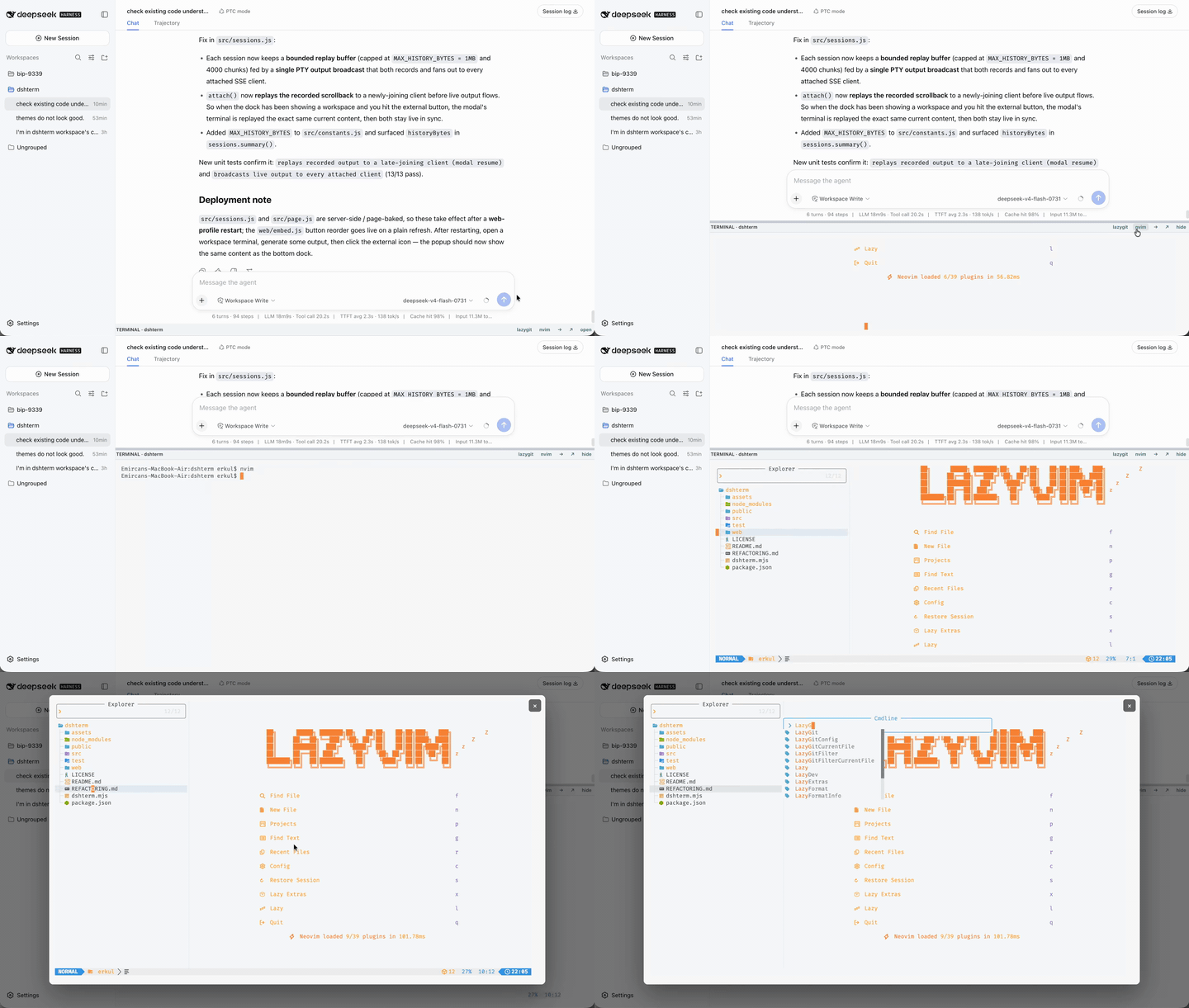
What makes it "workspace-aware"
- One PTY per workspace root, kept alive across SSE disconnects — switching conversations preserves each workspace's terminal and scrollback.
- Sessions are bounded by an LRU cap (default 8) and an idle reaper, so never-again-visited terminals are eventually freed.
- The dock targets whatever chat is active by asking the server for its authoritative workspace root (validated against the real workspace registry).
Installation
Install directly from the GitHub repository:
dsh plugin --profile web add github:emircanerkul/dsh-terminal
dsh web
Or clone it locally and install from the local directory:
git clone https://github.com/emircanerkul/dsh-terminal.git
cd dsh-terminal
npm install
npm run check
dsh plugin --profile web add .
dsh web
Loading
The web profile mounts this plugin through a patch layer and resolves it as a
package by name (so DSH's runtime client-plugin discovery can find its
dsh.client half — the Settings → Plugins card). In cordis.patch.yml:
- insert:
    - id: terminal
      name: 'dsh-terminal'
with dsh-terminal linked into the profile's shared install so both the
loader and the client-modules scanner resolve it:
ln -s /absolute/path/to/dshterm ~/.dsh/profiles/node_modules/dsh-terminal
The plugin declares a client half in package.json (dsh.client +
exports["./client"], implemented in client.js) that contributes a
Settings → Plugins card; the host serves the config through
GET/POST /terminal/shortcuts and keeps it in a small file store
(~/.dsh-terminal/shortcuts.json), so the plugin stays self-contained and
never waits on the shared settings service. See src/index.js for the
plugin row (inject: ['webServer', 'sandboxPolicy']).
Layout
terminal.mjs        entry point (re-exports src/index.js — the mounted path)
src/               host-side server code
  index.js         plugin assembly + teardown, idle-reaper timer
  constants.js     limits, MIME table, asset manifest, path roots, knobs
  palette.js       the single fixed terminal palette (no theme switcher)
  pty.js           single node-pty accessor
  sessions.js      PTY lifecycle manager (LRU + idle reaper)
  http.js          body reader / static server / JSON-text response helpers
  workspace.js     workspace-root resolution helpers
  auth.js          page-token mint + ?token= check helpers
  page.js          /terminal page HTML builder
  routes/          all HTTP routes + the chat-column embed tap (split by area)
    index.js         installRoutes() wiring + shared route helpers
    terminal.js      /terminal, /stream, /input, /resize, /kill
    api.js           /bin, /workspace, /debug, /sessions
    assets.js        /terminal/assets/*
    embed-tap.js     chat-column embed injection
web/               browser-side assets served at /terminal/assets/*
  embed.js         the chat-column SPLIT-PANE dock (client LRU of iframes)
  terminal/        terminal page bootstrap + vendored xterm
  fonts/           Nerd Font used for nvim/lazygit PUA icons
test/              unit tests (TerminalSessions) + a module smoke harness
Config / static-asset map
src/constants.js holds the knob values (MAX_SESSIONS, MAX_CLIENTS_PER_SESSION,
IDLE_MS, REAPER_MS, MAX_INPUT_BYTES, MAX_RESIZE_BYTES) and the ASSETS
manifest that maps public /terminal/assets/<name> URLs to files under web/.
HTTP surface (authed = ?token= from the /terminal page)
| Method | Path | Purpose |
|---|---|---|
| GET | /terminal | the terminal page (mints the auth token) |
| GET | /terminal/stream | SSE: PTY output for the workspace |
| POST | /terminal/input | keystrokes into the PTY |
| POST | /terminal/resize | resize the PTY |
| GET | /terminal/bin | is a command (lazygit/nvim) on PATH? |
| GET | /terminal/proc | the executable currently occupying this workspace's terminal (or null) |
| GET | /terminal/debug | last embed-reported detection diagnostic |
| GET | /terminal/workspace | authoritative active workspace root + list |
| GET | /terminal/sessions | live per-workspace PTY debug listing |
| GET | /terminal/shortcuts | effective dock hotkeys (Settings → Plugins → Terminal) |
| POST | /terminal/kill | kill one workspace's terminal |
| GET | /terminal/assets/* | static files (embed, bootstrap, xterm, fonts) |
Keyboard shortcuts
The dock registers global shortcuts that fire whatever has focus — chat, sidebar, or the terminal itself (the config is relayed into the terminal page, which captures matching combos before xterm/lazygit see them and asks the dock to act):
| Action | Default | Notes |
|---|---|---|
| Toggle dock | `Ctrl+`` | restores the last size/position (persisted) |
| Toggle popup mode | `Ctrl+Shift+`` | open/close the full-screen floating modal |
| Open lazygit | Ctrl+Shift+G | → lazygit, only at an idle shell prompt |
| Open nvim | Ctrl+Shift+E | → nvim ., only at an idle shell prompt |
Toggling back open restores the previous size and split because those are
persisted per workspace. The launchers first ask /terminal/proc, which scans
this workspace's PTY process tree for any non-shell program (lazygit, nvim,
vim, htop, …). If one is running — whatever it is — the shortcut does NOT type the
new command; instead it shows a short toast telling you to close the running app
first (Ctrl+C / :q). So pressing Ctrl+Shift+E while lazygit is up won't type
nvim . over it — it toasts "running lazygit — close it first". A lazygit in
another workspace or a separate terminal never counts: each /terminal/proc call
walks only the active workspace's PTY.
Shortcuts are layout-independent: each matches event.key or
event.code (the physical key, and multiple codes are accepted). On US the key
left of 1 is Backquote; on a UK/ISO ("British PC") layout that key reports
IntlBackslash (yielding key="0" under Ctrl), so the toggle matches both, so Ctrl+ `
toggles the dock there too. mod is one of ctrl | meta | alt | any; note
Cmd+ ` is the OS "cycle windows" shortcut on macOS, so a meta default
would never reach the page — ctrl is the safe cross-platform default. Each
binding is set by key (character), code (physical key; several codes may be
given), or both. Toggle/modal accept both the US Backquote and the UK/ISO
IntlBackslash physical codes.
Configure bindings from Settings → Plugins → Terminal. The Settings card
reads the current bindings from GET /terminal/shortcuts and saves them via
POST /terminal/shortcuts; the host persists them to
~/.dsh-terminal/shortcuts.json. The dock fetches the effective config from
GET /terminal/shortcuts on every page load and merges it over the defaults in
web/embed.js (no localStorage override path any more). web/embed.js is
loaded fresh per page, so after saving in the settings panel a plain browser
refresh picks the new bindings up.
Development
npm run check   # syntax-check every source + web asset
npm test        # unit tests for PTY lifecycle (TerminalSessions)
node test/smoke.mjs  # mount the plugin against a mock ctx (wiring smoke test)
Reload behaviour (important):
web/embed.jsis injected as a tiny loader that pulls/terminal/assets/embed.jsfresh from disk on every page load — embed edits go live on a plain browser refresh.web/terminal/boot.jsis read once at module load and baked into the/terminalpage, so boot.js edits require a web-profile restart.- Server-side edits under
src/**also require a web-profile restart. - The Settings → Plugins → Terminal card comes from the
dsh.clienthalf, so it appears only after a web-profile restart realigns loader entry names and the browser loads the new client bundle (refresh the page too). From then on, saved bindings go live in the dock on a refresh.
Sponsor

Sponsored by erklab — Architected with production-grade systems using AI-driven velocity and human-centered precision.
Ähnliche Plugins
archify (deepseek-harness)
tt-a1i/archify
WeKnora (dsh-weknora)
tencent/weknora
weknora
tencent/weknora
BrowserSkill (dsh-plugin-browserskill)
tencent/browserskill