dsh-sound-notify
hifengzy/dsh-sound-notify
Plays a sound when a DSH task completes, fails, or waits for approval, with per-category switches.
Installation
dsh plugin --profile web add github:hifengzy/dsh-sound-notifyREADME
dsh-sound-notify
English | 简体中文


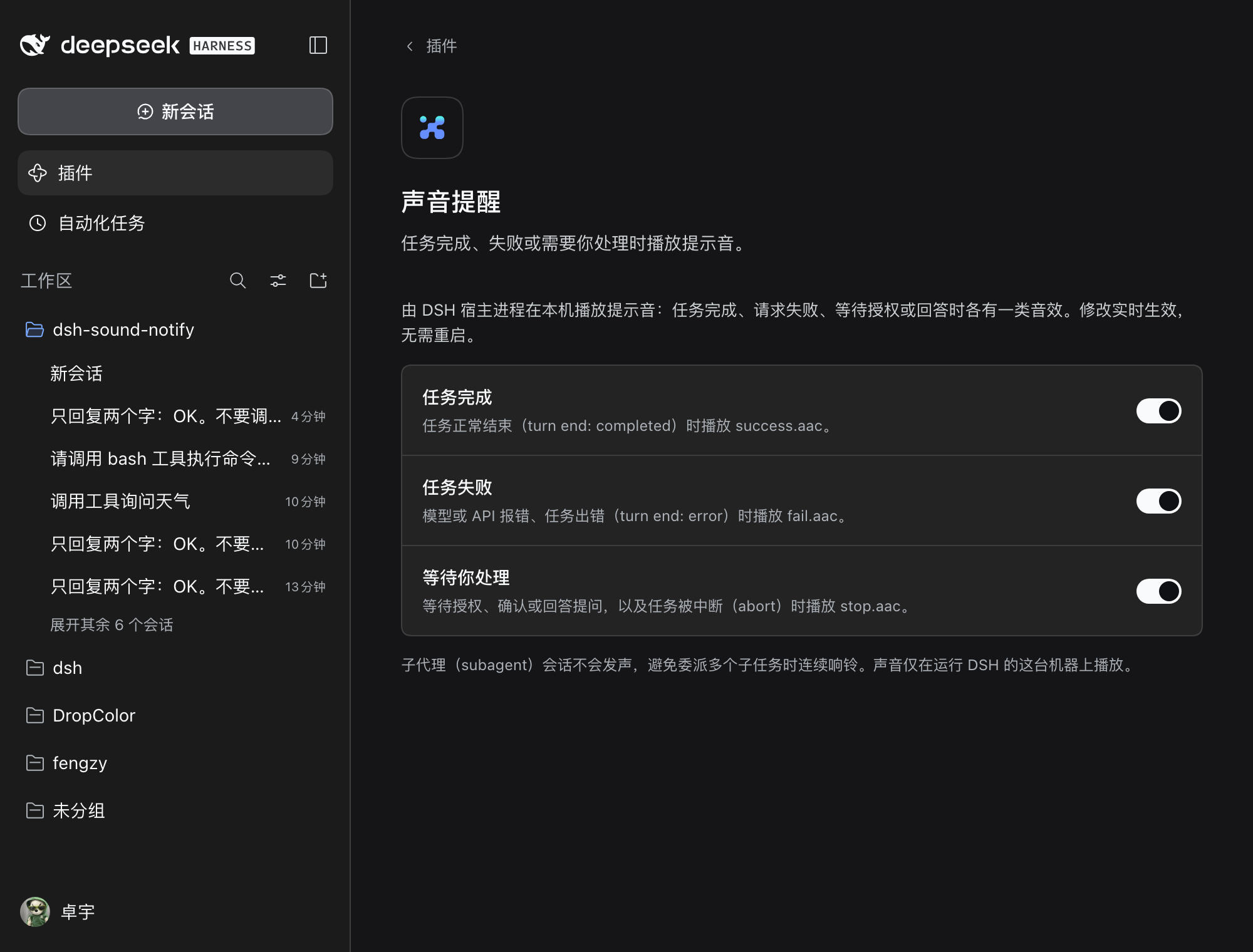
Sound notifications for DeepSeek Harness (DSH). When a DSH task finishes, fails, or stops to wait for you, this plugin plays a short sound on the machine running DSH — and gives you a switch for each category.
Why
DSH sessions are long-running. Without a sound, you keep alt-tabbing back to the window to check whether the agent is done. This plugin makes "it stopped" audible:
| Event | Trigger | Sound |
|---|---|---|
| Task completed | turn ends with completed | sounds/success.aac |
| Task failed | turn ends with error / max-tokens, or an API request failed and a retry was scheduled (llm/retry) | sounds/fail.aac |
| Waiting for you | approval prompt (approval/asked), ask_user_question, turn aborted / blocked / interrupted | sounds/stop.aac |
Playback happens in the DSH host process with the OS audio player (macOS afplay, Linux paplay), so it works even when the browser tab is backgrounded, minimized, or closed. The sound plays on the machine that runs DSH.
Features
- Three independent switches, all enabled by default, stored in DSH settings and applied live — no restart needed.
- Quiet where it should be:
- subagent sessions are silent, so one delegated parent task does not ring for every child turn;
- a 500 ms grace period after
idlecancels the alert when queued input or an automatic continuation immediately starts again; - one failure sound per turn even across automatic retries;
- 700 ms cooldown between two sounds of the same category.
- Works with current DSH: settings render as a card in the 0.2.x Plugins page, with an automatic fallback to the 0.1.x settings section.
- No build step: plain ESM host code plus a hand-written
window.__ModuleLoader__client bundle.
Install
Desktop app (desktop profile)
Install it as a managed third-party plugin from inside DSH — do not copy files into the profile by hand:
- Open DSH → left sidebar → Plugins.
- Click Add plugin.
- Paste the repository address:
https://github.com/hifengzy/dsh-sound-notify(or the release tarball URL; the npm package name works after publication). - Install, then restart DSH if it asks.
The package then appears under Plugins → Installed plugins with its own uninstall and update controls. The three sound switches are on its package page: Plugins → Installed plugins → dsh-sound-notify.
Why not copy files? The Plugins page records a managed install in
$DSH_HOME/profiles/desktop/package.json(dependenciesplusdsh.profile.bundles). Files copied intonode_modulesby hand are invisible to the manager — no installed-plugin row, no uninstall button — and the next DSH desktop update prunes them because they are not a declared dependency.
Upgrading from the v0.1.0 manual install?
v0.1.0 copied the package into the profile by hand. Run the migration helper, then install through the Plugins page:
git clone https://github.com/hifengzy/dsh-sound-notify.git
cd dsh-sound-notify
./scripts/migrate-desktop-legacy-install.sh
The helper removes the unmanaged copy and mount row while keeping your saved switch values, then prints the managed install steps (paste the repository address into Add plugin).
CLI-managed profiles (web, headless, custom profiles)
Pick whichever source you prefer — all of them are the same plugin:
# directly from GitHub (works today)
dsh plugin --profile web add github:hifengzy/dsh-sound-notify

# prebuilt tarball attached to the latest GitHub Release (works today)
dsh plugin --profile web add https://github.com/hifengzy/dsh-sound-notify/releases/latest/download/dsh-sound-notify.tgz

# npm (after the package is published; see docs/PUBLISHING.md)
dsh plugin --profile web add dsh-sound-notify
Restart the profile's app after installing. dsh plugin add installs the package into the profile and appends dsh-sound-notify to dsh.profile.bundles; the package's own cordis.patch.yml mounts the plugin row.
For a custom profile, replace web with its name. Check that the plugin composed correctly:
dsh --profile web --dump-config | grep -A2 sound-notify
Settings
DSH 0.2.x: Plugins → Installed plugins → dsh-sound-notify (the package page, beside its install/enable controls). The values live in the plugin entry's config in the profile patch ($DSH_HOME/profiles/<profile>/cordis.patch.yml) and are read live on every notification.
DSH 0.1.x: Settings → Sound notifications (registered sound-notify settings namespace in $DSH_HOME/settings.yaml).
| Switch | Default | When off |
|---|---|---|
| Task completed | on | success: false — no completion sound |
| Task failed | on | failure: false — no failure/API-error sound |
| Waiting for you | on | waiting: false — no approval/question/abort sound |
Debugging
The desktop host has no terminal. Set DSH_SOUND_NOTIFY_LOG before launching DSH to get a line for every decision and playback attempt:
DSH_SOUND_NOTIFY_LOG=/tmp/dsh-sound-notify.log dsh web
2026-10-19T17:21:05.071Z [sound-notify] notifyIdle reason=completed kind=success
2026-10-19T17:21:05.071Z [sound-notify] enabled success = false (config)
2026-10-19T17:21:05.071Z [sound-notify] muted success
Playback failures (missing file, no audio player) are logged too instead of failing silently.
Platform support
| Platform | Player | Status |
|---|---|---|
| macOS | afplay | verified |
| Linux | paplay (PulseAudio/PipeWire) | requires paplay |
| Windows | — | no AAC CLI player; logs a diagnostic and stays silent |
Compatibility
| DSH | Settings surface | Install |
|---|---|---|
| 0.2.x (current, incl. desktop 0.2.1-rc.3) | Installed-plugin package page over volatile Config | app Add plugin / dsh plugin add / GitHub / tarball |
| 0.1.x | dedicated settings section over a registered namespace | dsh plugin add / GitHub |
The host half only observes the event bus (session/event, agent/status, user-questions/request) and never edits the session log or influences approval decisions (the question waterfall listener always calls next()).
Development
npm install
npm test        # 31 node:test cases
npm run verify  # packaging self-check (manifest, files, AAC magic, client bundle)
npm pack        # prebuilt tarball for releases
CI (.github/workflows/ci.yml) runs the test suite on Node 20/22/24, verifies the package, and performs a real install smoke test against the latest published @deepseek-ai/dsh: it creates a web profile, installs the packed tarball with dsh plugin add, and asserts the plugin composes into the profile tree.
Tagging v* runs .github/workflows/release.yml, which attaches the tarball to a GitHub Release and publishes to npm when an NPM_TOKEN secret is configured. See docs/PUBLISHING.md for the npm-token and catalog-submission steps.
Community
The plugin is listed in the awesome-dsh-plugin catalog (category: notify), which powers the DSH plugin market (dshmarket). Search for “sound” / “notification” on the Plugins page to install it. Native DSH Discover is npm-only, so it will also appear there once an NPM_TOKEN is configured and a release publishes to npm. Repo topics: dsh-plugin, deepseek-harness, dsh.
License
MIT © 2026 fengzhuoyu — see LICENSE. The bundled sound clips are part of this repository and shipped under the same license.
Ähnliche Plugins
dsh-web (dsh-ssh)
zhu1090093659/dsh-web
dsh-web (dsh-remote-web-ui)
zhu1090093659/dsh-web
dsh-web-ui (dsh-ssh)
zhu1090093659/dsh-web-ui
dsh-web-ui (dsh-remote-web-ui)
zhu1090093659/dsh-web-ui