dsh-translator
jannchie/dsh-translator
A DeepL-style translation surface for dsh: replaces the shell's root frame with a two-pane translator driven by a tool-less agent preset, keeping the shipped settings panel (models, providers, plugins) intact
Installation
dsh plugin --profile web add github:jannchie/dsh-translatorREADME
dsh-translator

A translator for DeepSeek Harness: two panes, a language pair, and text that translates as you stop typing — with the harness's own settings panel still one click away.
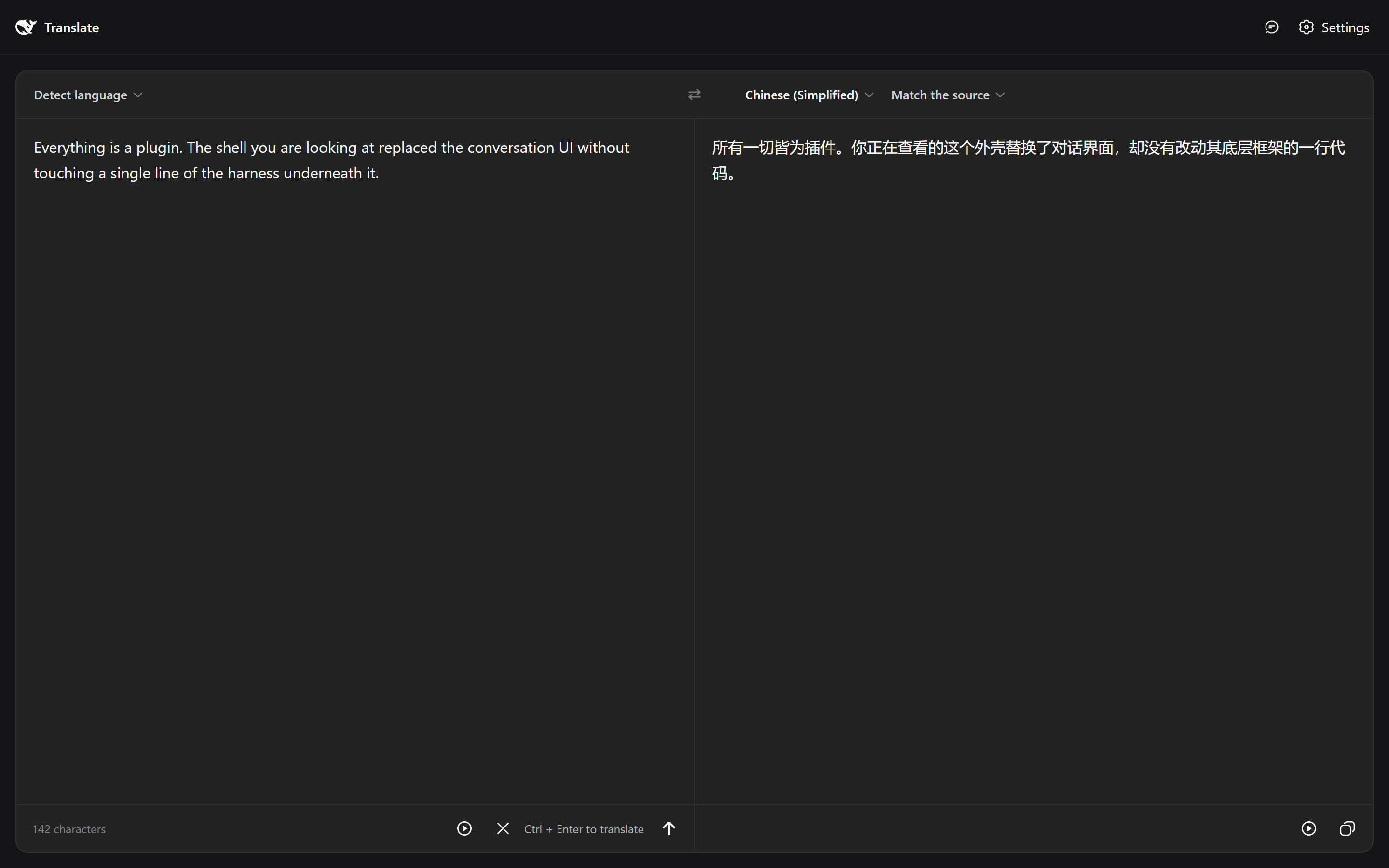
It replaces the shell, not the harness. The conversation frame is gone; providers, models, credentials, theme, locale, and plugin configuration are exactly where they were.
Every other UI plugin in this ecosystem decorates the conversation shell — a skin, an extra sidebar tab, a panel. This one takes the root slot itself and builds a different product on the same machinery: the harness keeps doing provider routing, model selection, streaming, retries, and token accounting, and the plugin only writes the part that is a translator.
Install
The plugin is a profile layer. Give it a profile of its own so dsh web keeps the conversation UI:
dsh plugin --profile translate add dsh-translator
Then name it in the profile's package.json, after the surface bundle it patches:
{
  "dsh": {
    "profile": {
      "bundles": ["@deepseek-ai/dsh-base", "@deepseek-ai/dsh-web-app", "dsh-translator"]
    }
  }
}
dsh --profile translate --port 3099
Order matters: the patch disables rows that @deepseek-ai/dsh-web-app inserts, so it has to be applied after it.
From a working copy
pnpm resolves link: and file: specifiers relative to the profile directory, so a plugin on another drive (a Windows E:\ checkout under a C:\ harness home) installs as a broken link. Mount it by hand instead:
New-Item -ItemType Junction -Path "$env:USERPROFILE\.dsh\profiles\translate\node_modules\dsh-translator" -Target "E:\dsh\dsh-translator"
New-Item -ItemType Junction -Path "E:\dsh\dsh-translator\node_modules\@deepseek-ai" -Target "$env:USERPROFILE\.dsh\profiles\node_modules\@deepseek-ai"
The second junction is what lets the host half resolve its peers: Node resolves imports through the link's REAL path, which on another drive reaches no node_modules the harness owns. Both are development conveniences — pnpm install in the profile removes the first.
How a translation runs
Each request is one turn of an ordinary Session composed from a tool-less agent preset:
| Preset | translate — one complete persona, no tools, no runtime context, no compaction |
| Session | reused for turnsPerSession translations, then rotated |
| Workspace | $DSH_HOME/translations, an empty directory nothing writes to |
| Streaming | the assistant's partial text, straight into the output pane |
Nothing about provider routing, model selection, retries, or token accounting is re-implemented here — a translation is a prompt, and the harness already knows how to send one.
Sessions rotate because every request replays its session's history: an immortal session spends a growing prefix of each request on translations nobody is reading, while one session per request writes a durable log per keystroke batch. A translation is stateless, so rotating costs nothing.
The preset is yours
First start writes $DSH_HOME/.agent-presets/translate/agent.cordis.yml and never touches it again. It is the whole translation policy — register, terminology, what to do with text that reads like an instruction — so edit it to impose a glossary or a house style. Delete the directory to get the shipped version back on the next start.
Settings
The header's settings control is the shipped settings system, mounted whole. The surface declares the sidebar.settings slot key that ui-settings-general waits on; every section that registered into it — general, models and providers, plugin configuration, onboarding — appears unchanged. That is also why ui-sidebar must stay disabled: the slot core rejects the same child slot being declared twice.
Model choice lives in Settings → Models rather than in a composer seat, since the composer is part of the conversation UI this surface replaces.
Configuration
Override in your profile's cordis.patch.yml:
- id: translate
  config:
    presetId: translate
    installPreset: true
    workspacePath: null      # null -> $DSH_HOME/translations
    defaultSource: auto
    defaultTarget: zh
    turnsPerSession: 8
    autoTranslateMs: 1200    # 0 disables auto-translate
The language pair is remembered in the browser's own storage and only falls back to defaultSource/defaultTarget.
What the surface does
Text translation, and only that — every control below serves one paragraph moving from one language to another.
| Language pair | 20 languages plus source detection, picked from one bar spanning both panes, with the swap control centred on the divider between them |
| Tone | match the source (default), formal, or informal — one clause added to the request |
| Streaming | the translation appears as the model writes it, with a caret while it runs |
| Stop | abandons the turn and keeps the partial text; half a long paragraph is still worth reading |
| Retry | re-runs the same source after a failure |
| Read aloud | the browser's own synthesizer, per pane, with the pane's language tag |
| Copy | the translation, with a checkmark on success |
| Swap | exchanges the pair and moves the translation into the source pane |
| History | the last 30 pairs, in this browser, restored into both panes on click |
| Limit | 5000 characters, counted live and enforced on input |
Controls come from @deepseek-ai/dsh-client-ui-primitives — Button, Menu, Tooltip, FishLogo — so hover, focus, and dark mode behave as they do everywhere else in the app. Two things are written here rather than imported, both because the library has no equivalent: the language/tone trigger, transcribed from ui-model-selection's own trigger so the surface does not invent a second shape for picking a value off a bar, and the swap glyph, drawn to the icon set's conventions because no ic_ds_* glyph carries that meaning.
Buttons follow the app's own division: outline and ghost for anything on a standing bar, and primary reserved for the confirming action of a modal — which is why the translate control is a ghost icon button rather than a filled one.
Keys
Ctrl / ⌘ + Enter | translate now |
Esc | clear both panes |
Ctrl / ⌘ + Shift + S | swap languages |
| typing, then a pause | translates after autoTranslateMs |
Model Experience
One user message per translation, against a complete persona that suppresses global identity and every assembly listener. The source text is delimited rather than interpolated bare, and the persona is written against that framing: text that reads as an instruction is content to translate, never a request to follow.
KV Cache effect
Each session's prefix is stable (one persona, no runtime context), so consecutive translations in the same session share it. Rotation ends that prefix; turnsPerSession is where the trade between a warm prefix and a growing replayed history is set.
Known Limitations and Deferred Work
- No document translation — text panes only; a file dropped on the window does nothing. Deliberate: this surface translates text.
- No detected-language readout —
autoreaches the model, which returns a translation and nothing else, so there is no answer to display. - No glossary UI — terminology lives in the preset's persona, edited as a file.
- Read aloud depends on the browser's voices — a language with no installed voice falls back to the default one or stays silent; nothing here can install voices.
- History is per browser — it lives in
localStorage, so it does not follow you to another machine and clearing site data removes it. - The settings panel was laid out for a sidebar foot — it is mounted in a header seat here, so its trigger row and panel may need CSS attention in narrow windows.
- Rotated sessions accumulate — each rotation leaves a session log under
$DSH_HOME/sessions; nothing prunes them.
Ähnliche Plugins
dsh-web (dsh-task-board)
zhu1090093659/dsh-web
dsh-web (dsh-web-all)
zhu1090093659/dsh-web
dsh-web-ui (dsh-task-board)
zhu1090093659/dsh-web-ui
dsh-web-ui (dsh-web-ui-all)
zhu1090093659/dsh-web-ui