dsh-custom-js
jeffreyren1/dsh-custom-js
Customize DeepSeek Harness without forking it—load, edit, manage, and hot-reload trusted JavaScript and TypeScript userscripts from the Web UI.自定义 DeepSeek Harness,无需 Fork——直接在 Web UI 中加载、编辑、管理并热重载可信的 JavaScript 和 TypeScript 用户脚本。
Installation
dsh plugin --profile web add github:jeffreyren1/dsh-custom-jsREADME

dsh-custom-js




English | 中文
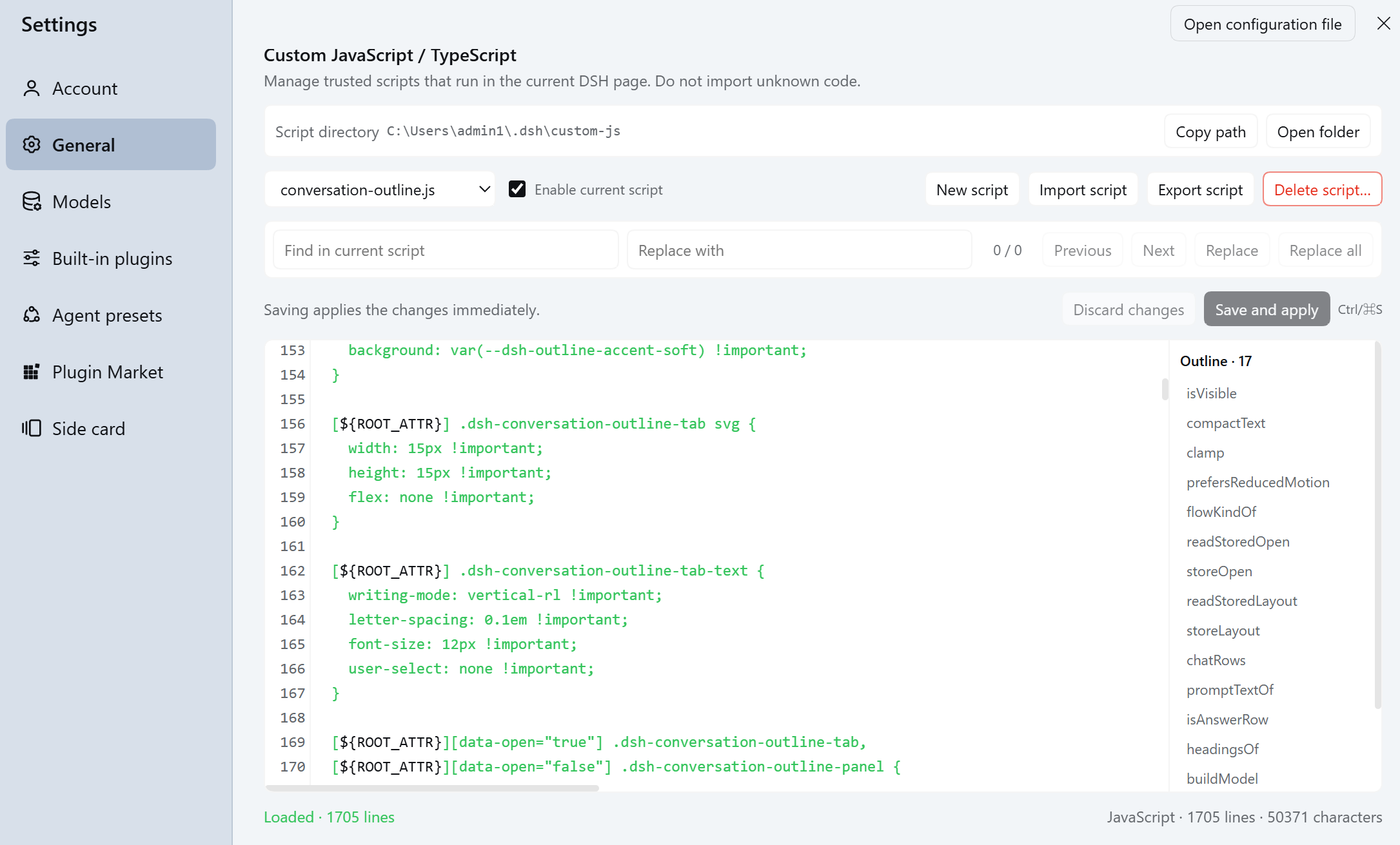
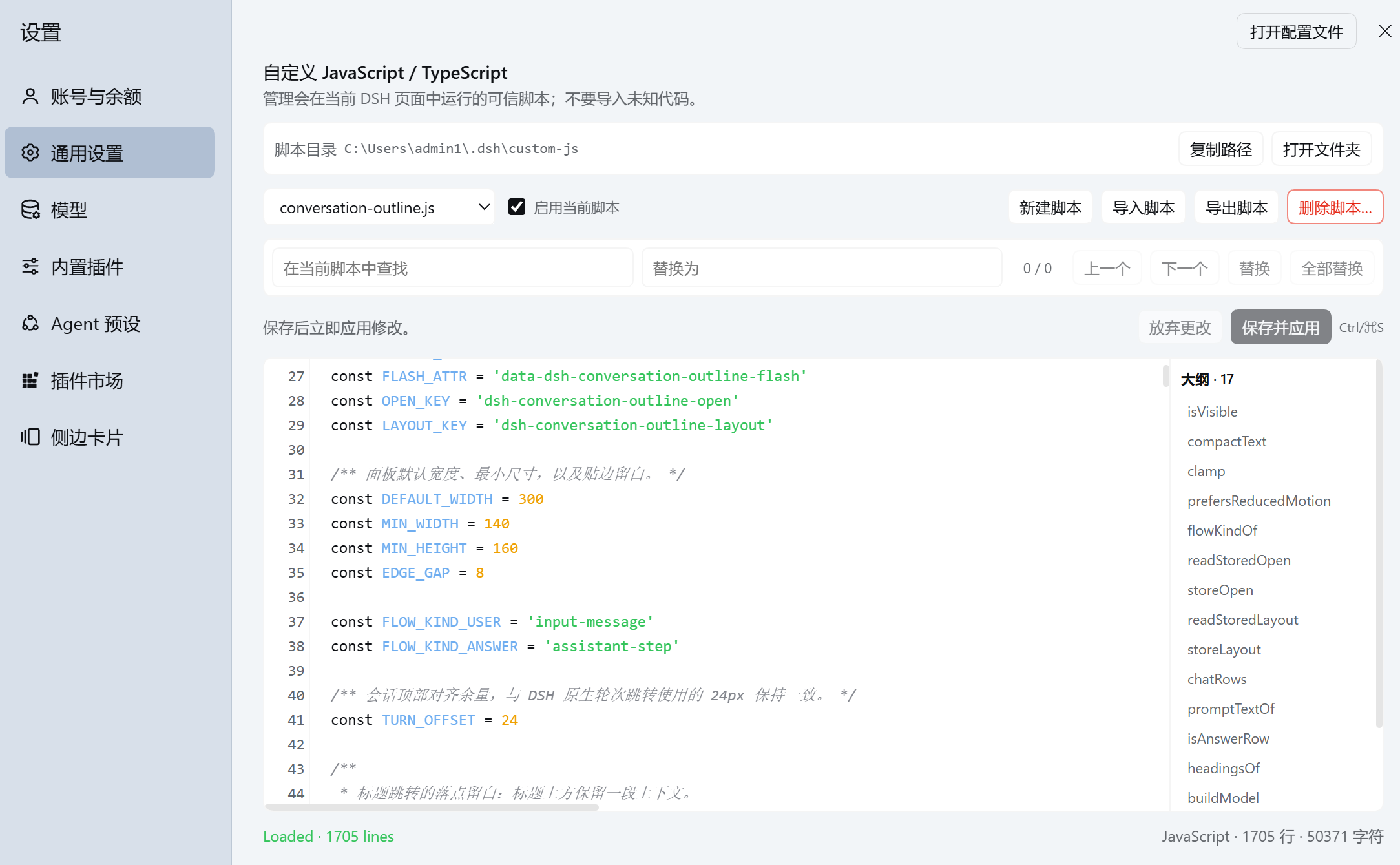
dsh-custom-js loads trusted .js, .mjs, and .ts userscripts into the DeepSeek Harness Web GUI. It includes a built-in script manager, hot reload, per-script enable/disable controls, lifecycle cleanup, TypeScript transpilation, runtime status, and bilingual UI copy through the native DSH locale service.
The plugin stays generic. UI changes such as custom Settings layouts, Sidebar buttons, shortcuts, or page behavior live in your own userscripts.
| English Version | Chinese Version |
|---|---|
 |  |
Install
dsh plugin --profile <profile> add dsh-custom-js
Example:
dsh plugin --profile web add dsh-custom-js
Restart DSH after the first installation. Then open Settings → General → Custom JavaScript / TypeScript.
Current package compatibility: DSH >=0.2.0-rc.1 <0.3.0-0, covering 0.2.0-rc.1 and later 0.2.x prerelease and stable versions, using a profile based on the web template.
Update
dsh plugin --profile web update dsh-custom-js
Restart the active DSH process after updating, then refresh the browser page.
Uninstall
dsh plugin --profile web remove dsh-custom-js
Restart the active DSH process after removal. Uninstalling the plugin does not delete $DSH_HOME/custom-js/ or the userscripts stored there. Remove that directory manually only if you no longer need its contents.
Quick start
Open Settings → General → Custom JavaScript / TypeScript, create hello.js, and paste:
console.log('Hello from dsh-custom-js')
Save the script. With auto reload enabled, the Host detects the change and the Client loads it immediately.
You can also create the same file directly at $DSH_HOME/custom-js/hello.js with your preferred editor.
What you can build
Use userscripts to customize the DSH Web GUI, add shortcuts and helper controls, keep reusable debugging tools, or maintain your own small UI extensions without modifying the DSH installation.
More screenshots
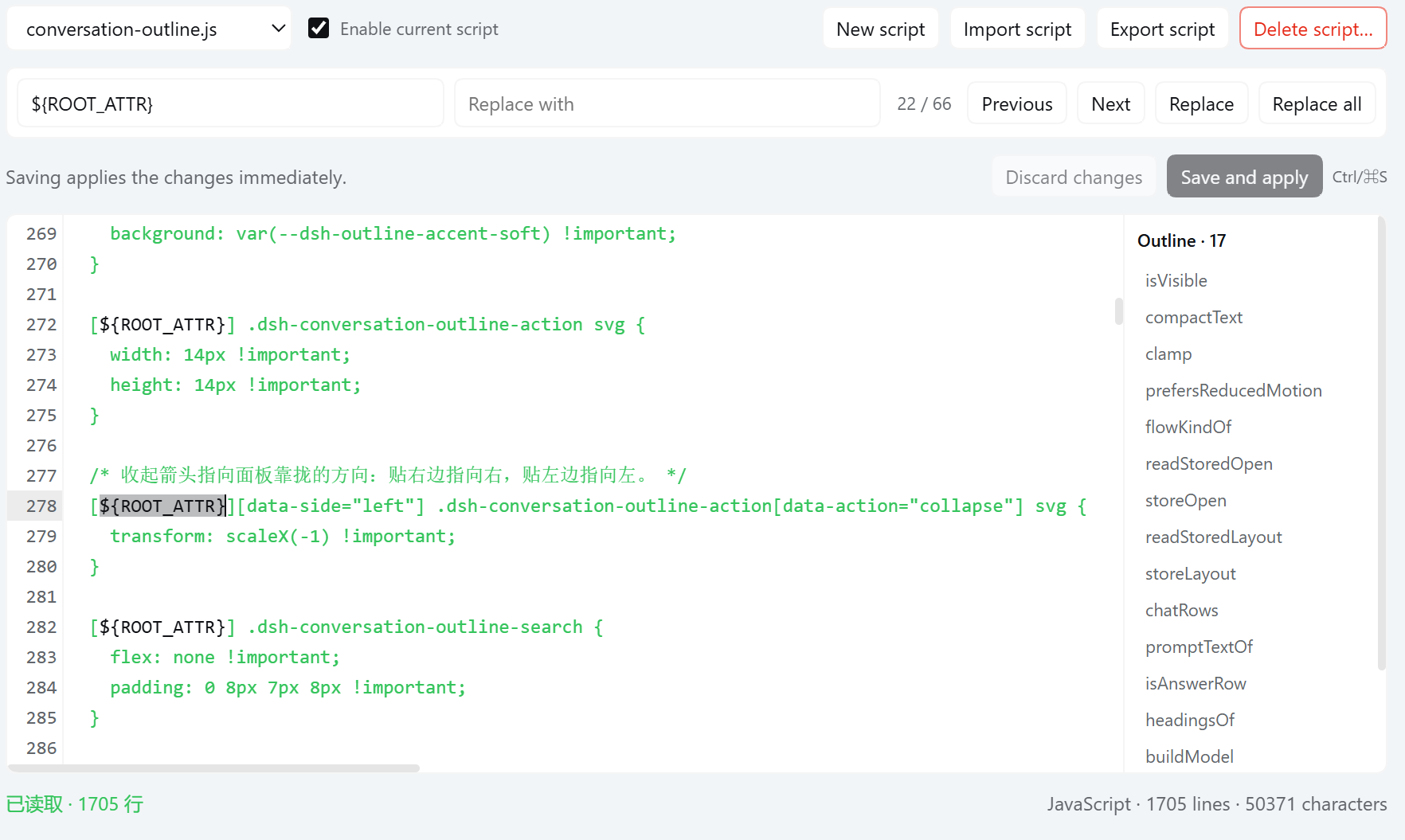
Find and replace in the built-in editor
Find or replace code without leaving the DSH Settings page.
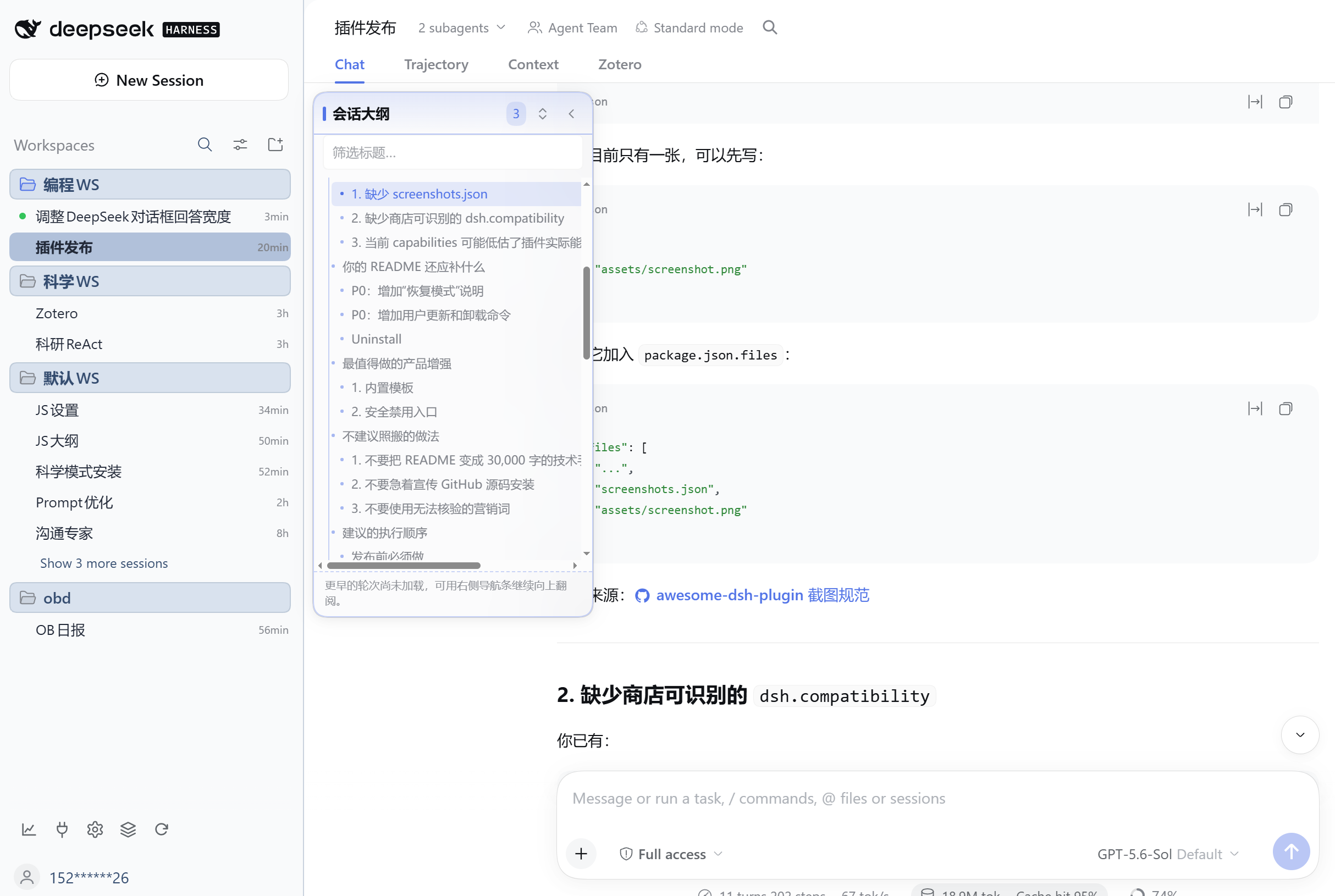
Build new DSH features with your own script
This outline view was implemented in a user-written JavaScript file and loaded through dsh-custom-js.
Features
- JavaScript, MJS, and TypeScript userscripts
- Built-in CodeMirror editor with JavaScript / TypeScript syntax highlighting, line numbers, bracket matching, and history
Ctrl/Cmd+S, Tab indentation, find and replace, and code outline navigation- Safe-by-default import: new imported scripts remain disabled until you review and enable them
- Export, delete, per-script enable/disable, and contextual retry after runtime errors
- Script-directory path copy and safe folder opening
- File watcher plus low-frequency polling for reliable external-editor updates
- TypeScript ES2022 Module transpilation with compile diagnostics
- Managed
default/apply/initlifecycle and cleanup - Revision protection against overwriting external file changes
- Per-script runtime status
window.dshCustomJsbrowser API- Chinese and English UI through
@deepseek-ai/dsh-client-locale
Security
[!WARNING] Only load code that you wrote yourself or fully trust.
Userscripts run with the browser-side permissions of the current DSH page. They can read and modify the DOM, use localStorage and sessionStorage, access data visible to the page, and make network requests through APIs such as fetch and WebSocket. dsh-custom-js does not sandbox userscripts.
Host management and script routes pass through the DSH Connection request fence, but an authorized userscript still has the browser privileges described above.
Recovery
If a userscript prevents the DSH Web GUI from working:
- Stop the active DSH process.
- Open
$DSH_HOME/custom-js/(normally~/.dsh/custom-js/). - Rename the offending file, for example from
outline.jstooutline.js.disabled. - Start DSH again and refresh the browser page.
Only top-level .js, .mjs, and .ts files are loaded, so the renamed file is ignored while its contents remain available for inspection and repair. If you configured a different scriptDirectory, use that directory instead.
Script directory
Default:
$DSH_HOME/custom-js/
If DSH_HOME is unset, the Host uses ~/.dsh/custom-js/. The directory is created automatically.
custom-js/
├─ base.ts
├─ sidebar.js
├─ settings-window.js
└─ shortcuts.mjs
Only top-level .js, .mjs, and .ts files are scanned. Subdirectories and other extensions are ignored. scriptDirectory is relative to $DSH_HOME; absolute paths and .. escapes are rejected.
Script manager
Open Settings → General → Custom JavaScript / TypeScript.
The manager provides script selection, JS/TS type and size information, directly visible create/import/export/delete actions, safe script-directory opening, timed deletion confirmation, a syntax-highlighted CodeMirror editor, find and replace, code outline navigation, per-script enable/disable, contextual retry after errors, TypeScript compile diagnostics, runtime status, and revision conflict protection.
The editor uses explicit saves so partially written JavaScript is not executed while you are typing. Saving an enabled script is labeled Save and apply and applies the new version immediately—even when automatic external-file reload is disabled. Saving a disabled script only writes the file. New imported scripts are created atomically in the disabled state so you can inspect their code before enabling them. If a saved script fails, a contextual Retry action appears; the low-level window.dshCustomJs.reload() API remains available for advanced use. External file changes still follow the autoReload setting. If the editor has unsaved changes, the local edit is preserved until you save or discard it.
Per-script enable/disable state is stored in .dsh-custom-js.json inside the script directory and survives DSH restarts.
Plugin settings
| Setting | Default | Purpose |
|---|---|---|
enabled | true | Master switch; disabling cleans up and unloads all userscripts |
autoReload | true | Watch for file changes and notify the Client |
scriptDirectory | custom-js | Directory relative to $DSH_HOME |
scripts | [] | Preferred load order |
scriptStates | [] | Initial per-script enabled state |
devLogs | false | Verbose Host / Client loading logs |
Files listed in scripts load first in the declared order. Remaining files load in stable Unicode file-name order. Duplicates and missing files are ignored. Scripts absent from scriptStates are enabled by default.
Plain scripts
Files load as browser ES Modules and do not need to export a function:
console.log('custom js loaded')

document.addEventListener('click', event => {
  console.log(event.target)
})
.js and .mjs source is served as-is. Browser modules cannot use Node.js APIs such as node:fs, node:path, or node:child_process.
Managed lifecycle
A default initializer can return cleanup logic:
export default function apply(context) {
  const handler = () => console.log('click', context.name)
  document.addEventListener('click', handler)

  return () => {
    document.removeEventListener('click', handler)
  }
}
Named apply or init exports are also supported, along with a named cleanup. Initializer priority is default → apply → init. Cleanup runs on reload, disable, delete, and plugin unload. When all scripts unload together, cleanup runs in reverse load order.
TypeScript
The Host uses the official typescript compiler to transpile .ts files into browser ES2022 Modules with inline source maps. Compile errors are written to the manifest with file name, 1-based line and column, TypeScript error code, and message. A failed TypeScript file does not block other scripts.
This is single-file transpilation. Run tsc --noEmit in the script's own project when you need project-level type checking.
Browser API
window.dshCustomJs.version
window.dshCustomJs.scripts
window.dshCustomJs.getStatus('sidebar.ts')
await window.dshCustomJs.sync()
await window.dshCustomJs.reload('sidebar.ts')
await window.dshCustomJs.reload()
Runtime states include disabled, compile-error, loading, loaded, error, and unloaded.
Host routes
GET  /api/custom-js/manifest
GET  /api/custom-js/scripts/<script>
GET  /api/custom-js/events
GET  /api/custom-js/manage/read?name=<script>
POST /api/custom-js/manage/write
POST /api/custom-js/manage/create
POST /api/custom-js/manage/toggle
POST /api/custom-js/manage/delete
POST /api/custom-js/manage/open-directory
The management routes share the DSH Connection request fence. Script names must be a single .js, .mjs, or .ts file name. Directory traversal and symbolic links are rejected. Edit request bodies are limited to 2 MiB and writes use revision preconditions. create accepts an enabled boolean so imported files can be persisted disabled before their first manifest update. open-directory only opens the fixed script directory; it never invokes the operating system's default handler for a script file.
Localization
DSH ships a native Client locale service. dsh-custom-js follows that API by registering a typed settings.custom-js namespace with complete zh and en dictionaries. When a slot is registered with locale: 'settings.custom-js', its standard t seat updates automatically when the user changes the DSH language.
The locale source files are:
src/client/locales.ts
src/client/i18n.ts
The Client entry should include locale in its Cordis inject list and call installCustomJsLocale(ctx) during apply(ctx).
Verification
Verified automatically:
- TypeScript type checking
- Automated compiler, Host manager, Client manager, Settings, and HTTP route tests
- Production Host and Client builds
- npm package content inspection with
npm pack --dry-run
Manually verified on Windows 11 with DSH 0.2.0-rc.1:
- Installation from the packed
.tgzinto an isolatedwebprofile without a compatibility exemption - Plugin inventory recognition of the
custom-jscomponent and its Host/Client exports - DSH startup plus manifest, TypeScript create/compile/serve, disable, and delete smoke checks
- Script creation and editing
- Hot reload
- TypeScript diagnostics
- External-editor updates
Not currently verified:
- macOS
- Linux desktop folder opening
- Future
0.2.xbuilds not yet published; the declared peer range admits them without covering DSH0.3.x
Development
pnpm install
pnpm typecheck
pnpm test
pnpm build
Publish
Check the package contents before publishing:
pnpm typecheck
pnpm test
npm pack --dry-run
Publish:
npm publish
prepublishOnly runs type checking and tests. prepack rebuilds lib.
Contributing and support
- Found a bug or have an idea? Open an issue.
- Want to contribute? Read CONTRIBUTING.md.
- For private vulnerability reports, follow SECURITY.md.
- See release history in CHANGELOG.md.
If the plugin is useful to you, starring the repository helps other DSH users discover it.
License
Links
Ähnliche Plugins
dsh-web (dsh-task-board)
zhu1090093659/dsh-web
dsh-web (dsh-web-all)
zhu1090093659/dsh-web
dsh-web-ui (dsh-task-board)
zhu1090093659/dsh-web-ui
dsh-web-ui (dsh-web-ui-all)
zhu1090093659/dsh-web-ui