dsh-plugin-agent-collaboration (agent-collaboration)
leo-sail/dsh-plugin-agent-collaboration/packages/bundle/agent-collaboration
Persistent Bots and group rooms inside DSH — each Bot keeps its own model, permission preset, workspace and session across restarts, and every answer is a run written to a ledger the sidebar panel replays.
Install
dsh plugin --profile web add github:leo-sail/dsh-plugin-agent-collaborationThis plugin lives in the packages/bundle/agent-collaboration subdirectory of the repository.
README
Agent Community — Bots for DeepSeek Harness
Persistent Bots, group rooms and a durable run ledger, inside DSH.
简体中文 · Design notes · MIT



A community-maintained DeepSeek Harness plugin, not an official DeepSeek product.
A Bot here is not a temporary subagent: it has an identity, its own model and permission preset, its own workspace, and its own session that survives a restart. Put several of them in a room and they answer together. Every run is recorded, so a conversation can be read back later even after the session that produced it is gone.
Features
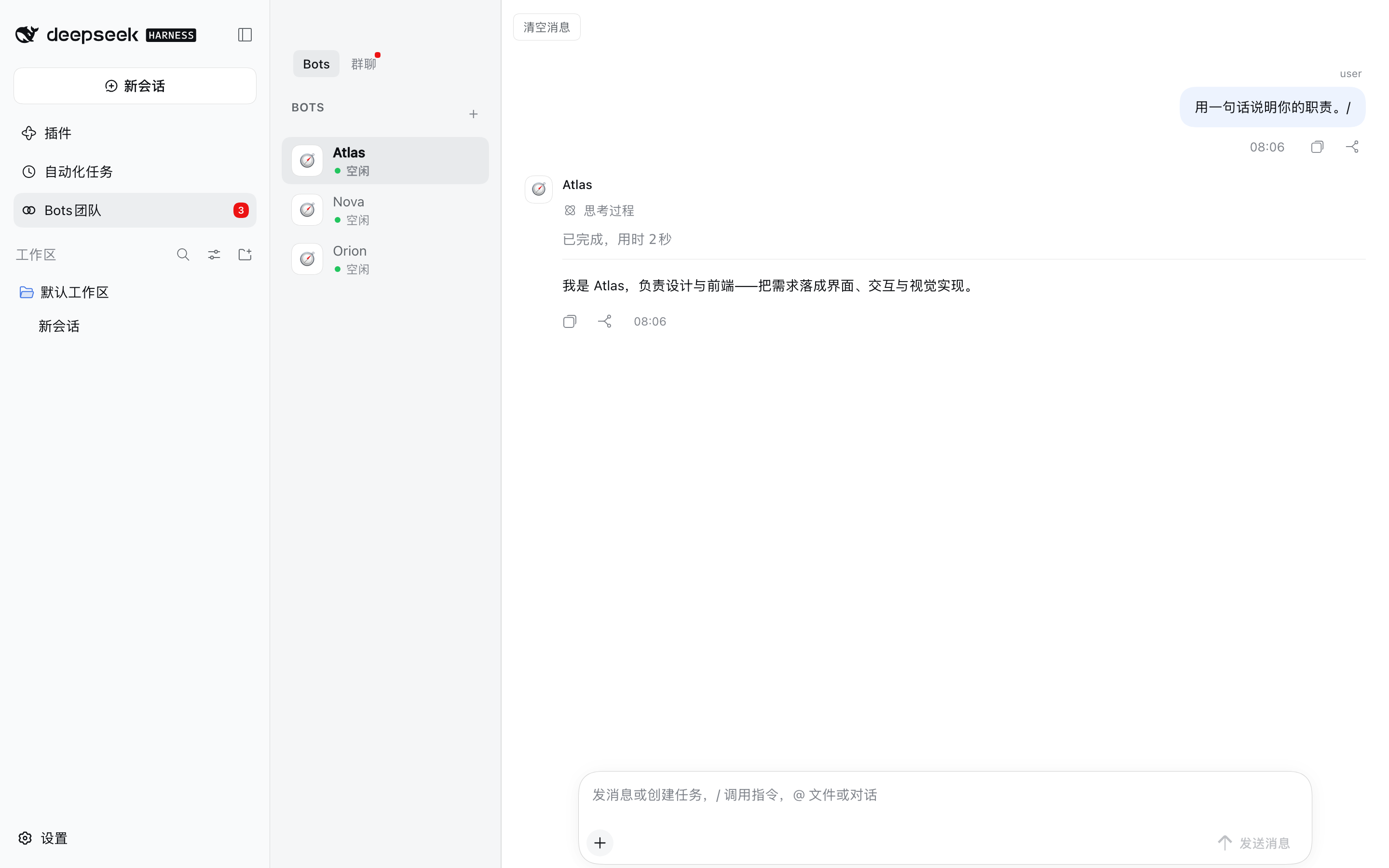
- Bots that persist. Each Bot keeps a name, a model, a permission preset and a workspace on disk. It is listed in the panel and answers in any room it belongs to, before and after a restart.
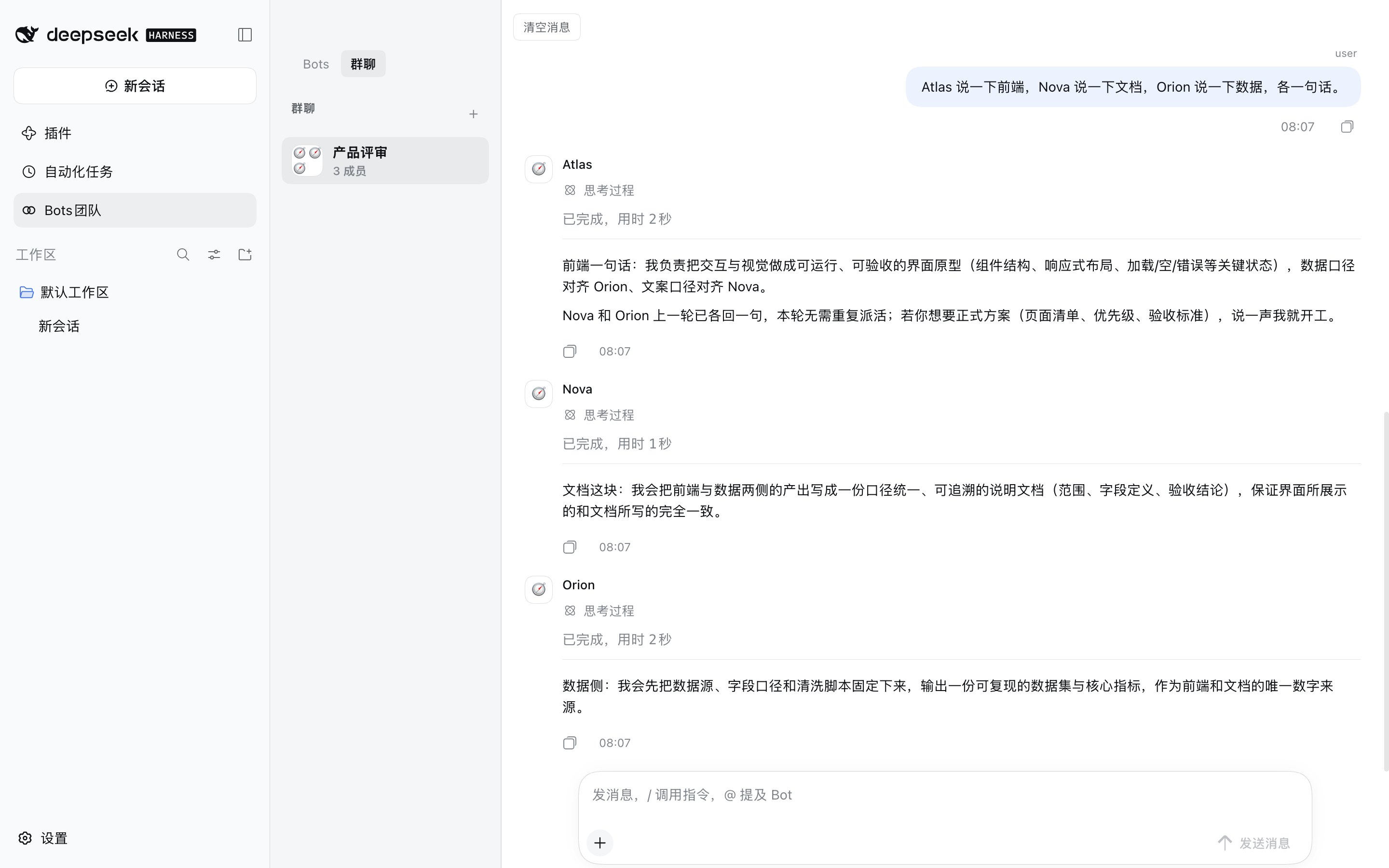
- One-to-one and group conversations. A room is a list of members. A message addressed to one Bot routes to that Bot; a message addressed to nobody in particular is answered by every member, because a greeting is addressed to the room.
- Runs are queued, leased and recoverable. Each answer is a run with a lease and a heartbeat. A run whose runtime dies is reclaimed instead of blocking the room, and a room keeps working while you do something else.
- A durable transcript. The panel draws from a ledger written as the run happens (messages, tool calls and their results, approvals, errors), not from the session log. Compacted-away history is replaced by a summary rather than silently dropped.
- 13 model-facing tools, so a Bot can create rooms, hand work to another Bot, decompose a request
into tasks and report on them:
agent_community_create_bot,agent_community_update_bot,agent_community_list_bots,agent_community_create_room,agent_community_send_message,agent_community_list_runs,agent_community_get_context,agent_community_post_message,agent_community_task_decompose,agent_community_task_assign,agent_community_task_status,agent_community_task_report,agent_community_submit_final. - Attachments. Files and images can be added to a message. They are stored inside the receiving Bot's own workspace and appended to what the model sees; the bubble still shows exactly what you typed.
- Compaction that you can trigger.
/compactsummarises the older part of a room with the room's own Bot model, keeps the newest messages verbatim, and retires the session that was carrying the old history — so the next answer continues from the summary instead of replaying the transcript. - Unread state that survives compaction. A read water mark records when you read, not just which message, so a room that has been compacted can still tell you what is new.
Requirements
| DeepSeek Harness | 0.2.0-rc.2 (the version these packages are built and typechecked against) |
| Node.js | ^22.19.0 or >=24 |
| pnpm | 11.7.0 (for building from source) |
@deepseek-ai/* packages are not published to the public npm registry. The peer ranges in this repo
therefore carry an explicit prerelease branch (>=0.2.0-rc.1 <0.3.0): a broad-looking range such as *
or >=0.0.1-rc.1 <0.2.0 matches no prerelease version at all, because node-semver only lets a
prerelease satisfy a range when some comparator carries the same major.minor.patch tuple and a
prerelease tag. That is why pnpm install in this repo alone fails — it is expected, and it is also why
the plugin is meant to be installed into a DSH profile, where those packages are already present.
Installation
dsh plugin --profile <your-profile> add dsh-plugin-agent-collaboration
The published package carries all three packages prebuilt, so nothing is compiled on your machine. Restart DSH and refresh the page — Bots团队 appears in the sidebar.
Installing the release tarball instead
The archive attached to each release is the same build that is published to npm — use it when you would rather not install through a registry. The line below points at the latest public release; see CHANGELOG.md for what a newer version changes.
dsh plugin --profile <your-profile> add \
  https://github.com/Leo-sail/dsh-plugin-agent-collaboration/releases/download/v0.2.0/dsh-plugin-agent-collaboration-0.2.0.tgz
Installing from a checkout instead
dsh plugin --profile <your-profile> add "file:/path/to/this/repo/packages/bundle/agent-collaboration"
Keep the file: prefix. pnpm records a bare absolute path as a link: symlink and then installs none of
the bundle's own file: dependencies; the profile ends up with the bundle and no @dsh-plugin-agent-community/* rows,
and every row fails to import. The same applies to DSH's own plugin manager, which passes an absolute
path through unchanged.
Verify the install — all three must be real directories, not symlinks:
ls -ld ~/.dsh/profiles/<your-profile>/node_modules/@dsh-plugin-agent-community/*
Ask an agent to do it
Install the DSH plugin at
https://github.com/Leo-sail/dsh-plugin-agent-collaboration/releases/download/v0.2.0/dsh-plugin-agent-collaboration-0.2.0.tgz
into my DSH profile, restart DSH, and confirm the "Bots团队" entry appears in the sidebar.
Usage
| What you want | How |
|---|---|
| Create a Bot | Open Bots团队 → + → fill in name, model, permission and workspace. The Bot is created immediately and appears in the roster. |
| Talk to one Bot | Select it in the Bots tab (one-to-one room) and send a message. |
| Create a group | + in the 群聊 tab, pick the members. |
| Address one member of a group | Type @ and pick a Bot from the menu, or use its name in the text. Only that Bot is queued. |
| Address the whole room | Send a message that names nobody. Every member answers. |
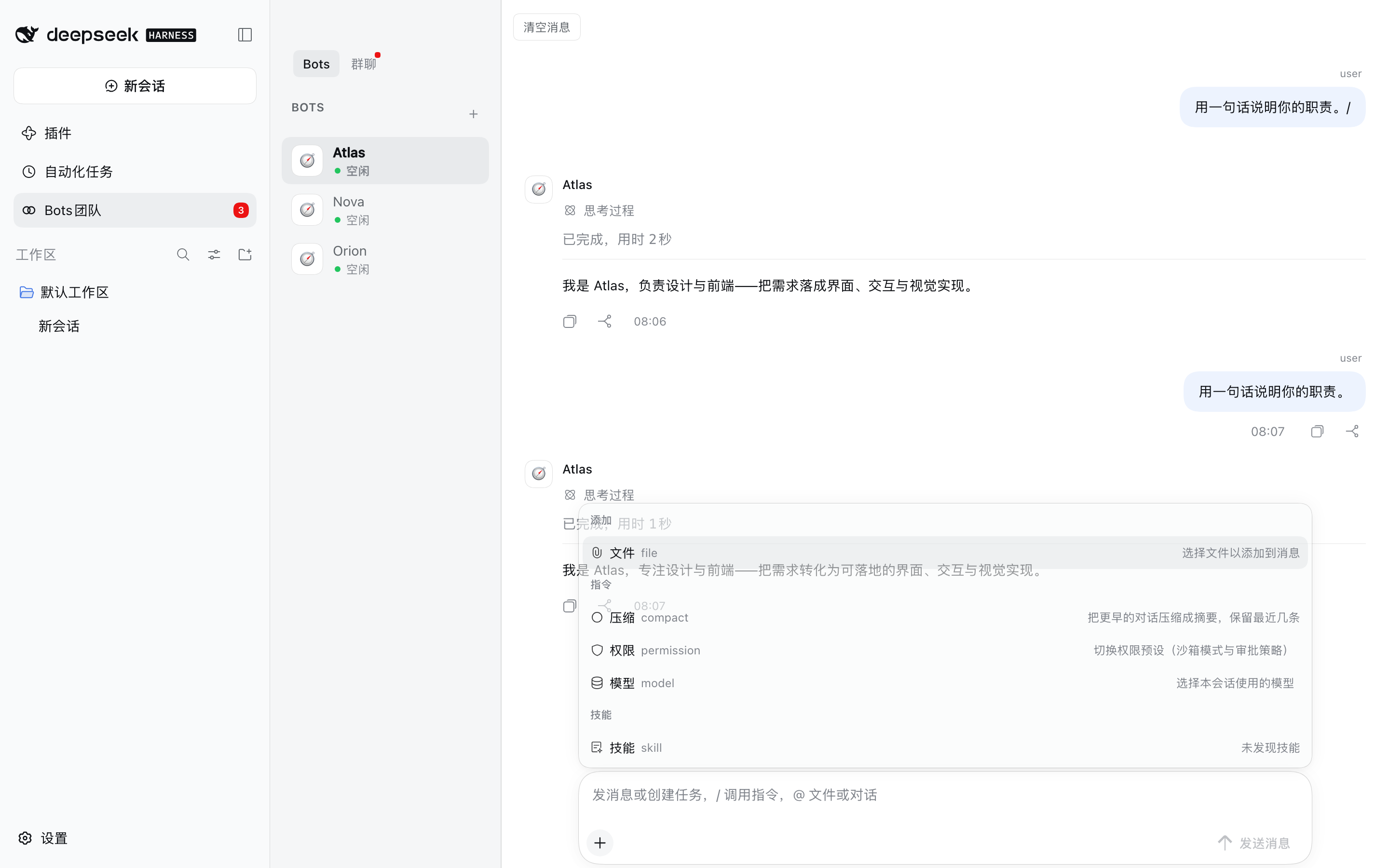
| Add a file or image | + → 文件, or paste/drop it onto the composer. |
| Change the model for one room | + → 模型. Affects the next run, not one already in flight. |
| Change a Bot's permission preset | + → 权限: 仅可查看 / 工作区内修改 / 完全权限. |
| Compress a long room | + → 压缩. Shows a summary row and keeps the newest messages. |
| Stop a run | 停止 in the title bar cancels the room's active runs. |
| Read an older part | Scroll up — the transcript pages in earlier entries. |
| Clear a room | 清空消息 in the room header. |
Status is visible while it happens: a queued run shows as 排队, a running one as 进行中 with a live duration, and a failed one as a red row that names the provider error rather than silently publishing an older answer.
Configuration
Every key is optional and is set on the bundle's row in the profile's cordis.patch.yml.
| Key | Default | What it does |
|---|---|---|
maxBots | 32 | Bots that may exist |
maxRooms | 64 | Rooms that may exist |
maxMessages | 10000 | Messages kept before the oldest are pruned |
maxRuns | 1000 | Run records kept |
maxConcurrentRuns | 8 | Bots that may answer at the same time, across all rooms |
runTimeoutMs | 600000 | A run is failed after this long |
runLeaseMs | 60000 | How long a run's lease lasts without a heartbeat |
historyMessagesInPrompt | 10 | Messages of context handed to each answer |
a2aMinIntervalMs | 3000 | Minimum gap between Bot-to-Bot messages |
groupProposalTimeoutMs | 120000 | How long a group proposal waits for an answer |
idleLimit | 12 | Live Bot sessions kept before the least recently used is disposed — disposing one is what releases its session write lease |
hardLimit | 24 | Hard ceiling on live Bot sessions |
botReasoningEffort | max | Reasoning effort for Bot turns: off low high max, or '' to take the provider default. A Bot can override it |
botAgentPreset | standard | Agent preset handed to each Bot session |
botDeniedTools | plugin_manager, ask_user_question, skill | Tools a Bot must never see |
homeDir | $DSH_HOME, else ~/.dsh | Where the board is stored |
sessionsDir | <homeDir>/sessions | Where Bot session logs are written |
maxConcurrentRuns is global, not per room. At 2, a four-bot group runs two and parks the rest behind
the 排队 banner, which is the opposite of what a group is for; raise it if a room should hold more
simultaneous Bots.
Where your data lives
$DSH_HOME/agent-community/state.json        the board: Bots, rooms, messages, runs, read marks
$DSH_HOME/agent-community/workspaces/<bot>  each Bot's workspace, including its attachments
$DSH_HOME defaults to ~/.dsh. Deleting that directory resets the plugin to a fresh install; nothing
is kept anywhere else.
Coexistence with DSH's built-in Agent Teams
This repo ships the Community half only. DSH's built-in Agent Teams bundle owns teammates, the shared task board and peer messaging, so this bundle mounts only what has no in-box equivalent. The two can run side by side without either disabling the other.
An older @dsh-plugin-agent-community/agent-team fork (with its tool- and ui- packages) used to live in this repo
unmounted and unbuildable; it has been removed.
Screenshots
A group room where three Bots answered one message, each attributed to its own Bot:
The roster and the room list, with the sidebar entry carrying an unread count:
The composer's menu — 文件 / 压缩 / 权限 / 模型, then the skills group:
These are declared in screenshots.json — beside
the bundle's package.json, because this plugin is listed as a monorepo subpackage and that is where
storefronts read it from. See
screenshots/README.md for how they were taken.
Development
pnpm install      # fails by design: @deepseek-ai/* are not on the public registry
pnpm typecheck    # typecheck every package against the real DSH types, when they resolve
pnpm bundle       # build all packages and run the build-shape checks
pnpm bundle runs scripts/check-build.mjs — every assertion in it maps to a
bug this repo actually shipped (a bare-ESM client bundle, a package whose files omitted its own types, a
stale lib/, dangling exports targets, duplicate CSS selectors). Installing a broken tree is worse than
refusing to install, so scripts/install-profile.sh runs the same checks before copying anything.
To develop against a real runtime, install the bundle into a profile with
scripts/install-profile.sh <profile> and restart DSH.
Architecture
packages/
  core/agent-community         the service: Bots, rooms, runs, sessions, the ledger
                               AgentCommunityService (ctx.agentCommunity), persists state.json
  tools/tool-agent-community   the 13 model-facing tools (ctx.tools.register)
  ui/ui-agent-community        the browser panel: sidebar entry, transcript, composer
  bundle/agent-collaboration   the installable entry (cordis.patch.yml)
The bundle mounts all three; each package is also installable on its own — core/agent-community ships
its own cordis.patch.yml and dsh.bundle, which is the right shape for a headless deployment.
See DESIGN.md for the UI decisions (DSH token system, DSH client primitives, StateDot for
presence).
License
Related plugins
webnovel-writer
lingfengqaq/webnovel-writer
loopx (dsh-loopx-plugin)
loopx-project/loopx
ouroboros (dsh-plugin)
q00/ouroboros
loopx (dsh-loopx-plugin)
huangruiteng/loopx