dsh-lark-session-monitor-plugin
lifeopsgo/dsh-lark-session-monitor-plugin
飞书会话监听并投递到指定工作区的会话中
Installation
dsh plugin --profile web add github:lifeopsgo/dsh-lark-session-monitor-pluginREADME
dsh-lark-session-monitor-plugin
Watch Feishu (Lark) conversations as yourself, and forward new messages into a DeepSeek Harness session.
English · 简体中文
What it is
A DeepSeek Harness (DSH) plugin that reads Feishu conversations with your own user identity and delivers new messages as prompts into a DSH session you choose.
Compatible DSH versions
| DSH version | Status |
|---|---|
| 0.2.0-rc.1 | verified — package surface and plugin contract checked against the current DSH Web runtime; automated build and regression suite pass |
| Earlier 0.1.x releases | not supported by this release line |
Quick start
Requires Node.js ≥ 22.6.
dsh plugin --profile web add github:lifeopsgo/dsh-lark-session-monitor-plugin#v2.0.0
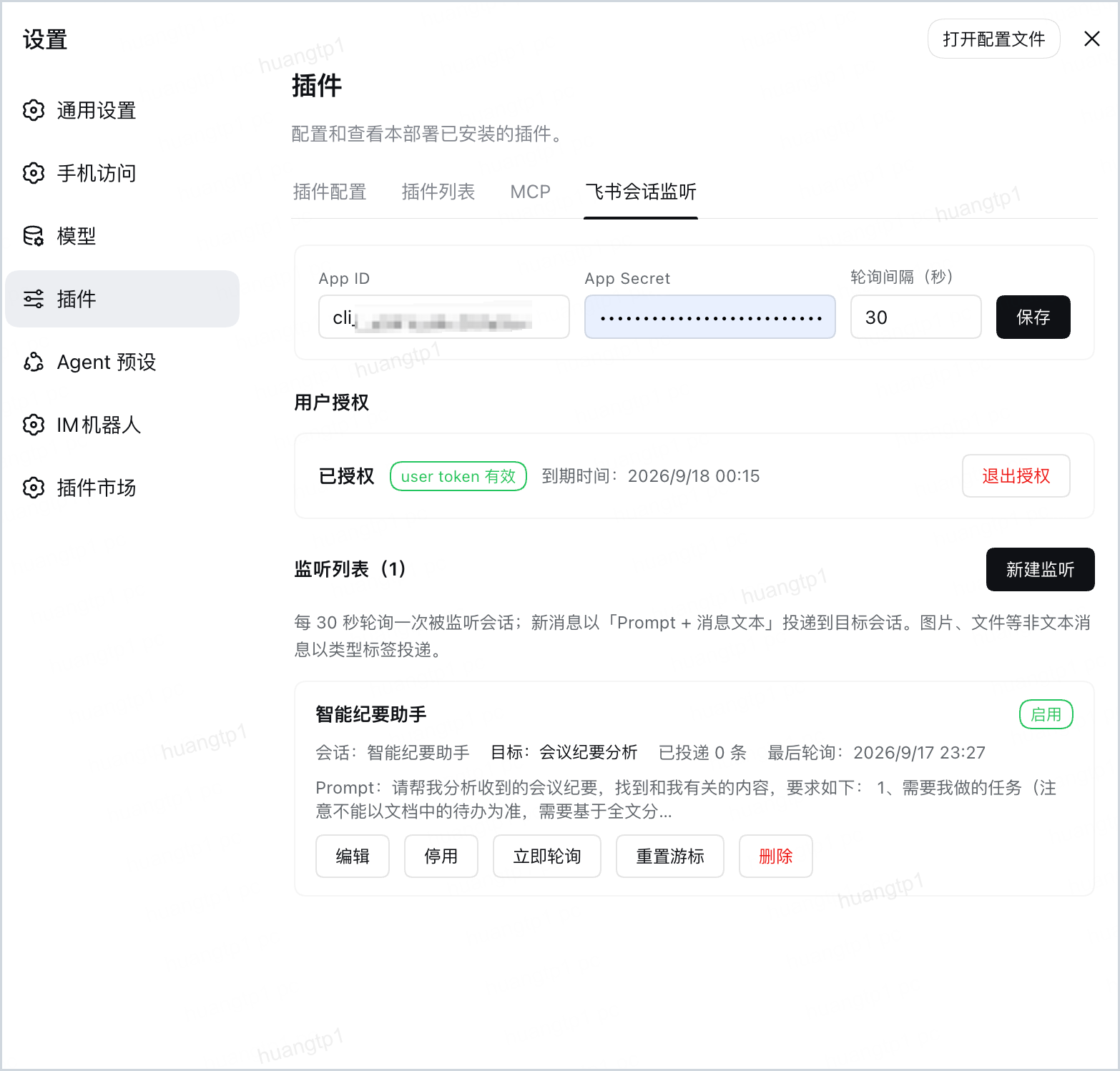
Restart DSH, then refresh the page. Open Settings → Plugins → 飞书会话监听.
Upgrade or remove
dsh plugin --profile web add github:lifeopsgo/dsh-lark-session-monitor-plugin#v2.0.0
dsh plugin --profile web remove dsh-lark-session-monitor-plugin
Setup
1. Create a Feishu app
In the Feishu Open Platform console, create a self-built app and enable these user permissions:
| Scope | Purpose |
|---|---|
im:message.p2p_msg:get_as_user | Read your p2p conversations |
im:message.group_msg:get_as_user | Read your group conversations |
im:chat:read | Resolve conversation names |
offline_access | Refresh the token without re-authorizing |
Enter the App ID and App Secret in the settings page and save.
2. Authorize
Click 开始授权, open the link, approve the scopes in Feishu, then click 我已完成授权.
The user token is stored in DSH's credentials service and refreshed automatically. Neither the secret nor the token is returned over RPC.
3. Create a monitor
Click 新建监听:
| Field | Meaning |
|---|---|
| 名称 | Optional label |
| 会话类型 | Filter the picker to 全部 / 私聊 / 群 |
| 监听会话 | Conversation to watch; type to filter |
| Prompt | Sent first, with the message text beneath it |
| 目标工作区 | Where the target session lives |
| 目标会话 | Leave empty to auto-create |
| Skip own messages | Off by default; when on, messages you sent yourself are not delivered |
| Senders | Empty by default = all senders; pick specific users or bots to receive only their messages (a bot with no readable name shows as its App ID) |
| Also @bot mentions | Off by default; when on, messages that @-mention this app's bot are delivered even from senders outside the whitelist |
| Blocked keywords | Empty by default; a message whose rendered text contains any listed keyword is not delivered (the cursor still moves past it) |
| Allowed keywords | Empty by default = deliver everything; when set, only messages whose rendered text contains at least one listed keyword are delivered. The blacklist wins when both match |
| 启用 | Whether this monitor polls |
How delivery works
New messages are delivered as one prompt:
<your prompt>

[发送者] [消息ID] 消息正文

[发送者] [消息ID] 第二条消息
Message rendering. Only readable text is delivered; raw Feishu JSON never reaches the model. Text uses its own text, posts are flattened, and cards are read from their original card JSON (card_msg_content_type=user_card_content) and rendered as readable lines — headings, text, notes, buttons with their links. Links are delivered as plain URLs, never fetched. Images/files/audio/video become a label such as [图片]. Messages with nothing to say are skipped. Each delivered line carries the Feishu message id, so a session can reference the exact message.
Target session. The 目标会话 field decides where messages land:
| Target session | Auto-create + pin | Behavior |
|---|---|---|
| A chosen session | — | Messages accumulate there |
| Empty | ✅ | First delivery creates a session and pins it |
| Empty | ⬜ | Every delivery creates a new session |
Polling. Polls are single-flight per monitor. At most 10 messages per prompt; the remainder follows after that delivery. The cursor advances only after a successful delivery, so a failed delivery re-reads its messages.
Own messages. A monitor can skip messages you sent yourself; if your identity cannot be read, messages are delivered as before. Source filters. The sender list narrows a monitor to specific senders (candidates are whoever spoke in the chat recently); the @bot switch widens it back by one case: a message that @-mentions this app's bot is accepted even from a sender outside the list — being addressed is the signal, not who typed it. Leave the list empty with the switch on and only @bot messages arrive; leave both unset and everything is delivered as before. The bot's identity is resolved through the app's own credentials — no extra scope; while it cannot be resolved the round is held: nothing delivered, nothing lost, retried every poll.
Privacy
- Reads only the conversations you configure, within the polling window.
- The App Secret stays in the settings file; the user token stays in DSH's credentials service. Neither is returned over RPC.
- The only network access is the Feishu API calls you authorized: your user token for chat reads, plus the app's own credentials to resolve the bot identity behind the @-mention filter. No telemetry.
- Message text goes only to the DSH session you selected. The plugin never replies into Feishu.
- The settings endpoint rides DSH's authenticated
/apicarrier.rpcAuthority: loopbackadditionally requires a loopback Host and Origin.
Limitations
- Text only. Images, files and media are delivered as type labels.
- Polling, not push. Delivery is bounded by the poll interval; offline messages are not back-filled beyond the initial window.
License
MIT — see LICENSE.
Ähnliche Plugins
dsh-web-ui (dsh-chat-recovery)
zhu1090093659/dsh-web-ui
dsh-synapse
liangmianya/dsh-synapse
billion-context
ranxianglei/billion-context
dsh-chat-import
nwflower/dsh-chat-import