dsh-subtitle-remover
lijianbin2/dsh-subtitle-remover
Sidebar page that removes burned-in subtitles from a video with a local video-subtitle-remover checkout: frame preview with a start/end range, drag-drawn regions (up to six), automatic region detection reviewed by a DSH chat model, live before/after comparison, and open-file/open-folder on the result. Requires the video-subtitle-remover checkout with its models and a Python environment with torch, paddle and OpenCV.
Installation
dsh plugin --profile web add github:lijianbin2/dsh-subtitle-removerREADME
dsh-subtitle-remover
A DSH Web UI plugin with a left-sidebar entry for video-subtitle-remover: pick a video, see a frame, mark one or more subtitle regions on it (or let the engine propose them), then run the job — or the whole automatic path — without leaving the Harness window.
Install
-
Get video-subtitle-remover working on the same machine: models downloaded, its
config/config.jsonin place, and a Python environment with torch / paddle / cv2 installed. -
Clone this repository somewhere stable. Auto-detection covers these layouts — the engine (
vsr) and its environment (vsr-env) either inside the plugin folder or next to it / itsplugins/parent:<repo>/engine/vsr <dir>/vsr <parent>/vsr <repo>/engine/vsr-env <dir>/vsr-env <parent>/vsr-env <repo> ← or <dir>/dsh-subtitle-removercd <dir> # or <parent>\plugins git clone https://github.com/lijianbin2/dsh-subtitle-removerWith any of these nothing needs configuring — the page's installer uses the
engine/layout by default. Any other layout works too — setvsrRoot/pythonPath(see Configuration), or use the panel to point at it. -
Add it to DSH: on the Plugins page add this folder, or call the plugin manager's
install_bundlewith its absolute path. -
Open the left sidebar entry
字幕擦除/Subtitle Remover.
The engine itself is a separate Apache-2.0 project; this plugin only spawns it and never bundles its code or models.
Screenshots
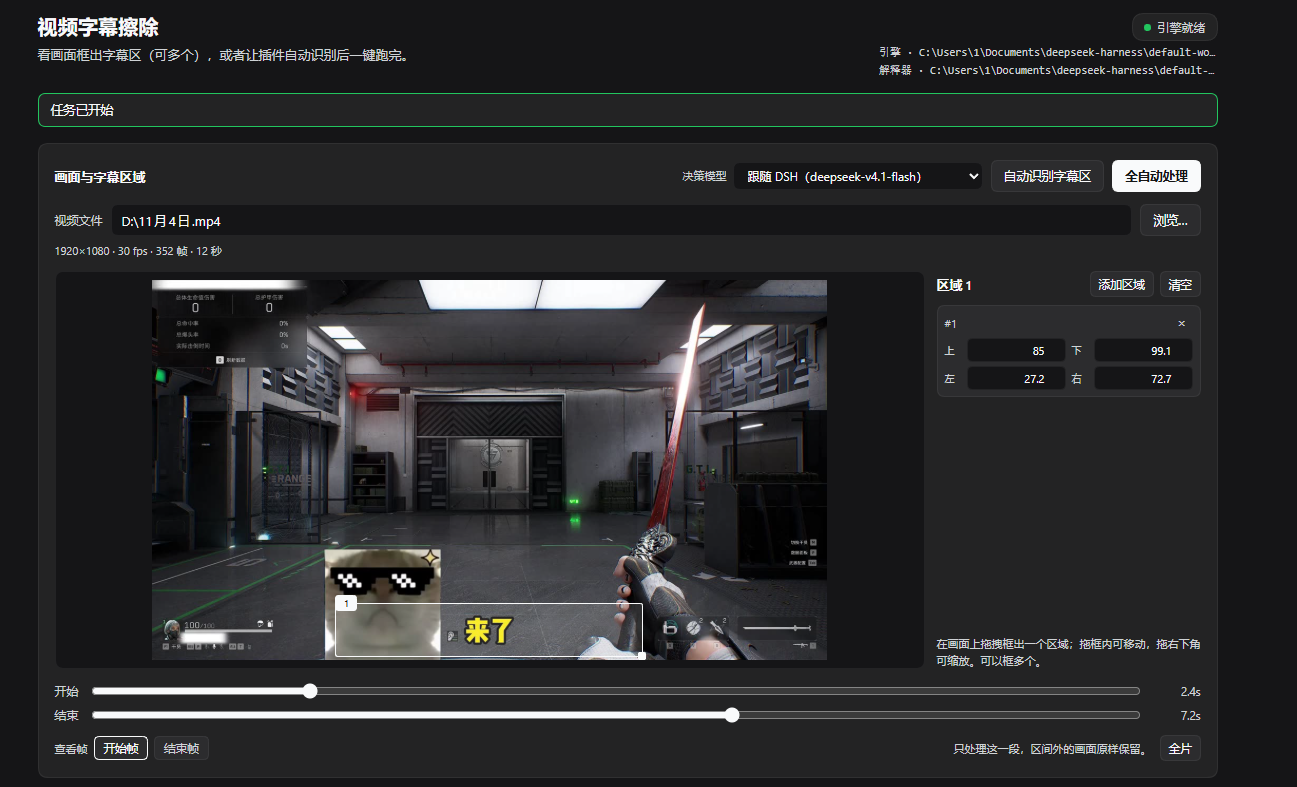
The editor: frame preview with the start/end processing range, drag-drawn regions, and the detection/model controls.
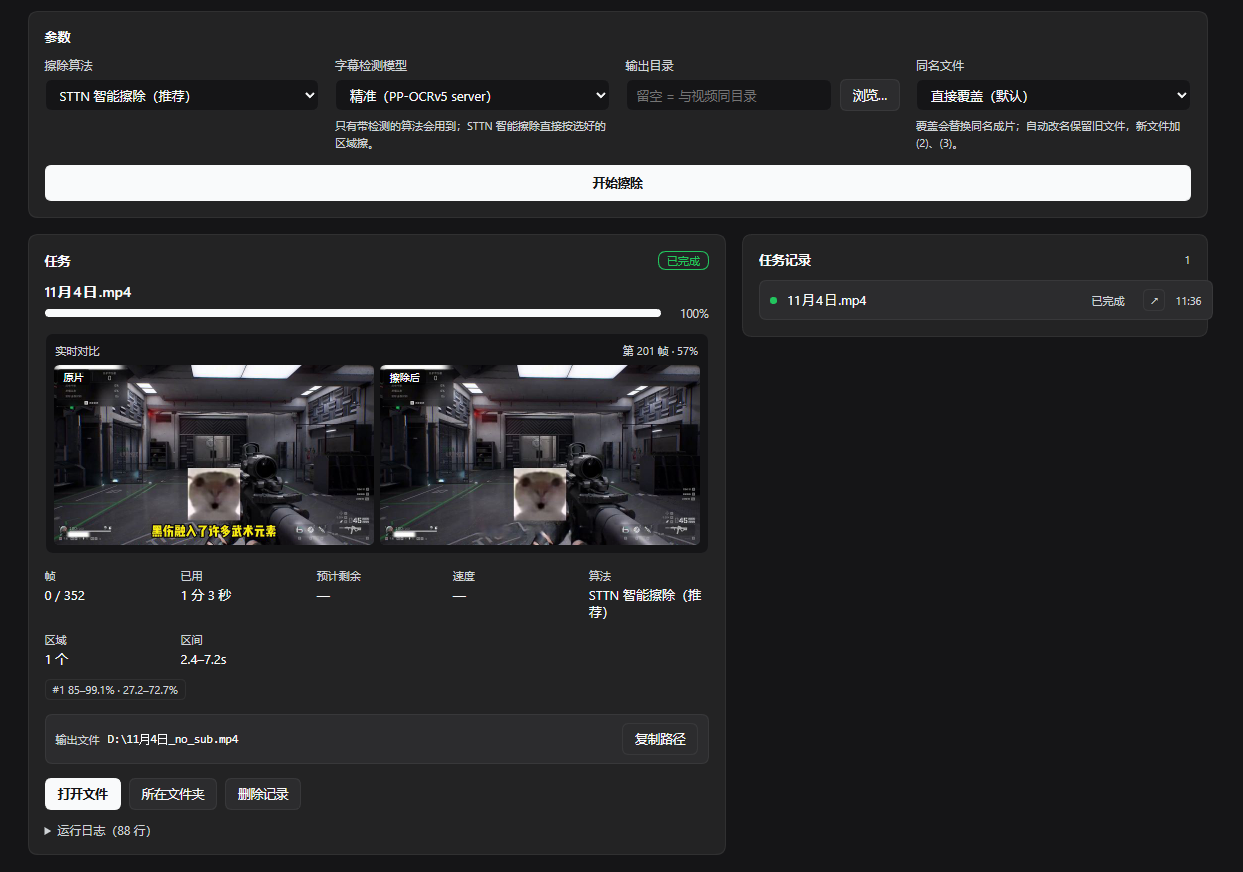
A finished job: the live before/after comparison strip kept from processing, per-job metadata with the processing range, and the open-file actions.
What it adds
- Sidebar entry
字幕擦除/Subtitle Removerin the global panel list (sidebar.panellist), with a small pulse while a job runs. - A page (
mainpanel keyed bysubtitle-remover) with:- video path + directory picker (drives, folders, video files, sizes),
ffprobereadout (resolution, fps, frame count, duration),- frame preview with a start/end time range and a region editor: drag to draw a box, drag inside to move it, drag its bottom-right corner to resize; the start frame and end frame can both be inspected,
- several regions at once (up to 6), each also editable numerically,
- automatic region detection using the engine's own PP-OCR text detector on sampled frames; the proposed boxes land in the same editor, so they stay editable,
- 模型复核: after detection the plugin can hand the candidate bands and video metadata to a DSH chat model (by default the one selected in DSH, switchable in the page), which decides which bands are real subtitles and which inpainting model to use,
- 全自动处理 / Run automatically: detect, let the model decide, then start the job in one click,
- inpainting model + subtitle-detector choice, optional output folder,
- 处理区间: only frames between the start and end times are rewritten; the rest of the video is copied through untouched,
- 实时对比预览 / live comparison: while the job runs, the engine's own preview hook writes a throttled before/after JPEG pair, so the page shows the original and the cleaned frame side by side, frame number and percent included,
- live progress, frames, elapsed/remaining, speed, output path + copy,
- open-file / show-in-folder on a finished job, in the job card and in each history row,
- engine setup inside the page: a scan of common locations, manual folder and interpreter pickers (saved to the plugin, no profile editing), and a one-click installer (clone + virtualenv + PyTorch/PaddlePaddle) for machines that don't have the engine yet.
How it talks to the engine
The Host half spawns the runners in runner/ with the local checkout's
interpreter. Both print one JSON event per line on a private channel
(@@VSR@@ {...}) while every engine/tqdm/paddle print goes to stderr:
vsr_runner.pyremoves subtitles (one--areaper marked region),vsr_detect.pysamples frames, clusters the detected text boxes into bands and reports them as percentages. Bands are ranked by width, horizontal centring and frame hits, so HUD text in a corner (ammo counters, kill feeds, minimaps) loses against the wide, centred subtitle line.
The page polls these over /dsh-subtitle-remover/api/* (registered on the
Harness webServer, same origin, loopback + same-origin checked):
| Route | Purpose |
|---|---|
GET /state | environment verdict, jobs, running detection |
GET /jobs, GET /jobs/<id> | job list / one job with its log |
POST /jobs, POST /jobs/<id>/cancel, POST /jobs/<id>/remove | job lifecycle |
GET /browse?path= | directory listing for the pickers |
GET /probe?path= | video metadata via ffprobe |
GET /frame?path=&t= | one JPEG preview frame via ffmpeg |
GET /jobs/<id>/preview/left|right | live before/after comparison frame |
POST /jobs/<id>/open | open the output file or its folder with the OS handler |
GET /models | DSH model catalogue plus the current DSH selection |
POST /detect, GET /detect/<id>, POST /detect/<id>/cancel | automatic region detection (optionally model-reviewed) |
Engine setup
Precedence: the folder saved from the page, then the config below, then automatic detection.
- Automatic — the Host looks next to the plugin, in
~,~/Documents,~/projects, and the working directory for a checkout of video-subtitle-remover with its virtualenv. - Manual — open
配置引擎in the page and pick the engine folder (and the interpreter if it is somewhere unusual). The choice is stored in<DSH_HOME>/data/dsh-subtitle-remover/settings.json, so it survives plugin upgrades and needs no profile editing. - One-click install — the same panel can clone the engine and prepare a
virtualenv with PyTorch / PaddlePaddle (
自动picks CUDA when an NVIDIA GPU is found, otherwise CPU). The target defaults toengine/video-subtitle-removerinside the plugin folder and is editable/pickable. It needsgitand Python 3.10+ onPATHand downloads several GB. Model files are not in the engine repository: install the engine, then copybackend/modelsfrom a video-subtitle-remover release archive (or an existing install) into the cloned folder — the panel says exactly which files are missing.
Configuration
All keys are optional; the plugin auto-detects the checkout and its interpreter
first (<workspace>/vsr, <workspace>/vsr-env/Scripts/python.exe).
- id: dsh-subtitle-remover
  name: dsh-subtitle-remover
  config:
    vsrRoot: 'D:\tools\video-subtitle-remover'   # directory containing backend/main.py
    pythonPath: 'D:\tools\vsr-env\Scripts\python.exe'
    ffmpegPath: 'C:\ffmpeg\bin\ffmpeg.exe'       # preview frames; the checkout's bundled copy is used otherwise
    ffprobePath: 'C:\ffmpeg\bin\ffprobe.exe'     # only for the info readout
    defaultDir: 'D:\videos'
    defaultMode: 'sttn-auto'
    defaultDetect: 'server'                      # or 'mobile'
Requirements
- A working video-subtitle-remover checkout (models downloaded,
config/config.jsonpresent). - Its Python environment (the one with torch/paddle/cv2 installed).
ffmpegfor the preview frame (the checkout ships one, so this normally works out of the box) andffprobefor the metadata readout.
Tests
Two integration checks drive the real Host half through a stub Cordis context and real engine runs. Each uses its own temp output directory and removes it again.
node test/host-api.test.mjs   # routing, gates, browse/probe/frame, detection, model decision, range, preview, open (~5 min)
node test/cancel.test.mjs     # cancel a running job, partial output cleanup (~40 s)
test/fixtures/ holds two tiny synthetic clips; they are test-only and not part
of the shipped files list. host-api.test.mjs points DSH_HOME at a temp folder,
so it never touches the engine settings of the machine that runs it.
Notes
- The job needs at least one region: draw one, press Detect, or use Run automatically. Up to 6 regions per job.
- One job runs at a time (one GPU, one engine); a second request is rejected with
409until the current job finishes or is cancelled. - Progress granularity follows the engine's batch size, so very short clips can jump from 0 to 100 in two steps.
- Automatic detection finds text-bearing bands and prefers wide, horizontally centred ones; a video whose subtitles are absent in most sampled frames may return nothing, so mark the band by hand then.
- The model decision is text-based: the model receives the candidate bands (position, width, hit rate), the video metadata and the algorithm menu — not the pixels. If the call fails (no key, quota, bad JSON) the heuristic result is kept and the page says so.
- The output directory is created only when missing; with the default setting the
result lands next to the source file (e.g.
D:\clip_no_sub.mp4). - Collision handling: 「同名文件」 defaults to overwrite; choose auto-rename to
keep the old file and write
clip_no_sub (2).mp4,(3), … instead. The job log records the rename. - The processing range maps to the engine's A/B sections: frames outside it are written unchanged, so the output keeps the full length.
- Live comparison frames come from the engine's own preview hook (
gui_mode+update_preview_with_comp) and are throttled to two JPEGs per ~0.5 s at 640 px. Frames outside the processing range are skipped because they would look identical. POST /jobs/<id>/openusesexplorer.exeon Windows (/select,for the folder),open -Ron macOS andxdg-openelsewhere. It only ever opens that job's own output path.- Jobs live in memory: restarting the Host clears the history, never the files.
Security
The HTTP surface is registered on the GUI's own origin and answers only loopback
requests whose Host is loopback and whose Origin, when present, matches the
GUI. The image routes (/frame, /jobs/<id>/preview/*) additionally refuse
cross-site embeds through Sec-Fetch-Site, because an <img> on another local
page would otherwise be able to display arbitrary local pictures. The
/jobs/<id>/open route only ever opens that job's own output path — it never
accepts a caller-supplied path. There is no authentication beyond the desktop
app's own renderer credential gate, so never expose the GUI port to other
machines.
Ähnliche Plugins
dsh-web (dsh-task-board)
zhu1090093659/dsh-web
dsh-web (dsh-web-all)
zhu1090093659/dsh-web
dsh-TUI
ccch1mneyyy/dsh-tui
dsh-web-ui (dsh-task-board)
zhu1090093659/dsh-web-ui