dsh-inline-attachments
panther-w/dsh-inline-attachments
Composer enhancement: put images or files where you mean them and the model reads each one at that exact position.
Installation
dsh plugin --profile web add github:panther-w/dsh-inline-attachmentsREADME
dsh-inline-attachments(输入框增强)
输入框增强:把图片或文件放在你想要的位置,模型就在该位置读到它。
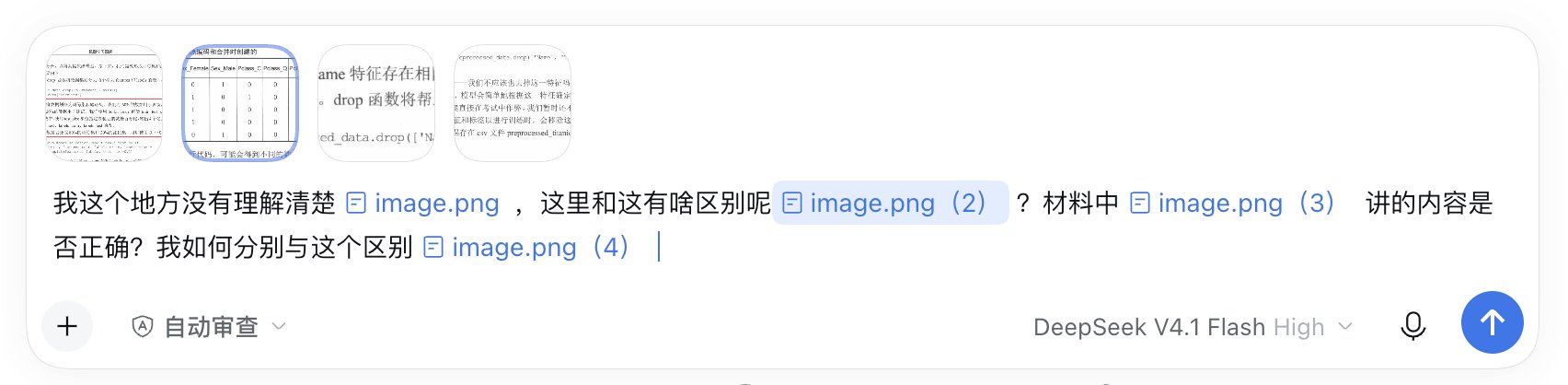
怎么用
在输入框里粘贴、拖入或点 + 选择图片/文件,它会自动变成一个带文件名的小标签(不是链接);发送时模型就在这个位置读它。
删掉正文小标签会一起删附件;点图片标签看大图,点文件标签打开/下载。鼠标放在标签上,上方对应缩略图会描边。重开 DSH 后,草稿里的图需要重新贴一次。
安装
在 DSH Desktop 打开「插件 → 添加插件」,输入 dsh-inline-attachments;或:
dsh plugin --profile desktop add dsh-inline-attachments
市场收录后也可以搜「行内附件」。
从源码开发/安装:git clone 后 dsh plugin --profile desktop add <本地仓库路径>;发布与市场材料见 PUBLISHING.md。
卸载
在 DSH 的插件页卸载(或禁用)dsh-inline-attachments,重启 DSH 即恢复原样。
验证
# Node 22+
node --test test/host.test.mjs test/client-load.test.mjs test/host-wiring.test.mjs test/client-flow.test.mjs
# 或 npm test
31 个自动测试 + 多轮人工测试(粘贴/拖入、删图/撤销、焦点、悬浮描边、文件标签、亮/暗主题)。
状态
0.1.4。早期版本,依赖 DSH 输入框的内部接口,DSH 以后升级可能需要跟着改。
亮/暗主题跟随 DSH;Windows 没有平台相关代码,但没有在 Windows 真机实测。
English
Composer enhancement: put images or files where you mean them and the model reads each one at that exact position.
Paste, drop, or upload an image/file; it becomes a small label in the composer. On send, the model reads each file where you put it. Version 0.1.4 relies on composer internals. Light/dark themes follow DSH; Windows is untested.
MIT · repo Panther-w/dsh-inline-attachments · 31 automated tests + manual testing.
Ähnliche Plugins
dsh-web (dsh-task-board)
zhu1090093659/dsh-web
dsh-web (dsh-web-all)
zhu1090093659/dsh-web
dsh-TUI
ccch1mneyyy/dsh-tui
dsh-web-ui (dsh-task-board)
zhu1090093659/dsh-web-ui