dsh-notify-bark
pc439527/dsh-notify-bark
Bark-Push-Benachrichtigungen ans iPhone: Ereignisse für Rundenabschluss, Warten auf Eingabe und Genehmigungen werden vom DSH-Host gesendet.
Installation
dsh plugin --profile web add github:pc439527/dsh-notify-barkREADME
dsh-notify-bark

License: MIT · Requires: Node ^22.19 · DSH: 0.2.2-rc.1 (inlined client module table era) · Platform: DSH Host + Web settings page
A Bark push-notification plugin for DeepSeek Harness (DSH): the DSH Host listens for events such as turn completion, waiting for your answer, and waiting for approval, and pushes notifications to your iPhone through a Bark Server. Notifications are sent entirely from the Host, so closing or refreshing the browser does not affect delivery. The machine running the Host must remain awake, with DSH running and network access available.
- Host half (
src/index.ts+lib/*.js): session/event listener + Bark HTTP sending + the plugin entry's ownConfigschema (volatile fields persisted and hot-applied through DSH 0.2'sctx.settingsdocument) + thebarkNotifyTypert Remote served on the shared/apichannel. - Browser half (
src/client/+lib/client.js): registers asettings.sectionslot; the form calls the mountedbarkNotifyRemote namespace. The Bark URL never crosses the wire to the browser — only a masked status is shown (configured:••••••••3F82).
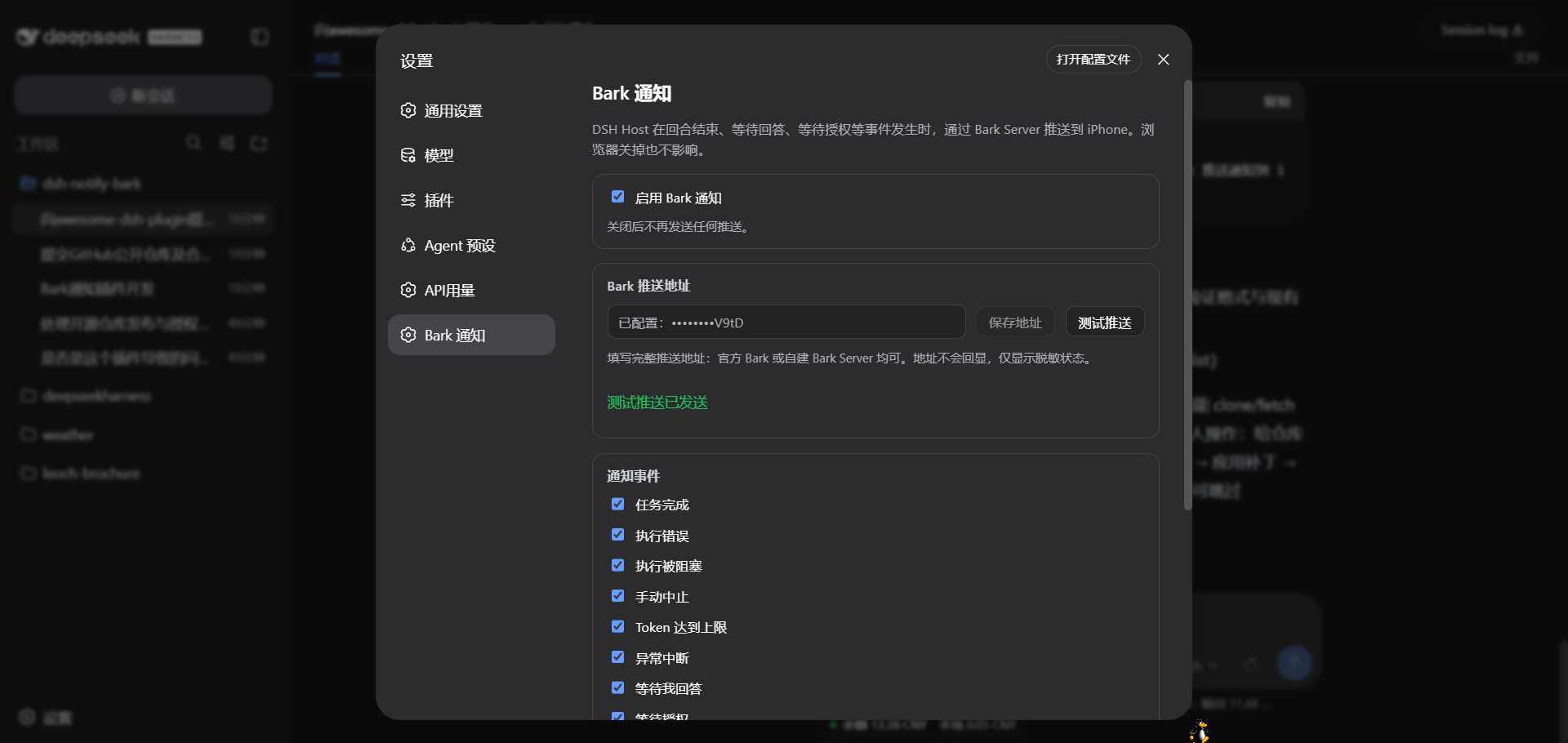
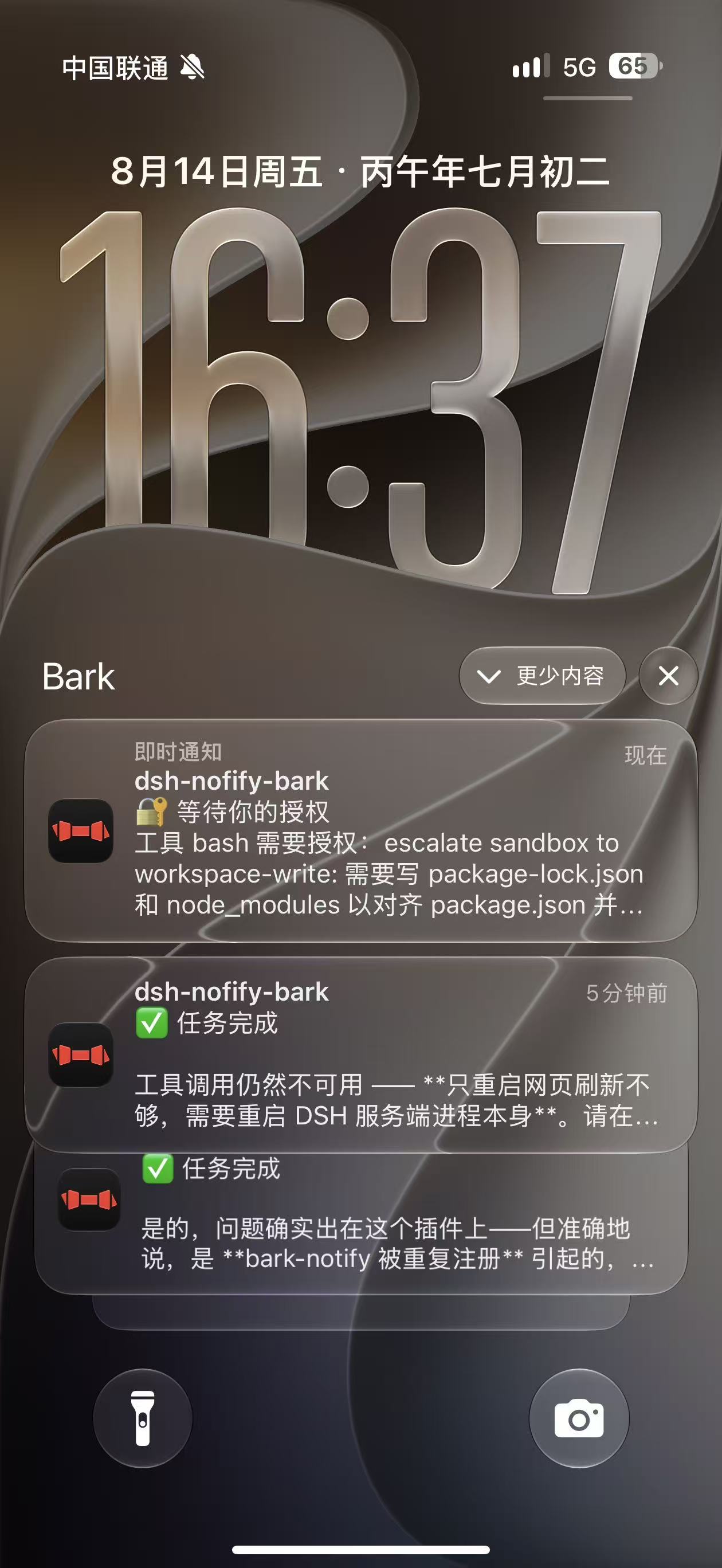
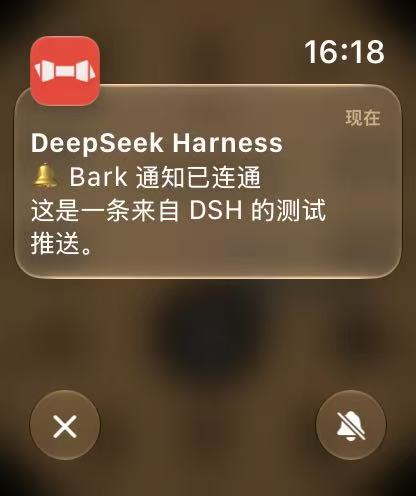
Notification events (9 switches)
| Event | Trigger | Default | Bark level |
|---|---|---|---|
| ✅ Task completed | turn/end reason completed | On | active |
| ❌ Execution failed | turn/end reason error | On | timeSensitive |
| 🚫 Execution blocked | turn/end reason blocked | On | timeSensitive |
| ⏹ Aborted | turn/end reason aborted | Off | passive |
| ⚠️ Token limit reached | turn/end reason max-tokens | On | timeSensitive |
| ⏸ Interrupted | turn/end reason interrupted | On | timeSensitive |
| ❓ Awaiting your answer | tool/call ask_user_question | On | timeSensitive |
| 🔐 Awaiting your approval | approval/asked | On | timeSensitive |
| 📋 Plan awaiting confirmation | tool/call exit_plan_mode | Off | timeSensitive |
The notification title is fixed to the workspace name (last path segment of session.header.cwd); the status is placed on the first line of the body. Optional extras: the AI's last reply text, a body length cap, and a Bark Group.
Installation
Install directly from GitHub (the repo ships compiled output — clone and use, no build step required):
dsh plugin --profile web add https://github.com/pc439527/dsh-notify-bark.git
Or from a local path:
dsh plugin --profile web add /path/to/dsh-notify-bark
dsh plugin add runs pnpm add (writing dependencies + dsh.profile.bundles), and the plugin's own cordis.patch.yml inserts the bark-notify line. A running dsh web watches the profile's cordis.patch.yml through Cordis HMR — appending the same insert line at the user layer hot-loads the plugin without restarting the service:
# $DSH_HOME/profiles/web/cordis.patch.yml
- insert:
    - id: bark-notify
      name: 'dsh-notify-bark'
Refresh the browser settings page (gear → Bark notifications) to see the configuration form.
Configure notifications
- Install Bark on your iPhone and copy its base push endpoint (for example,
https://api.day.app/your-key). - Open Settings → Bark notifications, enable notifications, paste the endpoint, and save it. The saved endpoint is shown only as a masked status.
- Click Send test push to check delivery, then choose which events to receive and adjust the notification content and group.
The page uses the settings panel's title once. A Bark source on GitHub ↗ link below all configuration options opens the Bark open-source repository in a new tab.
Module not found after installation
The previous manifest incorrectly listed the Host runtime packages @deepseek-ai/schemastery and @deepseek-ai/dsh-typert-protocol under devDependencies. This could let local development succeed while the installed plugin failed during Host imports. Both are now declared in dependencies so the package manager installs them with the plugin; removing the schema or rewriting RPC is unnecessary for this dependency issue.
Users with an older Git revision installed must update or reinstall a revision containing the fix; refreshing the page alone does not install missing dependencies. If loading still fails, retain the full error log and distinguish ERR_MODULE_NOT_FOUND (module resolution) from unavailable RPC methods or services (Host API compatibility).
Security & privacy
- No built-in keys:
barkUrldefaults to empty; each deployer fills in their own Bark URL on the settings page (https://api.day.app/your-key). This repository contains no real credentials (tests use only a faketestkey). - Credentials never reach the browser:
barkUrlis declaredrole('secret')in the schema; the Remote get answers only a masked status (configured:••••••••3F82) and logs onlyconfigured: true/false. - Config is stored on the Host only: written to the profile's DSH settings document on the Host and never uploaded to any third party; notifications are sent only to the Bark URL you configured.
- Paste-friendly endpoint field: you can paste Bark's documented
curlexample (e.g.curl -X GET 'https://api.day.app/KEY/title/body?...') — the plugin extracts the embedded URL and reduces it back to the base endpoint; non-URL text is rejected with an actionable error instead of an opaque parse failure.
Development
pnpm install              # typescript / @types/node + the DSH 0.2 peer types (lockfile: pnpm-lock.yaml)
pnpm run typecheck        # Host half against the installed DSH 0.2 packages
pnpm run typecheck:client # browser-half source against the DSH 0.2 client packages
pnpm run build            # tsc compiles the Host half to lib/; the client bundle is maintained directly in lib/client.js
pnpm test                 # node:test unit + smoke tests (send / mapping / defaults / dedup / masking / remote contract / client bundle)
Structure
dsh-notify-bark/
├── package.json          # dsh.client declaration + bundle patch declaration + repo metadata
├── pnpm-lock.yaml        # pnpm lockfile
├── cordis.patch.yml      # plugin line insertion
├── LICENSE               # MIT
├── src/
│   ├── index.ts          # Host entry: Config schema + event listener + Remote service
│   ├── bark-service.ts   # Bark HTTP sending (timeout / error classification)
│   ├── event-listener.ts # session/event → notification intent (dedup / title / content)
│   ├── settings-store.ts # settings model / schema / defaults / masking
│   ├── remote-contract.ts # shared Remote contract: payloads, validation, descriptors
│   ├── bark-remote.ts    # barkNotify Remote service (get masked / set / test)
│   └── client/           # browser-half source (lib/client.js is its bundle mirror)
├── lib/                  # deployment artifacts (tsc-compiled Host + hand-maintained module-loader bundle)
└── tests/                # node:test unit tests
Design notes
- Notifications go through the Host:
ctx.on('session/event')listens directly (the same path dsh-im-bridge uses); the browser is only a configuration panel. - Config is stored on the Host: on DSH 0.2 a plugin entry is its settings namespace, so the plugin exports a
Configschema whose fields arevolatile()(stable live references, no remount) and writes go throughctx.settings. The plugin suppresses the auto-generated page (configure({ auto: false })) and owns itssettings.section; thebarkNotifyRemote keeps reads masked and set write-only. - Settings writes are revision-fenced: the set method reads the entry's revision from
ctx.settings.describe()and passes it toctx.settings.update(), so a stale editor cannot silently overwrite a concurrent change. - Credentials never reach the browser:
barkUrlisrole('secret')and the Remote returns only masked status (configured: ••••••••3F82); logs output onlyconfigured: true/false. - Event dedup:
sessionId+event.seqkey with a bounded ledger, so reconnects or replays never push duplicates. - No RPC channels were harmed: the
barkNotifymethods ride the standard Typert/apigateway (SRC discovery from the live service), not a customconnection.rpc.handlechannel — the one surface that cannot work cross-plugin on DSH 0.2.
References & acknowledgments
- Architecture patterns referenced (design only — no code copied):
- dsh-im-bridge — the session/event listening path (internal DeepSeek plugin, not public);
- dsh-codex-auth — the pattern of a settings page reading/writing Host config through a dedicated RPC (internal DeepSeek plugin, not public).
- Plugin platform: DeepSeek Harness (MIT).
- Push service: Bark (open-source iOS push service) — this plugin only sends HTTP requests to the Bark URL you configured; it does not include or distribute Bark code.
License
MIT. Provided as-is, without any express or implied warranty; any loss arising from use of this plugin is borne by the user. Contributors agree to license their contributions under MIT.

Ähnliche Plugins
dsh-web (dsh-ssh)
zhu1090093659/dsh-web
dsh-web (dsh-remote-web-ui)
zhu1090093659/dsh-web
dsh-purge
kingcharleslzy-ai/dsh-purge
dsh-web-ui (dsh-ssh)
zhu1090093659/dsh-web-ui