dsh-pin
polunzh/dsh-pin
把侧栏整份插件列表移到工作区上方并支持折叠,可在设置里切换成工作区左侧的并排列;同时置顶常用工作区与插件面板,取消时精确还原。Move the whole sidebar plugin list above workspaces with a collapsible header, optionally into a column beside the workspaces, and pin workspaces and plugin panels to the top with exact restor
Installation
dsh plugin --profile web add github:polunzh/dsh-pinREADME
English | 中文
dsh-pin


Pin workspaces and sidebar plugin panels to the top of the DeepSeek Harness sidebar. It also moves the whole plugin panel list above workspace browsing, under a collapsible "Plugins" header that remembers its state — or, from Settings → Sidebar layout, beside the workspaces as its own column. Hover a row, click 📌; click again and the item returns to its exact former slot. Pins survive reloads and restarts.
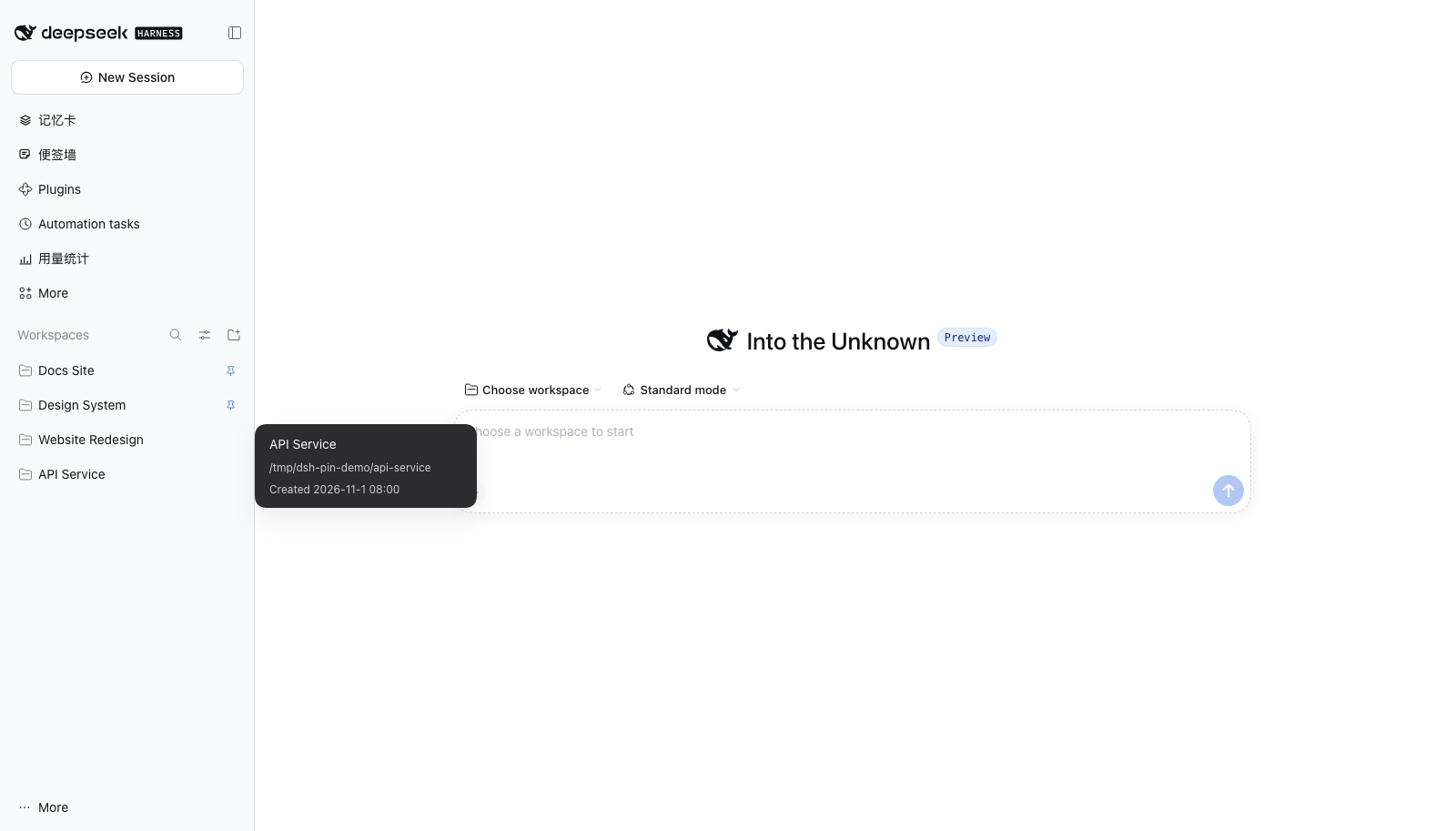
| Hover a workspace row | Hover a plugin panel row |
|---|---|
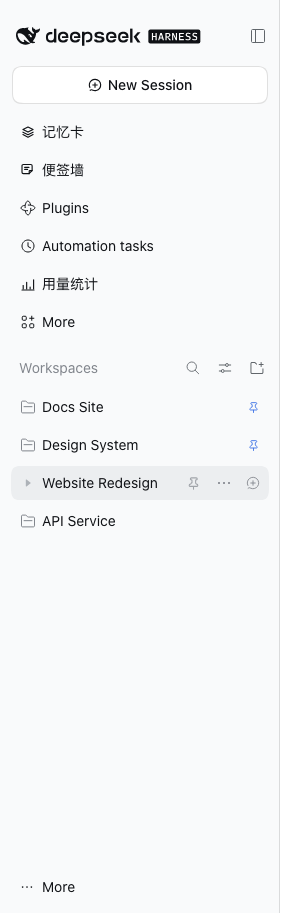 | 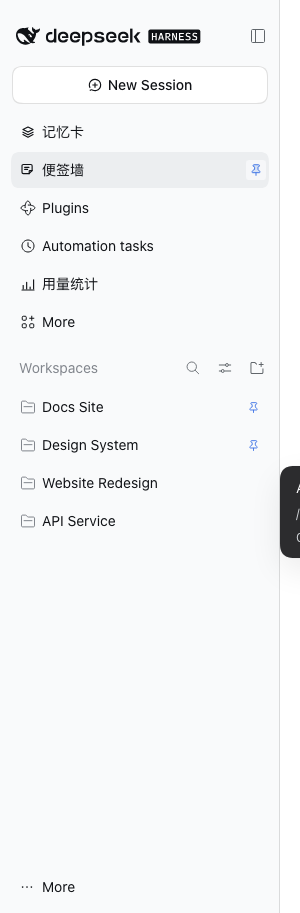 |
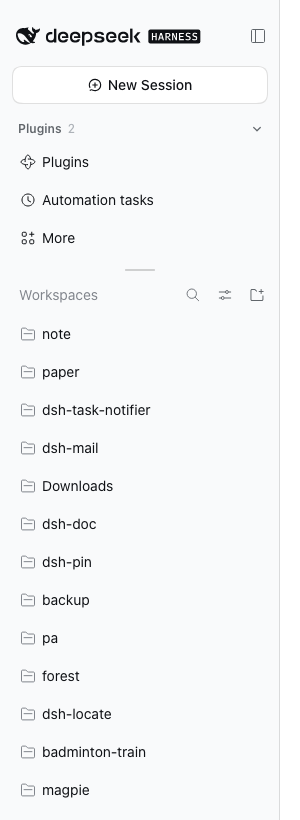
The plugin list sits at the top, above Workspaces:
Install
dsh plugin --profile desktop add @polunzh/dsh-pin
GitHub and local checkouts work too (github:polunzh/dsh-pin, link:/path/to/dsh-pin), as does the plugin marketplace in DSH settings. Restart DSH or reload the profile afterwards.
Use
- Pin a workspace — hover any row under Workspaces, click 📌. It moves to the top; with several pins the most recent comes first.
- Pin a panel — hover any sidebar plugin row (third-party panels,
Plugins,Automation tasks), click 📌. The other panels keep their registration order. - Unpin — click 📌 again, or click the small pin that pinned items always display.
The button matches the native row buttons (24×24 hit area) and never opens or collapses the workspace folder behind it. Pinned rows keep a visible pin so their state reads without hovering.
Plugin section on top
The whole plugin list move is the same list the host renders — no copy, no second entry per plugin. A small "Plugins" header with a panel count and a chevron for expansion sits above it.
- Click the header, or focus it and press Enter, to collapse or expand the list. The state is stored per browser under
dsh-pin.panel-section.v1. - On a first visit the list is expanded on a normal desktop width and collapsed on a narrow one; an explicit choice always wins afterwards.
- Expanded, the list is capped near one third of the sidebar height and scrolls on its own, so a long plugin list never pushes workspace browsing out of reach.
- Drag the thin grip below the list to raise or lower that cap; arrow keys nudge it and double-click resets. The height is stored per browser under
dsh-pin.panel-section-height.v1. - Collapsing only hides the list — it never changes or closes the selected panel.
- When the sidebar collapses to the 56px icon rail, the header hides and the native icon list shows as before.
Sidebar layout
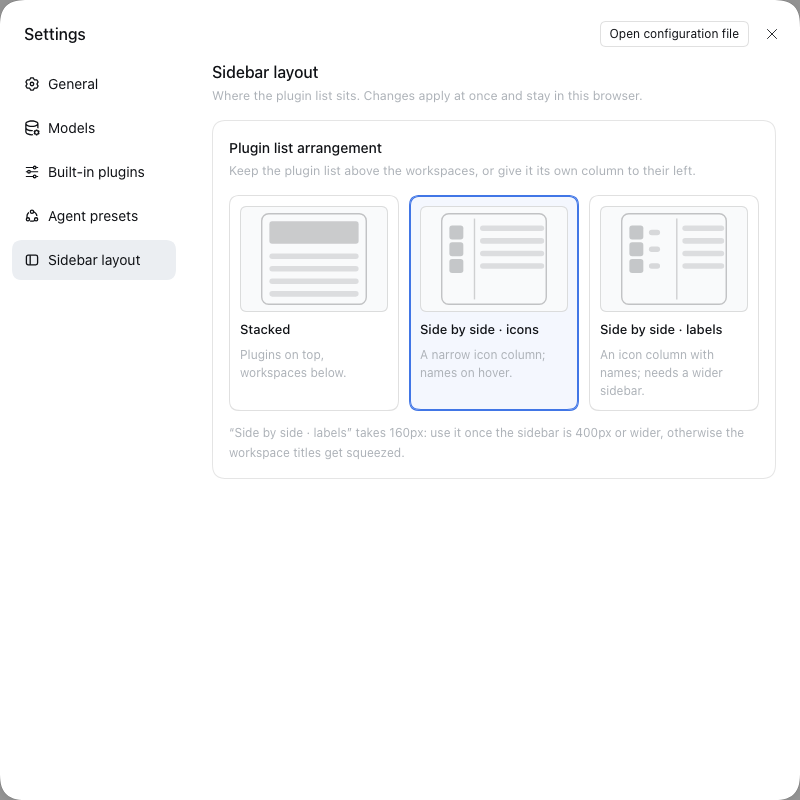
Settings → Sidebar layout picks how the plugin area sits: stacked on top (default), or side by side as a narrow icon column or a labelled one. The choice applies immediately, stays in this browser (dsh-pin.sidebar-layout.v1), and no list is duplicated.
Side by side with icons at the default 280px sidebar — the plugin column takes 44px, workspaces keep 211px:
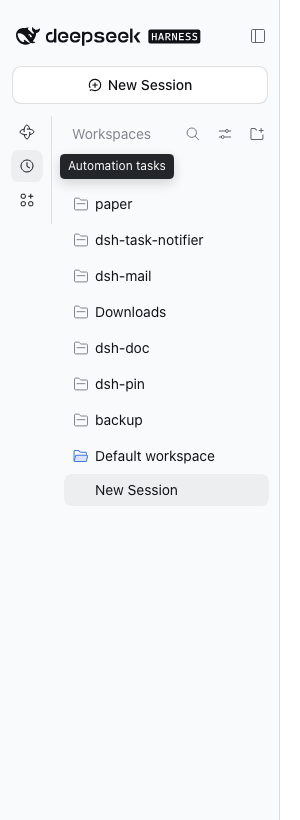
- Side by side · icons — 44px column that keeps only the plugin's own logo: badges, unread counters (99+, a bell count) and timers plugins mount on the row (dsh-todo's pomodoro) are hidden so they cannot spill over the workspaces; text-only logos stay. Hovering shows the plugin name in a custom tooltip. Panel pins are hidden here (no room for a second icon next to a 16px glyph), so pin panels in the labelled mode or the stacked layout. There is no collapse chevron in either column mode: the column stays, and the collapse state applies again in the stacked layout.
- Side by side · labels — 160px column. It needs the width: drag the sidebar to about 400px or wider, otherwise workspaces keep only 95px and titles get squeezed.
- Switching back to stacked drops the attribute and the grid override, and the sidebar returns to its original layout.
What DSH already ships
| Built in | dsh-pin adds | |
|---|---|---|
| Workspace order | drag only | pin to top |
| Workspace pin state | none | persisted, exact restore |
| Session pin | pinnedSessionIds | left alone |
Panel order | fixed at registration | pin to top, ordered per browser |
| Panel pin/unpin | native hover pin (sends the panel to "More") | replaced: native pin hidden, dsh-pin's pin pins to top |
| Plugin area position | fixed above workspaces | stacked, or a column beside workspaces |
How it works
- Workspace order uses the host's own
workspaces.insertBeforeRPC, so the durable registry stores it and every client agrees on it. - Unpinning inserts the item before the workspace that used to follow it; a missing anchor falls back to the end of the list.
- New workspaces are created at the head of the registry. The plugin watches order changes and pulls pins back up, leaving the remaining order alone.
- Panel order is DOM-only: rows get reordered and the order recorded under
dsh-pin.panels.v1, with unpin restoring slot registration order. - Moving the list reuses the host's own
nav[class*="panelList"]: it records a hidden origin marker, then inserts the nativenavbefore the workspace branch. If the expected DOM changes, it puts thenavback by the marker and leaves the original sidebar working. - Newer DSH builds ship their own panel unpin pin (a gray filled pin shown on row hover). dsh-pin hides it and draws its own pin, so each row shows a single pin that turns accent-blue when pinned.
- The panel pin sits inside the row's
panelEntry(a sibling of the row), so plugins that draw their own right-edge content — like dsh-todo's pomodoro countdown — can measure it and shift aside instead of overlapping. - A
MutationObserverre-injects buttons after React re-renders and replays panel order. - The host half is a no-op; all logic lives in
lib/client.js.
Limits
- Web GUI and the desktop web layer only; the TUI has no sidebar.
- "Ungrouped" is not a real workspace and cannot be pinned.
- Workspace order is global to the host; panel order is per browser.
- Dragging a pinned item down snaps it back — unpin first.
- Depends on internal DOM (
data-row-key,panelRow/panelEntry, React fiber), so a major DSH upgrade can disable the buttons until the selectors are updated. The plugin section fails open: with no matching marker it restores the original layout. - Debug hook:
window.__dshPin(workspaceOrder(),panelPins,panelSectionCollapsed,panelSectionHeight,sidebarLayout,setSidebarLayout(),lastError,reassertPins()).
Development
npm test        # pure-logic unit tests (node:test, no dependencies)
npm run build   # regenerate lib/client.js from src/client-src.js
npm run check   # verify the committed bundle matches the source
End-to-end tests need a running DSH web instance and headless Chrome reachable over CDP:
DSH_PIN_LAB_URL="http://127.0.0.1:3091/?token=…" npm run test:e2e     # sidebar DOM and injection contracts
DSH_PIN_LAB_URL="http://127.0.0.1:3091/?token=…" npm run test:pin     # pin button clickability and regressions
DSH_PIN_LAB_URL="http://127.0.0.1:3091/?token=…" npm run test:panel   # top plugin section (placement, collapse, persistence, rail)
DSH_PIN_LAB_URL="http://127.0.0.1:3091/?token=…" npm run test:layout  # sidebar layout (settings section, both columns, restore, reload, rail)
API contracts and DOM experiments: docs/API-NOTES.md, docs/DOM-CONTRACTS.md.
Publishing
CI runs the unit tests and the bundle check. A push to main publishes through npm trusted publishing (OIDC) whenever package.json carries a new version, so the repo holds no long-lived token.
License
MIT — see LICENSE.
Ähnliche Plugins
dsh-web (dsh-task-board)
zhu1090093659/dsh-web
dsh-web (dsh-web-all)
zhu1090093659/dsh-web
dsh-TUI
ccch1mneyyy/dsh-tui
dsh-web-ui (dsh-task-board)
zhu1090093659/dsh-web-ui