Q
dsh-pc-bridge
qic-9821/dsh-pc-bridge
Loopback HTTP bridge that lets a peer machine ping this PC and run shell commands, with an optional ssh reverse-tunnel supervisor.
Installation
dsh plugin --profile web add github:qic-9821/dsh-pc-bridgeREADME
dsh-pc-bridge




DeepSeek Harness 插件:在电脑上开一个只监听回环的小 HTTP 桥,让对端(例如云端的 QQ 机器人)能 ping 这台电脑、并按需执行 shell 命令;可选同时维持一条 ssh 反向隧道,让远端能访问到这台电脑的回环端口。
仓库里同时提供一个命令行 pcctl,不依赖 Harness 也可以在终端里直接调桥。
演示
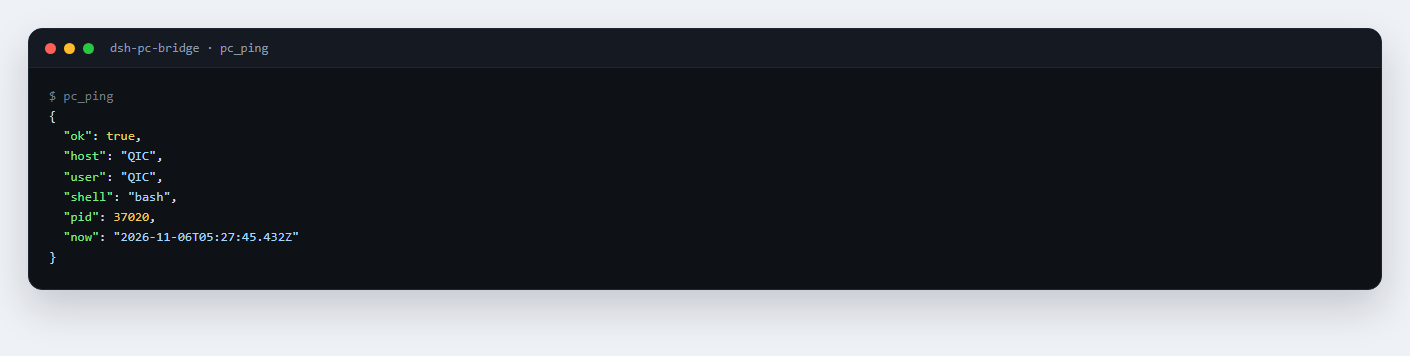
对端问一句「这台机器在不在」,回的是主机名、用户、shell 类型和服务器时间:
要拿东西就在这台机器上跑命令——下面是远端(云端 QQ 机器人)让我在家里的电脑上列目录、读 git 提交记录:
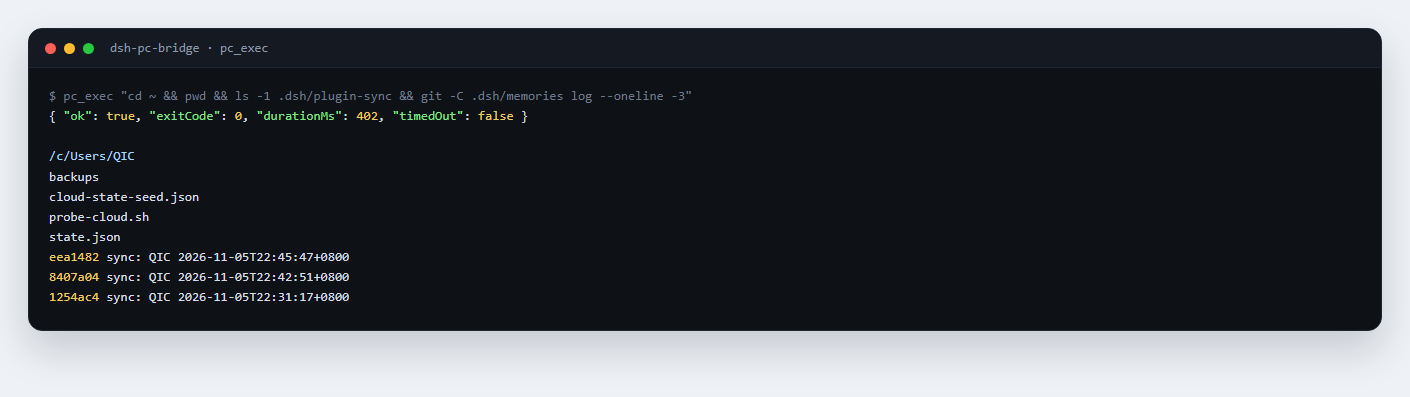
两条都是真跑出来的输出,不是示意。注意桥走的是 Git Bash,PATH 里没有 Node,能用的命令以本机 Git Bash 为准。
组成
- Host 桥(
role: host | both):node:http服务,POST /exec、GET|POST /ping,每个请求都要带x-pc-secret头。 - 工具:Agent 可调用
pc_ping(探活)与pc_exec(执行命令),默认打http://127.0.0.1:18790。 - 隧道管理器(
tunnelEnabled: true):守着ssh -N -R ...,断了按 5/10/30/60 秒退避重连;远端 sshd 残留占用端口时先fuser -k再重试。 - CLI:
pcctl ping、pcctl exec -- "hostname"。
安装
三种方式选一:
# npm(推荐)
dsh plugin add dsh-pc-bridge

# 直接从 GitHub tag 装
dsh plugin add github:QIC-9821/dsh-pc-bridge#v0.1.0

# 本地目录(开发时)
dsh plugin add /absolute/path/to/dsh-pc-bridge
也可以在插件管理器里把本目录当 bundle 安装。要求 Node.js ≥ 22;没有任何第三方运行时依赖。
安装后在 Harness 设置里找到「电脑执行桥」,按下面的键配置。
- id: dsh-pc-bridge
  name: 'dsh-pc-bridge'
  config:
    role: both
    listenHost: 127.0.0.1
    listenPort: 18790
    tunnelEnabled: true
    sshHost: 203.0.113.10
    sshUser: dsh
    sshKeyPath: C:/Users/me/.ssh/id_ed25519
配置
| 键 | 默认 | 说明 |
|---|---|---|
role | both | host 只开桥;client 只注册工具/隧道;both 全开 |
listenHost | 127.0.0.1 | 监听地址,不要改成 0.0.0.0 |
listenPort | 18790 | 监听端口 |
secretFile | $DSH_HOME/pc-bridge/secret | 密钥文件;不存在时 host 角色自动生成(32 字节 hex,权限 600) |
secretEnv | DSH_PC_BRIDGE_SECRET | 优先级高于密钥文件的环境变量名 |
peerUrl | http://127.0.0.1:18790 | 工具调用哪个桥 |
defaultTimeoutMs | 30000 | 默认命令超时 |
maxTimeoutMs | 600000 | 请求可指定的最大超时(10 分钟) |
maxOutputBytes | 2097152 | stdout/stderr 各自截断上限,超出部分标记 truncated |
shellPath | 自动 | 指定 shell 可执行文件;默认 Windows 优先 Git Bash(C:\Program Files\Git\bin\bash.exe),没有才用 PowerShell;POSIX 用 /bin/bash |
cwd | 当前目录 | 命令工作目录 |
tunnelEnabled | false | 是否维持 ssh 反向隧道 |
sshHost / sshUser | 空 | 隧道目标 |
sshKeyPath | 空 | 私钥路径;空 = 默认密钥 |
tunnelRemotePort / tunnelLocalPort | 18790 | 远端/本端端口(都绑 127.0.0.1) |
对端准备(以云服务器为例)
- 把本机公钥加到对端用户的
~/.ssh/authorized_keys。 - 对端把桥的共享密钥放进进程环境,例如 systemd:
[Service]
Environment=DSH_PC_BRIDGE_SECRET=替换成同一串
- 对端先
curl -s http://127.0.0.1:18790/ping -H "x-pc-secret: $DSH_PC_BRIDGE_SECRET"自测;隧道通了以后这台电脑的桥就出现在对端回环上。 - 对端也可以直接用
pcctl:
PC_BRIDGE_SECRET=... pcctl ping
PC_BRIDGE_SECRET=... pcctl exec -- "hostname; echo OK"
安全
- 只绑回环;隧道也把两端都绑在
127.0.0.1,不向公网开端口。 - 每个请求都检查共享密钥(
timingSafeEqual),缺失/错误返回 401。 - 请求体 ≤ 64 KiB、命令 ≤ 8 KiB;输出截断;超时杀进程树。
- 密钥不进配置文件,日志只写密钥来源(
env:/file:),不写值。 - 桥提供的是任意命令执行能力。只把密钥给可信的对端,只在对端可信时开隧道。
工具
pc_ping:返回{ok, host, user, shell, now}或网络错误。pc_exec {"command":"...","timeoutSec":30}:返回{ok, exitCode, stdout, stderr, durationMs, timedOut, truncated}。
开发
npm test                     # node --test test/*.test.mjs
node --check index.js
测试覆盖:shell 选择与回落、隧道参数与退避、服务端鉴权/路由/超时钳制/截断、客户端网络错误、密钥生成与优先级、真实命令执行与超时。
许可
MIT
Ähnliche Plugins
Z
dsh-web (dsh-ssh)
zhu1090093659/dsh-web
10.2kvor 8 StundenIntegrationen & FernzugriffApache-2.0
Z
dsh-web (dsh-remote-web-ui)
zhu1090093659/dsh-web
10.2kvor 8 StundenIntegrationen & FernzugriffApache-2.0
Z
dsh-web-ui (dsh-ssh)
zhu1090093659/dsh-web-ui
7.9kvor 2 MonatenIntegrationen & FernzugriffApache-2.0
Z
dsh-web-ui (dsh-remote-web-ui)
zhu1090093659/dsh-web-ui
6.3kvor 2 MonatenIntegrationen & FernzugriffApache-2.0