dsh-voice-mode (dsh-voice-mode)
qishuilalala/dsh-voice-mode/plugin/dsh-voice-mode
Vollduplex-Sprachmodus für die DeepSeek Harness Web-UI: Toggle (2-Sekunden-Pause Auto-Send) oder Hold-to-Talk-Diktat in einen editierbaren Entwurf mit zipformer2-Streaming-ASR, optionalem Wake Word; Edge-TTS-Vorlesen Satz für Satz mit Live-Untertiteln, und Sprechen unterbricht Wiedergabe und laufenden Turn (echtes Barge-in). On-Device-ASR, kein API-Schlüssel.
Installation
dsh plugin --profile web add github:qishuilalala/dsh-voice-modeDieses Plugin befindet sich im Unterverzeichnis plugin/dsh-voice-mode des Repositorys.
README

dsh-voice-mode
DeepSeek Harness 全双工语音插件 —— 边说边出字 · 按句朗读 · 开口即打断
中文 · English




Full-duplex voice mode for DeepSeek Harness —— 在会话内用语音完成整轮对话:说话时边说边出字、停顿后自动发送;回复按句朗读并跟随实时字幕;朗读中开口即打断。识别在本地推理、无需 API Key;朗读默认 Edge 云端(快且自然),本地 VITS / Kokoro 可选(隐私优先)。兼容 dsh 0.1.1-rc.2 起全版本(已验证至 0.2.1-alpha.2,含官方桌面端等价的 Electron 宿主,完整矩阵见 docs/compat-contract.md §10–§17)。433 项测试全绿(33 套件);当前版本见上方 npm 徽章与 Releases。
💡 它是什么
在 DeepSeek Harness 的会话里,点一下麦克风就能用语音完成整轮对话:
- 🎤 你说 —— 一边说一边实时出字(流式识别),停顿约 1500ms 自动发送;
- 🔊 它答 —— 最终回复按句朗读,全程实时字幕跟随;
- ⏸️ 随时打断 —— AI 还在朗读时开口即打断,你的话直接被听见。
零 API Key:识别在宿主端本地推理(zipformer2 流式 + SenseVoice 定稿);朗读默认 Edge 云端(快、自然),可选本地 VITS 纯中文 / Kokoro 中英混读(回复文本不出本机,隐私优先)。
🤔 为什么值得用(3 个真痛点)
| # | 痛点 | 我们的应对 |
|---|---|---|
| 1 | 字幕看不清 —— 字小、窄屏被输入框挡住 | captionFontSize 4 档(12/14/18/24px)+ captionMaxWidth 3 档(50/70/90vw) |
| 2 | 让位误打断 —— AI 朗读时插一句「嗯/对」就被硬打断 | backchannelYield 让位语义:短词自动让位 1.5s,真要说走才硬打断 |
| 3 | 本地 TTS 太机械 —— 一句话读完停顿 3-5 秒 | 本地 VITS / Kokoro 原生 addon + epoch 队列管理,按句流式朗读、句间无停顿 |
✨ 功能(按用户价值)
- 🎙️ 识别准 —— SenseVoice 多语种定稿 + ITN(数字/日期/货币自动规范化)
- 🗣️ 不说错 —— 唤醒词待机、唤醒词前缀语气词白名单(
嗯/那个不再误触) - 🤝 让位 —— 让位语义 + 三档打断灵敏度(
interruptLevel),外放也能精准打断 - 💬 有感情 —— 本地 Kokoro 103 音色 + Edge 322 音色,行内可试听;分段朗读不漏句
- 👁️ 字幕 a11y —— 4 档字号 + 3 档宽度,浅色主题变量跟随 dsh 主题
🎬 Demo
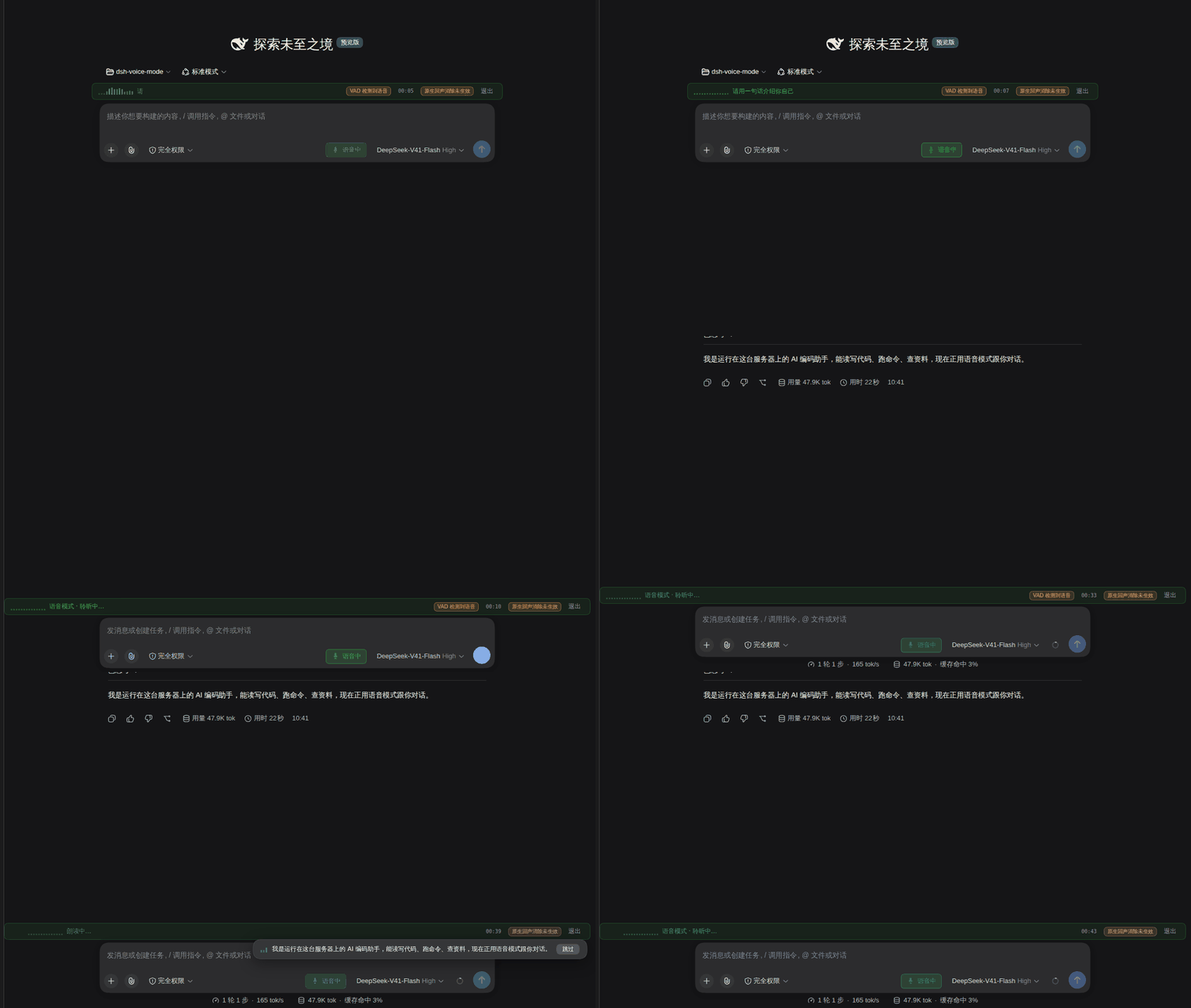
上图为当前界面的真实录制(由
screenshots/scripts/capture-demo.mjs驱动真实链路产出,非 UI 摆拍)。设置面板见 使用说明。
🚀 5 分钟上手(Quick Start)
dsh plugin --profile web add dsh-voice-mode
systemctl restart dsh   # Linux;其他平台重启 dsh 进程
第一次用:
- 进入任一会话,按
Ctrl+Shift+V(或点输入区麦克风按钮)进入语音模式,状态条显示「聆听中…」; - 说一句完整的话(如「帮我看看今天的天气」)→ 实时字幕立即出现,停顿后自动发送;
- AI 回复开始朗读时,开口说话 → 朗读即刻停止,你的话被听见(这就是 barge-in)。
操作手势
| 手势 | 作用 |
|---|---|
Ctrl+Shift+V | 进入 / 退出语音模式 |
| 直接说话(toggle) | 边说边出字,停顿 1500ms 自动发送;按住 Ctrl 强制立即发送 |
| 按住麦克风按钮(hold) | 松手发送;短按退出;滑出 / Esc / 失焦放弃本段 |
| 点输入框旁模式按钮 | 在「持续聆听 ⇄ 按住说」间切换(保存到设置) |
| AI 朗读时开口说话 | 打断朗读并取消当前回合 |
| 点状态条「退出」 | 退出语音模式 |
| 点字幕浮层「跳过」 | 跳过当前句朗读 |
⚙️ 配置
所有 dsh 版本通用入口:设置(Settings)→ 语音模式(Voice Mode)——插件在 Settings 弹窗里注册了专属设置页。另有按版本不同的次要入口:
| dsh 版本 | 次要入口 | 设置存放 |
|---|---|---|
| ≤ 0.1.5 | 设置 → Plugins → 插件配置 → 语音模式 | dsh 官方设置存储 |
| 0.1.6-alpha 及以后 | 左侧 Plugins → 已安装的 dsh-voice-mode → 详情页「语音模式」卡片 | 0.1.6:dsh 官方设置存储;0.1.7+(含 0.2.0):插件自有文件 ~/.dsh/voice-mode.settings.json($DSH_HOME 下) |
0.1.7+ 说明:官方设置存储不接受本插件条目的写入,故卡片改写插件自己的覆盖层文件——优先级高于 profile 配置里的同名键;要恢复为 profile 配置/默认值,把文件内容改成 {}(不要删除——首次运行会从旧 settings.yaml(.imported) 的 voice-mode: 段迁移一次,删除会触发再次迁移);重装或升级插件不丢设置;某个键在升级后变为非法值时仅该键回落默认。
常用设置键
| 你想调什么 | 改哪个键 | 默认 | 说明 |
|---|---|---|---|
| 逆文本归一化 | senseITN | true | SenseVoice 数字/日期/货币规范化(默认开,关掉保留原文) |
| 字幕字号 | captionFontSize | 0 | 档位 0=12px / 1=14px / 2=18px / 3=24px |
| 字幕宽度 | captionMaxWidth | 1 | 档位 0=50vw / 1=70vw / 2=90vw |
| 让位语义 | backchannelYield | true | 朗读期说「嗯/对」自动让位 1.5s,真要说走硬打断(ADR-0008) |
| 静音断句 | silenceMs | 1500 | 停顿多久定稿(毫秒) |
| 语速 / 空闲退出 | rate / idleTimeoutMinutes | 1.1 / 5 | Edge 语速倍率;空闲分钟数(朗读计为活动) |
字段名保持向后兼容,旧
~/.dsh/settings.yaml可直接沿用。
完整 19 项设置表见 plugin/dsh-voice-mode/README.md。
🏛️ 架构(Architecture)
flowchart LR
    subgraph Client["浏览器 Client"]
        Mic[麦克风 16kHz<br/>AudioWorklet] --> VAD[客户端 VAD<br/>RMS 分段]
        VAD -->|partial 0.9s| PC[partial 出字 + 字幕浮层]
    end

    subgraph Host["宿主 dsh.host"]
        ASR[zipformer2 流式识别<br/>host 端 WASM] --> SV[SenseVoice 定稿<br/>+ ITN + 标点]
        SV --> Draft[composer draft<br/>autoSend]
        Draft --> Tap[llm/stream tap<br/>仅观察·不阻塞]
        Tap --> Seg[sentence segmenter]
        Seg --> Q[TtsQueue<br/>epoch 打断]
        Q --> TTS{引擎}
        TTS -->|edge| Edge[Edge 云端]
        TTS -->|vits| Vits[本地 VITS<br/>WASM]
        TTS -->|kokoro| Kokoro[本地 Kokoro<br/>原生 addon]
    end

    PC -->|audio f32 PCM| ASR
    Edge -.->|SSE audio frame| PC
    Vits -.->|SSE audio frame| PC
    Kokoro -.->|SSE audio frame| PC
    VAD -.->|唤醒词/打断| Host
详细架构决策:见 docs/adr/ 11 个 ADR。
🔍 与 dsh 内置语音模式对比
| 维度 | dsh 内置 | dsh-voice-mode(本插件) |
|---|---|---|
| 识别模型 | 云端 API(需 key) | 本地 zipformer2 + SenseVoice(零 key) |
| 多语种 | 英文为主 | SenseVoice 自动识别(zh/en/ja/ko/yue)+ ITN |
| 朗读引擎 | 云端 TTS | Edge 云端 + 本地 VITS/Kokoro 三选一 |
| 打断检测 | 基础 VAD | 三档灵敏度 + 回声门控 + 让位语义 |
| 字幕 a11y | 无 | 4 档字号 + 3 档宽度 + 主题跟随 |
| 唤醒词 | 无 | 轻量流式匹配 + 前缀语气词白名单 |
| 兼容 dsh | — | 0.1.1-rc.2 起全版本(含 0.2.1-alpha.2) |
🛠️ 故障排查
| 现象 | 处理 |
|---|---|
| 点麦克风无反应,状态条红字 | 浏览器拒绝麦克风:地址栏(iOS 为 设置 → Safari → 麦克风)开启后重试 |
| 状态条「正在加载模型… x%」卡住 | 检查网络;模型较大可先 npm run prefetch;国内网络 modelHost 配 https://hf-mirror.com |
| 朗读无声音 / 无字幕 | 本地引擎首次合成需加载模型;若持续失败看状态条提示(自动退避重试);确认页面前台且未静音 |
| 语音模式进不去 | 检查插件 enabled;多标签页时确认当前会话为活动会话 |
| 识别到但不是我要说的 | 环境噪声:降低音量或提高 interruptLevel(高门槛) |
| 打不断(朗读中开口无反应) | 调高 interruptLevel(更敏感档)或检查麦克风权限;不要调 echoGateDb——原生 AEC 生效时它从未被执行(详见 ADR-0006) |
| 字幕被输入框挡住 | 默认 captionMaxWidth=1(70vw)+ captionFontSize=0(12px)在窄屏可能与底部输入框重叠;调整档位,或关闭语音模式后点状态条浮层右上角「×」收起 |
| 让位行为异常(朗读期说「嗯」不停 / 真话被打断) | 「嗯/对」类短词触发让位 1.5s(hold)后继续朗读;继续说真话会走硬打断;如不要让位语义把 backchannelYield 关闭即可恢复改造前行为(ADR-0008) |
| 朗读期说「嗯」没让位 | 确认 backchannelYield=true(默认开);hold 模式松手后让位 1.5s 内继续说话会变硬打断 |
| 空闲 5 分钟自动退出(不想退) | 调高 idleTimeoutMinutes(默认 5 分钟,朗读计为活动) |
已知限制:
Ctrl+Shift+V会覆盖浏览器「粘贴纯文本」快捷键(普通粘贴仍用Ctrl+V);识别为简体中文优先;Safari / iOS 需 HTTPS 或 localhost、首次需授权麦克风、后台 / 锁屏会暂停识别与朗读。
🛣️ 路线图(Roadmap)
完整 backlog(43 项 P0-P3)见 docs/competitive/backlog.md。
- ✅ 已完成(v0.7.7):字幕档位 / 让位语义 / 模型预热 / 默认值微调等
- ✅ 已完成(v0.7.18 ~ v0.7.23):安装形态修复(
msedge-tts内联)、桌面端 Electron 下 Kokoro 可用、权限与数据流/兼容声明与SECURITY.md、国际化(官方ctx.locale)、内联 axios 升级与第三方披露、语音全链路/闭环冒烟 - 🚧 P0(近期):ADR-0003 VAD 下沉 / ADR-0006 第一级探测接通 manual / F1 emotion DSL 全量上线
- 📋 P1(中期):MCP
voice_*工具集 / 卡片表单 draft validate / 状态条 idle 优化 - 💡 P2(远期):声音克隆(用户已决定推迟)/ ADR-0004 WebSocket transport
- ⏸️ 已推迟:xAI fallback / C1 人格层(用户已决定推迟)
📚 文档
| 文档 | 说明 |
|---|---|
| 完整使用说明(中文) | 功能 / 手势 / 设置 / 配置 / 已知限制 / 故障排查 |
| English docs | Same, in English |
| docs/ 索引 | 架构决策 / 实施计划 / 真机验收 / 规则 / 调研 / 竞品 |
| 60 天迭代博客 | 从 91 到 254 项测试的故事(现为 433 项) |
| CHANGELOG.md | Keep a Changelog 格式 |
| RELEASE-NOTES.md | 60 天时间线 |
🤝 Contributing / 📄 License / 🙏 Acknowledgments
License: MIT
Contributing: PR 欢迎,但请先读 docs/adr/ 11 个 ADR + CONTEXT.md + docs/rules/STATE.md。
Acknowledgments:
- 上游:haoku123/dsh-voice(派生声明见子包 LICENSE)
- 核心依赖:sherpa-onnx(Apache-2.0,本地 ASR / VITS / Kokoro 推理)/ msedge-tts(Edge 云端 TTS)
- 测试支持:awesome-dsh-plugin(收录到精选列表)
- 11 批次周全修复参与贡献者:见
docs/rules/STATE.md§ 批次进度表
📌 项目维护:仓库遵循「外科手术式改动」纪律 —— 不顺手优化、不重构无关代码、不强推发布历史;每个 commit 单一职责,便于审查与回滚。详见
CONTEXT.md。
Ähnliche Plugins
dsh-web-ui (dsh-tool-describe-image)
zhu1090093659/dsh-web-ui
modlens
liustack/modlens
ipollowork
devin-axis/ipollowork
dsh-vision-router
ysr666/dsh-vision-router