dsh-agents-md
sillykjs/dsh-agents-md
Adds an Agent docs tab to the conversation view: it lists the AGENTS.md and CLAUDE.md instruction files DSH actually loads for the current session (the ~/.dsh and ~/.agents roots, plus every directory from the project root to the working directory), previews each as Markdown with per-file sizes and the 64 KiB instruction budget, edits and saves them in place after a sha256 version check, and opens the workspace folder from the path button; a saved file takes effect on the next message.
Installation
dsh plugin --profile web add github:sillykjs/dsh-agents-mdREADME
dsh-agents-md
DSH Web 插件:在对话页签栏加一个「智能体文档」页签,查看并编辑当前会话实际加载的 AGENTS.md 指令文件,保存后从下一条消息开始生效。
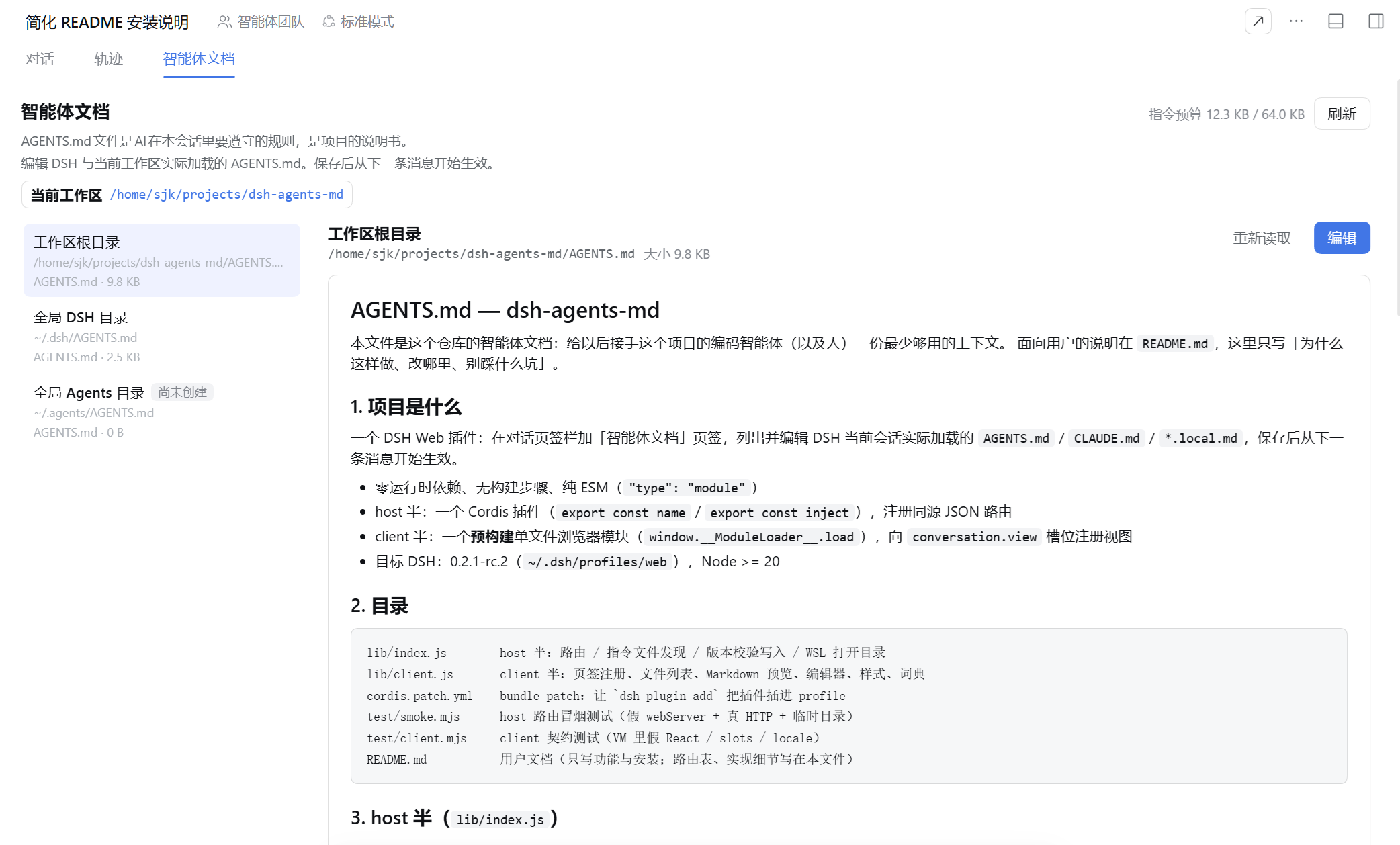
功能
- 列出当前会话加载的全部指令文件:用户级与工作区的
AGENTS.md/CLAUDE.md - 侧栏顺序:工作区文件置顶,其次
~/.dsh/AGENTS.md,~/.agents/AGENTS.md固定在最下面 - 默认 Markdown 预览,点「编辑」切换到编辑器
- Ctrl/⌘+S 保存,保存后下一条消息生效
- 缺失的
AGENTS.md可直接创建 - 顶部显示工作区路径(点击打开文件管理器)与 64 KiB 指令预算
- 保存前校验版本,文件被外部改过时报冲突而不是覆盖
- 中英文界面,跟随 DSH 语言设置
安装
在 DSH Web 的「设置 → 插件」页点「添加插件」,选「安装第三方插件」,在「包名或地址」里填入:
github:Sillykjs/dsh-agents-md
装完按提示重启 DSH,刷新页面,页签栏即出现「智能体文档」。
保存的指令在下一条消息才被重新读取,当前回合不受影响。
License
MIT
Ähnliche Plugins
dsh-web (dsh-task-board)
zhu1090093659/dsh-web
dsh-web (dsh-web-all)
zhu1090093659/dsh-web
dsh-TUI
ccch1mneyyy/dsh-tui
dsh-web-ui (dsh-task-board)
zhu1090093659/dsh-web-ui