dsh-work-plugin (bundle)
silverze/dsh-work-plugin/packages/bundle
Work mode for a DeepSeek Harness session: a stated goal becomes a tracked work task that keeps its plan, an artifact library indexed by size, hash and version, and RRULE schedules the host reruns after the conversation ends, with results handed to Feishu docs, sheets, wiki, drive and IM. Ships the work agent preset, a right-sidebar workbench for the current task, artifacts and schedules, 14 work tools, 15 Feishu tools, seven work skills, and on macOS 13+ and Windows 10+ a composer chip that quotes the Feishu conversation on screen.
Installation
dsh plugin --profile web add github:silverze/dsh-work-pluginDieses Plugin befindet sich im Unterverzeichnis packages/bundle des Repositorys.
README

DSH Work
Turn a stated goal into a tracked work task inside DeepSeek Harness — plan, execute, collect deliverables, schedule reruns, and share results to Feishu.



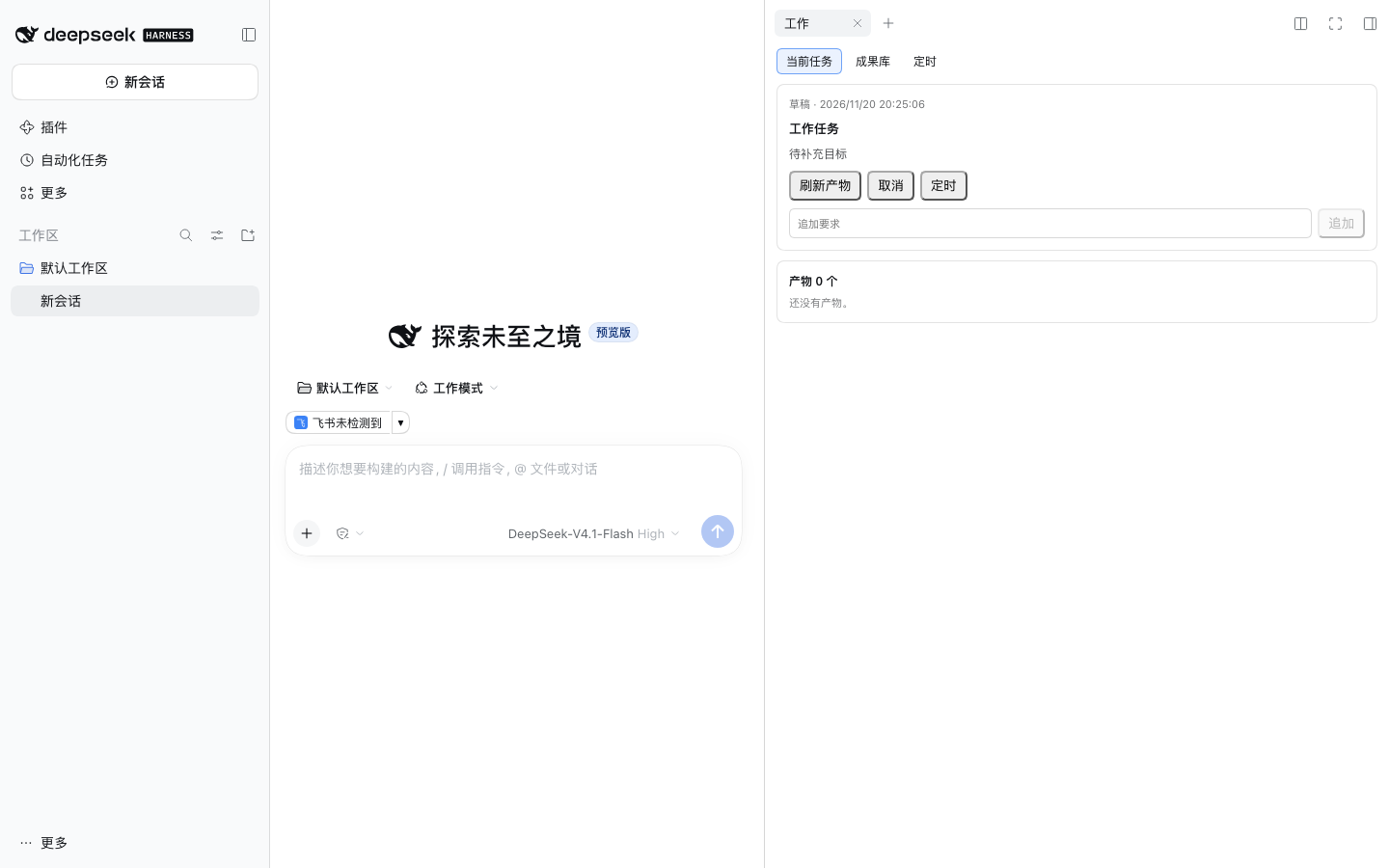
DSH Work adds a work layer to DeepSeek Harness: a session can be attached to a work task that survives the conversation, collects its own deliverables, can rerun on a schedule, and — on macOS and Windows — can quote the Feishu conversation you are looking at straight into the composer.
It is a plugin bundle, not a fork: when you turn it off, DeepSeek Harness is exactly what it was.
Why DSH Work
- Work mode is a preset. Pick it in the mode picker when starting a session and the session attaches to a tracked work task; other sessions, the default preset and your settings stay untouched.
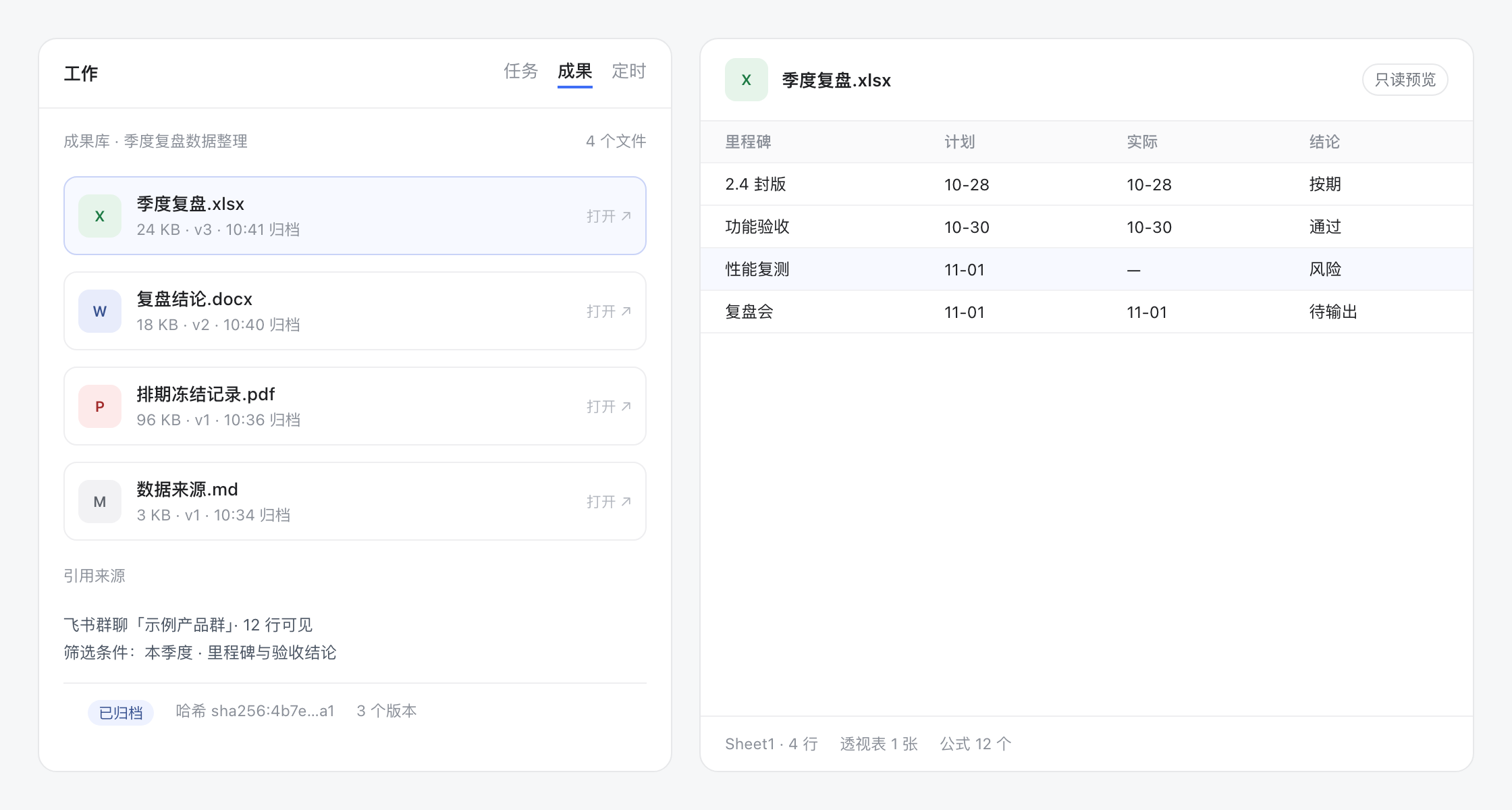
- Deliverables outlive the chat. Every output is copied into the task's artifact library — docx, pptx, xlsx, images — openable from the panel months later.
- Recurring work runs itself. Attach a schedule (daily report, weekly summary) to a task and let the host trigger it.
- Feishu is a first-class surface. 15 model-facing Feishu tools for docs, sheets, wiki, IM and drive, including full chat history by chat name, and on macOS/Windows a composer chip that quotes the conversation currently on your screen.
Install
DeepSeek Harness Desktop (recommended)
Open Settings → Plugins, search for DSH Work, click Install, then restart the app.
CLI / headless
dsh plugin add @dsh-work-plugin/bundle
# restart DeepSeek Harness afterwards
From source
git clone https://github.com/silverze/dsh-work-plugin.git
cd dsh-work-plugin
pnpm install
pnpm build
pnpm --filter './packages/*' pack --pack-destination dist
./scripts/install-work-profile.sh work dist
The script installs the five packed tarballs into a profile named work and
registers the bundle layer. Start it with
dsh --profile work. A plain dsh plugin add ./packages/bundle is not enough:
the CLI links a single directory, so the host, client, Feishu and skills
packages the bundle depends on are never installed.
Requirements
| Requirement | Notes |
|---|---|
DeepSeek Harness >= 0.2.2-rc.2 | engines.dsh of the bundle enforces this |
Node.js >= 24 | only needed to build from source |
| macOS 13+ | required for the Feishu conversation chip and screen text tools |
| Xcode Command Line Tools | the screen helper is compiled with swiftc on first use (~25 s, then cached) |
| Screen Recording permission | macOS asks once when the chip first reads Feishu |
| Windows 10+ | same chip and screen text tools, no permission prompt. Reads the Chromium accessibility tree for exact text, and falls back to OCR when that tree is empty |
| Windows SDK (optional) | the Windows helper is compiled with the .NET Framework csc against the SDK's Windows.winmd (~0.5 s, then cached). Without it the bundled PowerShell helper takes over: same output, about 2 s slower per read |
| Feishu app credentials | only for the Feishu tools; see docs/feishu-app-setup.md |
Quick start
- Start a new session and pick 工作模式 / Work mode in the mode picker.
- Describe the outcome you want — "prepare the Q4 review deck from these three docs".
- The right panel becomes a workbench: the current task, its plan and its artifact library.
- Ask for changes in the same conversation; every output lands in the artifact library.
- Optional: schedule the task, or share an artifact to a Feishu doc with one sentence.
Feishu conversation context (macOS and Windows)
In a work-mode session, a chip appears above the composer with the Feishu chat you were last looking at:

- Click the chip to insert a quoted block with the chat name, the read time and the visible messages.
- Click ▾ to pick one of the recent conversations or force a fresh read.
- The chip follows the focused conversation while Feishu is in front (about 1.2 s per read on macOS, 1.5-2 s on Windows, at most every 2.5 s).
- If the read fails — Feishu minimized, on another Space, or permission revoked — the chip keeps the last conversation, marks it 上次 / last seen, and still inserts a usable quote.
OCR runs locally. The recognized text goes to the current session only; this plugin uploads nothing. Three appearances (DSH default, Codex, Claude) are selectable in Settings → Feishu → Preferences.
What you get
Tools
| Group | Tools |
|---|---|
| Work tasks | work_task_create, work_task_list, work_task_get, work_task_prompt, work_task_cancel, work_task_schedule |
| Artifacts | work_artifact_list, work_artifact_get, work_artifact_scan |
| Screen awareness | work_frontmost_app, work_screen_text, work_feishu_screen, work_feishu_focus |
| Diagnostics | work_ping |
| Feishu | feishu_auth_start, feishu_auth_status, feishu_auth_disconnect, feishu_whoami, feishu_doc_create, feishu_doc_read, feishu_doc_append, feishu_wiki_get, feishu_sheet_read, feishu_sheet_write, feishu_sheet_append, feishu_im_send, feishu_im_history, feishu_drive_upload, feishu_share_artifact |
Skills
work-research · work-weekly-report · work-meeting-minutes · work-data-analysis · work-deck · work-doc-polish · work-screen-awareness
UI
- Work-mode chip in the composer, task status badge in the session list, task menu (export / remove).
- Right-side workbench tab: current task, artifacts, schedules.
- Settings section Feishu: credentials, connection state, and the chip appearance preference.
Settings
| Key | Default | Effect |
|---|---|---|
accessTokenEnv | FEISHU_USER_ACCESS_TOKEN | Environment variable read for a Feishu user token |
presence | true | Enables the screen/Feishu awareness tools and chip capture on the host |
presenceStyle | dsh | Chip appearance: dsh, codex or claude |
Task data lives in the DSH storage domain work, so turning the bundle off keeps your tasks, artifacts and schedules.
How it works
packages/bundle        patch + preset + locale: wires the plugin set into a profile
packages/host-work     tasks, artifacts, schedules, presence tools, screen helper
packages/host-feishu   OAuth, OpenAPI client, Feishu tools
packages/client-work   workbench panel, composer chip, settings (web client plugins)
packages/skills-work   seven bundled skills
The host reads the focused Feishu window with a small Swift helper (CGWindowList + screencapture -l + Vision OCR); the web client only renders snapshots returned by the host. Details: docs/architecture.md.
Privacy
- No telemetry, no analytics, no network calls except the Feishu OpenAPI you configure.
- OCR text stays on your machine and in the current session.
- Feishu tokens are stored in the DSH credential store, never in this repository.
- See SECURITY.md for the full data-flow description.
Compatibility
| Platform | Work tasks / artifacts / schedules | Feishu tools | Feishu chip / screen text |
|---|---|---|---|
| macOS 13+ | yes | yes | yes (Screen Recording + Xcode CLT) |
| Linux | yes | yes | no — the Host reports the missing capability and the chip stays hidden |
| Windows 10+ | yes | yes | yes (exact text from the Chromium accessibility tree; OCR fallback needs no permission either) |
Troubleshooting:
| Symptom | Fix |
|---|---|
Chip says 飞书未检测到 | Bring Feishu to the front on the same desktop/Space; the window must be on screen |
| Chip says permission missing | System Settings → Privacy & Security → Screen Recording → enable DeepSeek Harness |
| First read takes ~25 s | swiftc is compiling the helper; later reads are ~1.2 s |
ERESOLVE on install | Use DSH >= 0.2.2-rc.2 < 0.3.0; peer ranges include the pre-release line |
| Feishu tools say not connected | Run feishu_auth_start and finish the browser flow |
Development
pnpm install
pnpm build
pnpm test            # builds host/client/feishu, then node --test tests/unit/*.test.mjs
pnpm -r typecheck
pnpm check:public    # internal-identifier and secret guard
pnpm docs:check      # relative links and images
See CONTRIBUTING.md for the package layout, how to add a tool or skill, and the fixture rules.
Contributing
Issues and pull requests are welcome. Please read CONTRIBUTING.md and CODE_OF_CONDUCT.md first.
License
MIT © 2026 silverze
DSH Work is an independent community project. It is not affiliated with, endorsed by, or sponsored by DeepSeek or Feishu/Lark.
Ähnliche Plugins
webnovel-writer
lingfengqaq/webnovel-writer
loopx (dsh-loopx-plugin)
loopx-project/loopx
ouroboros (dsh-plugin)
q00/ouroboros
loopx (dsh-loopx-plugin)
huangruiteng/loopx