dsh-prompt-refine
sojo-negai/dsh-prompt-refine
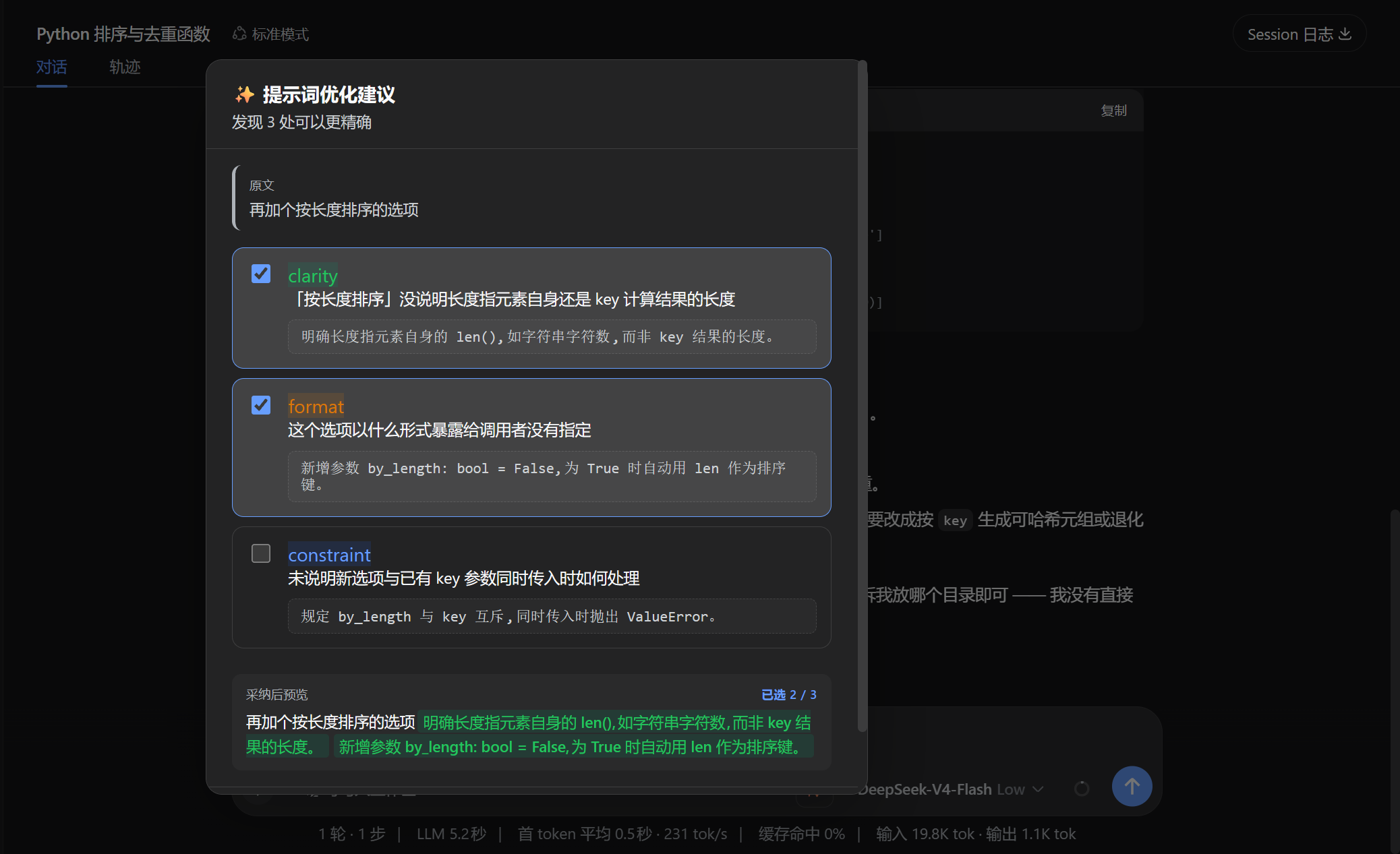
✨-Schaltfläche links neben Senden: Liest Entwurf und letzte Turns und lässt das konfigurierte Modell drei Vorschläge aus Problem und Korrektur erstellen. Vorschläge einzeln auswählen, zusammengeführten Prompt live ansehen und ohne Senden ins Eingabefeld zurückschreiben.
Installation
dsh plugin --profile web add github:sojo-negai/dsh-prompt-refineREADME
dsh-prompt-refine

DSH 提示词优化插件 —— 在发送前点一下,让模型结合上下文告诉你这条 prompt 缺什么。
它做什么
在输入框发送按钮左侧加一个 ✨ 按钮。点击后:
- 读当前草稿 + 最近几条对话历史
- 调你已配置好的模型(自动读
~/.dsh/settings.yaml的agent-default-model) - 弹窗列出 3 条「问题 + 补丁」 形式的建议
- 勾选想要的 → 实时预览合并后的 prompt
- 点「采纳 N 条并填入」→ 新 prompt 写回输入框
不抢你的发送权:填好后你自己按发送。Esc / 点遮罩 / 「跳过」都能随时退出。
为什么是「补丁」而不是「重写」
建议保留你原话,只补缺口:
原文    写个排序

scope     未说明排序对象 → 对一组整数数组进行升序排序。
format    未指定语言签名 → 请用 Python 实现,函数签名 sort_list(nums)。
constraint 缺边界约束     → 要求 O(n log n),处理空数组与重复元素。
三条可以同时采纳,不用三选一。
安装
方式一:npm 安装(推荐)
cd ~/.dsh/profiles/web    # 换成你要装进去的 profile
pnpm add dsh-prompt-refine
包内自带 dsh.bundle.patch 声明,安装后把 dsh-prompt-refine 加进该 profile package.json 的 dsh.profile.bundles 数组即可激活,然后重启 DSH。
方式二:源码安装(开发用)
pnpm install
pnpm build

# 装进 web profile
node scripts/install.mjs --profile web
rm -rf ~/.dsh/profiles/web/node_modules/dsh-prompt-refine
(cd ~/.dsh/profiles/web && pnpm install --force)
运行(开发模式)
# 在 deepseek-harness 仓库根目录
pnpm dsh web --patch ./dsh-prompt-refine/cordis.yml --no-open --port 0
或者用附带的脚本(自动杀旧实例 + 重启 + 打印新 URL):
bash scripts/dev-restart.sh
模型配置
v0.1 无需配置 —— 自动读用户 settings.yaml 里的 agent-default-model,
跟随你平时用的模型。改模型只改那里。
v0.2 计划:插件自己的设置页,可单独指定"优化用的模型"(比如用便宜的快模型)。
文件结构
src/
  dsh-prompt-refine.ts   host 入口
  host.ts                HTTP 端点 + ctx.llm 调用 + 降级
  shared/types.ts        请求/响应形状
  shared/prompt.ts       system prompt + JSON 解析
  client.ts              ✨ 按钮 + Portal 弹窗
scripts/
  install.mjs            装进 profile
License
MIT
Ähnliche Plugins
archify (deepseek-harness)
tt-a1i/archify
next-ai-draw-io (dsh-plugin)
dayuanjiang/next-ai-draw-io
WeKnora (dsh-weknora)
tencent/weknora
weknora
tencent/weknora