dsh-offwork-countdown
suojianan/dsh-offwork-countdown
Windows desktop companion: installs and launches a semi-transparent, always-on-top off-work countdown widget. It counts down to the configured end time, keeps counting overtime, shows rest days, remembers its position and opacity, and provides a tray menu plus Ctrl+Alt+D click-through. Windows 10/11 x64 only; the widget is a separate desktop process, not a Harness page panel. The bundled OffWorkCountdown.exe is an unsigned prebuilt .NET Framework 4.8 binary (source in source.zip) that the plugin starts when DSH loads and stops on unload. It uses the same package name as wungjyan/dsh-offwork-countdown and ZydFirst/dsh-offwork-countdown, so only one of the three can be installed in a profile.
Installation
dsh plugin --profile web add github:suojianan/dsh-offwork-countdownREADME
下班倒计时 · 桌面悬浮窗
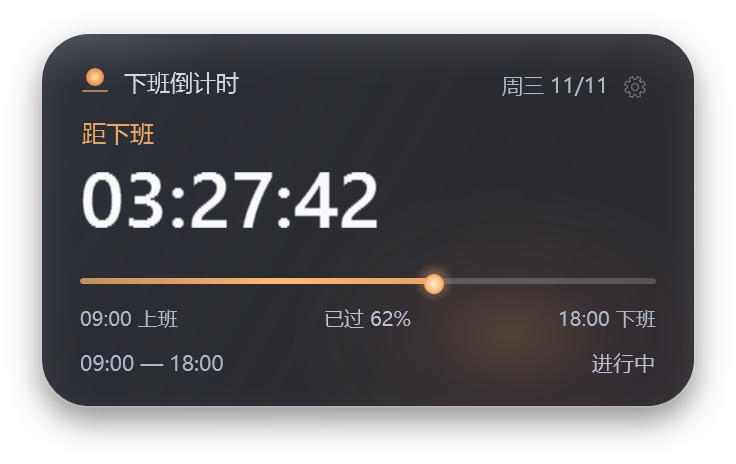
一个给 Windows 桌面用的半透明下班倒计时。这个仓库是它的 DSH 伴随插件:安装后,DSH 启动时会拉起随包附带的 OffWorkCountdown.exe,小窗出现在桌面右下角,不占用 Harness 页面。
Windows 10/11 x64 only. The bundle ships a prebuilt .NET Framework 4.8 desktop executable; the full source is in
source.zipand can be rebuilt with itsbuild.ps1.
它做什么
- 距下班倒计时:按上班 / 下班时间实时计算,显示
HH:MM:SS。 - 日落入海进度:太阳从上班滑到下班,过了下班时间沉到线的尽头。
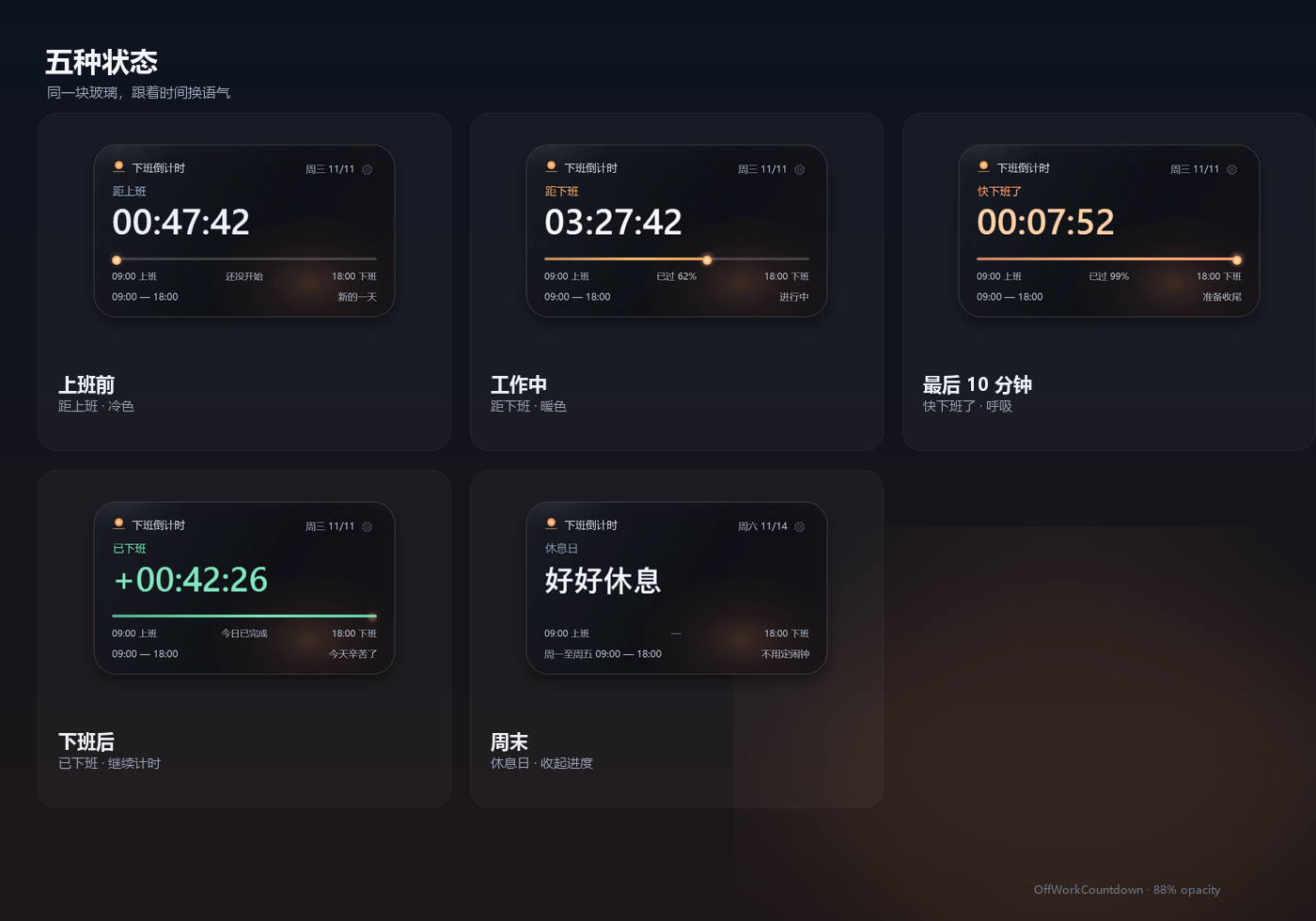
- 状态:上班前 / 工作中 / 最后 10 分钟 / 已下班加班计时 / 周末休息。
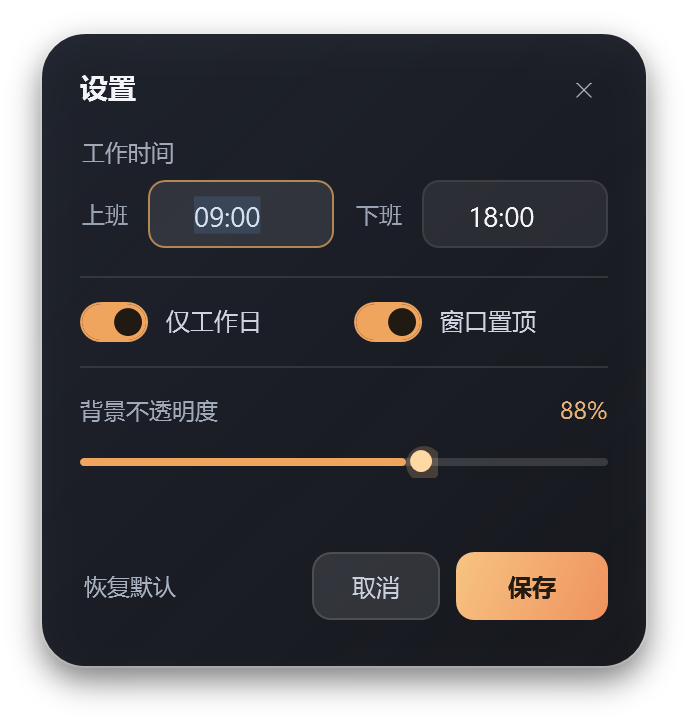
- 半透明:默认 88% 不透明度,设置里 65%–100% 可调;玻璃层和文字层分开。
- 桌面行为:无边框、始终置顶、可拖动、贴边吸附、记住位置。
- 托盘与快捷键:托盘菜单、隐藏/显示、置顶、鼠标穿透;
Ctrl+Alt+D开关穿透。 - 设置:上下班时间、仅工作日、不透明度、置顶;
%APPDATA%\OffWorkCountdown\settings.json。
安装
dsh plugin --profile desktop add github:suojianan/dsh-offwork-countdown
安装后 DSH 组合加载完成时,插件会启动桌面小窗。Windows 会把新进程当作普通桌面应用;如果没看到,检查右下角托盘里的日落图标。
卸载:
dsh plugin --profile desktop remove dsh-offwork-countdown
如果退出 DSH 后小窗还在,右键托盘图标退出即可;它也可以单独双击 OffWorkCountdown.exe 运行。
截图
结构
index.js               Host 半:启动/停止桌面小窗
cordis.patch.yml       插入 offwork-countdown-desktop 行
OffWorkCountdown.exe   预构建的 Windows 桌面小窗
working.png            主截图
states.png             五种状态
settings.png           设置面板
screenshots.json       市场截图清单
source.zip             完整 C# / WPF 源码、构建脚本、29 项时间测试
源码与构建
source.zip 是完整源码,没有 NuGet 依赖。解压后:
Set-ExecutionPolicy -Scope Process Bypass
.\build.ps1
构建只使用 Windows 自带的 .NET Framework 4.8 csc.exe,生成新的 OffWorkCountdown.exe。测试:
.\run-tests.ps1
说明与限制
- 仅支持 64 位 Windows 10/11;不支持跨午夜班次。
- 休息日按周六 / 周日判断,不识别法定节假日。
- 插件停止或禁用时,会结束它启动的小窗;如果小窗是先手动打开的,插件不会接管那个实例。
- 小窗是独立进程,所以它出现在所有桌面窗口之上,而不是 Harness 页面内部;这正是这个插件的用途。
- 预构建 exe 未做代码签名,Windows SmartScreen 可能提示;源码就在仓库里,可自行构建核对。
License
MIT
Ähnliche Plugins
deepseek-harness
deepseek-ai/deepseek-harness
dsh-market
dsh-market/dsh-market
dsh-web (dsh-plugin-manager)
zhu1090093659/dsh-web
dsh-web
zhu1090093659/dsh-web