dsh-infini-goal (bundle)
yankeguo/dsh-infini-goal/packages/bundle
A goal mode for DeepSeek Harness with no round cap: a goal stays active until it is completed, paused, blocked, or cleared; the minimum interval between automatic rounds is configurable, and quiet windows suppress automatic rounds.
Installation
dsh plugin --profile web add github:yankeguo/dsh-infini-goalDieses Plugin befindet sich im Unterverzeichnis packages/bundle des Repositorys.
README
dsh-infini-goal
English | 简体中文
A plugin suite for DeepSeek Harness (DSH):
it takes the domain model, model tools, and UI shape of the official dsh-goal, but reworks
"automatic continuation" into an endless goal with no round cap, paced by a minimum interval,
and configurable quiet windows.
- No maximum rounds: a goal stays
activeuntil it is completed, paused, blocked, or cleared; - Minimum trigger interval: two automatic rounds start at least
minIntervalMsapart, so an empty loop cannot spin into rapid retries; - Quiet windows (
quietWindows): no automatic triggers inside the configured local time ranges; human conversation and tool calls keep working as usual, and automatic progress resumes when the window ends. Use them for do-not-disturb, focus time, off-hours, nights, or anything else; - Built-in goal off by default: installing this bundle also switches DSH's official
dsh-goaloff as one ordinary bundle layer, so infini-goal is the only goal system without installing a second bundle. Every row it contributes stays switchable on the Plugins page.
Docs: Design · Publishing guide · Disabling the built-in dsh-goal · E2E verification tools · v0.1.0 release notes
Features
| Capability | Description |
|---|---|
| Endless continuation | No maxGoalRounds; roundsStarted only grows, so a goal can run indefinitely |
| Minimum trigger interval | Each automatic round starts at least the configured duration after the previous one (default 1 minute, minimum 1 second, maximum 30 days), specifically to suppress empty loops |
| Quiet windows | Supports midnight crossing, ISO weekday filters, and IANA time zones; no automatic rounds inside a window |
| Event sourcing | Every change is persisted as an ignorable plugin:infini-goal/change Session plugin record with strict replay validation; goals can be resumed and forked |
| Session projection | The infiniGoal projection syncs the current goal to the browser, so the UI needs no custom Remote API |
| Model tools | get_infini_goal / create_infini_goal / update_infini_goal |
| Human command | /infini-goal — inspect status, configure pacing, pause/resume without spending model rounds |
| Status-bar UI | InfiniGoalBar above the composer: phase, rounds, trigger pacing, quiet-window hint, pause/resume/clear |
| Permission model | Every change needs human authorization or the current automatic round's authorization; the model cannot rewrite the goal on its own (see Permission model) |
| Coexistence | Tool, command, and status-bar names do not collide with the official dsh-goal; installing the bundle also switches the official goal off by default |
UI
The status bar sits above the composer, in the same slot as the official goal's GoalBar
(conversation.input.dock):
| Auto-continuing (rounds and pacing) | Quiet window (no automatic trigger) |
|---|---|
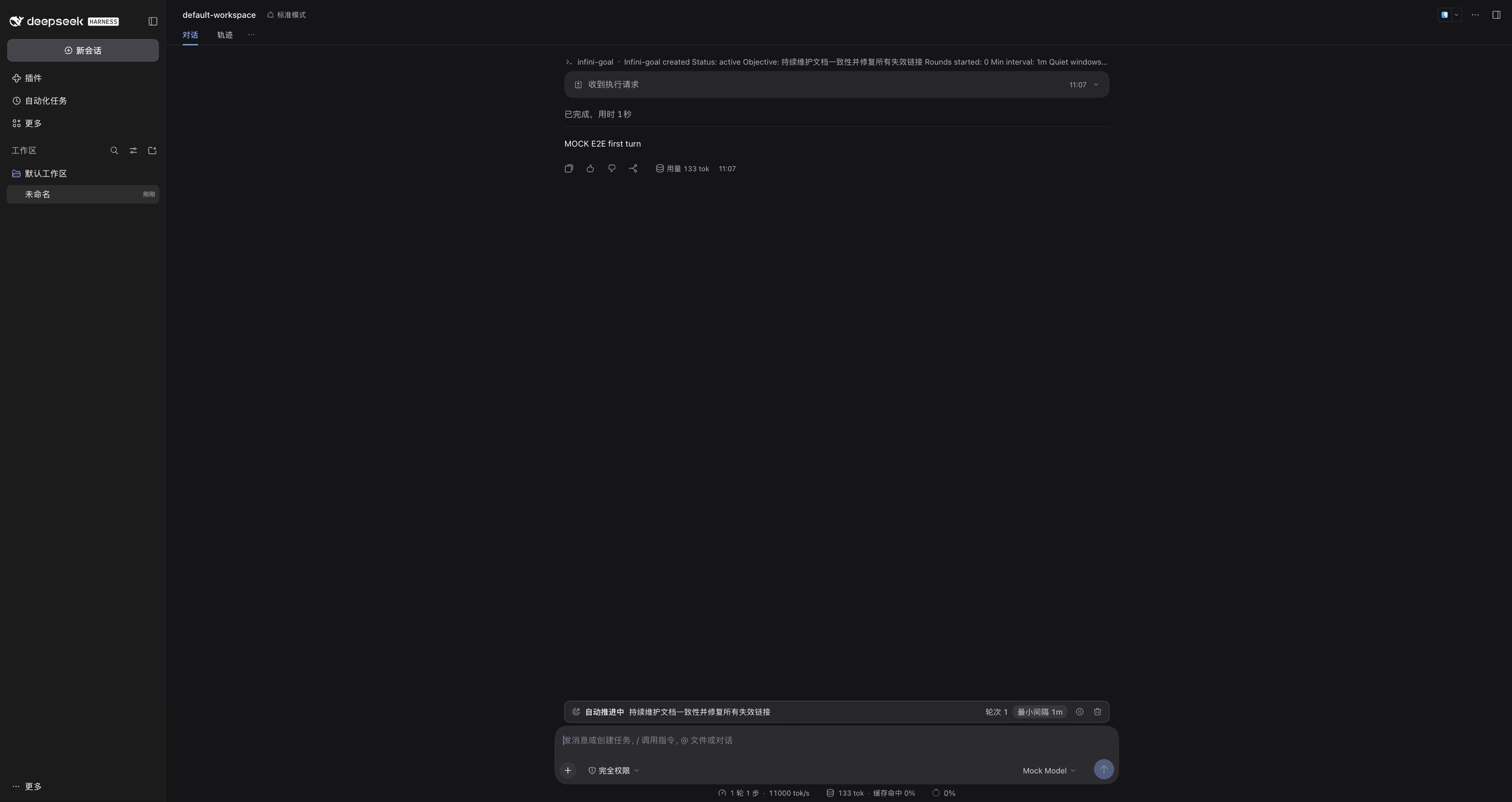 | 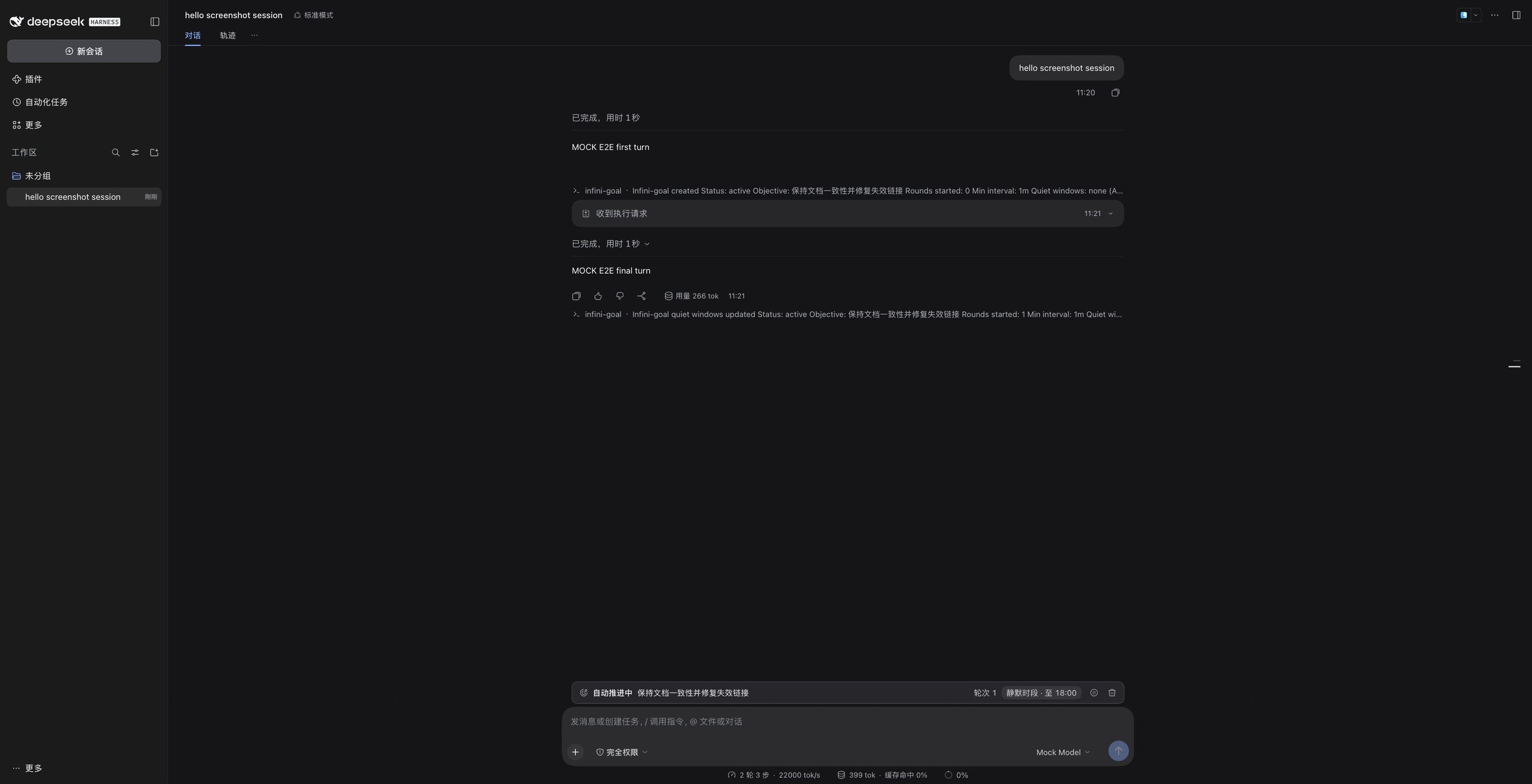 |
Status-bar states (phase label on the left, objective and rounds in the middle, pacing row and buttons on the right):
| Goal state | Status bar shows | Buttons |
|---|---|---|
active, minimum interval elapsed since the last round | Auto-continuing · objective · Rounds: N · next round in mm:ss (refreshed every second) | Pause / Clear |
active, minimum interval not reached yet | Auto-continuing · objective · Rounds: N · min interval 1m | Pause / Clear |
active, inside a quiet window | Auto-continuing · objective · Rounds: N · quiet window · until HH:mm | Pause / Clear |
paused / blocked | Paused / Blocked (blocked also shows the reason) · Rounds: N; no pacing row | Resume / Clear |
complete or no goal | Nothing rendered | — |
The buttons only dispatch /infini-goal ... commands; no custom Remote API is involved. Command
errors are shown inline in the status bar.
Differences from the official dsh-goal
| Dimension | Official dsh-goal | This plugin |
|---|---|---|
| Round cap | maxGoalRounds (default 256) | No cap |
| Trigger throttling | None; resumes immediately when idle | Minimum trigger interval + quiet windows |
| Activation model | In-process armed/disarmed; needs a manual resume after restore or fork | Durable phase: continues after an app restart or session restore (configurable autoContinueOnStart: false, which persists the goal as paused at startup) |
| Tools / commands | get_goal / create_goal / update_goal, /goal | *_infini_goal, /infini-goal; coexists with the official goal |
| Remote API | Typert Remote | Not needed: the UI reads a Session projection and actions go through the /infini-goal command |
Package layout
packages/
  protocol/    @yankeguo/dsh-infini-goal-protocol   pure types + interval/time-zone/quiet-window math (shared by host and browser)
  infini-goal/ @yankeguo/dsh-infini-goal            core service ctx.infiniGoals + strict replay fold + projection
  driver/      @yankeguo/dsh-infini-goal-driver     automatic-continuation driver (minimum interval / quiet windows)
  tool/        @yankeguo/dsh-tool-infini-goal       model tools
  command/     @yankeguo/dsh-command-infini-goal    the /infini-goal human command
  client-ui/   @yankeguo/dsh-client-ui-infini-goal  browser status bar
  bundle/      @yankeguo/dsh-infini-goal-bundle     bundle: cordis.patch.yml + generated cordis.disable-goal.patch.yml + dependencies
  disable-goal-bundle/  @yankeguo/dsh-disable-goal-bundle  standalone bundle: only switches the built-in dsh-goal off (also provides the main bundle's runtime preset-filter module)
pnpm build produces 9 lib/*.js files: protocol's index/client, core, driver, tool, command,
client-ui's index/client, plus the disable-goal-bundle runtime asset preset-filter.js;
the bundle package only contains patch files and emits no JS. The build uses esbuild: host entries
keep @deepseek-ai/*, @yankeguo/*, and node:* as external dependencies — workspace packages are
externalized so the whole process shares one instance of protocol/core — while other dependencies
(for example, the zod inlined into core) are bundled. preset-filter.js is a byte-for-byte copied
runtime asset and is not transpiled.
Quick start
Prerequisites
| Item | Requirement |
|---|---|
| DSH | 0.2.2-rc.1 (plugin / bundle packages declare engines.dsh: >=0.2.2-rc.1 <0.3.0) |
| Node.js | ≥ 24.9 (only needed for local build / publish / E2E; installing the plugin from npm does not need Node on this machine) |
| pnpm | 12.x (CI pins pnpm@12.16.1) |
| Web UI | DSH desktop app or dsh web; the status bar only renders in the Web UI |
Install from npm (after publishing; recommended)
# Main bundle: core service + driver + model tools + command + status bar.
# It also switches the built-in dsh-goal mode off by default.
dsh plugin --profile desktop add @yankeguo/dsh-infini-goal-bundle
One bundle is enough: it embeds the same disable layer as the standalone
@yankeguo/dsh-disable-goal-bundle, so the official goal mode is switched off without installing
that companion bundle. After installing, confirm on the Plugins page that the bundle is enabled
(newly installed bundles are usually enabled by default; if it shows as disabled, tick it), then
refresh the Web page. On the bundle's page every row it contributes (the five infini-goal rows and
the three generated preset-filter rows) can be switched individually; switching the whole bundle
off restores the official goal mode. For advanced setups you can also install individual plugin
packages and insert their loader rows into the profile's cordis.patch.yml yourself; for everyday
use, install the main bundle.
Install from a local checkout (development / acceptance)
pnpm install
pnpm build
pnpm install:profile                  # defaults to --profile desktop
# or specify a profile / home
node scripts/install-profile.mjs --profile desktop --dsh-home ~/.dsh
--disable-builtin-goal is still accepted as a deprecated no-op for scripts written against older
releases.
The script does three things:
- symlinks all 8 workspace packages (6 plugin packages + 2 bundle packages) into
$DSH_HOME/profiles/<profile>/node_modules/@yankeguo/; - appends
@yankeguo/dsh-infini-goal-bundleto the profile'sdsh.profile.bundles. The bundle embeds the built-in-goal disable layer, so the official goal is off by default; a profile that still selected the old companion bundle has it deselected (the package stays installed because the main bundle imports itspreset-filtermodule), and a leftover generated disable-goal block in the profile patch is removed; - backs up the profile's
package.jsonbefore writing (when there are changes).
DSH's profile HMR loads host plugins live; the status bar appears after refreshing the browser page.
Uninstall: pnpm uninstall:profile.
Upgrade / uninstall
# Upgrade to a specific version (after publishing to npm)
dsh plugin --profile desktop add @yankeguo/dsh-infini-goal-bundle@0.2.1

# Uninstall (DSH clears the selection of removed bundles the next time it loads the profile)
dsh plugin --profile desktop remove @yankeguo/dsh-infini-goal-bundle
dsh plugin --profile desktop remove @yankeguo/dsh-disable-goal-bundle

# Local checkout
pnpm install:profile                  # run pnpm build first; re-linking applies the change
pnpm uninstall:profile                # remove the links and bundle selection
Before upgrading DSH across a major version (0.3), update the plugins' / bundles' engines.dsh and
regression-test; incompatible bundles are skipped by DSH.
When upgrading from a release whose main bundle did not yet embed the disable layer: if the
profile still selects @yankeguo/dsh-disable-goal-bundle, disable/remove that bundle on the Plugins
page (or rerun pnpm install:profile, which deselects it). Both bundles share the same row ids, so
DSH tolerates the duplicate rows and mounts the filters once, but the Plugins page can then no
longer switch those three filter rows individually — prefer one bundle. The companion bundle stays
useful for profiles that want the built-in goal off without installing the infini-goal suite.
Upgrading from 0.1.0 / repairing old sessions
0.1.0 wrote goal changes as a custom Session event infini-goal/change. DSH 0.2.2-rc.1's durable
reader only accepts event types from its own vocabulary (or plugin records marked ignorable), so a
Session whose goals were written by 0.1.0 is refused interpretation after a restart (it reports
"refusing to interpret the log — it was likely written by a newer harness"). The current version
stores changes as ignorable plugin:infini-goal/change records, but does not migrate old 0.1.0
logs automatically; when needed, repair them once with the repository script:
# Quit every DSH instance that could write these Sessions first; dry-run is the default and only prints a report
node scripts/repair-session-log.mjs --dry-run --dsh-home ~/.dsh

# After confirming the report (e.g. "DRY-RUN ... rewrote 7 row(s)"), write the result
node scripts/repair-session-log.mjs --write --dsh-home ~/.dsh
The script only rewrites infini-goal/change rows into plugin:infini-goal/change + ignorable: true;
all other rows and bytes stay untouched. It keeps a timestamped *.bak-repair-* backup next to the
log before writing, refuses by default to repair Sessions still holding a session.lock (add
--force once the owning process has exited), and is idempotent. It requires Node.js ≥ 24.9 and a
completed pnpm install; you can also repair only the given logs with
--write <session-dir|log-file>....
Usage
/infini-goal Fix all failing doc checks and keep CI green   # create a goal
/infini-goal                                          # show status and the next trigger time
/infini-goal status                                   # explicit alias of the previous form
/infini-goal interval 10m                             # change the minimum trigger interval to 10 minutes
/infini-goal quiet "Mo-Fr 09:00-18:00"                # example: no automatic triggers in that window
/infini-goal quiet none                               # clear the quiet windows
/infini-goal timezone Asia/Shanghai                   # set the quiet-window time zone (system = host zone)
/infini-goal pause | resume | complete | clear
/infini-goal block vendor quota exhausted             # mark the goal blocked
/infini-goal edit <new objective>
You can also let the model create a goal: when a human request is a long-running objective, the
model calls create_infini_goal (this requires a direct human message in the current round). After
a goal is complete, running /infini-goal edit <new objective> creates a new goal instead of
modifying the completed one. Command arguments support paired quotes (e.g. the quotes around
"Mo-Fr 09:00-18:00" in /infini-goal quiet "Mo-Fr 09:00-18:00" are stripped and never become part
of the value); interval / quiet / timezone are rejected while the goal is complete — create a
new goal first.
Configuration
Deployment-level configuration goes into the profile patch row that loads the plugin (the bundle
ships defaults; to change them, override config in the profile's cordis.patch.yml by loader row
id — note that DSH patches replace the row's config wholesale).
Deployment defaults (core service)
- id: infini-goal
  name: '@yankeguo/dsh-infini-goal'
  config:
    defaultMinIntervalMs: 60000        # default minimum trigger interval
    defaultQuietWindows: []            # default quiet windows; elements are { days: [1..7], start: 'HH:mm', end: 'HH:mm' }
    timezone: Asia/Shanghai            # default quiet-window time zone; falls back to the host system zone
| Key | Default | Range / notes |
|---|---|---|
defaultMinIntervalMs | 60000 | 1000 – 2592000000 (1s – 30d), integer milliseconds |
defaultQuietWindows | [] | each element is { days, start, end }; syntax and schedulability are validated at creation time |
timezone | host system zone | IANA name; defaults to the system zone resolved via Intl |
Driver
- id: infini-goal-driver
  name: '@yankeguo/dsh-infini-goal-driver'
  config:
    autoContinueOnStart: true          # whether to auto-continue active goals when the plugin loads / the agent is created
    pollFloorMs: 1000                  # safety polling interval while the agent is busy or competing input exists
| Key | Default | Notes |
|---|---|---|
autoContinueOnStart | true | when false, existing active goals are durably paused at startup (a pause event is written) and wait for a human /infini-goal resume |
pollFloorMs | 1000 | integer, minimum 100; retry interval while the agent cannot be driven |
Model-tool policy
- id: infini-goal-tool
  name: '@yankeguo/dsh-tool-infini-goal'
  config:
    blockedAfterConsecutiveRounds: 3   # minimum rounds before the model may report blocked in automatic rounds
| Key | Default | Notes |
|---|---|---|
blockedAfterConsecutiveRounds | 3 | positive integer; applies only under "current automatic round" authorization, a direct human block is not limited by it (see Permission model) |
The bundle's tool row does not set this option explicitly, which is equivalent to the default 3.
Per-goal overrides
create_infini_goal / /infini-goal interval / /infini-goal quiet / /infini-goal timezone
write each goal's own durable settings, which take precedence over deployment defaults; the
/infini-goal status output and the status bar also display the per-goal settings.
Syntax
- Durations:
500ms,90s,5m,1h30m,2d, composable; as a minimum trigger interval it must be between1sand30d. - Quiet windows: semicolon-separated; each entry is
[days ]HH:mm-HH:mm, e.g.Mo-Fr 09:00-18:00; Sa-Su 10:00-12:00; 22:00-06:00.- empty
days= every day; ISO weekdays 1=Monday … 7=Sunday, supportingMo-Fr,Sa,Su,1-5;daily/everyday/*all mean every day; - a window's
startis included andendexcluded;end < startmeans crossing midnight (e.g.22:00-06:00);start == endis rejected; daysfilters the starting day of the window, e.g.Sa-Su 22:00-06:00covers Saturday 22:00→Sunday 06:00 and Sunday 22:00→Monday 06:00;- multiple windows form a union; the time zone comes from
timezone, and windows advance by local wall-clock time across DST transitions; none/off/ empty text means no quiet windows;always/allare rejected;- a configuration whose windows cover all local time (automatic rounds could never trigger) is rejected.
- empty
Behavior details
- Pacing:
nextAt = max(now, lastRoundAt + minIntervalMs)(the first round is not limited by the interval; it triggers as soon as the agent is idle and no quiet window applies); if the target falls inside a quiet window, it is pushed to the end of that window (possibly repeatedly) until it no longer falls inside any window.planTrigger'squietUntilis non-nullonly when a quiet window deferred the trigger, and equalsnextAt; the UI'squiet window · until HH:mmand the command output both use it to detect a quiet-window wait. - Empty loops: every round is a normal turn; rounds are spaced by the minimum trigger interval, so a "reply-then-trigger-immediately" burst cannot occur.
- Humans first: human messages and other tool calls proceed as usual; when competing input exists the driver yields and injects the next round only once the agent is idle and pacing allows.
- Durable checkpoint: before injecting each round, the driver flushes the current Session log so the next round sees history that is already on disk (on a failed flush it logs and retries by polling).
- Quiet time only gates automatic triggers:
/infini-goalstatus, human conversation, and tool calls are unaffected.
Automatic-round failure handling
A failed automatic round blocks the goal; blockedReason.code is one of:
| code | Trigger condition |
|---|---|
max-tokens | the automatic round hit the output token limit |
turn-error | the turn ended in error |
agent-error | the agent reported an error during the automatic round |
queue-failed | the round message could not be queued |
driver-error | internal driver exception |
prompt-rejected | the round message was rejected by a downstream hook before entering a step |
checkpoint-failed | flushing the Session log before injecting the next round failed (durability checkpoint) |
agent-error is usually the code actually recorded for a failed round (agent/error arrives before
turn/end, and both belong to that round's own turn). A human / hook interrupt or cancellation of
the round's own turn pauses the goal (pauses carry no reason); parent cancellation (unload,
stale round, terminal goal change) and disposed write no pause. Host-command pause / complete /
block / clear only abort the running automatic round and do not affect human turns; edit withdraws
rounds that have not yet been admitted, and the next round uses the new revision. resume on a
blocked goal clears blockedReason.
Permission model
Goal changes come either from a human or from "the current goal's automatic round"; the model cannot create or rewrite a goal on its own judgment:
- Humans:
/infini-goal ...commands can create, edit, pause, resume, complete, block, and clear goals, as well as configure pacing viainterval/quiet/timezone. - Model tools:
create_infini_goalrequires a direct human message from the runtime root agent in the current turn;edit,config,pause, andresumeonupdate_infini_goallikewise require a direct human message;completeandblockedare additionally allowed under "the current goal's automatic round" authorization;- reporting
blockedin an automatic round also requiresblockedAfterConsecutiveRounds(default 3) to be reached; - authorization is determined from Session events (the
user/messagesource inside the open turn, root-agent identity), not from the model's self-report.
- UI: status-bar buttons only submit
/infini-goal ...commands; there is no independent Remote API or higher privilege. - Security boundary: the plugin runs inside the host process, so installing a third-party plugin is equivalent to trusting its code; this suite does not change DSH's sandbox / permission mode, nor does it provide any privilege-escalation entry point.
Known limitations
- Single goal: each Session has exactly one infini-goal at a time.
- Resume means continue:
activeis durable, so the goal continues after a DSH restart or a session restore; withautoContinueOnStart: falsethe driver durably pauses active goals at startup / agent creation, the status bar shows paused and can resume, and a human must run/infini-goal resume. - Forks continue too: a forked child session contains the goal history and keeps advancing by
default;
pausefirst if you do not want that. - UI actions go through commands: status-bar buttons send
/infini-goal ...commands; no custom Typert Remote is introduced. - The countdown is computed locally: the status bar derives the pacing row from the projection
and local per-second computation, so second-level display drift is possible; the actual trigger is
computed by the driver with the same
planTrigger. - Compatibility: plugin / bundle packages declare
engines.dsh: >=0.2.2-rc.1 <0.3.0; the plugins must be updated before DSH moves to 0.3. - Single-session semantics: goals and rounds belong to the current Session; the plugin offers no cross-session sharing or aggregation of goals.
Troubleshooting
| Symptom | Likely cause / action |
|---|---|
| No status bar after installing | the bundle is not enabled (tick it on the Plugins page), the page was not refreshed, or DSH was not restarted after a preset change |
No /infini-goal command or *_infini_goal tools | the bundle is not enabled / was skipped by DSH (check the DSH version and engines.dsh); a local checkout needs pnpm build first |
The local install script says run "pnpm build" first | run pnpm build before pnpm install:profile |
| The goal does not continue automatically | phase is not active; a quiet window applies or the minimum interval has not elapsed; the goal was durably paused under autoContinueOnStart: false; the agent is busy or competing input exists |
/infini-goal quiet ... reports a "covers all day"-style error | the union of quiet windows covers all local time, which would block automatic rounds forever; use partial windows or none |
| The status bar shows paused and does not resume automatically | expected under autoContinueOnStart: false; run /infini-goal resume |
| The goal keeps running after a fork | expected; run /infini-goal pause before forking |
| A Session cannot be restored after a restart; the log reports "refusing to interpret the log" | that Session was written with the old 0.1.0 representation; quit DSH and run node scripts/repair-session-log.mjs --write --dsh-home ~/.dsh (see "Upgrading from 0.1.0 / repairing old sessions") |
repair-session-log.mjs reports session.lock | the Session is still open in DSH; quit DSH / close the Session and retry, or add --force once the owning process has exited |
/goal still appears | the main bundle switches the official goal off by default, and preset changes only affect new agents: restart DSH and create a new session once. If the bundle or one of its preset-filter rows was disabled on the Plugins page, re-enable it |
Publishing
When the packages are on npm, one command installs them:
dsh plugin --profile desktop add @yankeguo/dsh-infini-goal-bundle
Releases use staged publishing through npm Trusted Publishing (keyless OIDC): pushing a v*
tag triggers .github/workflows/publish.yml, which first verifies
that the tag matches the version of all 8 publishable packages (including the root
package.json), then installs, typechecks, tests, builds, and stages every package in dependency
order. Staged versions are private and not installable; the workflow holds no npm token secret
(id-token: write only) and never creates the GitHub Release. A maintainer then reviews the staged
versions and approves them with a 2FA prompt from their own machine, which publishes them and
creates the GitHub Release:
npm login                                                      # maintainer account with 2FA
scripts/trusted-publishers.sh                                  # one-time stage-only trusted publishers
node scripts/promote-release.mjs --version 0.2.1 --list-only   # review the staged uploads
node scripts/promote-release.mjs --version 0.2.1               # approve (2FA) + GitHub Release
This keeps a partial failure safe: nothing is public until every package is approved, and a failed
staging run can be rejected and re-run for the same existing tag. The trusted publisher grants only
--allow-stage-publish, so CI can never publish directly. The full process (trusted-publisher
migration, re-staging an existing tag via workflow_dispatch + release_tag, approval, failure
recovery, security model) is in docs/PUBLISHING.md.
Built-in dsh-goal is off by default
DSH ships an official goal mode which can technically coexist with this plugin (tools, commands,
and status bars all have different names). Installing @yankeguo/dsh-infini-goal-bundle switches
the official mode off as one ordinary bundle layer, so infini-goal is the only goal system and the
profile's cordis.patch.yml stays clean:
dsh plugin --profile desktop add @yankeguo/dsh-infini-goal-bundle # after publishing; one bundle is enough
The main bundle's dsh.bundle.patch lists two files: cordis.patch.yml (the five infini-goal
rows) and the generated cordis.disable-goal.patch.yml (the disable layer). Both are ordinary
Loader rows, so on the bundle's page under Plugins you can switch, individually:
- the five infini-goal rows (
infini-goal,infini-goal-driver,infini-goal-tool,infini-goal-command,infini-goal-ui) — e.g. keep the suite but hide the status bar; - the three generated
preset-*-filterrows that re-mount the shipped agent presets withoutcommand-goal/tool-goal.
Switching the whole bundle off restores the official goal mode live. The disable layer does not
copy preset content: it disables the shipped preset declaration and uses a tiny runtime filter
that reads the installed preset and filters out only command-goal / tool-goal, so no
regeneration is needed after a DSH upgrade. For the rationale (why the goal service cannot simply
be disabled, preset patch granularity, when it takes effect — preset changes only affect new
agents, so restart DSH once — script usage, and post-upgrade maintenance), see
docs/DISABLE-BUILTIN-GOAL.md.
@yankeguo/dsh-disable-goal-bundle still exists for profiles that want the built-in goal off
without the infini-goal suite; it ships the same disable layer standalone. Do not enable both
bundles in one profile: they share the same row ids on purpose, so DSH tolerates the duplicate rows
and mounts one filter per preset (last row wins), but the Plugins page then cannot switch those three
filter rows individually. pnpm install:profile deselects the companion automatically.
Development and verification
pnpm typecheck     # TypeScript check across the monorepo
pnpm test          # unit tests, including the generated-bundle composition and plugin-metadata checks
pnpm build         # esbuild outputs (9 lib/*.js files)
pnpm dev:patch     # generate .tmp/cordis.patch.yml (absolute-path insertion; debug without installing)
node scripts/build-disable-goal-bundle.mjs --check   # generated bundle patches + manifests are current
End-to-end verification (isolated DSH_HOME + mock LLM; does not touch the running DSH):
tools/e2e/bootstrap.sh          # create an isolated profile under /tmp
tools/e2e/smoke.sh              # infrastructure smoke (plugin / session / mock LLM insertion)
tools/e2e/suite.sh --fresh      # end-to-end scenarios for this suite (minimum interval / quiet windows / pause)
tools/e2e/probe-install.sh      # installed-profile proof: native goal off by default, /infini-goal works
tools/e2e/probe-bundles.sh      # bundle packaging: main-only install, legacy-companion migration, duplicate-id tolerance
Plugin display metadata
Every package ships DSH plugin display text in locale/en.json and locale/zh.json
({"meta":{"title":"…","description":"…"}}), wired through "locale/*.json" in files and
"./locale/*.json": "./locale/*.json" in exports. DSH reads these files without evaluating plugin
code, so the Plugins page and the plugin market show a friendly title and one-line description
instead of the npm package name. If a locale omits a field, DSH falls back to the package
description (then the package name for the title). packages/bundle/tests/plugin-metadata.spec.ts
(picked up by pnpm test) enforces en/zh parity, non-empty titles/descriptions, the manifest wiring,
the description ↔ English-locale sync rule, and keeps list copy free of marketing superlatives.
When adding a package, add both locale files, the files/exports entry, and the package to that
spec's expected table.
Design notes and data structures are in docs/DESIGN.md; E2E tooling and known
limitations are in tools/e2e/README.md.
License
Ähnliche Plugins
webnovel-writer
lingfengqaq/webnovel-writer
loopx (dsh-loopx-plugin)
loopx-project/loopx
ouroboros (dsh-plugin)
q00/ouroboros
loopx (dsh-loopx-plugin)
huangruiteng/loopx