dsh-session-card
yaorenliang/dsh-session-card
Three lines per session in the sidebar: the official title, the last question you typed, and a badge line with the agent preset plus whatever is running under that session. The preset rides the snapshot the sidebar already holds, so it costs no extra request, disk read or loop. A fifth settings switch pins the sessions you start from then on, writing DSH own pin set through the official pin call rather than painting a marker of its own; it is off by default, never reaches back over sessions already on screen, and skips delegated and archived ones. When there is nothing to show, the row folds back to the official single line.
Installation
dsh plugin --profile web add github:yaorenliang/dsh-session-cardREADME
dsh-session-card
中文 | English


Every session in the sidebar gets two more lines under its title: the question you last asked, and which agent preset the session runs together with the subagents and background tasks it has running.
The official session row is one line — a title, a time, an icon — so once the list grows long, every row reads like every other row. This plugin adds a summary of what you last asked, so the sidebar says which session is which on its own.
Screenshots
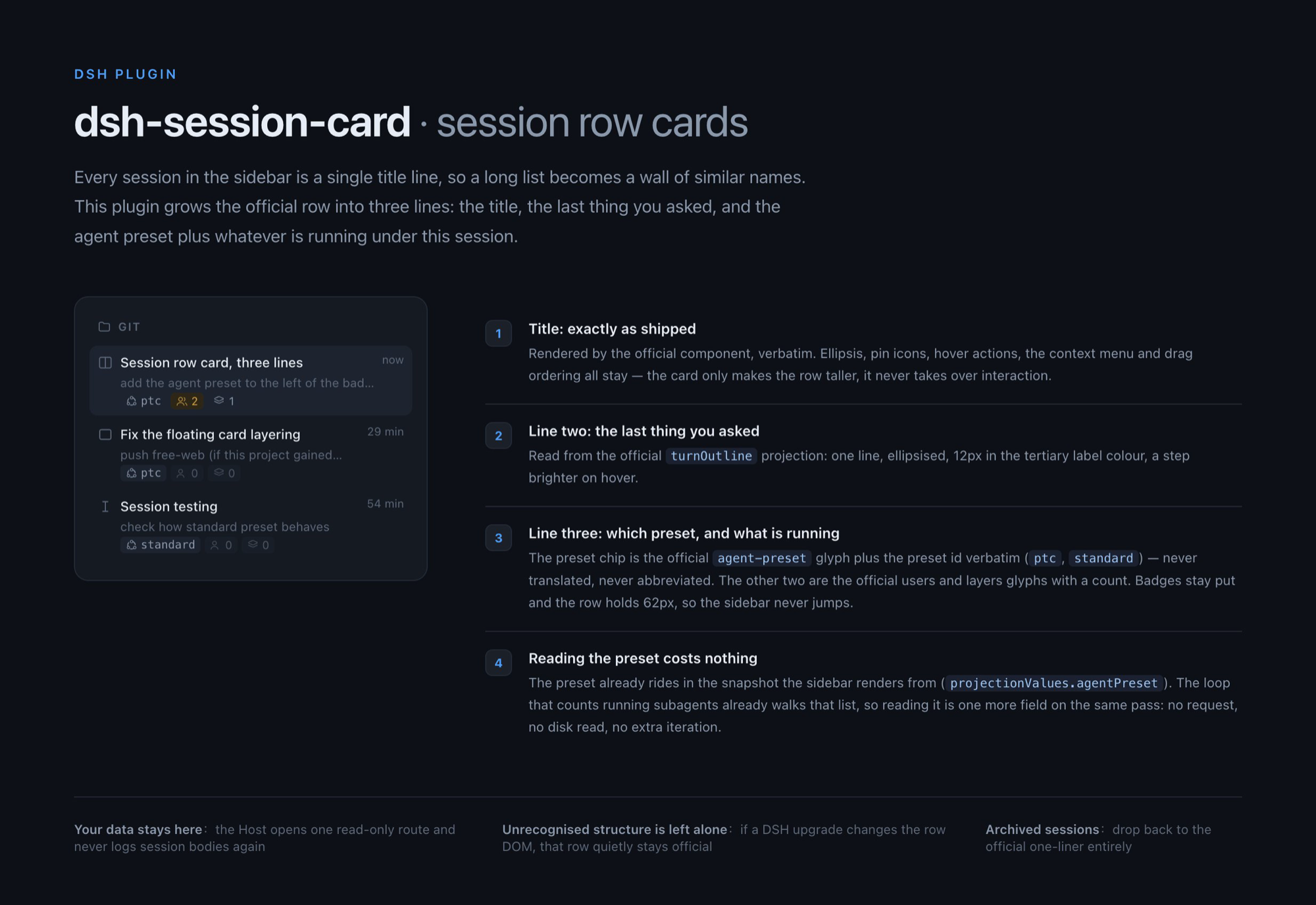
The sidebar as it looks in the real UI; four annotations in the picture name each line and what it carries.
What you get
-
Line 1 — the official title, kept verbatim: truncation, hover actions, the pin icon and the context menu all still work.
-
Line 2 — your most recent question, one line, ellipsised, 12px in the tertiary label colour; a step brighter on hover.
-
Line 3 — the badges, three of them, left to right:
- Preset — the official agent-preset glyph (the three-node graph) plus the preset id as written,
ptcorstandard. The id is neither translated nor abbreviated: DSH itself uses that id wherever a stable name is needed, and an invented abbreviation would only break the day a fifth preset appears. The tooltip reads "Agent preset ptc". - Subagents / background tasks — the official users and layers glyphs plus a count, no words: a sentence like "0 subagents" does not fit a sidebar row about 200px wide. The tooltip carries the full sentence ("0 subagents running"). Only a running subagent keeps a fill (the platform's amber), because that is the one thing on the line worth catching the eye; the job count is a fact about the session, not an activity, so it is set as plain dimmed text. While nothing runs, both badges stay where they are and drop to grey, with a 0.
The preset badge is the one that never falls idle — it has no count that can reach zero, so the "keep badges while idle" switch has nothing to say about it. A session that has not assembled an agent yet (blank) simply omits it.
- Preset — the official agent-preset glyph (the three-node graph) plus the preset id as written,
By default (badges keep their place) the row height holds at 62px — a 20px title, a 16px question line and a 16px badge line, 2px between each, plus the card's own internal padding — so a session measures the same from idle to working to finished, and the sidebar never jumps. With "keep badges while idle" off, badges appear only while work runs: 45px with just the question line, and nothing to say falls all the way back to the official 32px. Height is derived from the content (grid-template-rows: 20px auto auto) rather than declared as a min-height, so no combination of lines can leave a stray empty track behind.
When a card appears, lines 2 and 3 open downward inside the cells they already occupy (about 220ms); under prefers-reduced-motion nothing animates.
When it stays out of the way
- Archived sessions — drop back to the official presentation entirely; no card is drawn.
- Unrecognised row structure (a DSH upgrade changed the row DOM) — that row is skipped, the rest carry on.
- Switched off in Settings — everything falls back to the official row.
The switches live at the bottom of Settings → General: enable cards / show the question line / show running badges / keep badges while idle (on by default), and pin new sessions (off by default). State is kept in localStorage under dsh-session-card:settings.
Pinning new sessions
The last switch writes to DSH's own pin set (pinnedSessionIds), not to a mark this plugin paints: once it is on, a session created from then on appears at the top of the sidebar and stays there across refreshes, restarts and browsers, and the official "Unpin session" still puts it back in the ordinary order.
The boundaries are deliberate:
- Off by default. It writes the order the Host persists, and rearranging someone's list on install is not a decision a plugin gets to make.
- Not retroactive. Turning it on affects what comes next; the sessions already on screen are left alone. The first complete listing of a page load is recorded and never acted on.
- Only a new id counts. The test is an id that was not in the previous listing. If the Workspace still holds an unused blank session, "new session" starts the conversation in that row instead of creating one — the row was already where it belongs, so nothing is created and nothing is pinned.
- Delegated sessions are skipped. A subagent's child would otherwise be lifted above the conversation actually being watched. Archived sessions are skipped too.
- The cost that cannot be removed: the pin set only grows (that is DSH's design, not this plugin's choice). Left on while starting sessions all day, the pinned area gets long, and unpinning them is manual. The plugin will not delete platform data on your behalf.
Where the data comes from
| Line | Source |
|---|---|
| Your most recent question | the turnOutline projection (the official projection of the turn log; the log is not parsed again) |
| Background task count | jobs.list(), counting only what this session owns and is running |
| Subagent count | computed in the browser from parentId + running in the session list |
| Agent preset | projectionValues.agentPreset from that same session list (the official agentPreset projection) |
| Which sessions are new | that same session list — ids, parentId, origin — plus pinnedSessionIds and archivedSessionIds from workspaces.list |
The preset costs nothing. The sidebar already holds that snapshot while it renders (title, tokenUsage and agentPreset arrive together), and the pass that counts running subagents has already walked it, so reading the preset is one more field on the same pass — no request, no disk read, no extra loop.
The Host opens exactly one read-only route, GET /api/dsh-session-card/rows?ids=…, behind DSH's own authentication fence, with cache-control: no-store. Session bodies never leave the machine and no new log line is written.
The browser keeps the previous answer on this machine (localStorage, key dsh-session-card:facts, expiring after 7 days) so a reload can paint the card with the first frame and correct it in place once the network answer arrives — a refresh never shows the official one-line row first and then snaps into a card.
Install
dsh plugin --profile <your profile> add @yaorenliang/dsh-session-card
Every release also carries the built package as an attached tarball, for a machine that would rather not reach the registry. Download it from the latest release and add that file instead — same result, no clone, no build:
dsh plugin --profile <your profile> add ./dsh-session-card.tgz
Restart the DSH instance afterwards. A profile's plugin table is read at boot and the Loader watches no files: hot reload rebuilds the client bundle but never mounts a newly added Host plugin.
Requirements
- DeepSeek Harness
>=0.2.2-rc.1 <0.3.0, Node>=20.
Development
pnpm install
pnpm verify   # tsc --noEmit && vitest run && node scripts/build.mjs
Build products: lib/index.js (the Host half, ESM) and lib/client.js (the browser half, wrapped for __ModuleLoader__). lib/types/ holds the declarations.
Change styles in src/client/card.css and settings.css, then re-run pnpm build — the two *-stylesheet.ts modules are generated; do not edit them by hand.
Layout
src/
  core/       prompt summarising, subagent counting, preset reading (pure, unit-tested)
  host/       the one read-only route + the Host contract it needs
  client/     row painting, the settings row, polling and stylesheet installation
docs/
  showcase.html           the showcase page (open it in a browser; the screenshot renders from it)
  showcase.en.html        the same page in English
  screenshot-card.png     the picture in README.zh.md
  screenshot-card-en.png  the picture above
Boundaries
The plugin adds two lines of in-row DOM and one stylesheet. It never takes over the official row's click, drag, context menu or hover actions, and never changes session data. If another plugin that also rewrites the session-row DOM is installed at the same time, the two may overwrite each other — switch one of them off.
Documentation
- Changelog · 中文
- Security policy · 中文
License
MIT © 姚壬亮
Ähnliche Plugins
billion-context
ranxianglei/billion-context
dsh-web-ui (dsh-chat-recovery)
zhu1090093659/dsh-web-ui
dsh-synapse
liangmianya/dsh-synapse
EduWork (dsh-side-chat)
ecnu/eduwork