dsh-omarchy-agent
yorelog/dsh-omarchy-agent
Omarchy capabilities for DeepSeek Harness: live desktop tools, a package-ownership guard, web cards, and a top-bar panel.
Installation
dsh plugin --profile web add github:yorelog/dsh-omarchy-agentREADME
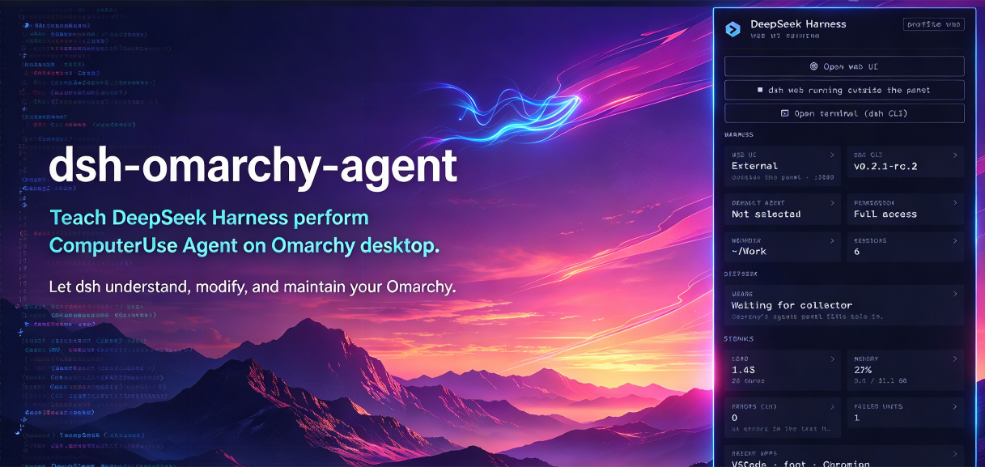

dsh-omarchy-agent



English | 中文
Teach DeepSeek Harness to use your Omarchy desktop.
Your coding agent can write code all day, but it can't see the desktop around it. This plugin gives dsh the live desktop, the right Omarchy commands, the docs and source behind them, and one bar panel for the harness itself.
What you get
- It reads the room. Recent errors, system load and memory, the apps you've been using, and the project you're in, read live instead of guessed.
- It finds the real command.
omarchy_catalogsearchesomarchy commands --json, so dsh uses a command that actually exists instead of inventing one. - It reads Omarchy's source.
omarchy_sourcesearches docs, agent skills, shell source, and config with line numbers, then thereadtool opens the file. - It keeps the harness in reach. The bar panel shows the dsh web server, CLI version, default agent, permission mode, working directory, session count, DeepSeek usage, and those live signals.
- The panel is readable both ways.
omarchy_panelgives dsh the same cards; clicking one copies its context and opens a fresh dsh web window. - It stays out of the way. Inspecting the desktop, plugins, agents, and usage is read-only. Installing dsh, choosing a default agent, and enabling plugins stay with you.
- Cards instead of JSON. Tool results become small Omarchy cards inside a dsh web session.
Install
Install the plugin package, then run its installer:
mise use -g npm:dsh-omarchy-agent
dsh-omarchy-agent-install
The installer adds the bundle to the web profile. If dsh is not on your PATH, it looks up the newest published dsh version — including the current rc releases, which have no stable latest — and asks before installing it:
dsh is not installed. Install the newest published version (0.2.1-rc.3) with mise? [Y/n]
Answer yes, or pass --yes for a non-interactive install. Use --no-install-dsh if you want the installer to fail instead, and --dsh-version <version> to pin a version. Omarchy still owns selecting dsh as the default agent.
Want the bar panel too? Install it as an Omarchy plugin:
omarchy plugin add https://github.com/yorelog/dsh-omarchy-agent --enable
omarchy plugin enable dsh-omarchy-agent right   # put it on the right
The bar plugin and the dsh bundle are separate: enabling the panel does not install the bundle, so run both steps.
If dsh web is already running, restart it once so it loads the new plugin.
Use it
Ask inside dsh web:
what is failing on my desktop right now?
why did the bar crash?
which Omarchy commands change the wallpaper?
where is BarIconButton documented?
what is my default agent?
how do I move the agents widget to the right?
Or click the DeepSeek Harness icon in the bar:
- Left click opens the harness panel.
- Right click opens the dsh web UI.
- Middle click opens a terminal with the dsh CLI.
The panel opens under its icon. If another dsh web already owns the port, it shows External and disables its own Start/Stop instead of starting a second server.
Every card is clickable. Click Load, Errors, Recent apps, Project, or any other card and the panel copies that signal's context to the clipboard and opens a new dsh web window. Paste it with Win+V (or your clipboard shortcut), edit it, and send when ready. The panel never sends for you.
Settings
The panel reads a few settings from shell.json:
| Setting | Default | What it does |
|---|---|---|
port | 3080 | Web UI port. |
permissionMode | danger-full-access | Permission mode for the managed server. |
workingDirectory | ~/Work | Where new sessions start. |
refreshIntervalSec | 10 | How often the panel refreshes while open. |
To change the plugin config, edit ~/.dsh/profiles/web/cordis.patch.yml:
- id: omarchy-agent
  config:
    privilegedTokens: [sudo, pacman]
privilegedTokens is empty by default because Omarchy launches agents with full access.
License
MIT
Ähnliche Plugins
archify (deepseek-harness)
tt-a1i/archify
WeKnora (dsh-weknora)
tencent/weknora
weknora
tencent/weknora
BrowserSkill (dsh-plugin-browserskill)
tencent/browserskill