dsh-plugin-container
zaynervewreck/dsh-plugin-container
DSH sidebar container panel for macOS Docker runtimes and Apple container
Installation
dsh plugin --profile web add github:zaynervewreck/dsh-plugin-containerREADME
DSH Container
English | 简体中文
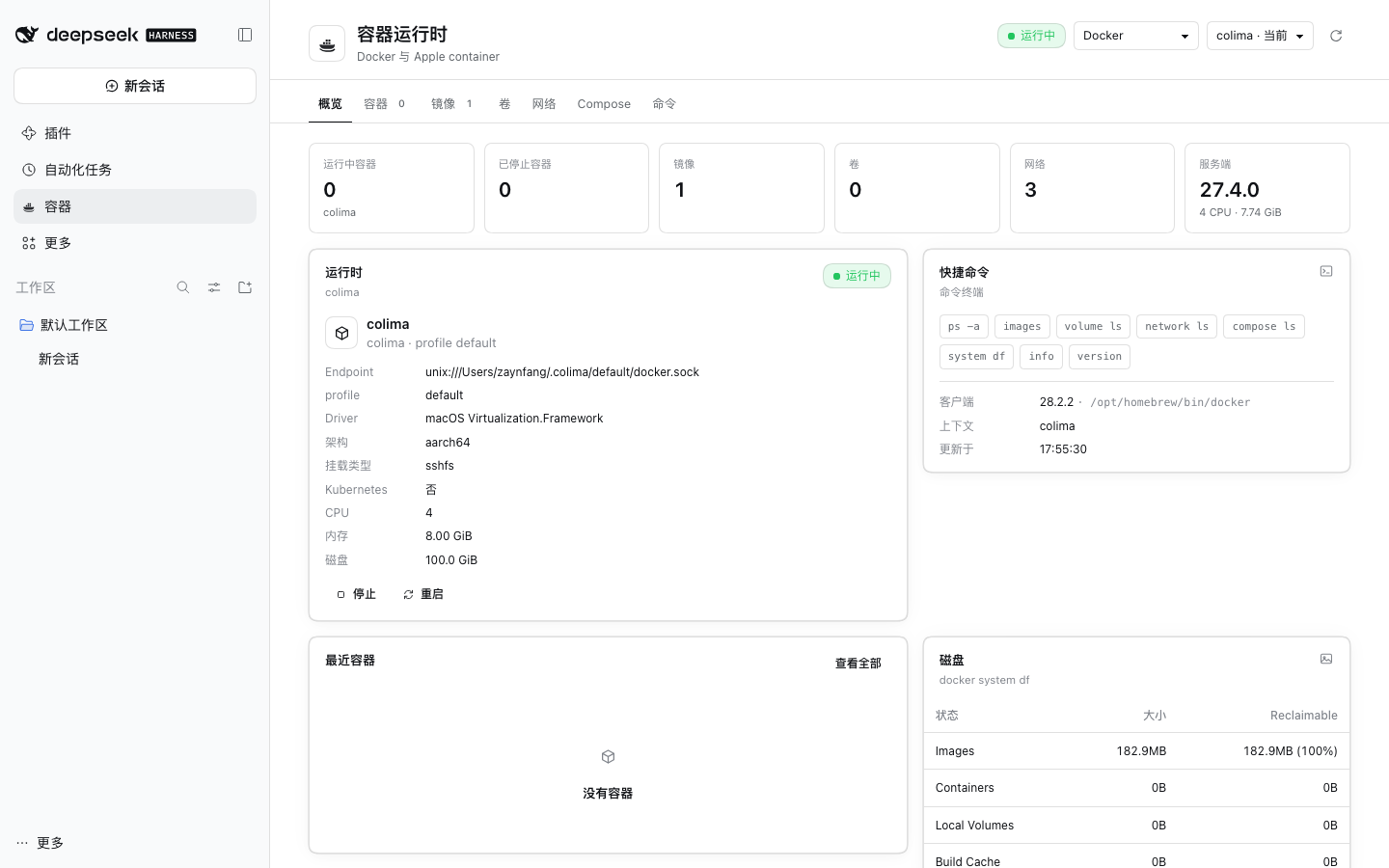
A DSH sidebar panel for managing containers on macOS: Docker (colima / Docker Desktop / OrbStack / remote contexts) and Apple container.
Features
- Two providers, Docker and Apple container, with runtime status and context switching
- Containers, images, volumes, networks, Compose, and commands
- Start / stop / restart / delete containers; pull / push / build / inspect / delete images
- Pull with an optional architecture (
linux/amd64/linux/arm64); a pasteddocker pull nginxworks too - Build an image from a project folder chosen with a folder picker: the form checks the folder, finds Dockerfiles, suggests a tag, and previews the command
- Push an image: pick a target such as
username/app:tagorghcr.io/username/app:tag; it is tagged first when the name differs, with login hints and a clear message when the registry rejects the push - Logs, inspect, and live follow
- Attach:
docker attachfor Docker;container execfor Apple - Exec: open a shell inside a container (
docker exec -it <id> /bin/sh) - Image architecture column (arm64/amd64)
- Read-only AI tools:
container_status,container_list,container_inspect,container_logs - AI diagnosis opens a separate session and leaves the current conversation untouched
Requirements
- macOS
- DSH 0.2.x
- Docker CLI, or Apple container
- Configure any network proxy for your own environment
Install
GitHub: https://github.com/Zaynervewreck/dsh-plugin-container
dsh plugin --profile desktop add dsh-plugin-container
Restart DSH. The installer writes dsh.profile.bundles for you, so you do not need to edit cordis.patch.yml by hand.
Local development build:
node scripts/install-profile.mjs --home "$HOME/.dsh" --profile desktop
Do not enable source-path mode and npm-package mode at the same time.
Usage
- Open Containers in the left sidebar
- Switch between Docker and Apple container at the top
- Container row actions:
- Start / stop / restart / delete
- Logs / Follow / Inspect
- Attach: take over the container's main process
- Exec: open a new shell inside the container
- Ask AI / Diagnose: starts a separate DSH session that calls the read-only container tools
- The Images tab shows architecture and can start a container directly from an image
Security
- All Docker/Apple commands run with the current user's permissions
- No shell string concatenation; commands are split into argv and spawned directly
- Dangerous actions such as delete, stop, and prune require confirmation
- AI tools are read-only; there are no start/stop/rm/prune tools
- Logs and inspect output are marked as untrusted data and are never executed as instructions
Release
Releases are published by GitHub Actions. The npm token is stored in the repository secrets:
- GitHub repository → Settings → Secrets and variables → Actions
- Create
NPM_TOKENwith an npm Granular Access Token (Bypass 2FA, Read and write) - Bump the version and tag:
npm version patch
git push --follow-tags
The Release workflow checks that the tag matches the package.json version, then runs:
npm publish --access public --provenance
Development
npm install
npm run build     # src/client -> lib/client.js
npm test          # 53 tests
npm pack          # pre-release check
@deepseek-ai/dsh-toolsis provided by the host app. Do not add it todependenciesorpeerDependencies. Otherwise installing the plugin puts an older copy in the profile'snode_modules, which shadows the host's own version, leaves thetoolsservice missing, and DSH fails to start. Keep it indevDependenciesonly.
Layout:
index.js                 Host entry
cordis.patch.yml         Bundle install patch
src/host/service.js      Provider routing + Docker
src/host/images.js       Image push/build validation
src/host/apple.js        Apple container
src/host/attach.js       Attach/Exec PTY
src/host/tools.js        Read-only agent tools
src/client/              Pages, tabs, i18n, styles
Ähnliche Plugins
deepseek-harness
deepseek-ai/deepseek-harness
dsh-market
dsh-market/dsh-market
dsh-web (dsh-plugin-manager)
zhu1090093659/dsh-web
dsh-web
zhu1090093659/dsh-web