dsh-ai-gateway-provider
zenvibecoding/dsh-ai-gateway-provider
Connect OpenAI-compatible gateways with per-gateway model lists, reasoning controls, model tests and optional quota reporting. GPT speed tiers support per-conversation choices and custom service_tier mappings.
Installation
dsh plugin --profile web add github:zenvibecoding/dsh-ai-gateway-providerREADME
AI Gateway for DeepSeek Harness


Connect any AI gateway to DeepSeek Harness — chat over OpenAI, Anthropic or Gemini protocols, with models, parameters and quota in one place.
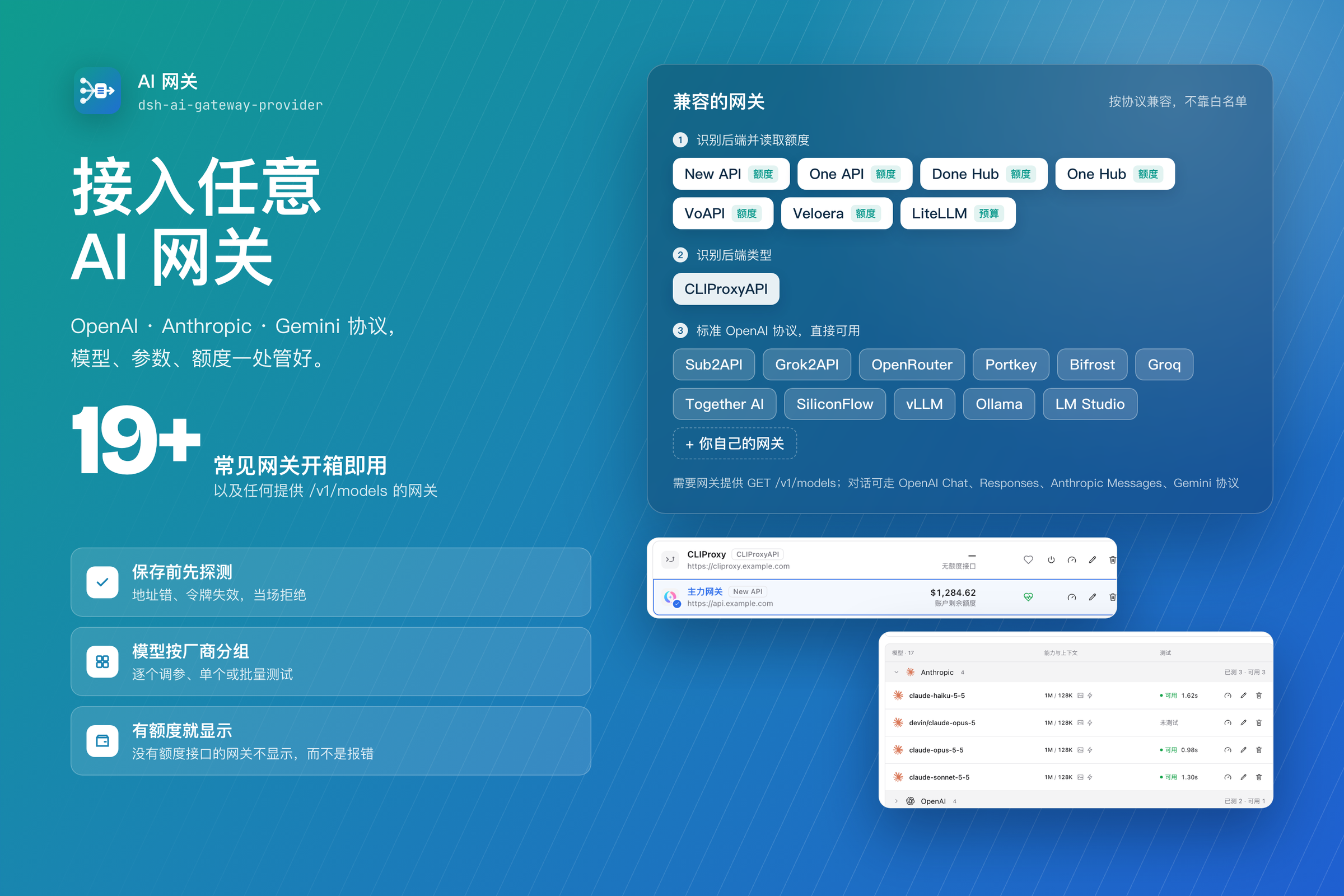
Most providers are the same three endpoints with different names on the box. Instead of a list of supported vendors, this plugin follows the protocol and probes each gateway for what it can actually do: if it speaks /v1/models and /v1/chat/completions, it works — including a gateway nobody has heard of yet.
Install
# in DeepSeek Harness → Settings → Plugins → install by package name
dsh-ai-gateway-provider
Requires DSH ≥ 0.2.1-rc.1 and < 0.3.0. This README describes local 0.6.0 (not yet published); npm latest is 0.5.2. Existing screenshots are illustrative and may predate the new tier editor and composer controls.
What it does
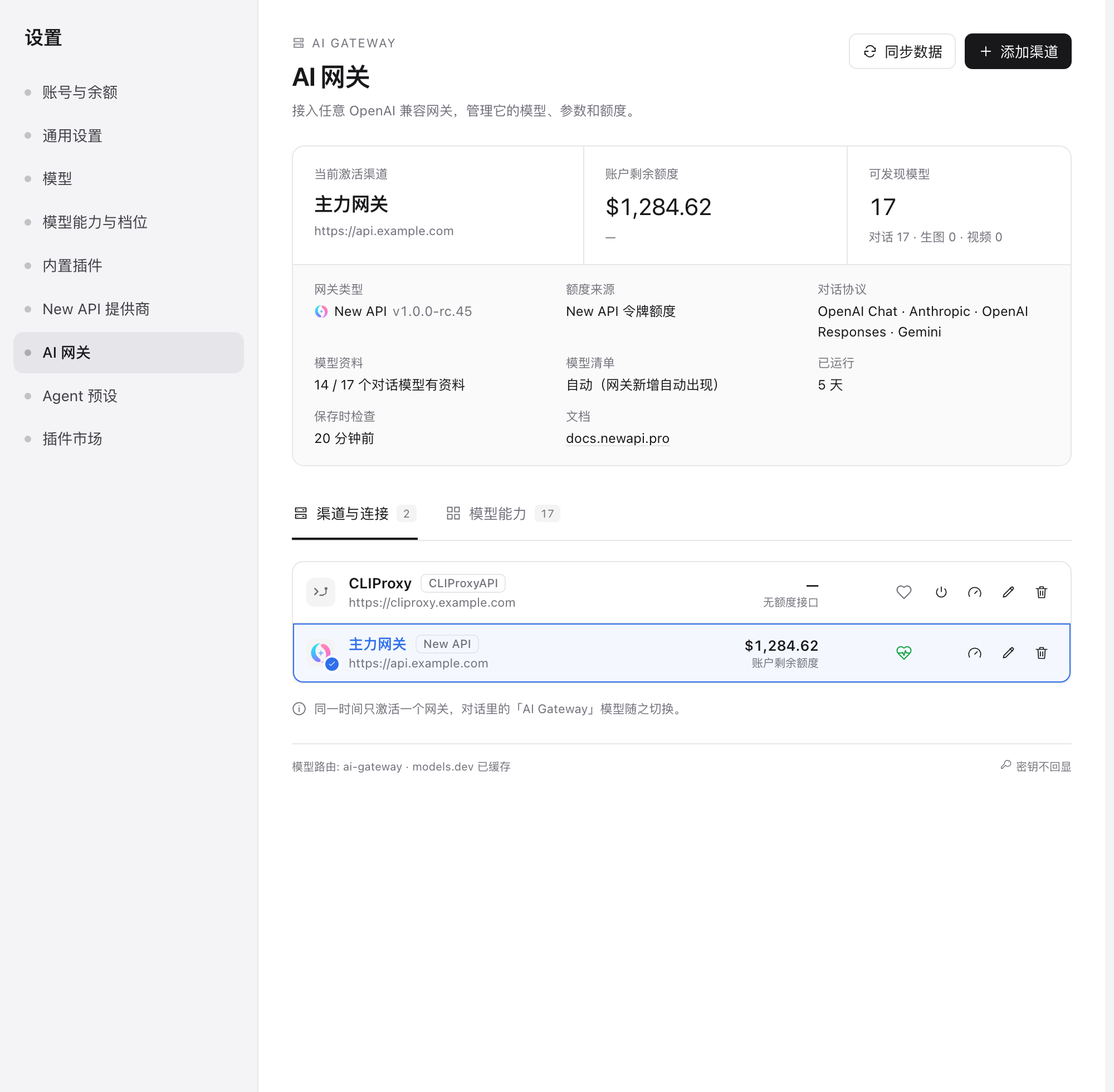
- Probe before saving. A gateway is written only after it lists its models with the address and token you entered. A wrong URL or a revoked token is refused at that moment, not on the first message.
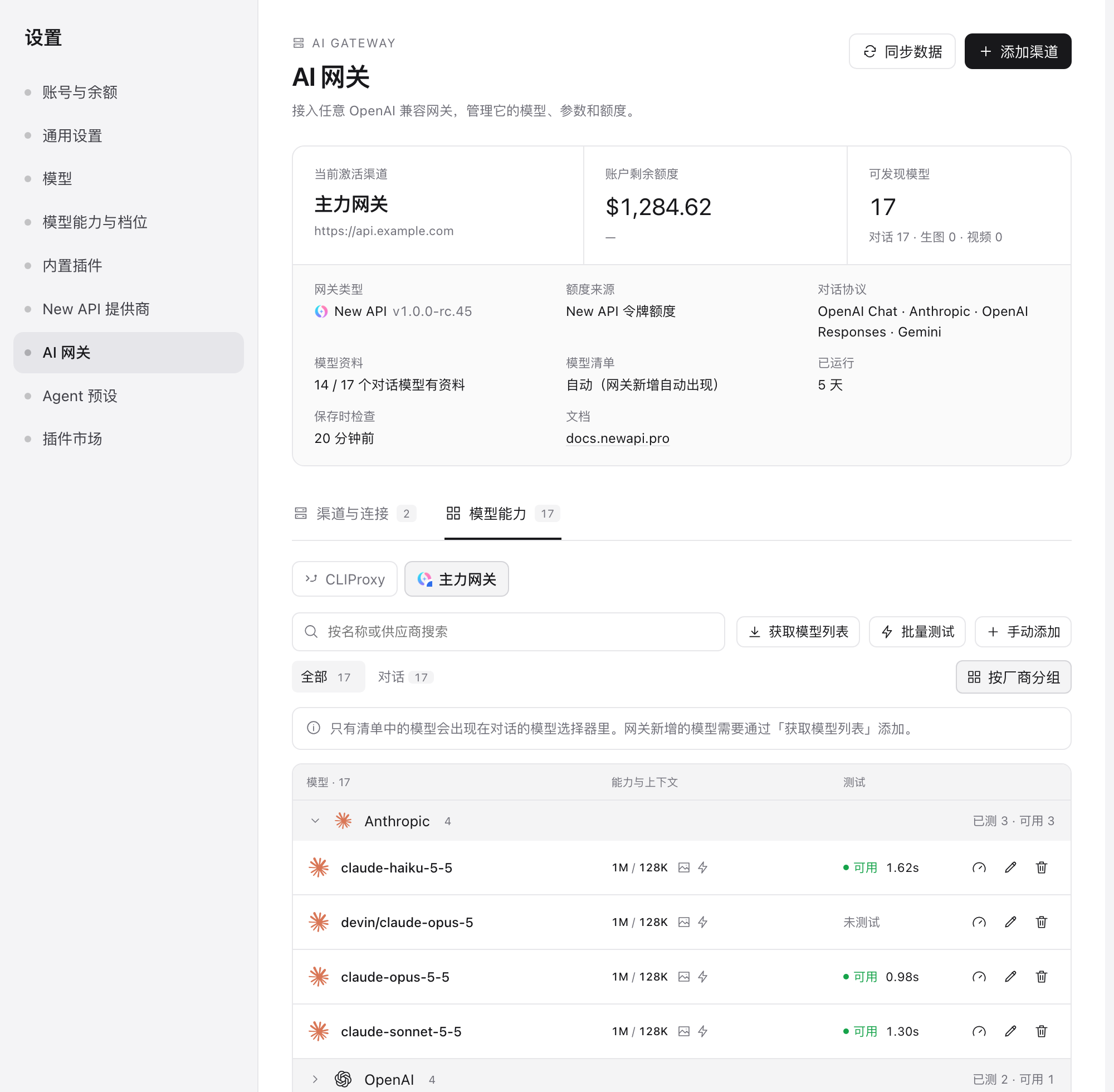
- Model management per gateway. Fetch the gateway's list, add a model it does not list, edit any model's name, upstream mapping, context window, output cap, input modalities, reasoning levels and wire protocol, and hide what you do not want.
- Grouped model table. Models are grouped by vendor —
devin/claude-opus-5andclaude-opus-5-5sit together under Anthropic — with a per-group "tested / working" count. Groups collapse, and the grouping can be switched off. - Hide models. Hide one model, or a whole vendor group, from the chat picker without removing it; Hidden models stay in the list, greyed out, so clicking again unhides them. Hiding never turns an automatic gateway into a fixed list.
- Model tests. Test one model or a batch: one tiny request each, bounded output, errors classified (no upstream channel, invalid token, rate limited, timed out).
- Quota where it exists, silence where it does not. New API, LiteLLM and one-api-family backends report quota; every other gateway simply shows no quota instead of an error.
- The gateway's own identity. The channel shows the site's favicon when it has one, its declared name (page title, then the backend's own name), its version, chat protocols and public facts. Unknown gateways fall back to a neutral icon.
Supported backends
The plugin never needs to recognise a vendor — recognition only decides the icon and which quota endpoint to call.
| Backend | Detected by | Quota |
|---|---|---|
| New API / one-api / done-hub / one-hub / Veloera / VoAPI | GET /api/status (system_name, quota_per_unit) | GET /api/usage/token/ |
| LiteLLM | GET /key/info answering | key budget (spend / max_budget) |
| CLIProxyAPI | GET / banner CLI Proxy API Server | none |
| Anything else that is OpenAI-compatible | GET /v1/models answering | none |
Wire protocols per model: OpenAI Chat Completions, OpenAI Responses, Anthropic Messages, Gemini. The gateway's supported_endpoint_types decides; the model editor can override.
Model capabilities and controls
Fetching a model list also resolves per-model reasoning levels and speed tiers. Reasoning resolution prefers manual mappings, then gateway supported_reasoning_levels / default_reasoning_level, then pi-ai's bundled catalog or family defaults. Those fallbacks are model metadata, not gateway declarations; unrecognised support remains unknown. Only per-model service_tiers / supported_service_tiers establish speed declarations. Discovery never sends billed model probes.
The model editor has independent reasoning and speed switches, with row-based add/remove controls and editable API values. Turning speed off hides the composer control and omits service_tier, including old conversation choices. Turning reasoning selection off removes its level menu. Detection metadata is retained for re-enabling.
GPT / OpenAI speed tiers
Each speed row maps a local selector id to a wire service_tier. Presets are Standard → default, Fast → priority, Ultrafast → ultrafast. Edit their wire values or choose Custom tier, e.g. turbo → vendor-priority. When all detected tiers are present, Add creates a custom row. These per-model/per-gateway mappings persist as allowedServiceTiers and serviceTierMap; OpenAI Chat / Responses requests send the mapped wire value. There is no model-default speed dropdown: choose a tier in the conversation.
OpenAI's Fast mode guide documents fast and priority as equivalent request spellings; the plugin canonicalises fast to priority when comparing declarations and response stamps. Ultrafast mode has model and availability restrictions: its presence as an editor preset does not make it available on every model, account or gateway.
Switching in a conversation: when the current model is an AI Gateway GPT model with speed enabled and per-model declared, response-stamped, or explicitly configured tier evidence, a ⚡ Speed button appears left of the model button in the composer. It selects preset or custom tiers for this conversation, and the menu labels each tier's evidence. The choice applies to this model in this conversation only; other conversations retain their existing model configuration; adding a custom row does not automatically select it. (DSH's model menu has no extension row for plugins, so the control sits beside it.)
How support is decided — per gateway and model, with three kinds of evidence kept apart:
| Evidence | Source | Shown as |
|---|---|---|
| Gateway declaration | per-model service_tiers / supported_service_tiers in the gateway catalog (CLIProxyAPI serves it at /v1/models?client_version=) | declared tiers in the editor, options marked declared |
| Response stamp | Test sends one tiny request with the tier and reads the returned service_tier | ✓ matching stamp (UI: in effect) / ↓ different stamp / ? no stamp |
| Manual configuration | explicitly configured local-to-wire mapping, not declared or confirmed by a matching response stamp | Configured in the composer menu, with the actual wire value in its tooltip |
Speed support is checked for the exact gateway and upstream model, using its selected OpenAI Chat / Responses protocol. A GPT name only limits this feature's scope; neither names, gateway brands nor models.dev prove speed support. An explicitly empty declaration means "no accelerated tier declared"; absent metadata means unknown. Labels describe declarations, response stamps or manual configuration—not independent proof that the upstream actually accelerated the request. Lower latency is not proof either.
Per gateway:
- CLIProxyAPI declares tiers in its client catalog (Codex-backed GPT models usually declare Fast).
- New API deployments may filter
service_tierunless the channel allows passthrough; a differing or missing response stamp is not by itself a diagnosis of where filtering occurred. - Other gateways remain usable through the generic OpenAI-compatible path. Missing tier declarations stay unknown; manual mappings are optional trials, not detected support.
Accelerated tiers may cost more. Connection probes and catalog reads never call a model, and there are no automatic paid probes. User-triggered model tests (including batch tests) and chat do call models and may incur charges. Anthropic / Gemini speed modes are not part of this release.
Add a gateway
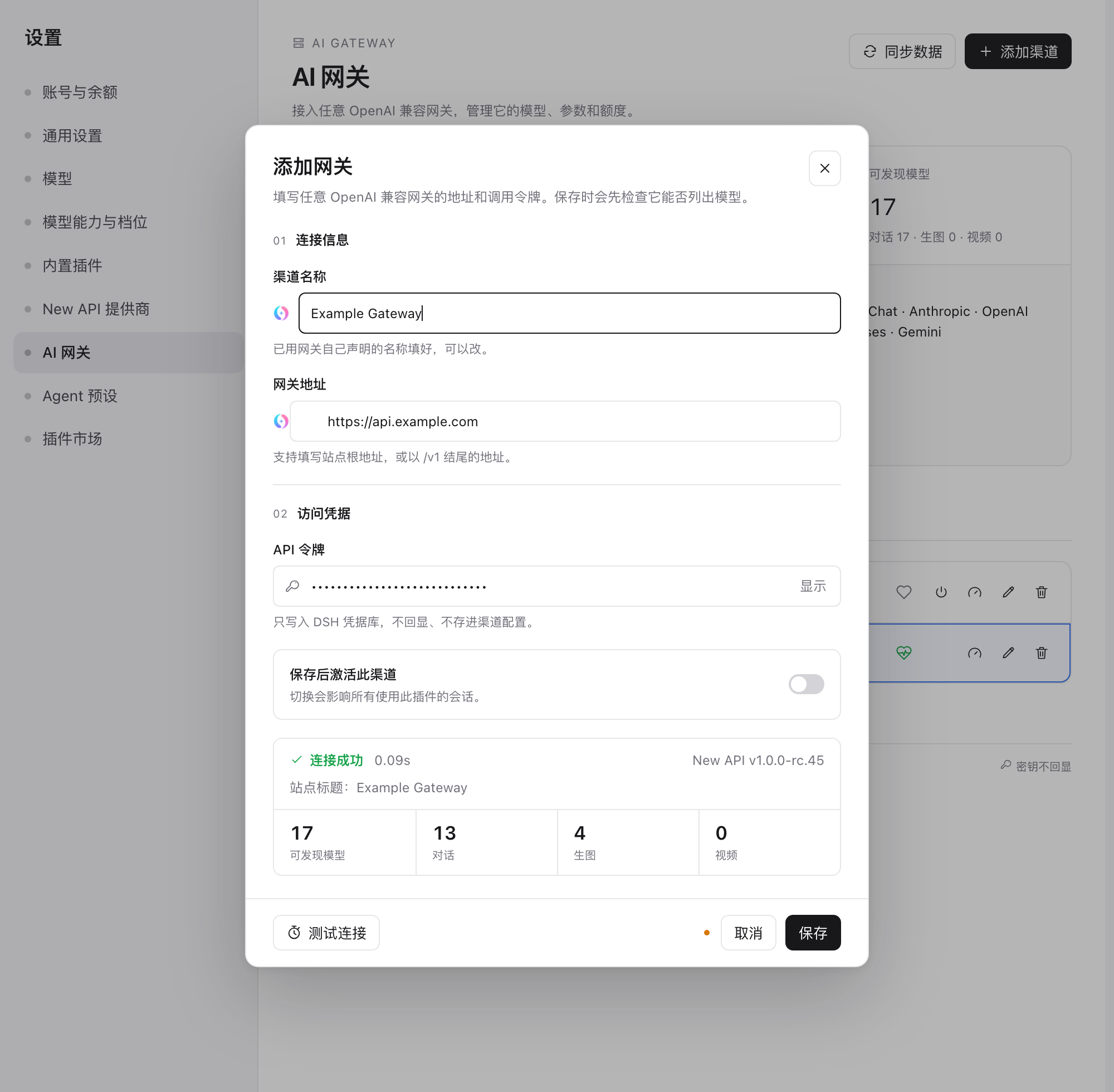
- Settings → AI Gateway → Add gateway.
- Enter the address and token, then Test connection.
- The name is filled with what the gateway calls itself (only when you have not typed one), its favicon previews in the address field, and the check reports the model counts.
- Save. The gateway's models appear in the chat model picker under AI Gateway.
Only one gateway is active at a time; switching affects every session using the plugin. Tokens are stored in the DSH credential store — never in the config, never returned to the page.
Privacy and safety
- Requests are read-only
GETs; no model is called and nothing is billed by probing. - Redirects are never followed, so a token cannot be forwarded to another host.
- Site icons are fetched only from the gateway's own origin, size-limited, and cached on disk for 24 hours.
- Identification uses only public endpoints and stores only public facts (family, version, title, icon) — no token, no user data.
- A gateway without a quota endpoint is reported as having none, never as an error.
Limits
- No image or video generation tools: the New API tools in
dsh-newapi-providerdepend on its own task API. A gateway's image models are listed but not driven from here. - Quota adapters cover the three families above. A backend that exposes quota some other way shows none until an adapter is added.
- Gateway identification is heuristic; a gateway that hides every public endpoint is treated as a plain OpenAI-compatible endpoint, which is still enough to use it.
Development
npm test                                    # 141 tests against local fake gateways
node scripts/probe.mjs --base <url>         # probe from a shell
GATEWAY_KEY=sk-... node scripts/probe.mjs --base <url>
License
MIT
Ähnliche Plugins
dsh-our-free-model
ebony-vinyl/dsh-our-free-model
dsh-routing-suite
yjh051108/dsh-routing-suite
dsh-workbuddy-connect
corrinehu/dsh-workbuddy-connect
dsh-connect-workbuddy
dingminhua/dsh-connect-workbuddy