dsh-python-manager
zlun-yan/dsh-python-manager
Binds one Miniconda environment to each workspace and skill, and creates or deletes conda environments or installs and removes pip packages from a sidebar page.
Installation
dsh plugin --profile web add github:zlun-yan/dsh-python-managerREADME
DSH Python Manager
One conda environment per workspace, one per skill — and the model never picks the interpreter.
🐍 The Python environment manager for DeepSeek Harness (dsh) 🐍
简体中文 · Install · How it works · Configuration · Details




Every DSH workspace runs on whatever Python happens to be first on PATH. The skill that needs pandas, the workspace that pins NumPy 1.x, and a model guessing which interpreter to call all share one environment — and one wrong pip install lands in the wrong place. DSH Python Manager adds a Python environments page to the sidebar: bind one Miniconda environment to each workspace and each skill, then manage conda environments and pip packages from the same page. The model never chooses an interpreter — the binding follows the session.
Highlights
🐍 A native page in the DSH sidebar: install the bundle, click the Python icon in the sidebar, and every conda environment, workspace, and skill on the machine is in front of you. No commands to remember, no config files to hand-edit, no second Python runtime installed.
- One environment per workspace, one per skill. A workspace binding applies to every session whose working directory is that workspace; a skill binding takes over the moment the model loads that skill. Priority: skill > workspace > DSH default, and an unbound session keeps DSH's stock Python behavior untouched.
- The model never picks the interpreter. Two host-side mechanisms do the work (below):
pythonandpiponPATHresolve to the bound environment, and a skill asking DSH for its bundled Python gets the bound one instead. The active skill comes from the session log — the last successfulskilltool call — never from a model instruction. - Package changes need a human yes. Install and uninstall first open a dialog naming the environment, package, version, and index URL; only a second request carrying the short-lived token executes pip. A shell
pip install …typed in a bound session is held by the tool approval gate with the same four facts. - Nothing touches your files. Bindings live in
$DSH_HOME/python-env-manager/state.json. No skill file, no workspace file, no harness config line is edited. Remove the bundle and every session is back to stock. - Zero dependencies, zero build. Node builtins only — no install scripts, no bundler, nothing to compile. The whole plugin is a single package.
- conda, found on its own.
CONDA_EXE,CONDA_PREFIX,PATH, and the usual Miniconda/Anaconda/Miniforge locations are all checked; when detection fails, onecondaPathline in the plugin config points it at your installation. - Mirrors one field away. The install form's index field carries presets: PyPI, Tsinghua, Aliyun, USTC, Tencent, Huawei, Douban.
Install
Requirements: a DeepSeek Harness with the web client (the page lives in the sidebar) and Miniconda, Anaconda, or Miniforge on the host machine.
Option 1, from the market. Once listed, it installs with one click from Plugins → Discover on dsh 0.2.1 and newer, or from dsh-market; the npm package is @zlun-yan/dsh-python-manager.
Option 2, from the Plugins page. Open Plugins → Add plugin and point it at this directory. @zlun-yan/dsh-python-manager appears under Installed, and the sidebar gains a Python environments entry with its Python icon.
Option 3, hand the install to your AI. Send it this line:
Install the DSH bundle at /path/to/dsh-python-manager, then open the Python environments page and tell me what it lists.
After either option the page's header shows the detected conda version. If conda is missing, the page says so outright, and condaPath in the plugin config points it at your installation.
Usage
Once installed, just work. Bind an environment to a workspace or a skill once, on the page; every session after that resolves it on its own. The page has three tabs:
- Environments — every conda environment under the detected root, with its Python version and pip packages. Create an environment (a name plus an optional Python version), delete one (base is protected), install a package with an optional version and index URL, uninstall anything installed.
- Workspaces — one environment per workspace. The binding applies to every session whose working directory is that workspace. The Active session resolution box shows, for each live session, its directory, its active skill, and the environment its
pythoncurrently resolves to. - Skills — one environment per skill, discovered from
~/.dsh/skills,~/.agents/skills,~/.agent, project skill roots, and the bundled skill catalog. A skill binding wins over the workspace binding.
How the binding reaches Python
Two host-side mechanisms are used, neither of which asks the model to choose an interpreter:
- Python shims on
PATH. The plugin prepends a small shim directory containingpython,python3,pip, andpip3. Each tool call receives trustedDSH_PYTHON_*values through the shell-environment registry. The shim reads those values and executes the bound interpreter; without a binding it delegates to the interpreter that was previously first onPATH, so unbound sessions keep their existing behavior. load_workspace_dependenciesresult rewrite. When a skill asks DSH for its bundled Python, the result is replaced with the bound environment's interpreter, site-packages directory, and installed distributions.
The active skill is derived from the session log (the last successful skill tool call), not from a model instruction. Workspace resolution uses the session's current working directory.
Package changes need confirmation
The page's install and uninstall flows first create a short-lived confirmation token and show a dialog containing the environment, package, version, and index URL. Only a second request with that token executes pip. In addition, a shell command such as pip install … or python -m pip install … in a bound session is held by the tool approval gate with the same four facts in the reason.
The manager page and its host API are owner-only: every request passes the composition's connection trust check.
See it work
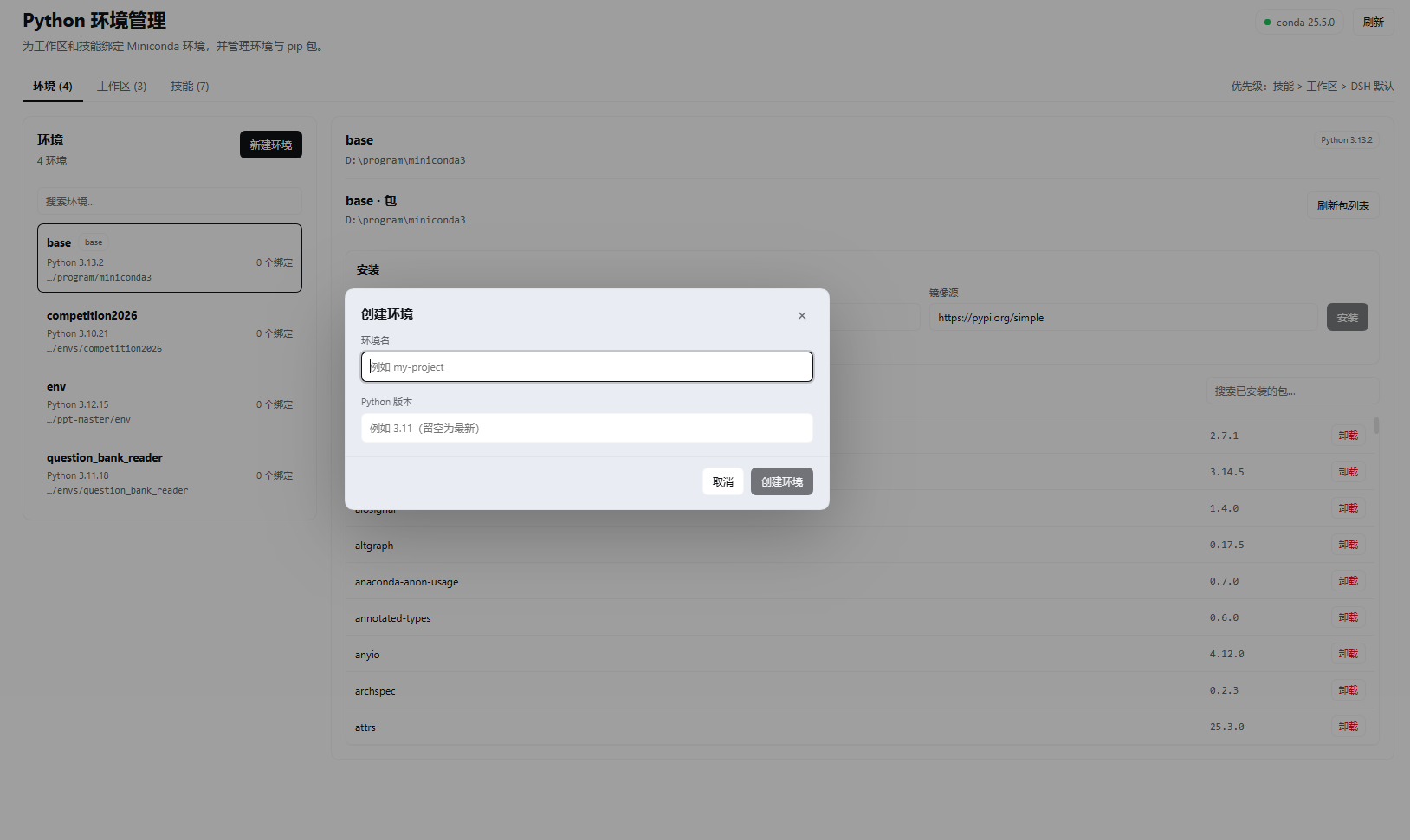
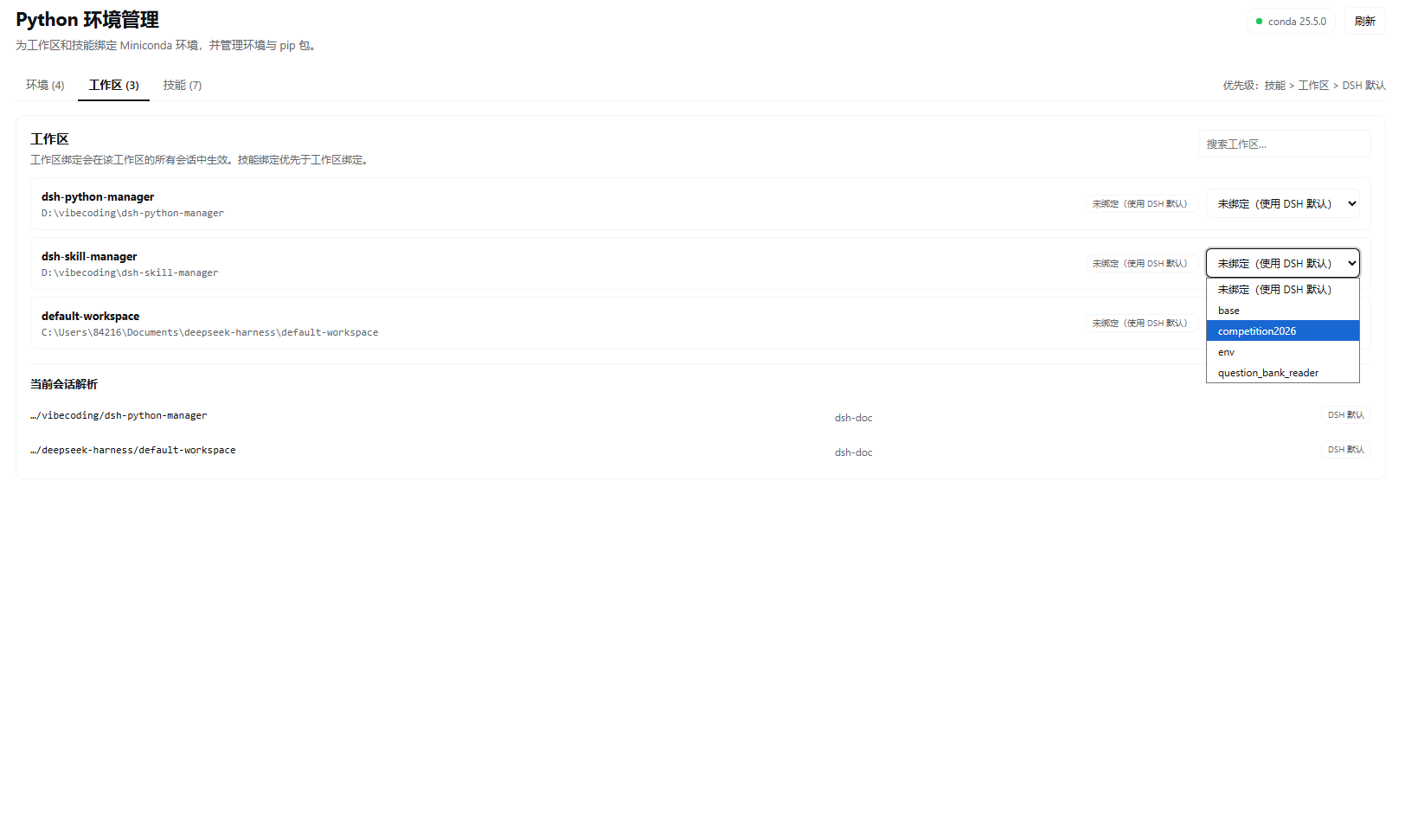
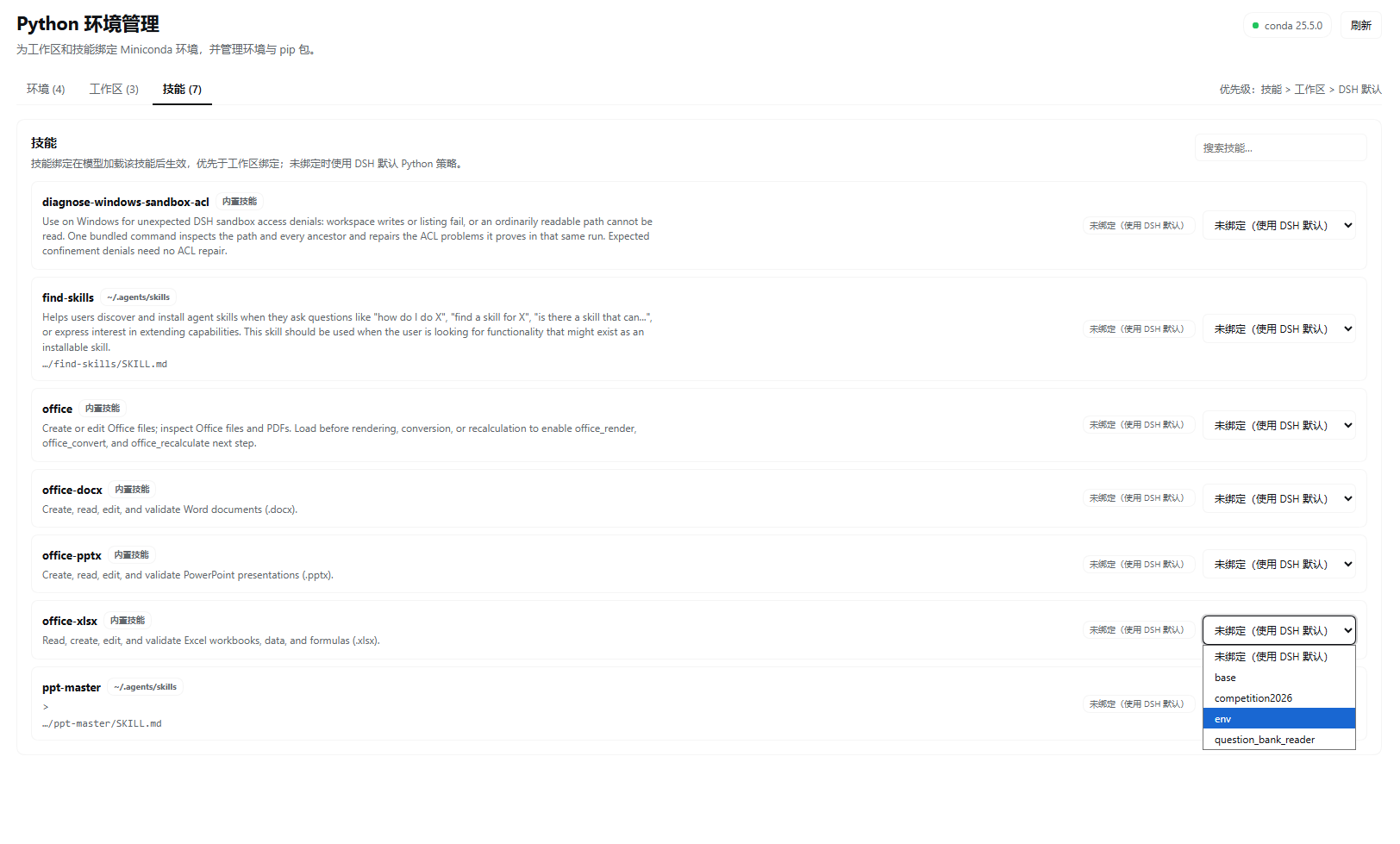
Unedited screenshots from a real machine. The page follows the DSH interface language; these shots show the Chinese UI.
Creating an environment is a name and an optional Python version — blank means the latest. The new environment is selected the moment it exists.
Binding a workspace is one dropdown per row. The bottom box resolves every live session — its directory, its active skill, and where its python points now.
Binding a skill works the same way. Each row shows where the skill came from — ~/.dsh/skills, ~/.agents/skills, the bundled catalog — its description, and the environment it is bound to.
Configuration
The bundle row accepts optional fields, edited on the bundle's page under Plugins:
- id: python-env-manager
  name: '@zlun-yan/dsh-python-manager'
  config:
    condaPath: D:\program\miniconda3\Scripts\conda.exe
    defaultIndexUrl: https://pypi.tuna.tsinghua.edu.cn/simple
    statePath: C:\Users\me\.dsh\python-env-manager\state.json
    shimDir: C:\Users\me\.dsh\python-env-manager\shim
    skillRoots:
      - D:\shared-skills
Every field is optional. Without condaPath, the plugin checks CONDA_EXE, CONDA_PREFIX, PATH, and common Miniconda/Anaconda installation directories.
Limitations
- conda is managed on the host machine; a remote or container-only filesystem is not supported by this first version.
- Skill bindings follow the last successfully loaded skill in a session. A session that has not loaded a skill falls back to its workspace binding.
- The shell-command approval guard recognizes common
pip/condainstall and uninstall forms. The manager page is the authoritative structured flow. - The plugin does not create a second Python runtime; it selects an existing conda environment.
Uninstall
Remove the bundle on the Plugins page and every session is back to stock Python. Delete $DSH_HOME/python-env-manager afterwards to take the state file and the shims with it.
Documentation
| Doc | Read it when |
|---|---|
| docs/DETAIL.md | The page, binding priority, and confirmation flow in short form |
| README.zh-CN.md | The same README in Chinese |
| client.js | The manager page: every tab, dialog, and label |
| index.js / lib/core.js | The host half: API, shims, bindings, conda detection |
Disclaimer
Provided as-is. conda, pip, and every package you install are governed by their own terms and quotas. The plugin selects and manages existing environments; it ships no Python runtime of its own and endorses no particular mirror.
Ähnliche Plugins
deepseek-harness
deepseek-ai/deepseek-harness
dsh-market
dsh-market/dsh-market
dsh-web (dsh-plugin-manager)
zhu1090093659/dsh-web
dsh-web
zhu1090093659/dsh-web