dsh-session-tidy
349840432m-dev/dsh-session-tidy
One-click tidy for the DSH session list: archive blank sessions and sessions inactive for N days, keep the newest N per workspace, clean truncated or instruction-prefixed titles, and disambiguate duplicate titles — with a preview sheet, selectable presets, and batch undo. Its HTTP routes have no DSH access check, so a web page open in your browser could call them.
Instalar
dsh plugin --profile web add github:349840432m-dev/dsh-session-tidyREADME
dsh-session-tidy — Session Tidy
A real, installable DeepSeek Harness plugin that tidies the sidebar session list in one click.
A resident “整理会话” chip sits just above the composer. It opens a preview sheet of proposed changes — archive blank sessions, rewrite truncated or instruction-prefixed titles, disambiguate duplicates, optionally archive stale sessions — and applies the selected ones in one action. Every batch can be undone.
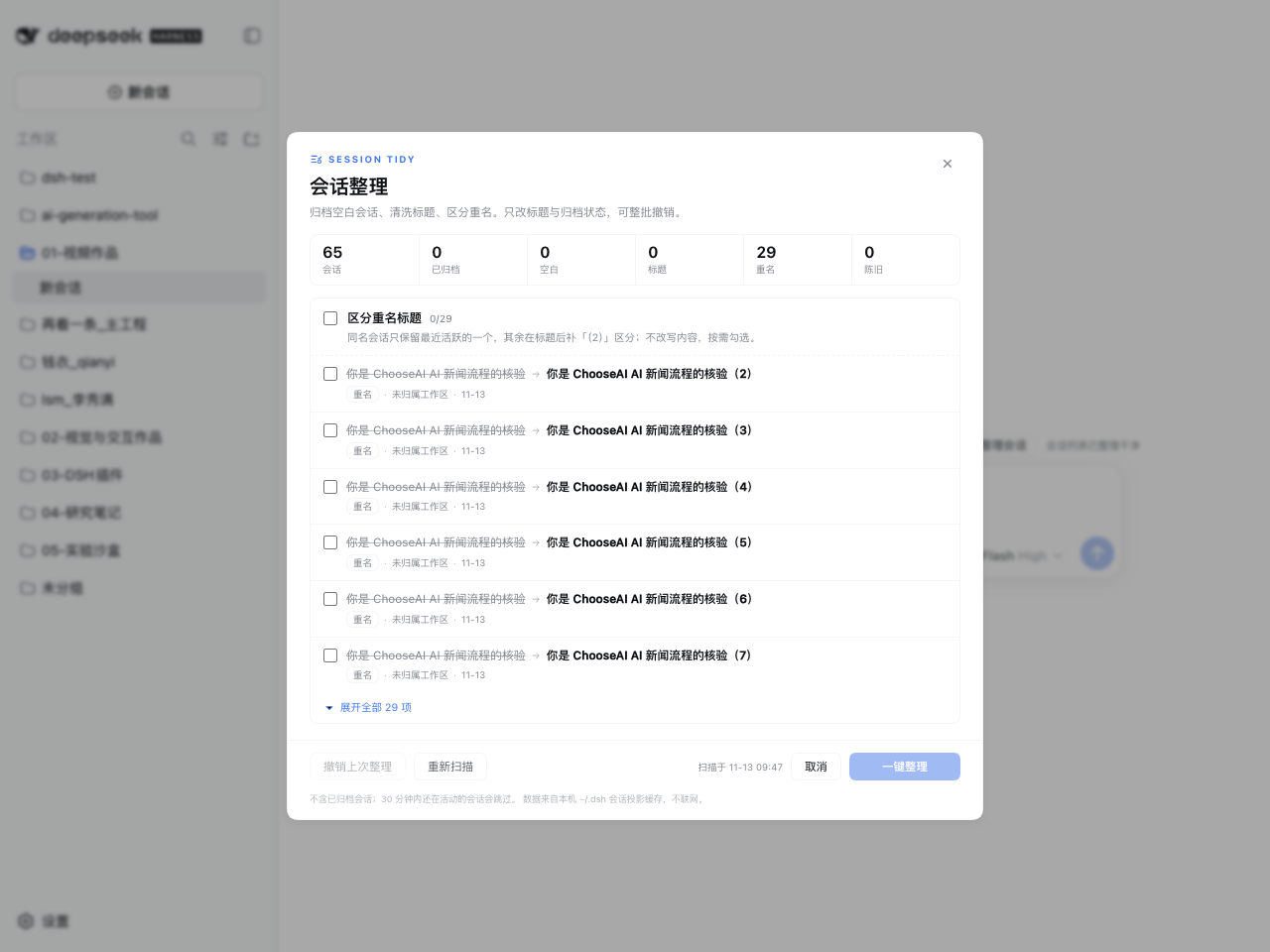
What it tidies
| Rule | Action | Default |
|---|---|---|
Blank sessions — never received a prompt (blank projection, or 0 turns with no first prompt) | archive (never delete) | ✅ on |
| Title cleanup — strips “you are a …” role preambles, code fences, URLs, newlines and truncation ellipses; caps at 30 display columns | rename | ✅ on |
| Duplicate titles — keep the most recently active one, suffix the rest with (2) | rename | ⬜ off |
| Keep newest N per workspace (3/5/8/12, default 5) — archive the tail of each registered workspace | archive | ✅ on |
| Stale sessions — no activity for N days (1/3/7/14/30/90, default 7) | archive | ✅ on |
Safety rails: archived, pinned, running and subagent-owned sessions are skipped; the session you have open and anything active within 5 minutes are skipped; at most 40 renames per run; the last five batches are recorded in data/undo.json for one-click undo.
Install
Requires DSH >= 0.2.0, Node >= 20.
# from GitHub source (build approval required)
dsh plugin --profile <profile> add github:349840432m-dev/dsh-session-tidy

# or the prebuilt tarball (no build step)
dsh plugin --profile <profile> add https://github.com/349840432m-dev/dsh-session-tidy/releases/latest/download/dsh-session-tidy.tgz
Then restart DSH Desktop (the Host half loads at boot). The Web half alone can be refreshed.
Data & privacy
Reads ~/.dsh/storages/session_projcache/sessions/*.json (titles, first prompts, turns, blank flag, last prompt time) and ~/.dsh/storages/workspace.json (workspace membership, archived/pinned state). No network, no model calls. Writes happen only after you press the primary action, and only touch titles and archive markers.
HTTP surface
| Path | Method | Purpose |
|---|---|---|
/session-tidy-api/status | GET | health, caches, last apply |
/session-tidy-api/plan | GET | tidy plan (?refresh=1 bypasses the 10 s cache) |
/session-tidy-api/apply | POST | {batchId?, actions:[…]} |
/session-tidy-api/undo | GET/POST | undo ledger / undo last batch |
Mutations go through sessionController.rename() and workspaceRegistry.archiveSession().
Development
node build.mjs
node verify/plan.test.mjs && node verify/routes.test.mjs && node verify/client.test.mjs
Host-side changes require a DSH restart (ESM caching). See STATUS.md for the verification record and README.zh-CN.md for the full Chinese documentation.
Plugins relacionados
billion-context
ranxianglei/billion-context
dsh-web-ui (dsh-chat-recovery)
zhu1090093659/dsh-web-ui
dsh-synapse
liangmianya/dsh-synapse
dsh-archive-manager
michengai/dsh-archive-manager