dsh-session-purger
595708049/dsh-session-purger
Permanently delete DSH session records from the sidebar context menu, removing the session log directory, the projection cache entry and the workspace registration in one action. A confirmation dialog guards every delete. Its /dsh-session-purger routes, including permanent delete, are mounted with webServer.register and carry no DSH Host/Origin admission check, so a web page open in your browser can delete session records through them.
Instalar
dsh plugin --profile web add github:595708049/dsh-session-purgerREADME
dsh-session-purger
彻底删除 DSH 会话 —— 右键左侧会话列表中的任意一条,即可把该会话从磁盘上真正删掉。
A DSH plugin that permanently deletes session records (logs, projection cache, workspace registration) from the sidebar context menu.
用法 / Usage
- 刷新一次 Web GUI 页面(让客户端包加载)。
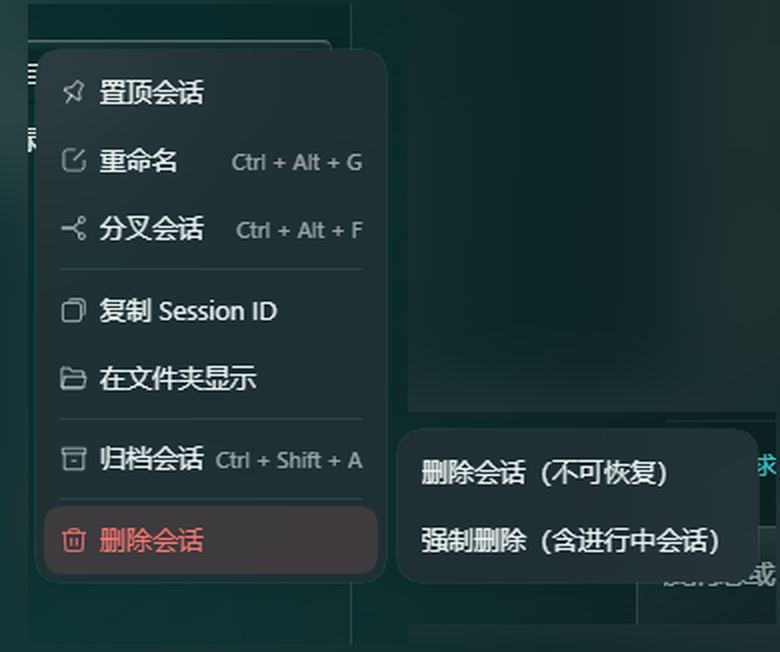
- 在左侧会话列表上右键任意会话 → 「删除会话」。
- 选择:
- 删除会话(不可恢复) —— 删除不在运行中的会话(打开过但已结束的会话也可以删);
- 强制删除(含进行中会话) —— 连正在跑一轮的那个会话一起删(删完当前页面会失联,请自行切换或重开)。
- 弹出二次确认对话框,点「删除」才真正执行;点「取消」、按
Esc或点空白处都会中止(不会发出任何请求)。
删除成功后侧栏立即消失,输入框的 @ 候选也会同步消失(两者都来自同一份会话存储列表)。

它到底删了什么 / What it deletes
| 位置 | 内容 |
|---|---|
~/.dsh/sessions/<项目目录>/<sessionId>/ | 会话日志 session.v4.jsonl.zstd(整个目录递归删除) |
~/.dsh/storages/session_projcache/sessions/<sessionId>.json | 标题 / 统计等投影缓存 |
~/.dsh/storages/workspace.json | 从工作区 sessionIds 摘除,并清除归档 / 固定标记 |
安全说明 / Safety
- 删除不可恢复,没有回收站。重要会话请先备份
~/.dsh/sessions/下对应目录。 - 只有正在跑一轮的会话默认不能删(接口返回
409 in-use);等这一轮结束,或改用「强制删除」。仅仅“打开过”不算占用。 - 宿主侧接口:
POST /dsh-session-purger/delete,body{"id": "<sessionId>", "force": false};GET /dsh-session-purger/list列出可删除的会话(每行带live与running)。
安装 / Install
从本地目录安装:
dsh plugin --profile desktop add file:<path-to-this-repo>
或从 GitHub 安装:
dsh plugin --profile desktop add github:595708049/dsh-session-purger
装好后重启 DSH 或重载插件,然后刷新页面。
本地
file:依赖是文件复制而非符号链接,改完源码要把文件同步到~/.dsh/profiles/desktop/node_modules/dsh-session-purger/再重载插件。
开发备注
- 宿主入口
index.js:注册webServerexact 路由。注册是幂等的(先查server.exact再 mount),因为桌面端禁用插件时不会卸载已注册的路由,重复注册会抛webserver: duplicate exact route导致整个插件条目不激活。 - 浏览器入口
client.js:window.__ModuleLoader__.load({ id, factory })外壳,通过contextMenus.register({ target: 'session' })挂右键菜单,子菜单两项(确认 / 强制),父项图标通过 keyed slotcontextMenu.icon注册(keydsh-session-purger.delete)。 - 二次确认框是自己画的 DOM 模态框(
confirmDialog(),z-index2147483000),因为客户端插件 API 没有dialog/confirm服务;取消走Esc、点背景、点「取消」三条路径,全部在发出请求之前返回。 - 删除顺序很重要:先把 sessionId 从 workspace 摘除,再删日志目录 ——
workspace.sessionIds会按candidateMatches过滤,目录一删就无法再匹配,detach 会变成空操作。
License
MIT
Plugins relacionados
billion-context
ranxianglei/billion-context
dsh-web-ui (dsh-chat-recovery)
zhu1090093659/dsh-web-ui
dsh-synapse
liangmianya/dsh-synapse
dsh-archive-manager
michengai/dsh-archive-manager