dsh-team-bots
8kugames/dsh-team-bots
Project spaces, group chats, task boards, memory and usage for teams of DSH bots
Instalar
dsh plugin --profile web add github:8kugames/dsh-team-botsREADME
DSH Team Bots
DSH Team Bots is the npm package dsh-team-bots, a DSH (DeepSeek Harness) plugin that packs a collaborating crew of bots into one workspace: project group chats, a task board, write-scope parallel scheduling, memory and skills, usage and cost, plus a personal WeChat channel.
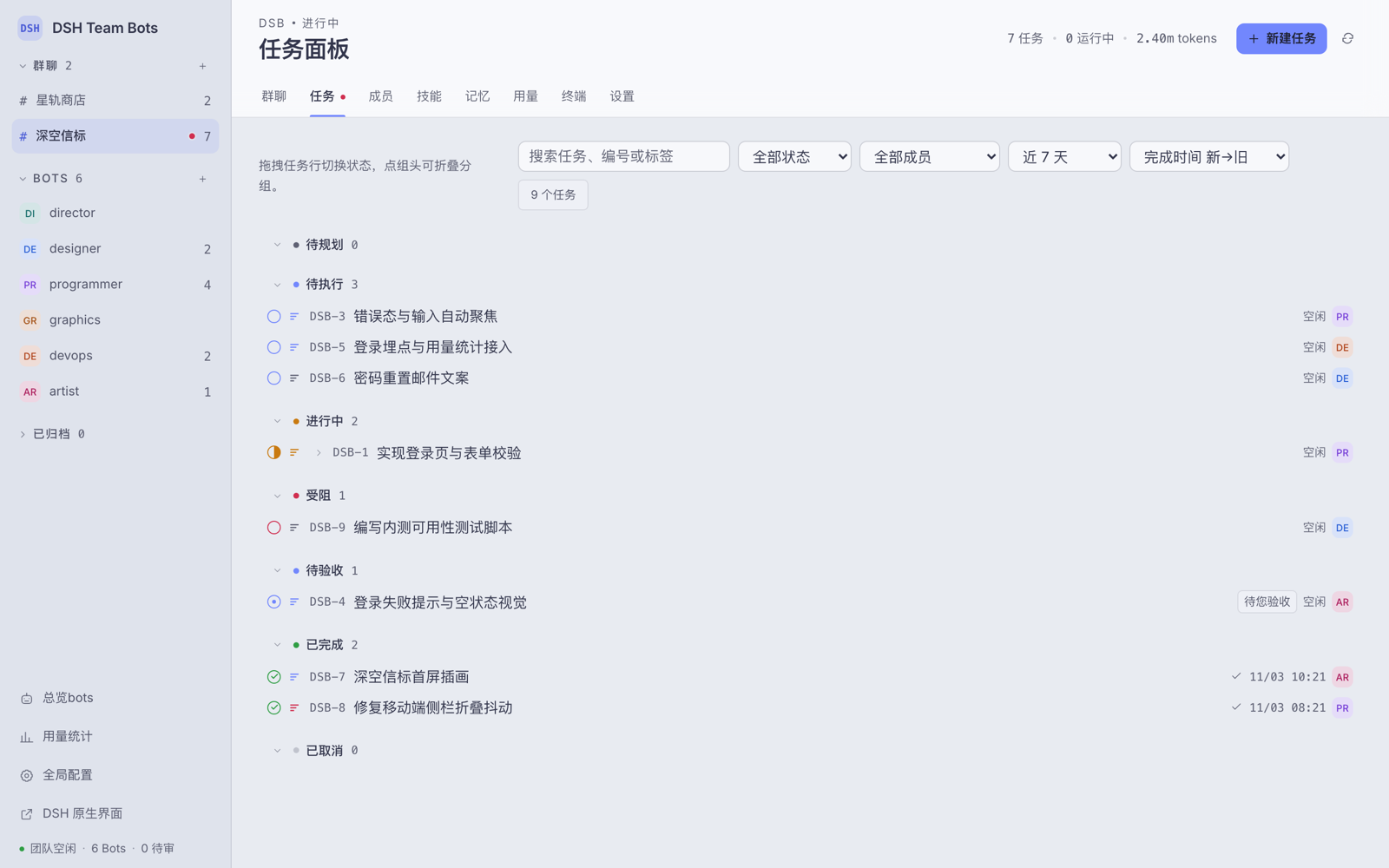
This file is the English edition of the project documentation; the Chinese edition is docs/README.zh.md.
1. Project Overview
dsh-team-bots runs inside the DSH Web process — no separate service — and lets several bots divide work across the same project spaces, exposing the collaboration as an operable web workspace.
- Collaboration happens in projects, not in a chat window. Each project has its own group chat, members, tasks and working directory; the project director bot splits, assigns and accepts work there.
- Parallelism is declared, not hoped for. A task declares the paths it will write; the scheduler runs two write runs in the same project in parallel only when both declare and their path prefixes do not overlap. Anything undeclared is treated as serial.
- Everything is traceable. Every run keeps a trajectory, duration, token count and cost; bot configuration keeps an immutable history that can be rolled back; secrets stay encrypted at rest and are materialised as one-time plaintext files that are burned after use.
The repository shape: index.js is the plugin entry point, src/ is the server side and scheduler, ui/ is the workspace frontend, tests/ holds the guard tests, and docs/ holds design specs, review records and screenshots.
2. Quick Start
2.1 Requirements and install
Node.js ≥ 22.19 (see engines in package.json) and the DSH CLI installed (dsh --version); the plugin runs inside the DSH Web process, with no standalone process or port.
cd <repo>
npm pack                                        # produces dsh-team-bots-<version>.tgz
dsh plugin --profile <name> add ./dsh-team-bots-<version>.tgz
dsh --profile <name>                             # read the tokenised dsh web entry from the startup log
2.2 Reinstall and local preview
npm run profile:install -- --profile <name>     # installs into team-bots when --profile is omitted
npm run dev                                     # local preview at http://127.0.0.1:4317, fake runtime
profile:install packs the repository and reinstalls the plugin into a profile. Plugin files inside a profile are a snapshot and DSH does not pick up replaced files on its own: after changing code you must reinstall, or the page sticks at "connecting to the team space". Team data is decoupled from the profile: DSH_TEAM_WORKSPACE / DSH_TEAM_DATA alone decide the data directory. The preview server uses a fake DSH runtime — no authentication, no DSH configuration touched, not for production; override the port with PORT.
2.3 Data, secrets and skills
Data lives under DSH_TEAM_DATA (default <workspace>/.data, workspace root DSH_TEAM_WORKSPACE, default ~/.dsh/workspace/team-bots): team.sqlite, wechat-channel.sqlite, secret.key, memory/, messages/ and secrets-runtime/ (burned on TTL expiry). Back up secret.key together with the data — without it the existing ciphertext cannot be decrypted. Schema changes go through the idempotent migrations in src/db-migrations.js. Skills come from a shared pool fixed at ~/.agents/skills, plus project-local <project>/.agents/skills, <project>/.claude/skills and <project>/.codex/skills.
A template for the common variables lives in .env.example; do not put a .env file in the repository root, because that would leak DSH_* into npm test and npm run dev.
2.4 Entry points and environment variables
http://<host>:<port>/                     auto-login, straight into the team workspace
http://<host>:<port>/api/dsh-team/ui      the DSH Team Bots workspace (direct)
http://<host>:<port>/index.html           the native DSH web UI
The first visit to the home page exchanges the current startup token for a 30-day login cookie. Auto-login means anyone who can reach the port becomes owner, so listen on the local machine or a trusted network; public exposure needs an HTTPS reverse proxy that forwards Host and WebSocket correctly.
The two paths that matter are DSH_TEAM_WORKSPACE (team workspace root) and DSH_TEAM_DATA (team database and run records); every other variable, its default and its resolution order (explicit env > value saved on the page > code default) live in src/config.js.
3. Feature Overview
- Project group chat: every project has one group chat and one director bot. Plain messages,
@Bot,/task @Bot <title>,/rememberand/clearare supported, with/and@completions for commands, skills and members. Conclusions stay in the chat; full deliveries go to task comments. - Task board: a Linear-style panel grouped by status, with a parent/child tree, priority and assignee, comments delivered into running sessions, drag-to-transition, and inline delivery artefacts and run list.
- Write-scope parallel scheduling: declared write scopes decide whether two write runs in one project may run at once; write runs are independent, and neither tasks nor chats block one another.
- Memory and skill pool: bot- and project-level long-term memory with a human review queue; the shared skill pool is fixed at
~/.agents/skillsand projects can add their own skill directories; skill changes go through proposal approval with rollback snapshots. - Versioned evolution and team tools: role, model, intensity and skill changes go through proposal approval, and bot configuration keeps an immutable, rollback-able history. The plugin registers the team tools for task assignment, review, memory, recall, evolution proposals, direct bot messaging and secret requests.
- Secret pipeline: AES-256-GCM at rest; once approved, materialised into the data directory (not the project workspace) and burned when the run ends or the TTL expires; messages and run output are always masked as
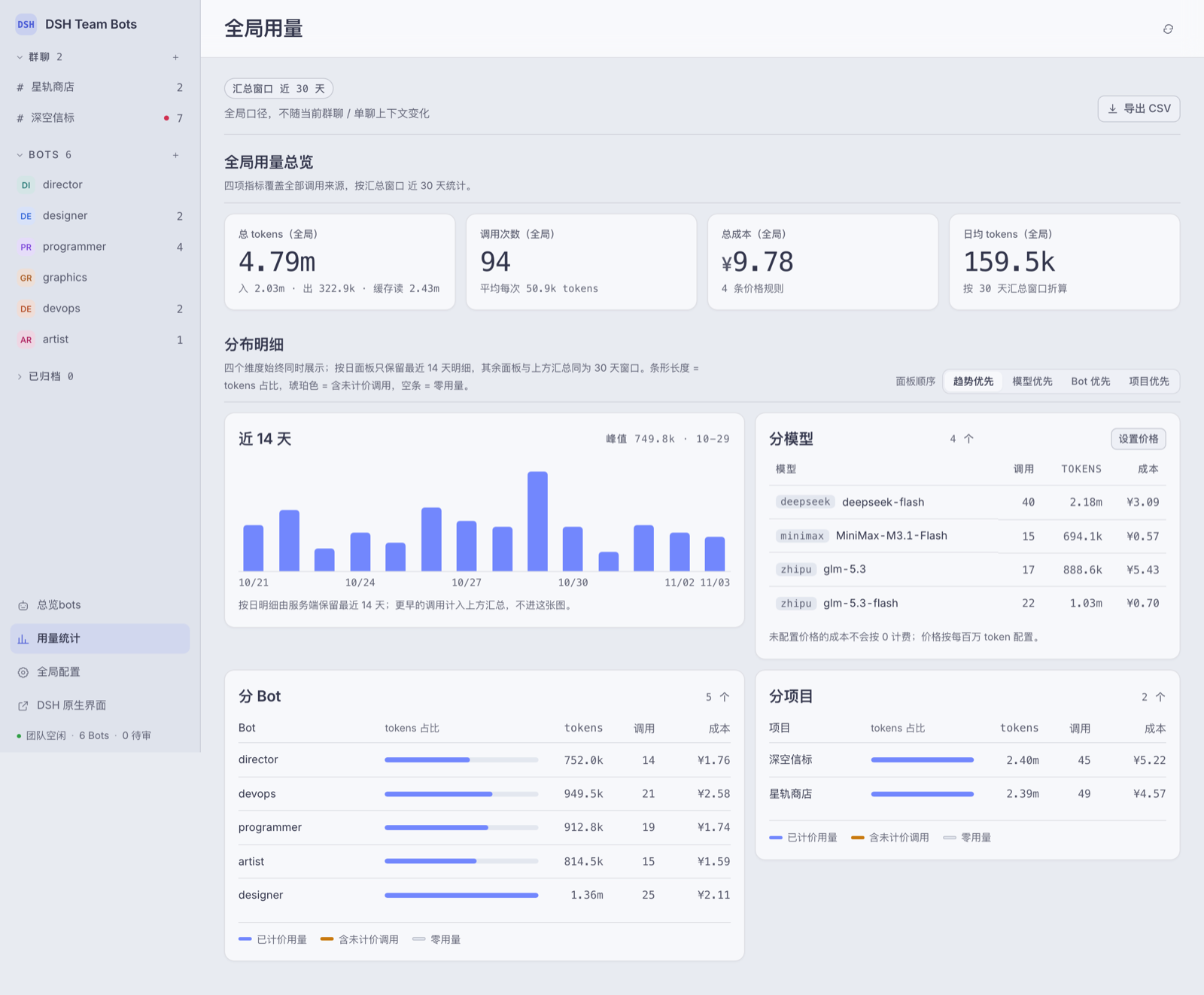
$<name>. - Usage and cost: tokens, call counts, cost and runtime aggregated at global, project and bot level; cost comes from configurable model prices and calls without a price are not billed as zero; CSV export and monthly reconciliation are available.
- Approvals, questions and terminal: privilege or human-answer requests become workspace cards — approvals time out to
rejected, an expired question stays answerable. Each project has an interactive terminal with a hard timeout, live tailing, cancellation and persisted history. - WeChat channel and code hygiene: QR-authorised task push plus a plain-text command surface (see 4.4); a per-project line limit (800 by default) is scanned at the end of every run, and an over-limit file triggers one 【系统指令】 asking the director to schedule a split card.
4. Architecture and Layout
4.1 Wiring
apply(ctx, config) in index.js is the only entry point, and it assembles the layers in dependency order — configuration, database, domain service, host runtime, team tools, skill pool, HTTP. service.initialize() then creates the database and seeds the default bots and buddies before service.start() brings up the scheduler.
4.2 The src/ directory
| Path | Responsibility |
|---|---|
index.js, src/config.js, src/db.js, src/db-migrations.js | plugin entry point; configuration resolution; SQLite access and idempotent migrations |
src/service.js, src/services/, src/runtime.js, src/services/runtime/ | the TeamService facade and its domain methods; the host adapter (prompts, sessions, model recovery, trajectories) |
src/http.js, src/api.js, src/tools.js, src/botmsg.js, src/skill-parse.js | HTTP routes and UI slices; the /api/dsh-team/api dispatch entry; team tools; bot-to-bot messages; skill parsing |
src/wechat/, src/secrets.js, src/pricing.js, src/usage*.js, src/skills*.js, src/seed-bots.js, src/updater.js, src/paths.js, src/util.js, src/errors.js | WeChat channel; secret crypto; pricing and usage; skill pools; seed bots; update check; path boundaries; utilities; error types |
4.3 The ui/ directory
The frontend is plain ES modules with no build step; every slice is loaded straight from an HTTP route. ui/modules/ holds one module per domain, ui/styles/ one CSS file per domain, and ui/i18n/{zh,en}.js the interface dictionaries. Contribution rules for this tree (style-slice registration, the 800-line limit) are in CONTRIBUTING.md.
4.4 The WeChat channel
The channel is off by default (DSH_TEAM_WECHAT=0) and becomes active after QR authorisation. Its command surface is plain text, and 帮助 / help / ? pulls it up at any time:
| Command | Effect |
|---|---|
帮助 / help / ? | show the command help |
状态 | overview of the projects and the tasks pending review |
验收 <task number> [comment] | accept a delivery, e.g. 验收 web-3 做得好 |
驳回 <task number> <reason> | send it back for rework; the reason is mandatory |
详情 <task number> | show the task card and its latest comments |
q | list the project keys that can be assigned |
<key>: <message> | forward a message into the project chat for the director to arrange, e.g. web: 上线新版官网 |
Pushes go through a local outbox; its discard policy (retry budget, batching window, connection-epoch retention) is defined in src/wechat/channel.js. When investigating a missed push, outbox.attempts and gave_up_at tell you whether the item was dropped by design or is still queued.
5. Testing and Development Conventions
5.1 Common commands
npm test                        # node --test "tests/*.test.js"
npm run dev                     # local preview (fake runtime)
npm run doctor                  # check Node/DSH versions and the writability of the workspace and skill-pool paths
npm run profile:install         # pack and reinstall into a profile (team-bots by default)
npm run backup                  # back up the team data
npm run restore-check           # check that a backup can be restored
5.2 Guard tests and commit conventions
npm test covers every feature domain plus the architectural pins. The guard-test details, the commit conventions and the ui/ contribution rules are in CONTRIBUTING.md.
5.3 CI
Pushing a v* tag triggers the publish workflow (.github/workflows/publish.yml): it installs dependencies, runs the full npm test, and only publishes to registry.npmjs.org when everything is green.
6. Troubleshooting and FAQ
Q: I changed the code but the page is still the old one?
The plugin files inside a profile are a snapshot and are not hot-reloaded. Reinstall with npm run profile:install -- --profile <name>. A page stuck at "connecting to the team space" usually has the same cause.
Q: Where does the data live, and how do I take it to another machine?
Under <DSH_TEAM_DATA> are team.sqlite, wechat-channel.sqlite, secret.key, memory/ and messages/. Back it up with npm run backup, and do not leave secret.key behind — without it the existing ciphertext can never be decrypted again.
Q: WeChat did not receive the push?
Look at outbox.attempts and gave_up_at first: a value means the item was dropped by design, not missed; no value means it is still in the queue.
Q: What is the "code hygiene" alert in the project chat? At the end of every run the source files in the project workspace are scanned, and a file over the project's line limit (800 by default, judgement line 880) triggers one 【系统指令】 asking the director to schedule a split card. Raise the limit in the project settings, or set it to 0 to switch the check off.
Q: Can it be exposed to the public internet?
The plugin ships no sandbox: bot sessions run under DSH's danger-full-access as the current user. Together with auto-login (reaching the port means owner), public exposure requires an HTTPS reverse proxy and your own authentication; teams that do not trust each other should not share one DSH instance and workspace.
Screenshots
Usage stats carry the summary window, the last 14 days of detail, a per-model / per-bot / per-project breakdown and a CSV export:
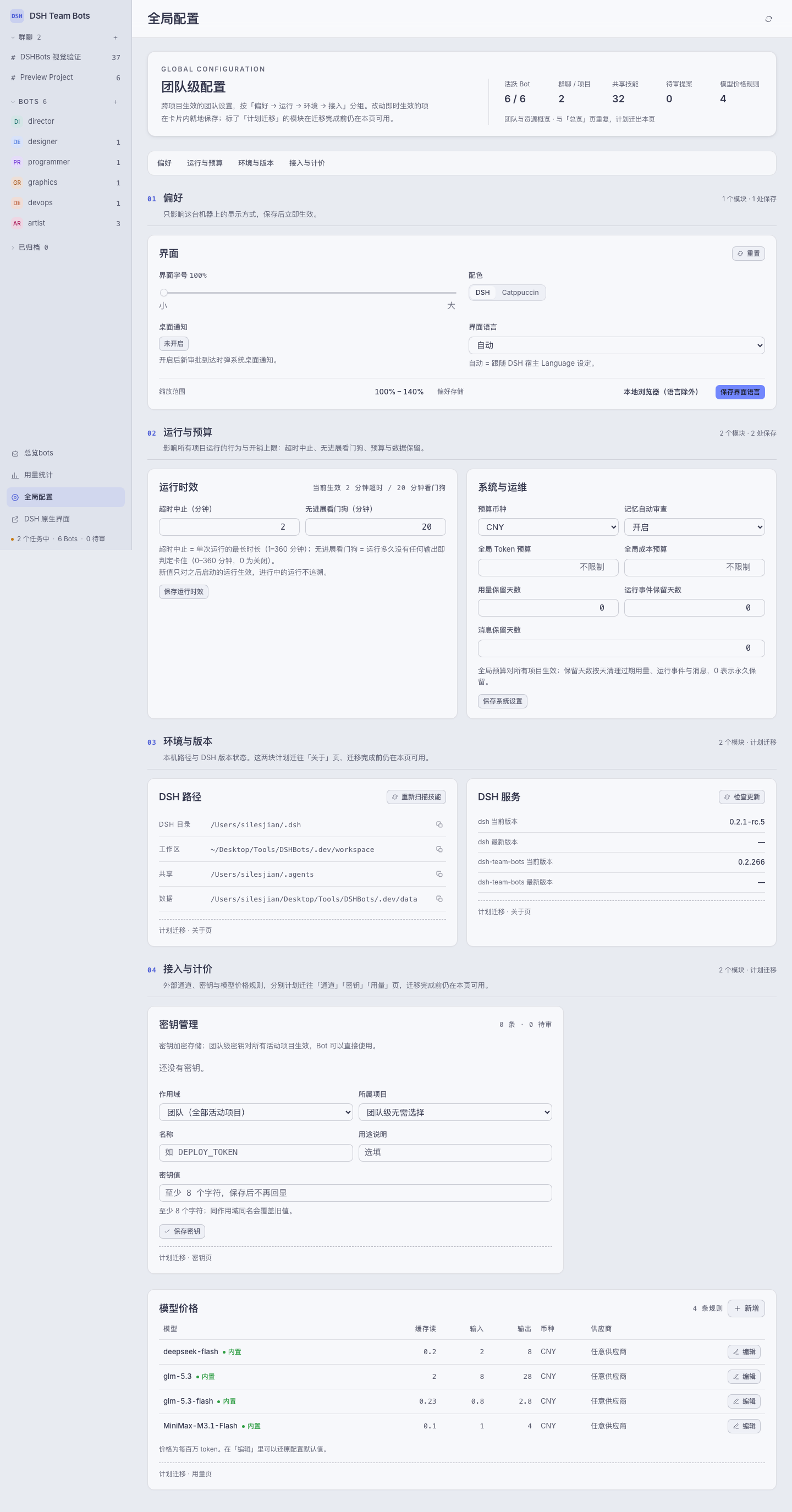
The global configuration page keeps only the core groups — preferences, run limits and ops; channels, secrets, version status and pricing rules live on their own top-level pages:
License
Apache-2.0, see LICENSE and NOTICE in the repository root.
Plugins relacionados
DeepSeek-Balance-Whale-Widget
meteornox/deepseek-balance-whale-widget
dsh-context
bowenliang123/dsh-context
dsh-cost-meter
han-1413141/dsh-cost-meter
dsh-damage-pulse
wssfk12138/dsh-damage-pulse