dsh-xray
alloevil/dsh-xray
Rayos X para su DeepSeek Harness: vea qué hay realmente cargado, por qué y qué le cuesta.
Instalar
dsh plugin --profile web add github:alloevil/dsh-xrayREADME




X-ray for your DeepSeek Harness — see what's actually loaded, why, and what it costs you.
The Problem
dsh --dump-config shows you the composed tree. The plugin panel shows you a flat list. Neither tells you why a plugin is there, what breaks if you disable it, or what it silently costs you.
dsh-xray does.
Static commands work even when dsh cannot boot;
deps/health/cost/shadowand the agent tool need the plugin mounted.

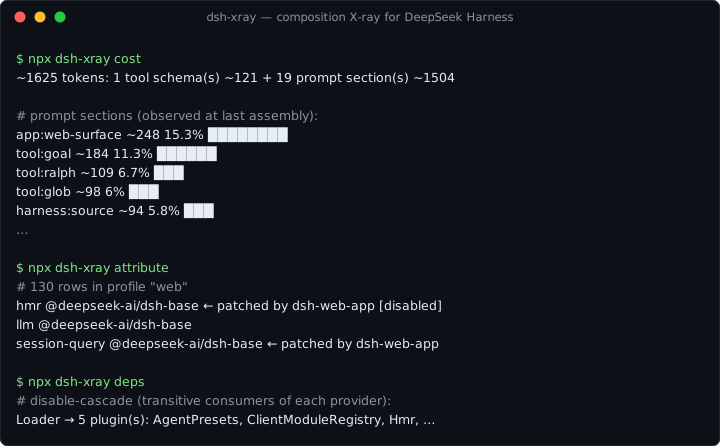
npx dsh-xray attribute   # which layer introduced each row, and who patched it since
npx dsh-xray conflicts   # rows whose fields have multiple writers, and who wins
npx dsh-xray diff        # declared (static layers) vs actual (dump-config) tree
npx dsh-xray snapshot    # content-addressed lockfile of the effective composition
npx dsh-xray deps [svc]  # service dependency graph: providers, consumers, disable-cascade
npx dsh-xray health      # plugin lifecycle health: failed fibers, pending injects, transitions
npx dsh-xray cost        # context cost: prompt sections + tool schemas, estimated tokens
npx dsh-xray shadow      # services provided by multiple plugins
npx dsh-xray audit       # static scan of out-of-tree plugins for sensitive touchpoints

🔍 Layer AttributionWhich layer introduced each active plugin: kernel bundle, profile dependency, 📊 Declared vs. Actual DiffInstalled-but-inactive, uninstalled-but-lingering patch rows — all surfaced. ⚡ Conflict DetectionPlugins patching the same config row, and which one silently wins. 📸 Composition SnapshotExport the effective composition as a lockfile; reproduce it elsewhere. |
🌐 Service Dependency GraphWho provides and consumes each service; what cascades if you disable X. 💊 Runtime HealthPer-plugin fiber lifecycle state, startup failures, transition history. 🤖 Agent Self-IntrospectionThe 🖥️ Web PanelMounted in
What every request actually carries — prompt sections observed at assembly, blended with tool schemas: And when a patch row targets an id that doesn't exist (dsh skips it silently), 🛡️ Capability AuditHeuristic static scan: network egress, shell, filesystem, env, eval. |
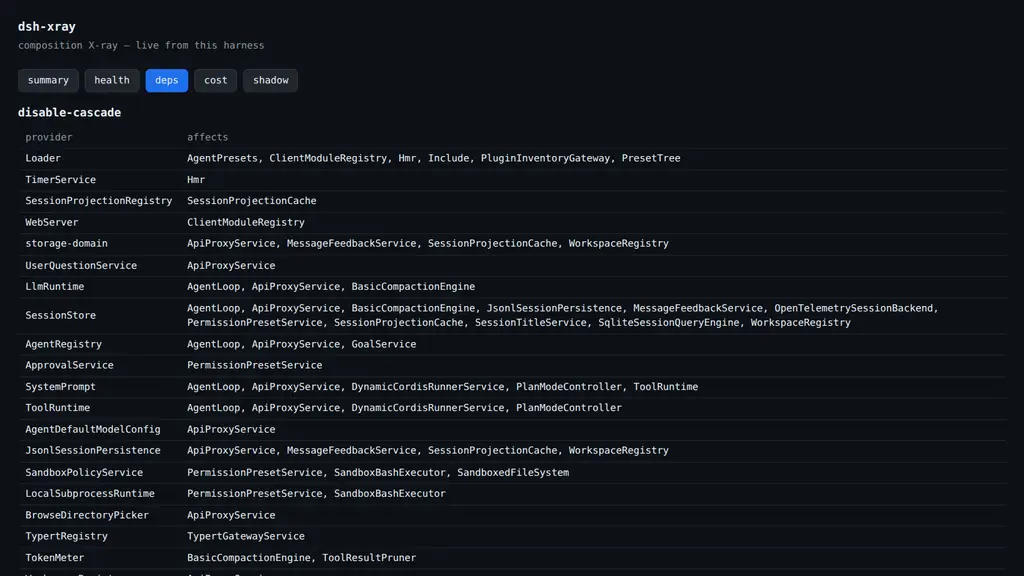

Mounted in the tree, dsh-xray registers an xray_composition tool (view: summary | deps | health | cost | shadow), so an agent can answer:
"What capabilities do I have?" / "What plugin provides X?" / "Why is Y unavailable?"
— about itself.

dsh-xray reads; it never runs.
- Loader
!!jsexpressions in patch files are parsed as opaque markers and never evaluated - The CLI never executes plugin code (
auditis a pattern scan over source text) - The mounted plugin writes only under
$DSH_HOME/xray/ - See SECURITY.md

dsh plugin --profile web add dsh-xray
All commands take --profile <name> (default web) and --json.
| Command | Behavior |
|---|---|
diff | Exits 1 when the trees disagree |
health | Exits 1 when any plugin is unhealthy |
attribute, conflicts, snapshot | Fully static — work even when dsh cannot start |
deps, health | Read runtime snapshot at $DSH_HOME/xray/runtime.json |

Diagnostic imaging for a running composition — complementary to dsh-doctor (rescue & recovery).
| Feature | Category |
|---|---|
| Layer attribution | 🔍 Inspection |
| Declared vs. actual diff | 🔍 Inspection |
| Conflict detection | 🔍 Inspection |
| Composition snapshot | 📦 Export |
| Service dependency graph | 🌐 Runtime |
| Runtime health | 🌐 Runtime |
| Agent self-introspection | 🤖 AI |
| Capability audit | 🛡️ Security |
| Service shadowing | 🌐 Runtime |
| Context cost | 💰 Optimization |
License
Plugins relacionados
deepseek-harness
deepseek-ai/deepseek-harness
dsh-web (dsh-plugin-manager)
zhu1090093659/dsh-web
dsh-web
zhu1090093659/dsh-web
dsh-web-ui (dsh-plugin-manager)
zhu1090093659/dsh-web-ui