fanframe
anglenaris/fanframe
FanFrame (繁界, “Fanxing’s realm”) lightly polishes the DeepSeek Harness Desktop UI for a more comfortable everyday experience.
Instalar
dsh plugin --profile web add github:anglenaris/fanframeREADME
繁界 · FanFrame
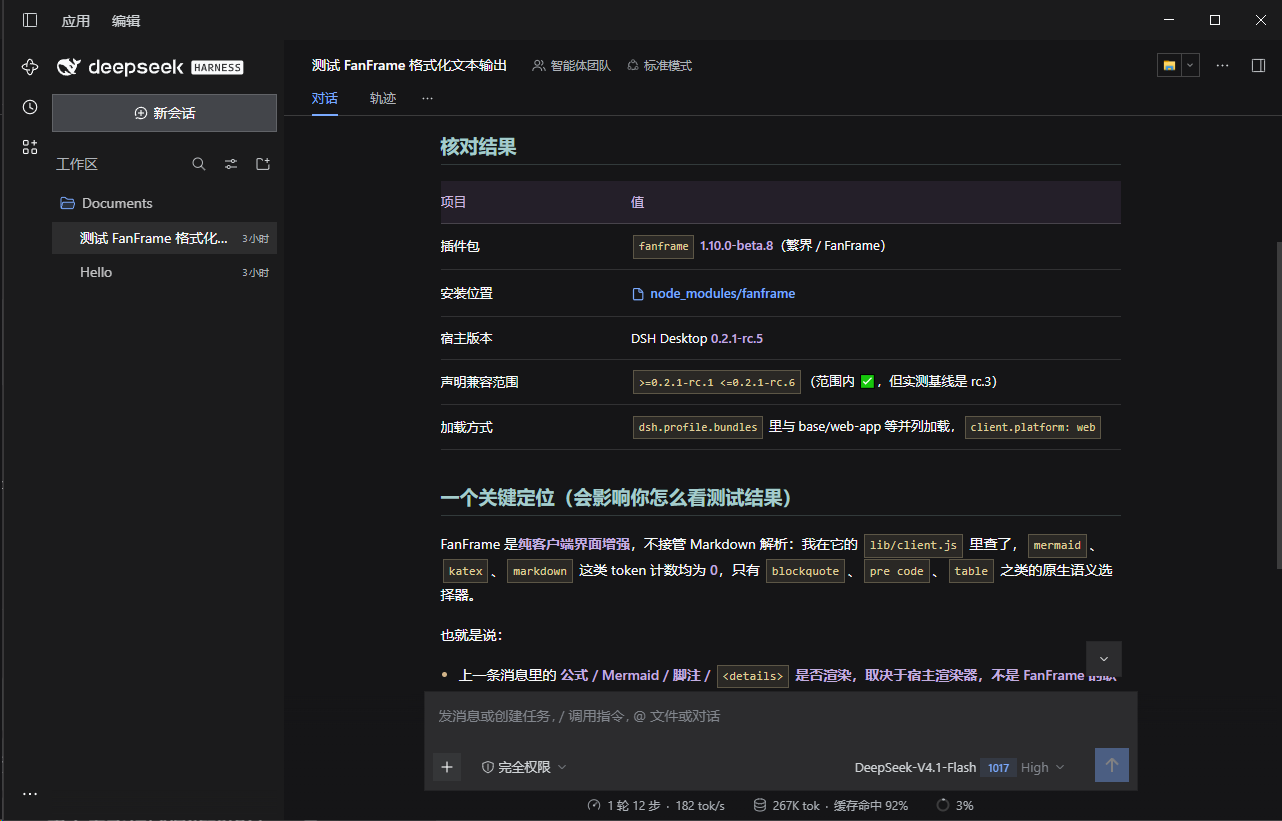
繁界 - 意思是“繁星的域界”,这个插件通过对DSH桌面版的UI界面进行轻度的打磨,带来更舒适的日常交互体验。我为DSH带来了放置图标的统一侧边栏,给对话列表充足的空间,同时避免插件喜欢随意摆放自己的图标造成的混乱。此外,为对话正文增加了染色处理,让文字阅读更轻松愉快。最后,通过冷峻的无圆角风格和大量增加的细微交互动画,增加一些小小的精致感。
界面预览
主要功能
- 直角外观。 统一界面的直角风格,调整侧栏会话标题的明暗层次。保留原生按钮和已有操作入口。
- 聊天阅读配色。 整理 Markdown 标题、强调文字、行内代码、引用与表格的配色。相关文字颜色跟随宿主的浅色或深色主题调整。
- 悬停与聚焦反馈。 为设置导航、输入框等控件补充状态反馈,保留设置项的当前选中态。沿用现有描边,不额外添加焦点外框。
- 短时动效。 为部分控件、浮层和折叠区域补充过渡,让新出现的任务列表、目标栏与本地发送回显淡入。保留宿主已有动效,历史消息不补播,新增动效尊重“减少动态效果”设置。
- 侧栏与插件列表。 整理窄图标栏布局,保留必要的滚动空间。插件列表支持搜索、恢复默认顺序,以及按名称升序或降序排列。
- 子智能体目录。 用鼠标打开目录时默认定位到末尾,开始手动浏览后不持续吸底,已有键盘焦点保持可见。可查询到模型信息时,用提供方与模型名替换对应目录项的摘要;无法查询时保留原生摘要。
版本与安装
当前公开版本为 1.10.0-beta.8,npm 包名为 fanframe。中文显示名为“繁界”,英文显示名为“FanFrame”。
在 DSH 插件管理器中添加 fanframe@1.10.0-beta.8,安装后启用插件。latest 和 beta 标签目前均指向这一测试版;latest 不代表稳定版。
兼容范围
- 安装兼容声明: DSH Desktop
0.2.1-rc.1至0.2.1-rc.6,包含两端,对应>=0.2.1-rc.1 <=0.2.1-rc.6。 - 实际验证基线:
0.2.1-rc.3。其他版本尚未逐一实测,不能把声明范围理解为完整的逐版验证结果。 - 宿主依赖: 部分样式与目录功能依赖 DSH 的界面结构和兼容接口。宿主升级后可能需要适配,不保证各版本呈现完全一致。
Desktop 0.2.1-rc.3 更新提示: 宿主可能缓存旧的客户端注入版本。更新插件后先确认新版本是否生效;确需完整重载时,保存当前工作后正常退出并重新启动 Desktop,避免直接硬刷新页面。
从旧包迁移
fanframe 不是旧 fan-de-hai 的 npm 原位升级。已使用旧包时,请按以下顺序迁移:
- 记录旧包版本,并保留回滚副本。
- 禁用旧
fan-de-hai插件或 bundle。 - 安装并启用
fanframe,检查显示名称、图标和常用操作。 - 确认正常后,再决定是否移除旧包。
不要同时启用两个包,也不要通过重命名安装目录来迁移。需要回滚时,先禁用 fanframe,再启用旧包。
使用边界
繁界调整的是已有界面的呈现和局部列表操作,不是模型接入、附件管理或图片查看器插件。它不替换原生图片查看器,也不宣称修复图片上传或存储问题。
同时使用其他修改全局主题、侧栏或浮层的插件时,样式可能互相覆盖。禁用或卸载繁界时,会清理插件自身添加的样式、监听、计时器和临时绘制层。
工程测试用于检查动效、清理与原生行为保留等实现约束,不能代替安装后的实际使用检查,也不是性能基准。分发包只包含运行文件、元数据、图标和必要文档,不包含工程夹具或本机审计资料。
English
FanFrame (繁界) means “Fanxing’s realm.” This plugin lightly polishes the DSH Desktop UI to make everyday interactions more comfortable. I have added a unified sidebar for icons, giving the conversation list plenty of room while avoiding the clutter caused by plugins placing their icons wherever they like. I have also added color styling to conversation text to make reading easier and more enjoyable. Finally, an austere, square-cornered style and numerous subtle interaction animations add a small touch of refinement.
Features
- Sharp corners: Apply a consistent angular appearance and adjust sidebar session-title contrast while retaining native controls.
- Chat styling: Refine Markdown headings, emphasis, inline code, quotations and tables, with text colors that follow the host's light or dark theme.
- Interaction feedback: Add hover or focus feedback to controls such as Settings navigation and the composer, using existing strokes without adding focus rings.
- Subtle motion: Add short transitions to selected controls, popups and disclosures, and fade in new task lists, goal bars and local submission echoes. Preserve native motion, skip historical messages and respect reduced-motion preferences for added effects.
- Sidebar and plugin tools: Refine the narrow icon rail and add plugin search, default ordering and ascending or descending name sorting.
- Subagent catalog: Start pointer-opened catalogs at the bottom without continuously overriding navigation or hiding keyboard focus. Show provider/model labels where the host can supply them; otherwise retain native summaries.
Installation and compatibility
Install fanframe@1.10.0-beta.8 through the DSH Plugin Manager. The npm package is fanframe; the Chinese display name is 繁界. Both latest and beta currently refer to this beta release, not a stable release.
The declared DSH Desktop engine range is >=0.2.1-rc.1 <=0.2.1-rc.6, inclusive. The actual verification baseline remains 0.2.1-rc.3; other versions in this range have not been individually tested. Some features depend on host UI structures and compatibility interfaces, so behavior can differ between DSH versions.
Disable the legacy fan-de-hai package before enabling FanFrame, and keep a rollback copy until migration is verified. Never enable both packages together. On Desktop 0.2.1-rc.3, verify that an updated client has loaded; if a full reload is needed, save your work and restart Desktop normally rather than hard-refreshing its page.
FanFrame does not add a model service, change message content or sending logic, modify attachment storage, or replace the native image viewer. Other UI plugins can conflict with its styles. Engineering tests do not establish a full device-compatibility matrix or a performance guarantee.
License
MIT. The four-point-star and radial-line icon is distributed with the package.
Plugins relacionados
dsh-web (dsh-task-board)
zhu1090093659/dsh-web
dsh-web (dsh-web-all)
zhu1090093659/dsh-web
dsh-TUI
ccch1mneyyy/dsh-tui
dsh-web-ui (dsh-task-board)
zhu1090093659/dsh-web-ui