A
dsh-composer-resize
ayachinene285/dsh-composer-resize
Adds a drag handle above the chat composer so its height can be set by hand at any content length, with double-click to restore auto-grow capped at 168px.
Instalar
dsh plugin --profile web add github:ayachinene285/dsh-composer-resizeREADME
dsh-composer-resize
可拉伸的输入框 — 给 DeepSeek Harness 的聊天输入框加一条拖动把手,随手改高度,并且默认不再长到半屏。
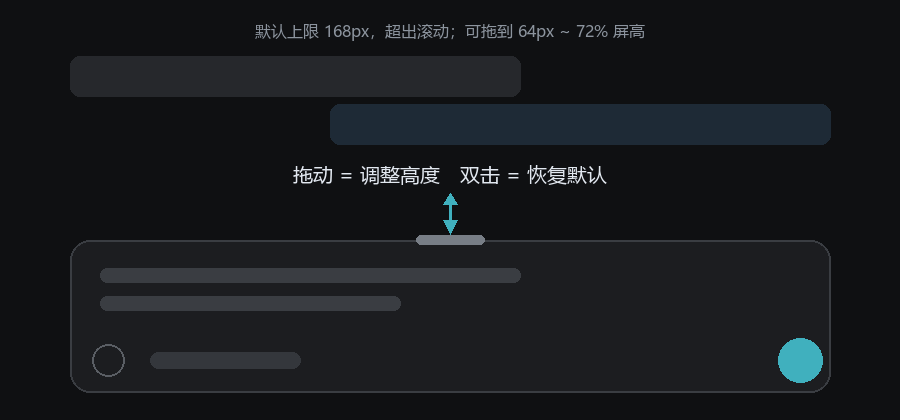
DSH 的输入框原本会跟着内容一直长,长到 336px 才开始滚动,而且不能拖。这个插件把它变成:
- 输入框顶部有一条细把手,鼠标移上去或聚焦时出现;
- 随时可拖:不管现在只有一行字还是已经很长,往上拖就变高、往下拖就变矮 (64px ~ 72% 屏高),拖动时右上角显示当前像素值;
- 拖动后进入固定高度模式:高度就是你要的那个值,内容超出在框内滚动,不再自己忽高忽低;
- 双击把手回到自动增高模式:跟着内容长,封顶 168px(比官方的 336px 矮一半);
- 松手即记住(
localStorage),重启浏览器/DSH 仍是这个高度; - 只改
[data-input-scroll]的height/max-height,不碰任何 React 组件,也不影响发送、附件、斜杠命令。
安装
git clone https://github.com/ayachinene285/dsh-composer-resize.git
dsh plugin --profile desktop add "$(pwd)"
或者手动:把目录放进 ~/.dsh/profiles/<profile>/node_modules/dsh-composer-resize,
在 profile 的 package.json 里 dependencies 加 link: 指向它、dsh.profile.bundles 末尾加 dsh-composer-resize,
然后完全退出 DSH 再打开。
实现方式
不接管任何组件,纯 DOM 增强:
- 找到
[data-composer-card](输入卡片,position: relative),在它顶部插入一条 10px 高的把手; - 拖动从"当前实际高度"起算,第一次移动后切到
height/min-height/max-height三件套的固定高度; 双击则清掉内联height,回到只设max-height的自动增高; MutationObserver+ 定时兜底,React 重建输入框后自动补回;- 插件卸载时移除把手、样式与所有内联高度。
宿主侧(lib/index.js)是空实现,只作为插件入口。
已知边界
- 只影响聊天输入框;队列编辑框(QueueDock)保持官方样式。
- 固定高度模式下不会自动增高(这是有意的);想恢复自动增高就双击把手。
- 高度按“本次浏览器”记住,不写进 DSH 配置。
- 依赖
data-composer-card/data-input-scroll两个稳定标记;DSH 若改名,插件会静默不生效(不会报错)。
License
Plugins relacionados
Z
dsh-web (dsh-task-board)
zhu1090093659/dsh-web
10.2khace 8 horasMejoras de UIApache-2.0
Z
dsh-web (dsh-web-all)
zhu1090093659/dsh-web
10.2khace 8 horasMejoras de UIApache-2.0
C
dsh-TUI
ccch1mneyyy/dsh-tui
7.2khace 2 horasMejoras de UIMIT
Z
dsh-web-ui (dsh-task-board)
zhu1090093659/dsh-web-ui
6.3khace 2 mesesMejoras de UIApache-2.0