dsh-zcode-rewind
bowluna/dsh-zcode-rewind
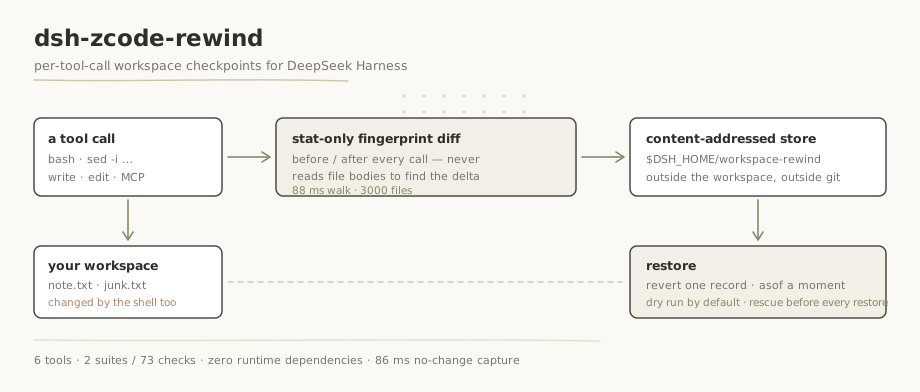
Workspace checkpoints per tool call: records every file mutation inside the workspace (excluding .git and node_modules by default), including changes made by shell commands rather than by write/edit, and stores the previous content of each changed path in a content-addressed store kept outside the workspace. Restores have two modes — undo one record, or return to a point in time — with a line-level diff preview, a dry run by default, and a rescue record written before every restore so the restore itself can be undone.
Install
dsh plugin --profile web add github:bowluna/dsh-zcode-rewindREADME
dsh-zcode-rewind




Per-tool-call workspace checkpoints for DeepSeek Harness — every file mutation, shell side effects included.
dsh plugin --profile web add dsh-zcode-rewind
What this catches that the other rewind plugins do not
Four plugins in this market solve a neighbouring problem. The difference is not a matter of taste —
it is one decision each, and node tools/compare-capture.mjs replays the same shell-made mutation
against all five criteria and prints what each one records:
| what the others do | what this does instead | evidence |
|---|---|---|
dsh-rewind-plugin 0.12.2 reads args.file_path off write/edit calls, so a sed -i — which has no such argument — never appears | a stat-only fingerprint diff around every tool call, so a mutation made by the shell is exactly as visible as one made by a file tool | node tools/compare-capture.mjs |
@anionex/dsh-turn-rewind 0.3.8 snapshots at turn boundaries, so a mutation made mid-turn is not in this round's record | the diff is taken per tool call, not per turn | same command |
dsh-undo-savepoint 0.4.9 keeps a tool whitelist and does not cover ordinary workspace files | covers the workspace by default — only .git and node_modules are excluded | same command |
dsh-recall-plugin 2.3.24 sees the change but restores at whole-tree granularity | records the path set of each individual change, and revert undoes exactly one record | same command |
Where this sits next to ZCode
This plugin studies the same problem ZCode solves and ports it to DSH. The honest version of that relationship — including the part where nothing was taken, and the part you cannot re-check from here:
| ZCode | what was taken | where this goes further | can you re-check it from this repo? |
|---|---|---|---|
zcode/apps/zcode-cli/packages/adapters/src/plugins/atomic-directory.ts — atomic directory activation with finalize / rollback, used when installing plugin sources | nothing | not the same problem: that rolls back an install, not a workspace | Not yet proven from this repo. The ZCode mirror is not vendored here, so the only honest statement is "read on 2026-09-22, and you cannot re-run it from a clone of this repository" |
no workspace-level checkpoint subsystem in zcode/apps | the idea, not the code | ZCode has no counterpart here — the capture loop, the store layout and the restore semantics are this repository's own work | Not yet proven from this repo — same reason |
Derivation credit: the idea of checkpointing an agent's workspace is studied from
zai-org/ZCode and
zai-org/GLM-skills. Nothing in the install path, the
tests, or the acceptance criteria depends on any third-party vendor key or service — model
capability, where this plugin needs it at all, goes through the host's own ctx.llm.
Reproducing the comparison
The first table above is the one you can genuinely re-run; the second one says out loud that it cannot be re-checked from a clone. That distinction is deliberate — a claim you cannot re-run is not evidence.
git clone https://github.com/BOWLUNA/dsh-zcode-rewind && cd dsh-zcode-rewind
node test/run.mjs                  # 2 suites / 73 checks — needs no DSH install
node tools/compare-capture.mjs     # ← the evidence for the first table
node tools/boot-check.mjs --port 31860   # optional; needs pnpm + a dsh install (see below)
compare-capture replays one shell-made mutation against five criteria, prints what each one
records, and asserts the three claims the table makes — so it exits non-zero the day this
README and the code disagree.
Why
Every checkpoint system we could find only tracks changes made through file-editing tools.
The Claude Code documentation says it outright: "Checkpointing does not track files modified by
Bash commands" — rm file.txt, mv old.txt new.txt, cp source.txt dest.txt cannot be undone
through rewind. Cline does catch command side effects, but by committing the whole repository to a
shadow git repository after every tool call, and its own documentation warns that large repositories
suffer significant storage use and slowdown.
DSH's own market is no different: all four rollback plugins we read (dsh-rewind-plugin,
@anionex/dsh-turn-rewind, dsh-undo-savepoint, dsh-recall-plugin) either parse only the
file_path argument of write/edit, or snapshot at turn boundaries — so a sed -i mid-turn is
invisible to all of them.
What it captures
- Every mutating tool call:
bash,pwsh,write,edit, MCP tools, subagent tools. - Deletions, creations and modifications — with a revertible previous-content hash for each path.
- Content-addressed file contents, deduplicated across sessions and workspaces.
- A durable ledger of who changed what, in entry order, that survives restarts.
How it works
tools/execute (before) ──> mark pending; first capture writes a full baseline
        │  (the tool runs: bash rm/mv/sed, write, edit, MCP …)
tools/post-execute ─────> fingerprint diff → read changed files →
                          content-addressed blobs (sha-256, deduped) →
                          append-only ledger record
The fingerprint is path → size + mtime for the whole workspace. Capture costs one O(files) stat
walk plus content reads only for files that actually changed — measured at 88 ms for 3000 files,
against 2936 ms for the initial full-content baseline, i.e. 86 ms for a no-change capture.
Install
dsh plugin --profile web add dsh-zcode-rewind
Restart DSH — a bundle plugin binds during startup assembly. Verify the composed tree with
dsh --profile web --dump-config | grep workspace-rewind. The store lives outside your workspace,
at $DSH_HOME/workspace-rewind/, and never touches your git repository.
Tools
| Tool | What it does |
|---|---|
rewind_now | Create a manual checkpoint right now, e.g. before a risky operation |
rewind_list | Recent records, newest first: id, time, tool, +added ~modified -deleted, sample paths |
rewind_diff | Restore plan plus a line-level unified diff; changes nothing |
rewind_restore | mode=revert undoes one record; mode=asof returns to a point in time |
rewind_undo | Undo the last restore — repeating it toggles undo/redo |
rewind_status | Store statistics: records, blobs, bytes, quota, active configuration |
Configuration
- insert:
    - id: workspace-rewind
      name: 'dsh-zcode-rewind'
      config:
        capture: all            # all | fileTools | off
        maxFileBytes: 8388608   # larger files are recorded as events only
        maxFiles: 20000         # per-walk file cap
        maxTotalBytes: 536870912  # store quota; oldest unreferenced blobs are evicted
        keepRecords: 500        # ledger trim threshold
        excludes: ['.git', 'node_modules', 'dist']
        secretNames: ['.env', '*.pem', '*.key']
Restore semantics
| Mode | Meaning |
|---|---|
revert | Undo exactly the delta of one record — the "undo what just broke" case |
asof | Return the workspace to the state recorded at a checkpoint, folding the ledger and resolving files created after the target |
Safety
- Restores are dry-run by default;
apply=trueis required to touch the filesystem. - Every restore first writes a rescue record, so
rewind_undocan reverse it — repeatedly. - Restore and rescue records are exempt from quota eviction: the undo trail is never evicted.
- Secret-named and oversized files are recorded as events only, and a restore plan keeps them untouched rather than guessing their history.
Compatibility
Developed and verified on DSH 0.1.5-rc.2 (desktop harness) and 0.1.6-alpha.2 (WSL). The declared
range is:
>=0.1.5-alpha.1 || >=0.1.6-alpha.1
Host APIs used: ctx.tools.register with defineTool, ctx.inject(['fs'], …) and the
tools/execute / tools/post-execute / tools/result events, ctx.systemPrompt.section,
ctx.logger, plus resolveDshHome() from @deepseek-ai/dsh-home-paths. Peers are resolved through a
multi-anchor createRequire, so a link:-installed copy works without a local node_modules.
Tests and guards
node test/run.mjs                                    # 2 suites, 73 checks — no DSH required
node tools/verify-translation-pairing.mjs --write     # bilingual pair hashes
node tools/verify-doc-numbers.mjs                     # documented numbers vs the real run
node tools/verify-version-consistency.mjs --dsh 0.1.6-alpha.2
node tools/boot-check.mjs --port 31860               # needs pnpm + a harness install
The last guard is the only one that installs the plugin into a throwaway DSH_HOME and boots it.
It exists because 1.0.0 installed cleanly, passed every unit test and produced a clean --dump-config
— and then took the whole profile down at boot, because one word in cordis.patch.yml still named
the package as it was called before the rename.
Known limitations
- External edits made between tool calls are attributed to the next captured call, the same class of limitation as a whole-tree shadow commit.
- Files whose content was never captured — secret-named, oversized, or deleted before first capture — cannot be content-restored; plans keep them as they are and say so.
- Massive monorepos need a larger
excludeslist orcapture: fileTools.
License
MIT
Related plugins
dsh-web-ui (dsh-chat-recovery)
zhu1090093659/dsh-web-ui
dsh-synapse
liangmianya/dsh-synapse
billion-context
ranxianglei/billion-context
dsh-chat-import
nwflower/dsh-chat-import