dsh-nce
chenyichener/dsh-nce
New Concept English Book 1 study panel: 144 lessons with text, IPA vocabulary, grammar and a Bilibili video on one page, Anki-style spaced repetition, a mistake notebook, and fillable exercise papers graded by your own model.
Instalar
dsh plugin --profile web add github:chenyichener/dsh-nceREADME
dsh-nce
English · 简体中文



A New Concept English Book 1 study panel that lives in the DeepSeek Harness sidebar: 144 lessons on one scrollable page, Anki-style SRS flashcards, a mistake notebook, an IPA / phonics reference, and fillable exercise papers graded by your own model. The host half serves
/dsh-nce/api; the browser half renders the panel.
Quick start
dsh plugin --profile <profile> add dsh-nce
Restart dsh web (or the desktop app) — the 144-lesson dataset arrives with the
optional dsh-nce-data package, so the panel is populated on first open. No
textbook files to supply, no build step.
Features
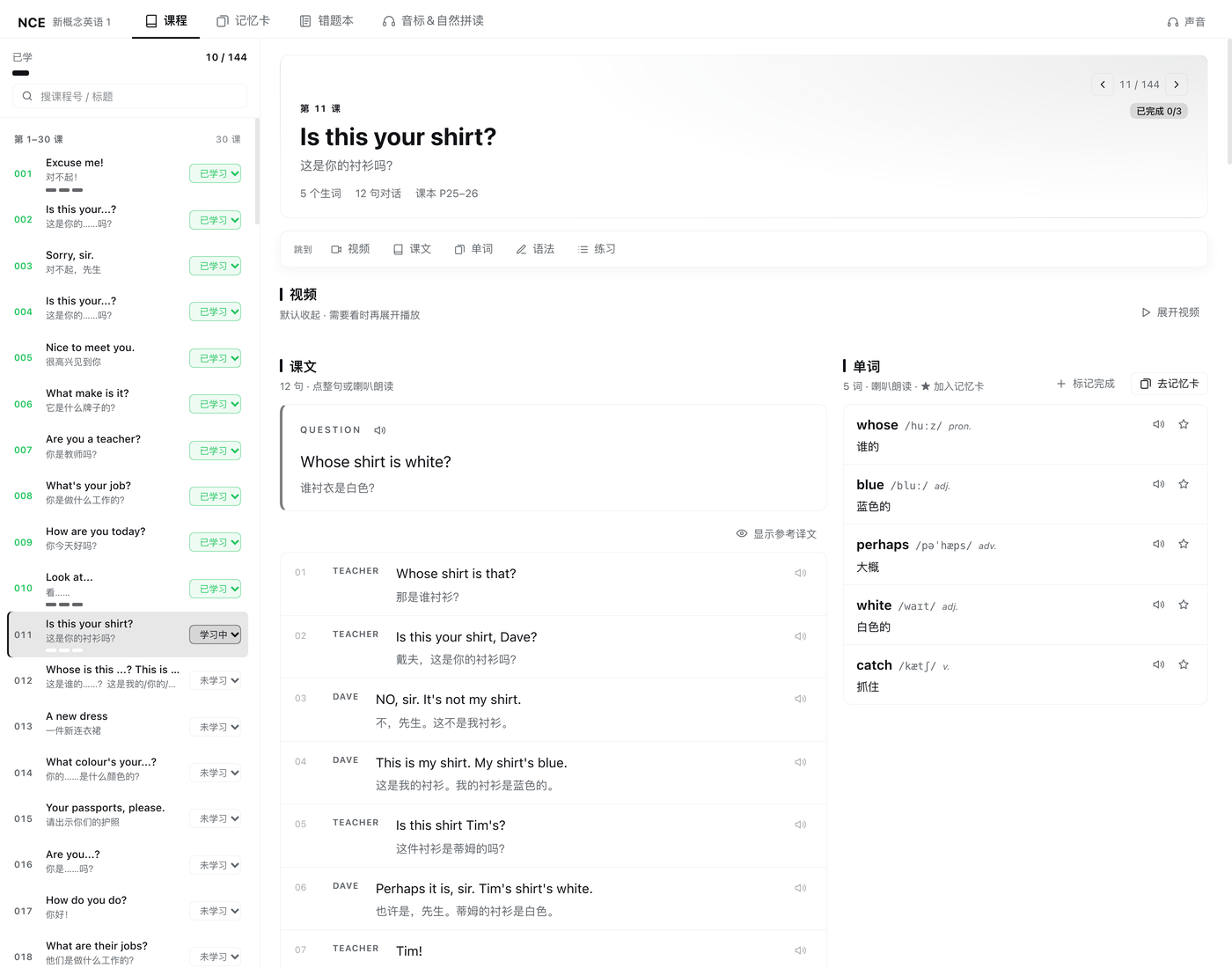
Course browser
- Split view: a persistent 144-lesson list on the left and the selected lesson on the
right, with a progress line (
已学 x / 144), search, four lesson groups, a status dropdown (not started / learning / done) and current-lesson highlight. Three step dots per lesson (words / grammar / exercise) show where you stopped; the panel opens on your last lesson or the next unfinished one and collapses to one column when narrow.
One-page lesson
- Header (prev / next, number, English + Chinese title, counts, textbook pages, status)
plus a sticky anchor bar that smooth-scrolls to
Video / Text / Words / Grammar / Practice. Video is collapsed by default; expanding loads an embedded Bilibili player mapped to the right part, and a custom Bilibili / YouTube URL can be saved per lesson with the built-in one restorable at any time. - Text + words — two columns: question, dialogue lines (click a line or the speaker to read it aloud) and collapsible reference translation on the left; a vocabulary table with IPA, part of speech, meaning, read-aloud, and star-to-flashcards on the right. Stacks automatically on narrow containers.
- Grammar — textbook notes plus classroom-notes blocks; Practice — a per-lesson homework checklist, a classroom recall card, and the fillable worksheet. The three study steps are toggled from the status dropdown (choosing "done" checks all three) or each section's "mark complete" switch.
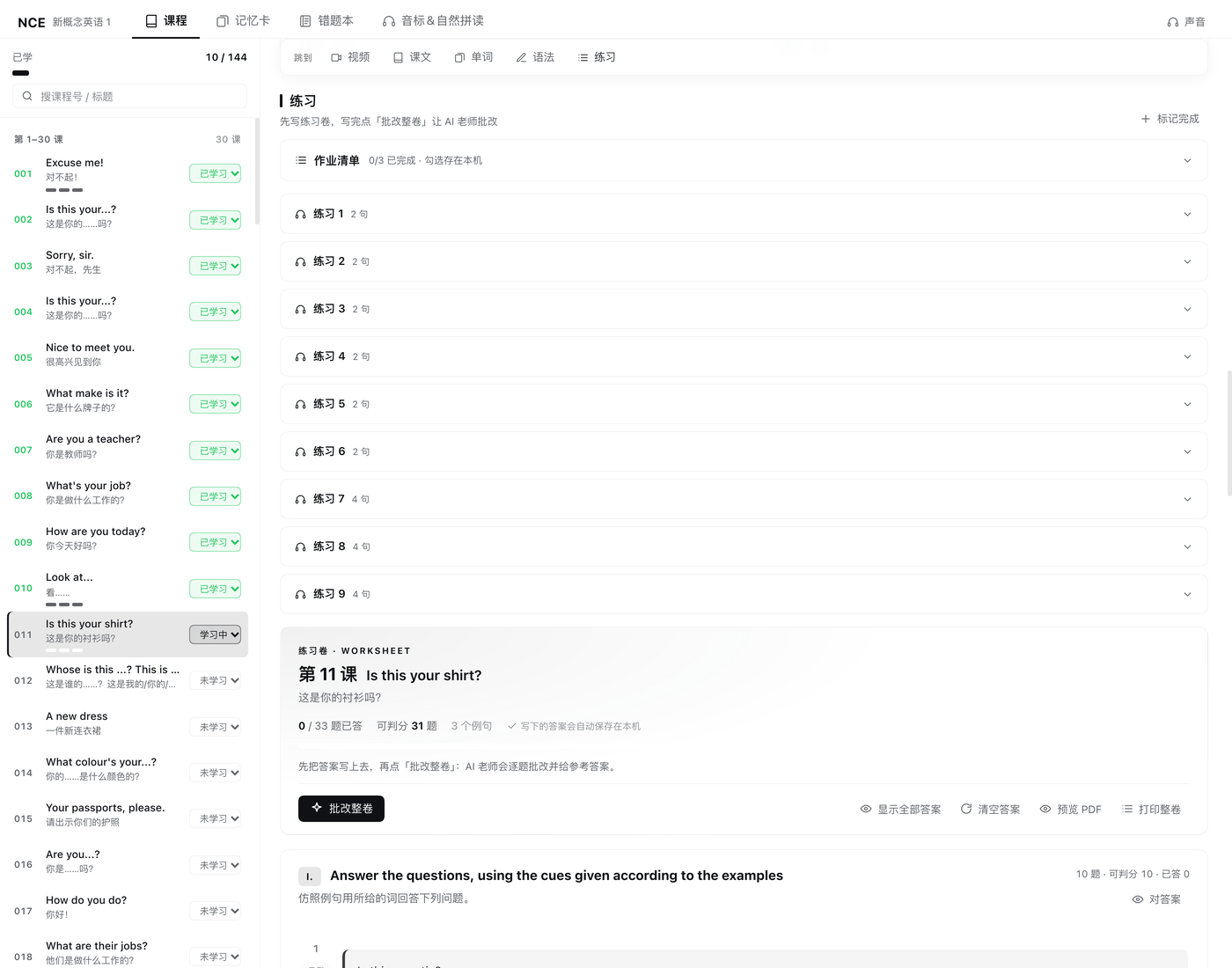
Fillable exercise papers
- Rendered from the textbook layout: blanks become inline inputs, matching questions
become real Column A / B tables graded from the answer key, tabular questions become
tables, word boxes become bordered cards, and printed worked examples stay static.
Enter/Shift+Entermove between blanks; drafts autosave tolocalStorageper lesson and survive lesson switches and a DSH restart. - One-click grading = AI teacher grades the whole paper. Every answered question is
sent to the profile's default model with the answer-key reference; the reply is
per-question
correct / close / wrongplus a comment and reference answer, the score is AI-correct / total, and every verdict can be overridden by hand. Without a default model (or on failure) it degrades to deterministic system grading with a header note. - Local PDF — "Preview PDF" shows the real A4 pages and "Download PDF" generates an image-based PDF entirely in the browser (no network, no server, no print dialog).
Mistake notebook
- Questions graded wrong or close are collected automatically and fixed ones drop out; grouped by lesson with your answer, reference answer, AI comment, verdict, and timestamp, filtered by all / wrong / close. Locally saved graded papers are scanned once so earlier mistakes are backfilled.
- AI explanation per question explains the correct answer, the mistake (word order / tense / agreement…) and a memory hint, cached on the question.
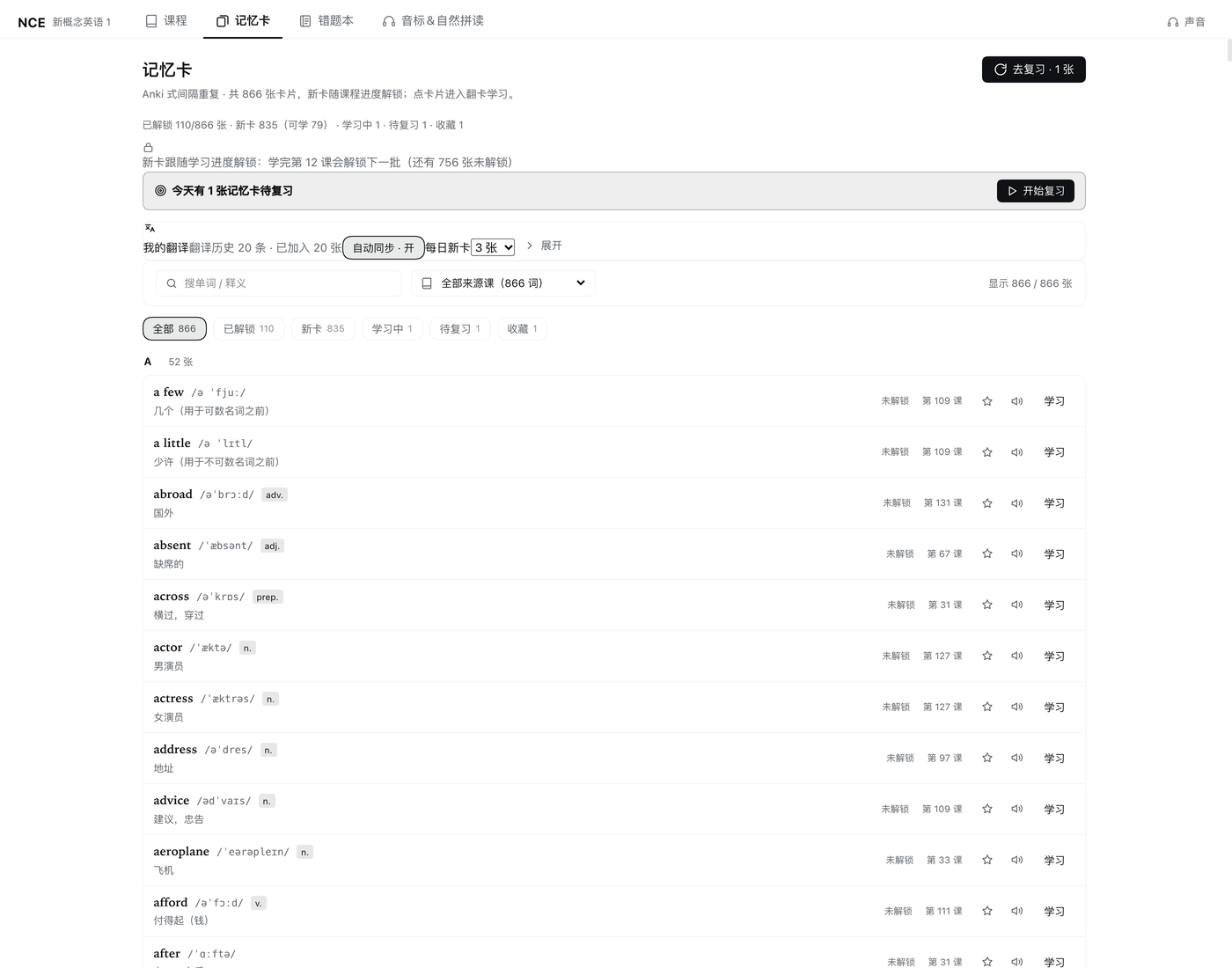
Flashcards and spaced repetition
- Cards come from the de-duplicated 866-word word bank; search and filter by lesson.
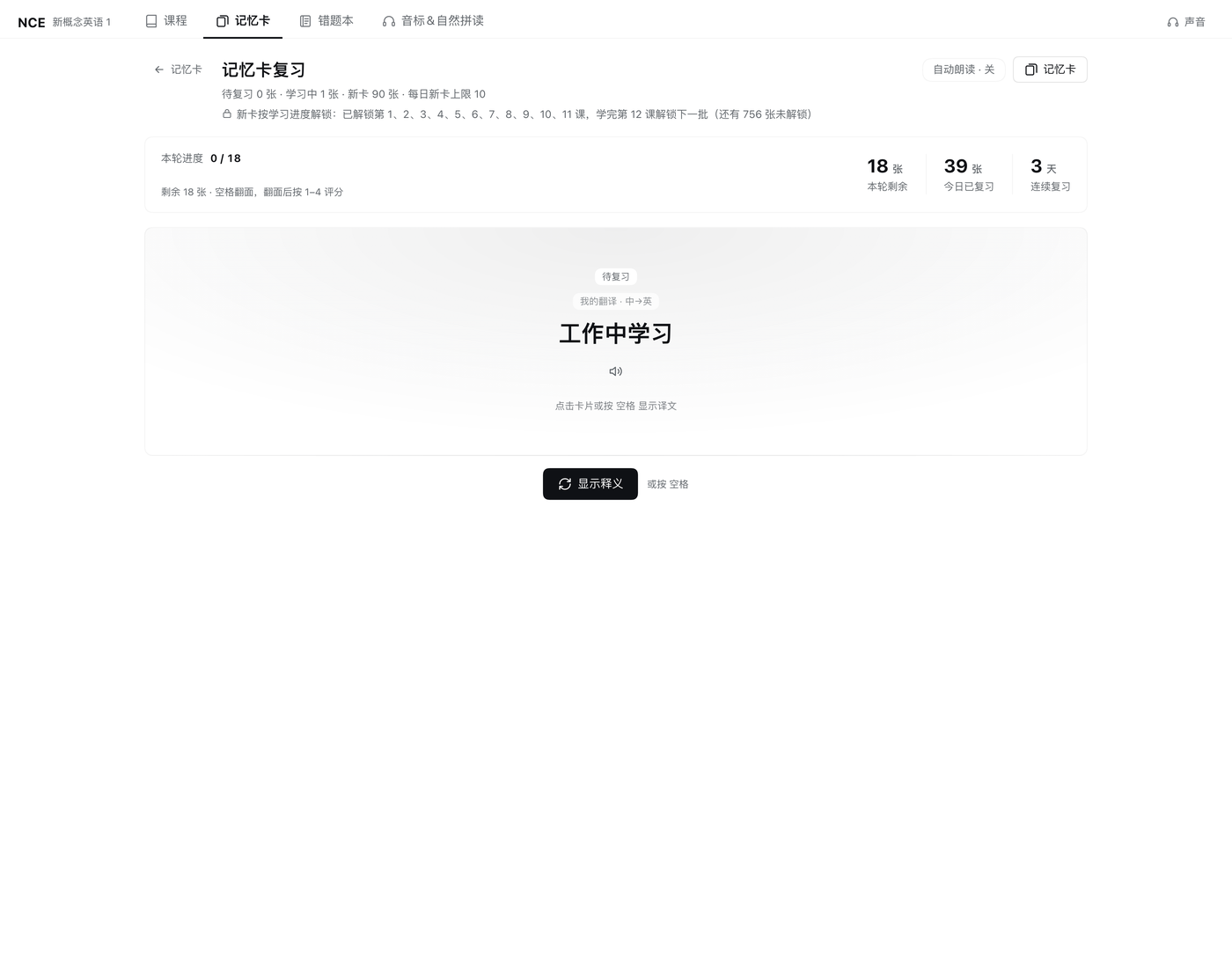
Spaceflips,1–4grade — Anki-aligned Again (1 min) / Hard (10 min) / Good (tomorrow) / Easy (4 days) — with new / learning / due counters and daily limit. - New cards follow the course: only words from started lessons enter the queue
(default 10/day); due cards are never locked, so reviews always come first. Sentence
cards are imported automatically from the translation plugin's history
(
~/.dsh/dsh-translate/history.json, default 3/day). - Page, selected lesson, scroll position, and expanded video are remembered per view.
IPA, phonics and read-aloud
- 48 IPA symbols (12 monophthongs / 8 diphthongs / 28 consonants) with pronunciation tips, common letter combinations, and clickable example words; 38 phonics rules, 22 minimal pairs, and syllable / stress rules.
- Read-aloud reuses the translation plugin's speech pipeline when installed (Microsoft
Edge neural voices, no API key, shared cache), then macOS
say, then browser speech; the voice menu sets voice, speed, auto-read, and preview.
Install
From npm (recommended)
dsh plugin --profile <profile> add dsh-nce
The lesson dataset is pulled in automatically as the optional dsh-nce-data package.
From GitHub
dsh plugin --profile <profile> add github:ChenYichener/dsh-nce
From a local clone
git clone https://github.com/ChenYichener/dsh-nce.git
dsh plugin --profile <profile> add /path/to/dsh-nce
DSH desktop app
Open the Plugins page, choose "install from local directory", and pick the repo folder.
Restart dsh web (or the desktop app) after installing so the host half is loaded;
after that, client-only changes need a page refresh, while host-half or dataset changes
need a DSH restart because both are cached in the host process.
Requirements
| Requirement | Notes |
|---|---|
| DeepSeek Harness | Plugin manifest (dsh.bundle patch + dsh.client); developed and tested with DSH 0.2.2-rc.1 and its dsh web / desktop web surface |
| Node.js | ≥ 20 on the machine running DSH; the host uses node:sqlite and falls back to JSON when unavailable |
| macOS (optional) | /usr/bin/say is the offline read-aloud fallback; other platforms use browser speech |
| dsh-translate (optional) | Adds the Edge neural voices and imports translation history as sentence cards |
| Dataset | Installed automatically as the optional dsh-nce-data package |
Where the dataset lives
The lesson data ships as a separate package, dsh-nce-data, so the plugin code stays
free of textbook content. Resolution order:
DSH_NCE_DATA_DIRif setdata/next to the plugin (local builds)- the
dsh-nce-datapackage
If none is present the panel still mounts and shows a Retry button instead of failing
hard. To use your own dataset, point DSH_NCE_DATA_DIR at a directory holding
index.json that follows docs/DATA-CONTRACT.md, and build one
from material you own:
NCE_CONTENT_DIR=/path/to/nce-content npm run build:data
npm run build:phonetics   # IPA / phonics reference; needs no textbook data
See docs/DATA-QUALITY.md for how the dataset is extracted and
verified. The dataset is provided for personal study; if you are a rights holder and
want it removed, open an issue and the dsh-nce-data package will be unpublished —
the plugin itself is code-only and keeps working with your own dataset.
Usage
Open NCE in the DSH sidebar. Four destinations: 课程 (Course) / 记忆卡
(Flashcards) / 错题本 (Mistakes) / 音标&自然拼读 (IPA & phonics), plus a 声音
(Voice) menu in the top right.
| Action | How |
|---|---|
| Open a lesson | Pick it in the left list; the right pane switches instantly |
| Follow the lesson | Sticky anchor bar jumps between video / text / words / grammar / practice |
| Expand the video | Click the video section header or the "Video" anchor (collapsed by default) |
| Read aloud / change voice | Click a dialogue line or press Enter / Space; voice and speed live in the voice menu |
| Mark progress | Lesson status in the list, or a section's "mark complete" switch |
| Flashcards / paper | Space flips a card and 1–4 grade it; Enter / Shift+Enter move through paper blanks |
Screenshots
| Course list + one-page lesson | Fillable paper with grading | Flashcards |
|---|---|---|
|  |  |
| SRS review (four grades) | IPA & phonics | Local A4 PDF preview |
|---|---|---|
 | 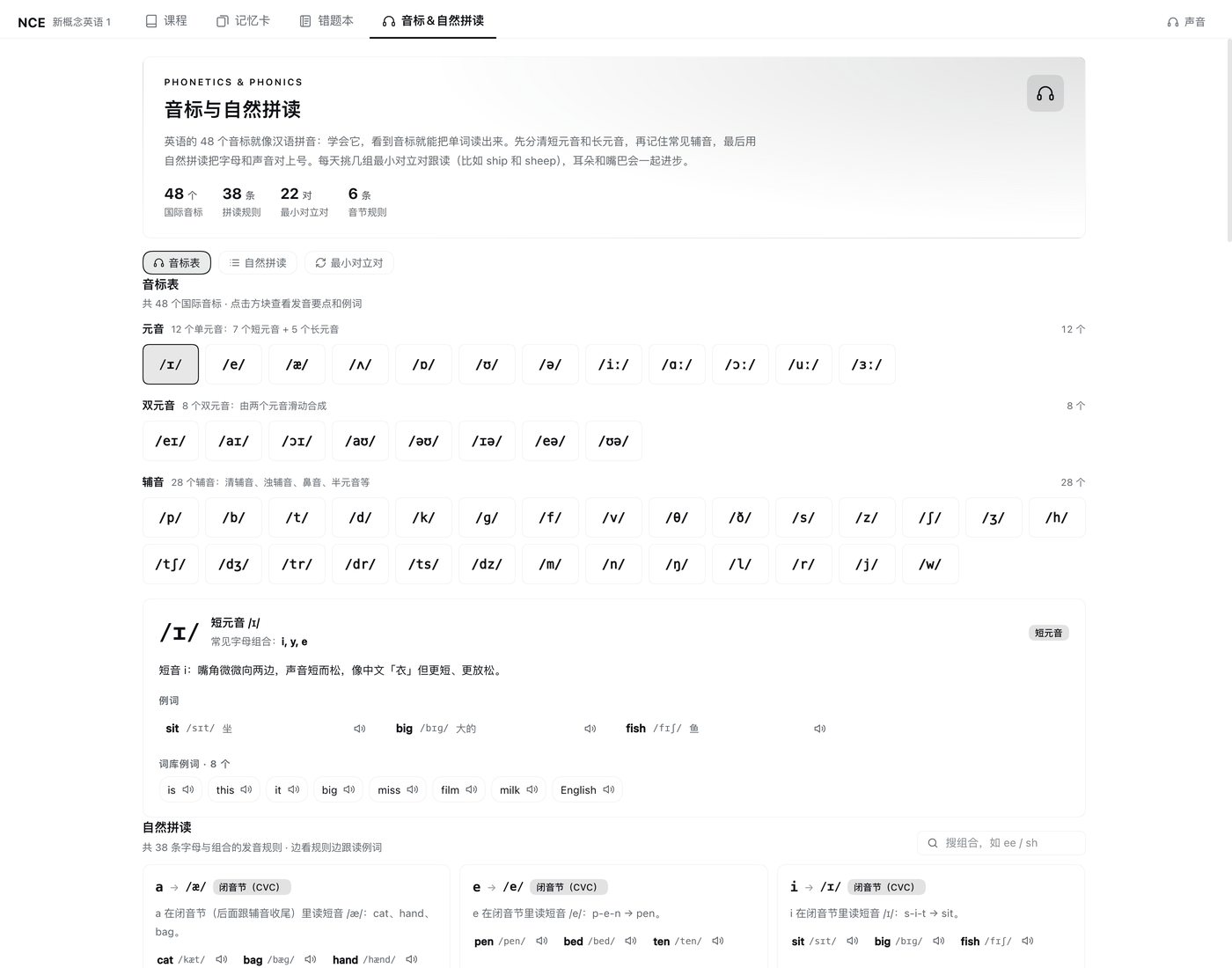 | 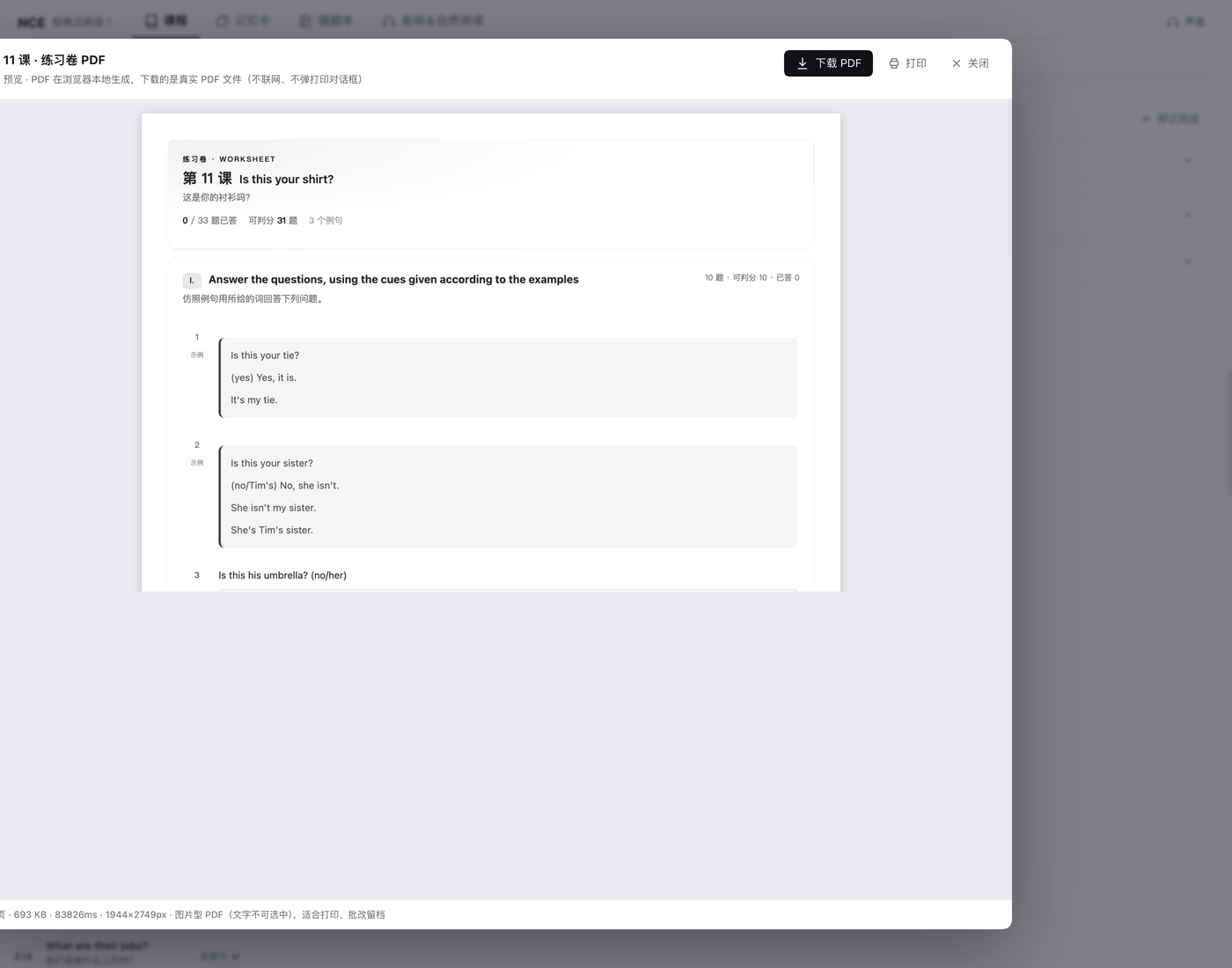 |
How it works
- Host half.
cordis.patch.ymlinserts one plugin row;index.jsis a thin composition root that wiressrc/host/(clean architecture:domainrules →applicationuse cases with injected ports →infrastructureSQLite/JSON/data/ speech/LLM adapters →httptransport) and mountsPOST /dsh-nce/api/<op>on the host web server. - Browser half.
client.jsis generated fromsrc/client/NN-*.jsfragments byscripts/build-client.mjs; fragments are concatenated in ascending two-digit layer order and may only reference earlier layers. React and the host theme come from the DSH module table. - API and storage. JSON in / JSON out (
{ ok: true, ... }or{ ok: false, error }) behind a loopbackHostfence. Lesson status, SRS cards, streak, and saved video URLs live in SQLite (node:sqlite, WAL) with a JSON fallback; paper drafts, homework, mistakes, and UI preferences live in browserlocalStorage. AI grading uses the profile's default model through the host LLM gateway; no API key is stored.
Deeper contracts: PLUGIN-ARCH · API-CONTRACT · PERSISTENCE · LEARNING-FLOW · EXERCISE-PAPER · DATA-CONTRACT · DATA-QUALITY.
Data & privacy
| What | Where |
|---|---|
| Learning progress (status, SRS, streak, video URLs) | ~/.dsh/dsh-nce/nce.sqlite (+ -wal / -shm), legacy ~/.dsh/dsh-nce/progress.json |
| Paper drafts / homework ticks / mistakes / UI state | localStorage → dsh-nce/paper/v1/lesson-<n>, dsh-nce/homework/v1/lesson-<n>, dsh-nce/mistakes/v1, dsh-nce/nav|scroll|ui|prefs/v1/* |
| Read-aloud cache / translation history (read-only) | ~/.dsh/dsh-translate/tts-cache/ (or ~/.dsh/dsh-nce/tts-cache/), ~/.dsh/dsh-translate/history.json |
| Course content | Read-only; resolved from DSH_NCE_DATA_DIR, a local data/, or the dsh-nce-data package |
Nothing is uploaded by default: progress, drafts, and the mistake notebook stay on the
local machine. Data leaves it only for features that need the network — the Bilibili
video embed, Microsoft Edge voices, and AI grading (sent to the model configured in
your DSH profile). The plugin repository ships no personal data; the lesson dataset
lives in the separate dsh-nce-data package.
Configuration
There is no config file: daily new-card limits, the translation-card limit, voice,
speed, and auto-read live in the panel UI and are stored in localStorage; host routes,
state directory, and body limits are fixed in src/host/config.js. NCE_CONTENT_DIR is
a build-time variable for npm run build:data only — the running plugin never reads it.
Development
npm run build              # regenerate client.js from src/client fragments
npm run build:check        # fail if client.js is stale (writes nothing)
npm run check:architecture # layering / fragment order / dead code / doc paths guard
npm test                   # full suite, rebuilds client.js first
| Command | What it covers |
|---|---|
npm run test:data | data hygiene, IPA validity, OCR-junk guards |
npm run test:paper, test:paper-ui | exercise-paper parser/grading engine against the real 144-lesson data, plus paper UI states |
npm run test:ai-grade, test:explain | AI-grading / explanation input sanitising, prompts, model-output parsing |
npm run test:host-domain, test:lesson-page | SRS, progress and unlock rules, one-page lesson layout |
npm run test:mistakes, npm run smoke:api | mistake notebook store/page; every /dsh-nce/api op with an isolated HOME |
npm test runs all of the above (12 steps) and boots the host API against a temporary
HOME, so your real learning data is never touched. Build the dataset first
(npm run build:data) — data-dependent steps fail without it, which is expected for a
fresh clone.
Project layout
dsh-nce/
├── index.js                 # host composition root; mounts /dsh-nce/api
├── src/host/                # domain / application / infrastructure / http layers
├── client.js                # browser bundle (generated by scripts/build-client.mjs — do not edit)
├── src/client/              # layered fragments, concatenated in NN order
│   └── generated/           # generated fragments (Bilibili part map)
├── scripts/                 # data/client builds, architecture guard, data checks, tests
├── locale/{en,zh}.json      # plugin manager title and description
├── docs/                    # architecture, API, data, persistence and paper contracts
└── data/                    # local dataset build output — gitignored, never published
FAQ / Troubleshooting
| Symptom | Fix |
|---|---|
| Course list shows a load error | Install the dsh-nce-data package (or set DSH_NCE_DATA_DIR) and restart DSH |
| Code changes do nothing | Host half (index.js, src/host/) is cached — restart dsh web; client changes need npm run build + page refresh |
| No sound | Check the voice menu; non-macOS needs browser speech, and online Edge voices need the translation plugin plus network |
| AI grading says unavailable | The profile has no default model (or the call failed); the paper falls back to system grading and verdicts can be overridden manually |
| Video area is blank | The embed needs network access to Bilibili; save a custom URL if the built-in one is unavailable |
| Where is my progress / how do I reset it? | ~/.dsh/dsh-nce/nce.sqlite; backup and reset commands are in PERSISTENCE |
Compatibility
- macOS, Windows, and Linux for the panel itself (a browser surface inside DSH); the
sayread-aloud fallback is macOS-only, other platforms fall back to browser speech. - Built against the DSH plugin manifest used by
dsh 0.2.x; a change to that manifest or to the client module table could require a plugin update. The textbook dataset is platform-independent and resolved at runtime from the three locations listed above.
Related DSH plugins
| Plugin | What it does |
|---|---|
| dsh-book | Markdown draft library + AI copywriting workspace for Xiaohongshu / WeChat / generic posts |
| dsh-notify | Native desktop notification when a session finishes while DSH is in the background |
| dsh-pomodoro | Distraction-free Pomodoro timer in the sidebar |
| dsh-translate | Chinese/English translation workbench with an always-on AI tutor and neural read-aloud |
| dsh-nce | New Concept English Book 1 study panel (lessons, SRS flashcards, mistake notebook) |
License
MIT © 2026 chenyichen. The plugin code is MIT-licensed and does not include any textbook content: the lesson dataset is compiled locally from material the user owns. New Concept English and the related books, exercises, and audio are the property of their respective authors and publishers; the embedded video player streams third-party videos from Bilibili. Use the plugin only with content you are entitled to use.
Plugins relacionados
dsh-web (dsh-task-board)
zhu1090093659/dsh-web
dsh-web (dsh-web-all)
zhu1090093659/dsh-web
dsh-TUI
ccch1mneyyy/dsh-tui
dsh-web-ui (dsh-task-board)
zhu1090093659/dsh-web-ui