dsh-tlogs
czk200518-hash/dsh-tlogs
Token usage meter in the DSH sidebar footer that runs both data sources at once rather than picking one: the DeepSeek platform account's usage and cost endpoints, which cover every device on the account but only the official channel, and local session logs, which cover this machine in real time across every provider but carry no cost. The two are merged per day — the official channel takes the larger figure, since one call is recorded by both, and providers the platform cannot see are added on top. History is backfilled month by month from the platform, providers are classified by channel rather than model name, days follow the platform's UTC boundary, and no token has to be pasted because the platform figures reuse the DSH account you are already signed in to. Totals appear as all-time, current-project, today, week, month, last-7 and last-30 in a compact bar, an expand panel and a detail modal with calendar, chart, model, provider, year, month and day tabs.
Instalar
dsh plugin --profile web add github:czk200518-hash/dsh-tlogsREADME
tlogs — DSH 侧边栏 Token 用量组件
English | 中文
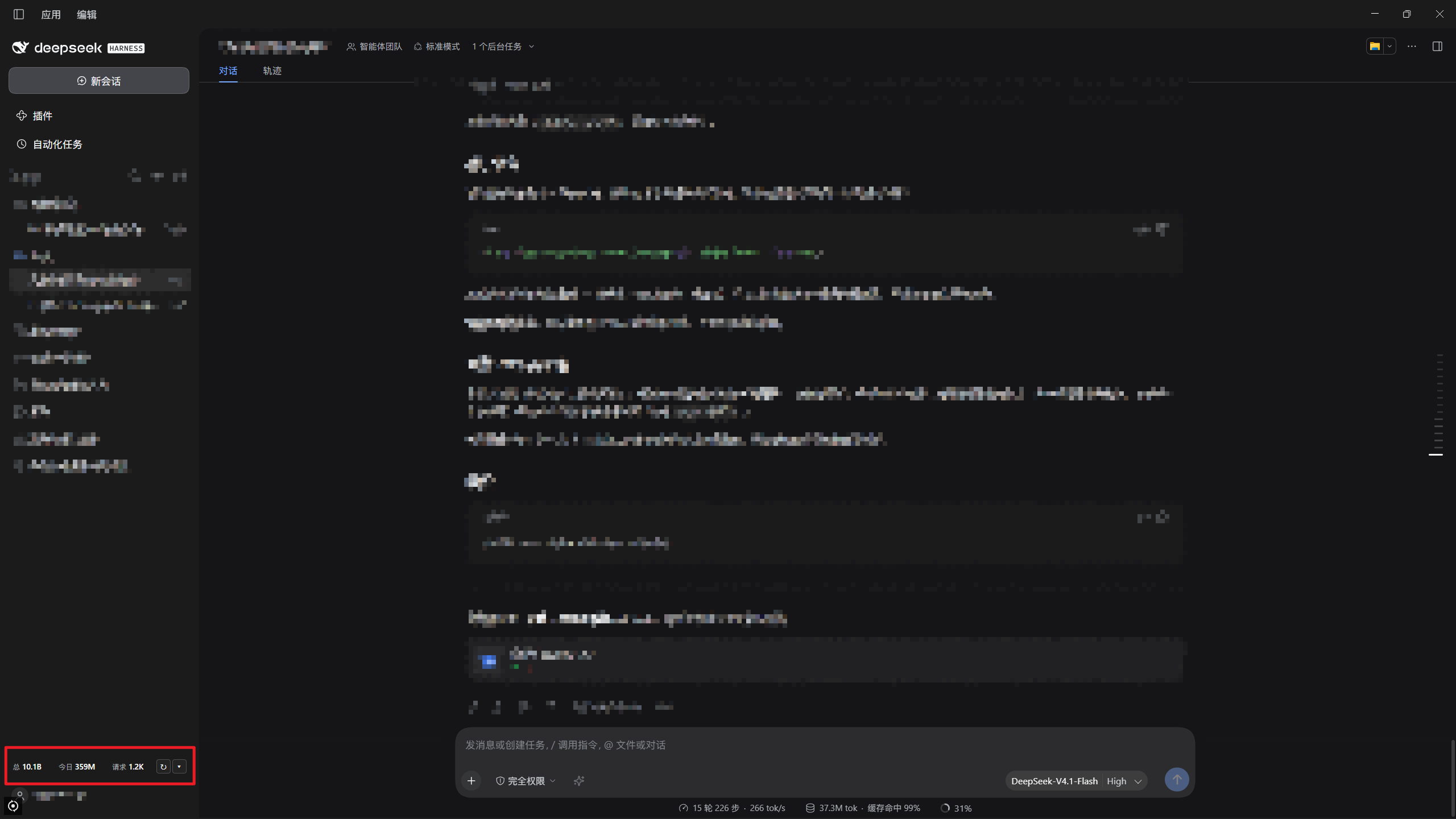
tlogs 在 DSH 桌面端侧边栏页脚常驻显示 Token 用量,含紧凑条、展开面板与详细数据弹窗。
紧凑条常驻页脚:
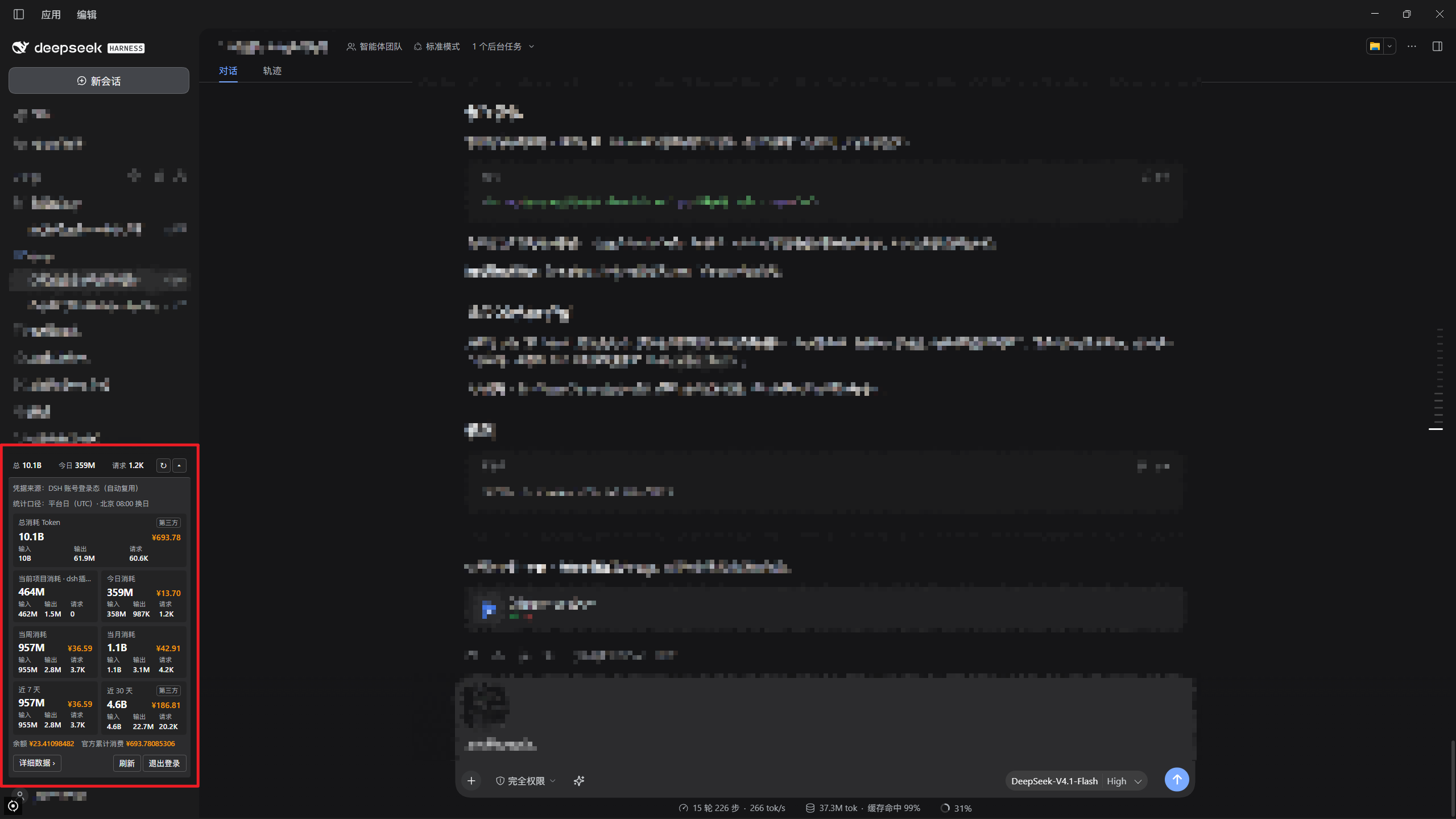
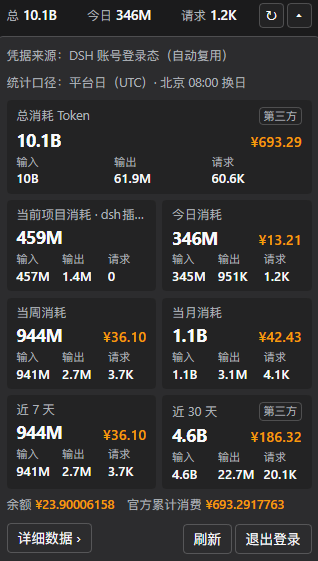
展开后是七张卡片:
形态
| 形态 | 内容 |
|---|---|
| 紧凑条 | 总量、今日、请求数。↻ 刷新,▾ 展开 |
| 展开面板 | 总消耗、当前项目、今日、当周、当月、近 7 天、近 30 天 |
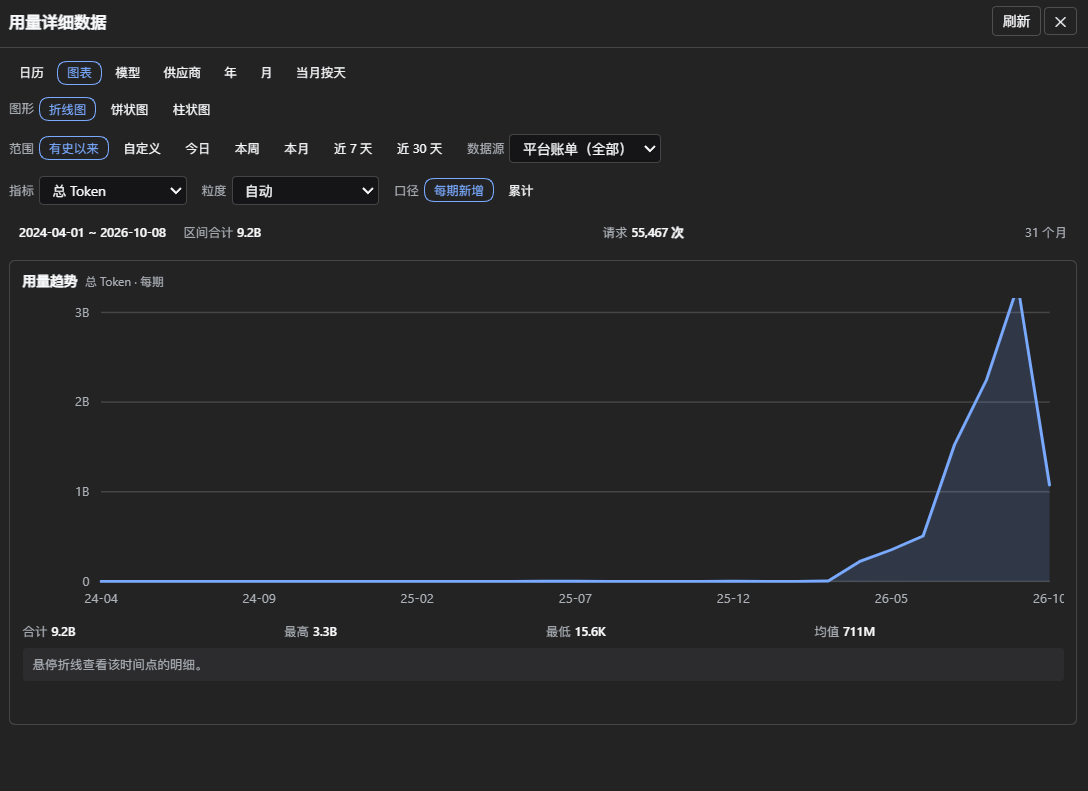
| 详细数据弹窗 | 日历、图表、模型、供应商、年、月、当月按天、设置 |
语言
插件的界面语言在详细数据弹窗的设置页签里切换:
| 选项 | 含义 |
|---|---|
| 跟随系统(默认) | DSH 界面语言 → 浏览器语言 → 中文 |
| 中文 / English | 固定该语言 |
选择存在本机浏览器,插件重启后保持;只影响本插件界面,不改 DSH 自身语言。
详细数据
弹窗按页签组织。图表页签的三张图共享同一套控制项(范围 × 数据源 × 指标 × 粒度),切换任意一项三张图一起变:
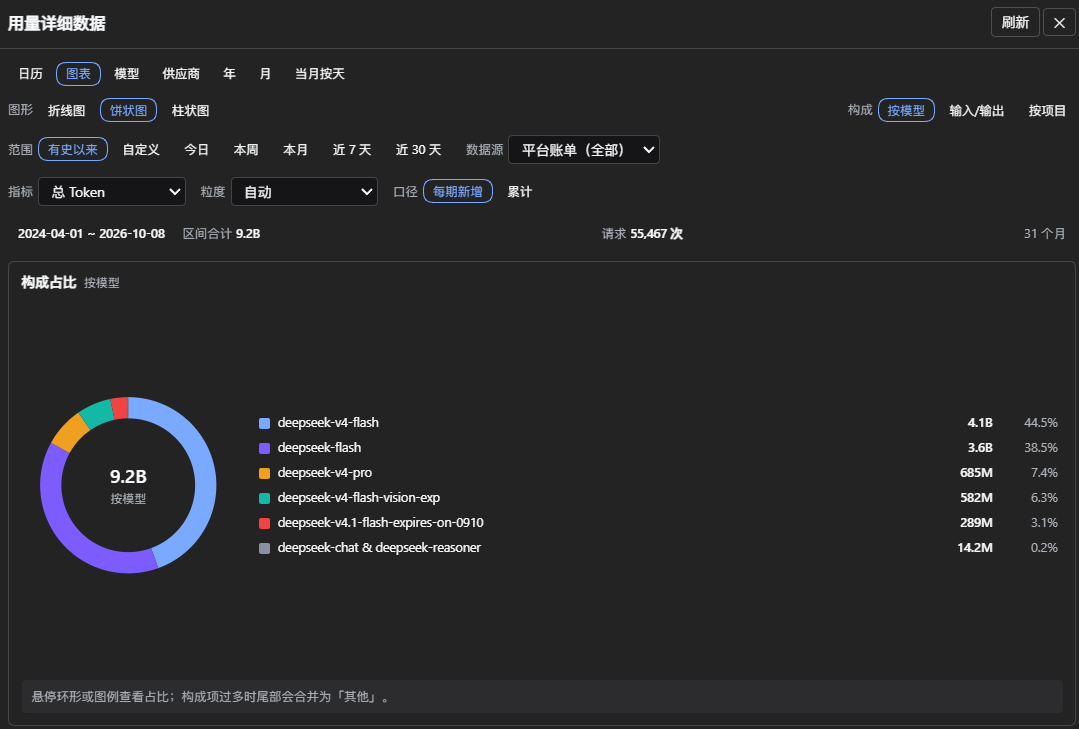
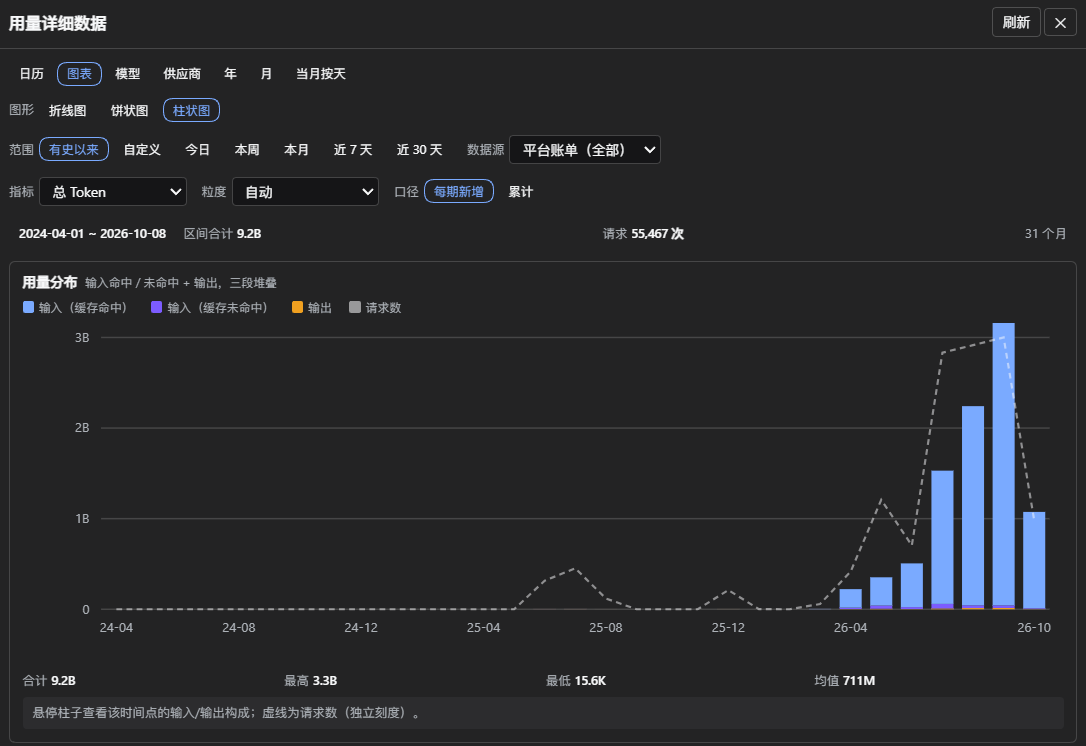
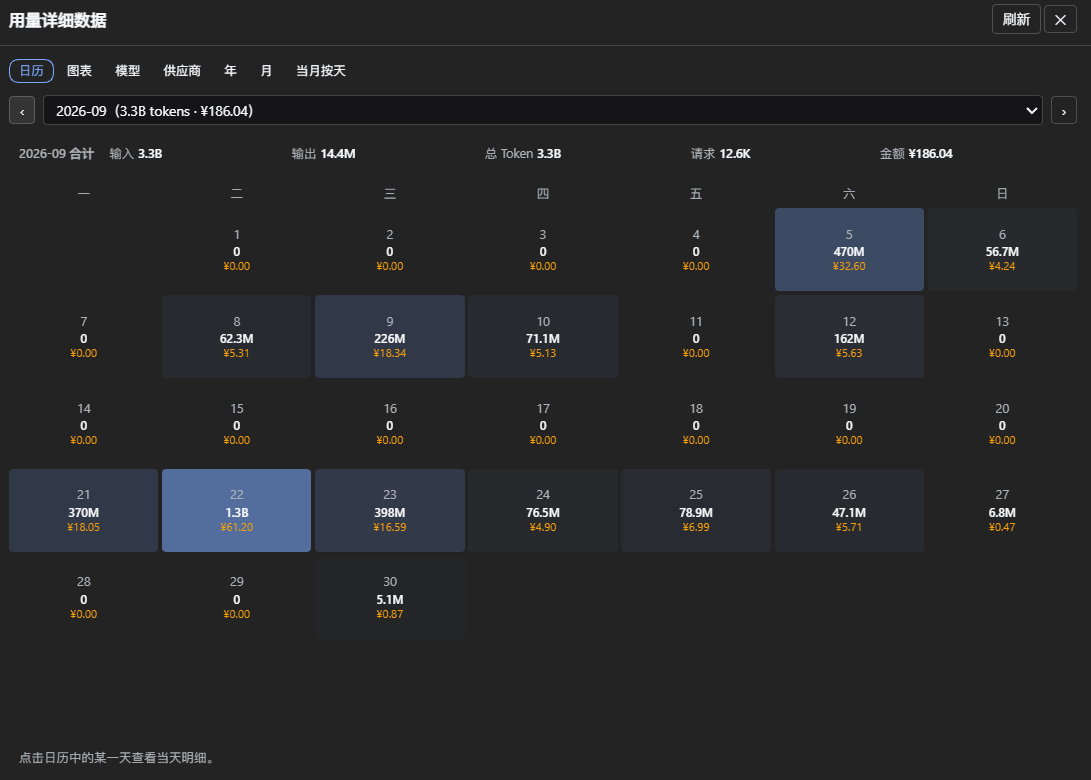
日历页签按月列出逐日用量与金额,点某一天看当天明细:
数据来源
| 来源 | 覆盖 | 时效 | 金额 |
|---|---|---|---|
| 平台账单 | 账号全部设备,仅官方通道 | 滞后 10~30 分钟 | 有 |
| 本机会话日志 | 仅本机,含所有供应商 | 实时 | 无 |
两路逐日合并:max(平台, 本机官方通道) + 本机第三方供应商。同一次调用会被两路各记一次,因此取大而不相加。
- 只有窗口内含平台看不到的第三方用量时,卡片才标
第三方;其余口径细节见卡片 tooltip。 - 历史月份与图表用平台口径。模型与供应商页签按通道判定,不按模型名:火山方舟上的
deepseek-v4-flash属第三方。
安装
四种方式:绝对路径、tarball、npm 包名、github:<user>/dsh-tlogs。lib/ 是已构建产物,安装不会构建。
desktop profile 不能用 CLI 安装,改用 设置 → 插件 → 安装;其它 profile 用 dsh plugin --profile web add dsh-tlogs。
安装后重启 DSH。实测 DSH 0.2.0-rc.2(desktop、web)。
凭据
| 顺序 | 来源 |
|---|---|
| 1 | 环境变量 DEEPSEEK_PLATFORM_USER_TOKEN |
| 2 | 配置 platformUserToken(明文) |
| 3 | DSH 凭据 TLOGS_USER_TOKEN(面板填写) |
| 4 | 复用 DSH 已登录账号 |
| 5 | 内置登录窗口(桌面端不可用) |
前 3 项优先于自动来源;退出登录只清除第 3 项。
配置
| 配置 | 默认 | 说明 |
|---|---|---|
exposeUsageToModel | false | 注册对话内查询工具 |
useAccountSession | true | 复用 DSH 账号凭据 |
localUsage / localUsageScanDays | true / 32 | 读会话日志与回溯天数 |
enableProjectScope | true | 当前项目卡片 |
persistHistory | true | 历史落盘 |
autoRefreshSeconds | 300 | 定时刷新间隔,0 关闭 |
cacheTTL.total / .current | 1800 / 300 | 缓存秒数 |
startYear / startMonth | 2024 / 4 | 历史起点 |
requestIntervalMs | 1000 | 月度请求间隔 |
numberFormat | short | full 千分位 / short K·M·B |
compactMetrics | [total, today] | 紧凑条指标 |
cacheDir | '' | 空为 <DSH_HOME>/tlogs |
compactMetrics 可选:total、today、week、month、last7、last30、cost_total、cost_today、cost_last7、cost_last30。
环境变量:DEEPSEEK_PLATFORM_USER_TOKEN、TLOGS_CACHE_DIR、DSH_HOME。
安全
| 措施 | 说明 |
|---|---|
| 凭据 | 只暴露 getPlatformSession();会话凭据仅刷新期间持有;失效标记只存摘要 |
| 网络 | 只连 platform.deepseek.com;不跟重定向;部署头白名单只放行 x- |
| 模型隔离 | 默认不注册工具;打开后项目 id 仍是不可逆哈希 |
| 会话日志 | 只读、只取计数与 provider/model,落盘只存路径哈希 |
| 发布闸门 | npm run verify:secrets |
最小权限配置:
exposeUsageToModel: false
useAccountSession: false
enableProjectScope: false
persistHistory: false
localUsage: false
隐患
架构
- 同一浏览器 realm 内,其它插件可调用本插件的 RPC。
.credentials.yaml同用户进程可读——本机凭据的主要暴露面,与插件无关。- 会话凭据只能断开引用,无法物理擦除(JS 字符串不可变);DSH 内部是否缓存不在本插件边界内。
取舍
- 面板显示项目 label,本机数据源读取会话日志;可用配置关闭。
- 项目快照从插件启用当天开始,无法回溯。
使用习惯
- 在对话中粘贴用量数字或截图会进入模型上下文。
开发
pnpm run check       # 密钥闸门、文案外置校验、注释闸门、typecheck、build、测试
pnpm run verify:dsh  # 用本机 DSH 解析器校验插件声明
pnpm run golden      # 在线端到端对拍,需要 DEEPSEEK_PLATFORM_USER_TOKEN
test/golden.test.ts 缺外部 Python 参考脚本时跳过,用 TLOGS_REFERENCE_SCRIPT=<路径> 指定。
许可
GPL-3.0-only,全文见 LICENSE。
Plugins relacionados
DeepSeek-Balance-Whale-Widget
meteornox/deepseek-balance-whale-widget
dsh-context
bowenliang123/dsh-context
dsh-cost-meter
han-1413141/dsh-cost-meter
dsh-damage-pulse
wssfk12138/dsh-damage-pulse