dsh-conversation-enhancer
dayangtuo247/dsh-conversation-enhancer
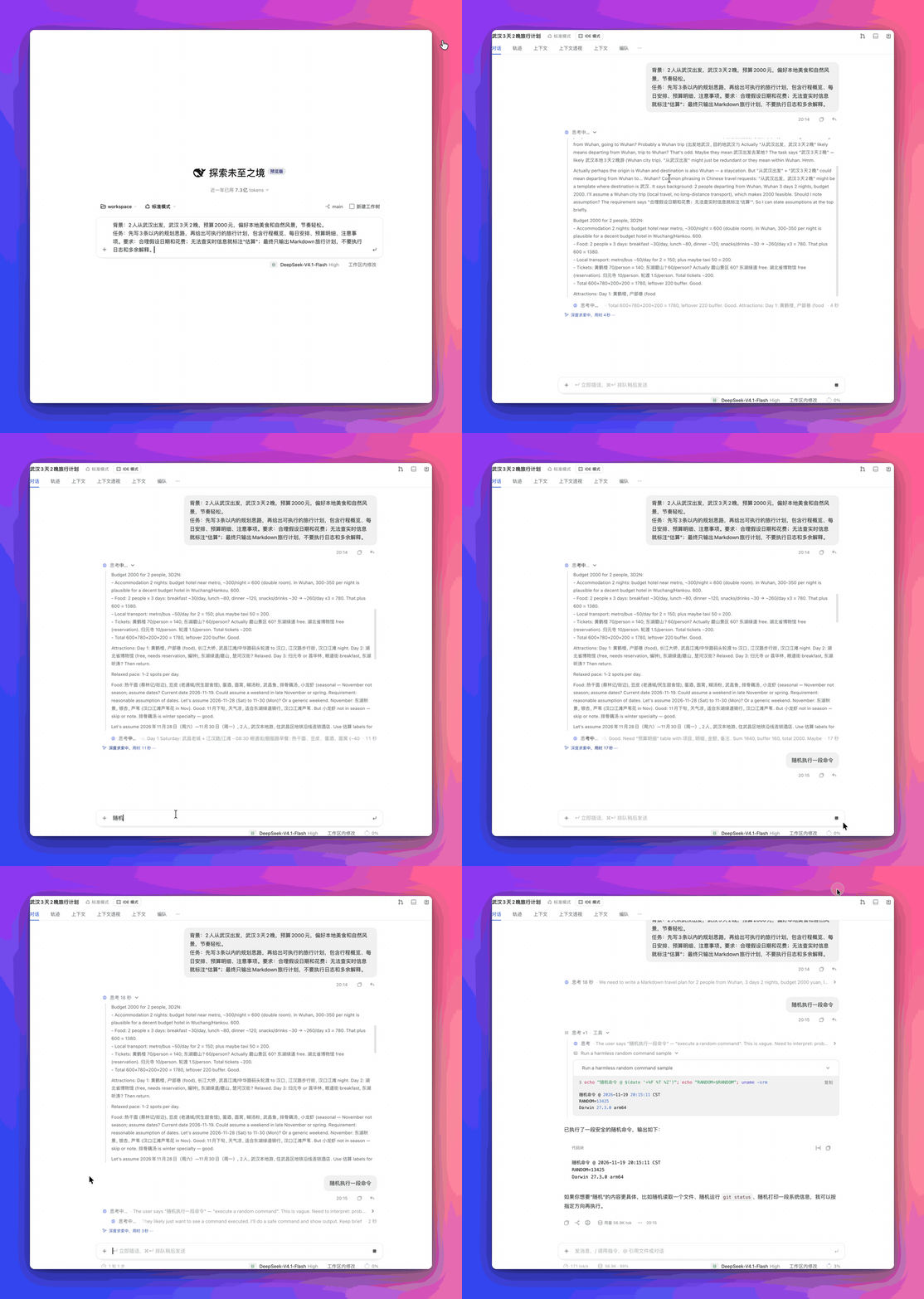
Conversation view enhancer for DeepSeek Harness — work details and tool calls regrouped, an inline plan card, Markdown user messages, older messages loaded automatically at the top of the scroll, and one reading column with its own typography and command-line colours.
Instalar
dsh plugin --profile web add github:dayangtuo247/dsh-conversation-enhancerREADME
preview
dsh-conversation-enhancer
An enhancer for the conversation view of DeepSeek Harness (web and DSH NEXT): it re-lays out what a turn shows — work details, tool calls, the plan card — and evens out how the whole column reads, from typography to command colours. Earlier names: dsh-claude-transcript → dsh-better-display (2026-11-11) → dsh-conversation-enhancer (2026-11-16, the name it is published under). The 回到底部 button lives in dsh-composer-display (it sits on the input box); surface colours and glass are in dsh-whale-theme.
| Part | File | What it does |
|---|---|---|
dom-hub | src/parts/00-dom-hub.ts | One shared, frame-coalesced MutationObserver for every DOM-scanning part, plus the shared watcher on <html>'s data-dcd-view / lang |
display-shared | src/parts/00-shared.ts | The words and styles every part reads: tool kinds and the 「命令 ×3」 word lists, the quiet summary-line CSS, the motion keyframes and the 动效 switch |
transcript-view | src/parts/01-transcript-view.ts | Replaces dsh's 工作步骤展示 (标准 / 思考 / 详尽) and pins dsh's own folding off |
transcript-polish | src/parts/02-transcript-polish.ts | Tooltips and other small touches |
tool-groups | src/parts/03-tool-groups.ts | Tool calls folded into groups, with image thumbnails |
plan-checklist | src/parts/04-plan-checklist.ts | Inline plan card from todo_write |
typography | src/parts/05-typography.ts | One sans, reading sizes and text colours for replies, bubbles and code (follows dsh-whale-theme's 界面字体 / 代码字体 when set) |
bash-highlight | src/parts/06-bash-highlight.ts | Syntax colours for the 「$ …」 line of command rows |
render-offscreen | src/parts/07-render-offscreen.ts | content-visibility:auto on transcript rows far from the viewport, so off-screen turns skip layout and paint |
conversation-flow | src/parts/08-conversation-flow.ts | Draws the conversation itself one quiet column (turns, runs, thinking, step folds), still calling dsh's own renderer row by row |
auto-older | src/parts/09-auto-older.ts | Loads 更早消息 automatically when the reader scrolls to the top, one page per gesture |
user-markdown | src/parts/10-user-markdown.ts | Renders the user's own message bubble with dsh's Markdown renderer |
native-probe | src/parts/11-native-probe.ts | Names, once per page load, the dsh internals the styles no longer find after an upgrade |
error-notes | src/parts/12-error-notes.ts | Lays out a failed model request's JSON body: its message as the sentence, the status / type / code on a quiet line under it |
ptc-diffs | src/parts/13-ptc-diffs.ts | Gives the edits a PTC program made dsh's own diff and +N -M, which dsh leaves out for any call with a parent |
Part of a set of independent DeepSeek Harness UI bundles: dsh-composer-display (the input box and what sits on it), dsh-conversation-enhancer (the conversation view), dsh-whale-theme (background, glass, fonts and its own Settings › 主题 page) and dsh-context-monitor (context usage in the composer and in a 上下文透视 tab). Each one works on its own; they share one build script, vendored here as scripts/.
Install
client.js is committed, so a checkout runs as-is — no build step is needed to use it.
- GUI: 插件 → 添加插件 → 安装第三方插件, enter
github:DaYangtuo247/dsh-conversation-enhancer(or the absolute path of a local checkout), then enable the bundle in 设置 › 插件. - CLI:
dsh plugin --profile <profile> add github:DaYangtuo247/dsh-conversation-enhancer, then enable it in 设置 › 插件.
Built and tested against DeepSeek Harness 0.2.2-rc.3 (DSH NEXT 2.0.23).
Develop
TypeScript in src/parts and src/lib, SCSS in src/styles — one style module per part, same number
and name; lib/ holds what several parts share. build.mjs runs tsc, compiles the SCSS with Sass,
then concatenates the result — lib, then styles, then parts, each in filename order — into the single
client.js that dsh loads. Every file opens with a comment saying what it is for.
Dev dependencies are typescript 7.0.2 and sass, both pinned in package.json; after a fresh checkout
run pnpm install before the first build, so pnpm puts them on PATH for the scripts.
src/
  parts/          one part each, built in filename order
    00-dom-hub.ts   shared MutationObserver hub + <html> attribute watcher
    00-shared.ts    the words (WORDS), tool kinds, chevrons, motion switch
    01-… 13-…       the parts listed above
  styles/         the CSS, one module per part (00-shared.scss … 12-error-notes.scss)
    _shared.scss   partial: $summary-heads plus the shared mixins (ellipsis, focus-ring, icon-box)
    03-… 04-…       use __DCG_*__ placeholders (a /* @js … */ directive makes the build
                    emit a validated wrapper) for the selectors the part also queries, so
                    the stylesheet and the DOM queries can never drift apart
  lib/            shared by every part, no part ids of their own
    types.d.ts      ambient bundle-scope surface: part(), Kit, PartContext, DomHub, SettingsUI, Sheet, ReactLike
    styles.d.ts     declarations for the CSS_* constants the SCSS build prepends to the bundle
    domain.d.ts     the transcript's data: FlowNode, FlowEntry, ToolCall, ToolArgs, Role, RunItem, TurnData, Pic, Vocab
    dom.ts          q() / qa() — typed querySelector helpers (document answers Element; rows are HTMLElements)
    flow-view.ts    conversation-flow's React components (makeFlowView): Turn, the run / thought / steps
                    lines, thumbnails and the lightbox — the view half of parts/08, which keeps
                    the model (classification, layout, wording, pictures) and hands it over as one object
    native.ts       the dsh DOM this bundle leans on, as one list the native-probe part checks on load
    slot-wrap.ts    wrapNativeEntries(): wrap dsh's own entries of a slot in place, put them back on
                    dispose (conversation-flow, error-notes, ptc-diffs)
pnpm build              # tsc -p . → .build/, Sass → .build/styles/, then concatenate into client.js
pnpm typecheck          # typecheck only
pnpm test               # 107 offline tests: units, static checks, a load smoke test, fuzzing
pnpm check              # build + corner-shape gate
pnpm test never opens a browser and needs no dsh. test/lib/harness.mjs loads one compiled part in a
vm context — a stub part(), a stub document, a stub React — and exposes the functions inside its
factory closure, so the pure half of conversation-flow (arguments, wording, row roles, layout, the structural
signature, image discovery) is testable directly. test/pure.test.mjs covers that; test/static.test.mjs
covers the things that break quietly (a dsh node kind without a decision in roleOf, a word missing from
one language, a CSS class nothing draws, a README listing a file that is gone); test/dom.test.mjs loads
the built client.js in a stub browser and checks that all twelve parts register, their closures build,
apply survives, and the injected style sheets balance and are not duplicated.
test/fuzz.test.mjs is the hostile half: 120 deterministic random transcripts per language, made of the
shapes dsh really hands over — a node with no data, half a JSON argument string, a call that never
settles, a turn with no location.turn, a kind nobody has heard of, 4000-character text, emoji, lone
surrogates — through layout, structSig, roleOf, argsOf, imagesOf and the rest. None of them may
throw, no row may be drawn twice, and the caches stay bounded. A transcript is not something this
plugin controls, so a throw there takes the whole conversation down.
test/static.test.mjs also pins the fixes from the 2026-11-16 audit, because each of them was a rule that
looks like a style preference until it is broken: never replace a DOM node React owns (replaceWith on
dsh's ioCard left React a stale child), revert every attribute and inline style in teardown, build
CSS.highlights with add() rather than spreading tens of thousands of ranges (that spread throws), keep
the one-second live timer from outliving the mode that needs it, and never hide a user row because one
field of its provenance is missing.
There is no JavaScript import/export anywhere: the sources are TypeScript scripts, so every file shares one
global program that tsc checks across files, and the build can still concatenate them file by file.
tsc is taken from PATH (TSC=… overrides it); Sass is resolved from the bundle's own
node_modules. The bundle itself ships plain ES2022 and dsh needs no compiler or Sass at run time.
SCSS uses @use 'shared' as * for $summary-heads and the shared declaration mixins; Sass resolves and
inlines them at build time, so the compiled CSS is unchanged. The generated 03- / 04- wrappers throw
if the caller omits a __DCG_*__ key instead of writing undefined into the sheet.
动效 / Motion
The display has a small motion language of its own, shared by every part (defined once in src/styles/00-shared.scss): enters rise 4px over .16s on the family curve cubic-bezier(.2,.8,.2,1), exits sink 2px over .13s, a finished task's check pops, and a new turn fades in (opacity only — nothing that fights scroll anchoring). Summary lines answer the pointer with a hover wash and a slightly deeper press (:active).
A conversation-flow card folds rather than pops: the body stays mounted once opened and animates grid-template-rows between 1fr and 0fr (.dcd-flow-fold, closed via data-shut), so opening and closing both glide over ~.2s, a reopen mid-close reverses smoothly, and a closed body takes exactly zero room. A first open also rises in (@starting-style), and an opened card staggers its rows by 20–40ms. In the native (non-flow) mode, tool-groups still fades closing rows one beat (150 ms) under data-dcd-group-closing before display:none lands; reopening inside that beat cancels the fade. Thumbnails fade in once their image has decoded, and the ⋯ overflow menu fades out before it leaves the page (arrow keys walk it; Escape closes it and hands focus back to the ⋯ button).
One switch governs it: the bundle's plugin page (侧边栏 › 插件 › 已安装 › 对话显示) has a 动效 row; off sets html[data-dcd-anim="off"], which silences every decorative transition in one place. The liveness markers keep going either way — the running dots, the spinner and the shimmer say work is happening, not decoration. prefers-reduced-motion: reduce silences the same set without asking, per animated rule.
Each part calls part({ id, factory(require, kit) { … return { inject, apply } } }), typed by src/lib/types.d.ts. The shared kit (from scripts/kit.js) provides React, h, portal and sheet(name, css) for named <style> tags. The bundle injects the union of every part's services; one part failing to load or apply is logged and does not stop the others. Linked install: after a rebuild, reload the page.
transcript-view
Replaces dsh's own Settings › 通用设置 › 工作步骤展示. dsh's four modes fold finished turns and group steps by themselves, which fought this view and tool-groups, so:
- dsh's value (
ui-chat.transcriptView) is held at 完全展开, the only native mode that folds and groups nothing; if anything changes it, it is set back. - This part registers its own row under the same slot id (
settings.general.item›transcript-view) at priority −10, so it renders in place of dsh's row and its two collapse rows (收起时机 / 收起后显示的回复 do nothing without folding). - On the first run the choice is carried over from what dsh's setting showed; after that it is saved in localStorage (
dsh-transcript-view.mode).
| 工作步骤展示 | Shows |
|---|---|
| 标准 / Normal | Replies and one-line command rows. Thinking is hidden; a process group left with only thinking takes no space. |
| 思考 / Thinking | Also every thinking block expanded. |
| 详尽 / Verbose | Thinking expanded, and every command card open with its input and output. |
html[data-dcd-view] carries the view (normal / thinking / verbose) for other parts; dcd:view:set switches it (the title menu's 对话显示 › in dsh-claude-shell). Rows it opened are closed again when the view steps down; rows you open or close by hand are left alone, and the reading position is kept. The row and dropdown come from kit.settingsUI() (dsh-claude-shared/kit.js), shared with the theme's 主题 page.
transcript-polish
Small quiet touches in the DeepSeek Harness transcript. CSS only.
- Button tooltips: left exactly as dsh ships them — same place (below the button), same dark chip, no colour, size, radius or shadow from us. A lifted version and a frosted one both read worse than the native chip and were pulled back out.
- Bubble vs. tooltip: the quiet user-bubble selector matches on
[class*="_bubble"], and dsh's tooltip chip is_bubble_<hash>too — rendered inside the message, so your own messages' action labels came out as a tinted 18px bubble in reading size (the 6%--dcd-type-texttint, dark text), and no!importantrule could outrank it. The selector now excludes[role="tooltip"], with a test guarding it. - Calmer turn header: the rule under 「已完成,用时 X 秒」 is dropped.
- Configurable reply actions: each known button (copy / branch / like / dislike / context jump / save memory) can be shown, folded behind one ⋯ overflow, or hidden, and reordered by dragging its handle (rows slide between their slots, FLIP-style; arrow keys work too). Managed on the bundle's own plugin page (侧边栏 › 插件 › 已安装 › 对话显示, or the market card's ··· → 在插件页查看), registered under
plugins.bundle.configlike dsh-context's card; that page also notes that this plugin's 工作步骤展示 takes over the system setting. Display only: marker attributes plus a generated stylesheet, never reparenting or runtime discovery. - Metadata last: the turn's usage chip and timestamp (
_endInfo) read after the ⋯ overflow, at the end of the action row.
tool-groups
Quiet tool-call groups for the DeepSeek Harness transcript. dsh shows each tool call as its own row; a run of two or more consecutive calls in one turn folds into one line:
运行了 3 条命令,读取了 2 个文件 ›
- Click the line to open a bordered card, quiet-style: one call per row with dividers and a › on the right. Commands show only their description; other tools keep 「读取 · 文件名」. Each row still opens dsh's own input / output view inside the card.
- A single call folds too (「运行了 1 条命令 ›」).
- Kinds: commands, reads, searches (grep / glob / search / symbol lookups), edits (write / edit / patch), web requests, plan updates; anything else counts as "调用了 N 个工具". Failed calls add 「· N 个失败」.
- While a turn runs the line shows the current call and how long it has run, e.g. 「⁘ 列出当前目录文件 12s ›」, then becomes the summary when the turn ends.
- A finished turn drops dsh's 「已完成,用时 X 秒」 line (the quiet style has none); it stays while the turn runs.
todo_writerows are left out while a plan card or To-dos dock is on the page. - Hidden thinking (dsh-transcript-view 标准) does not split a run; visible text does. In 详尽 view groups start open. A group you open or close by hand stays that way until reload.
- Browser DOM only: a header inside the first row and
data-dcd-group-*attributes. Session data is never touched.
Pair it with Settings → 通用 → 工作步骤展示 = 完全展开, so dsh doesn't also fold the turn into its own summary.
conversation-flow
Replaces dsh's conversation.chat.flow (the message list in 对话) with a quiet-style one: the user message, narration and answer always in view, thinking inline, tool calls folded. Every row is still drawn by dsh's own renderer — tool details, markdown and other plugins' rows keep working; only the structure around them is this part's. Split in three: src/parts/08-conversation-flow.ts is the model (row roles, layout, wording, pictures), src/lib/flow-view.ts the React view, src/styles/08-conversation-flow.scss the CSS.
While a turn runs, the bottom of the transcript is three lines, each answering one question:
| Line | Answers | Says |
|---|---|---|
| the counts, 「思考 ×6 · 工具 ×8 ›」 | what has happened so far | kinds and counts, 失败 ×N in red |
| the live line, under the group it belongs to | what is happening now, and for how long | the call in flight with its seconds (「命令 · sleep 3 · 2 秒」), 「思考中… · 12 秒」, 「输出中… · 3 秒」, or the words being thought with their seconds |
| dsh's own running row (the whale) | how long this turn has been going | 「深度求索中,用时 12 秒」, untouched — same words, same blue, same shimmer |
- Every state on the live line is timed. A call counts itself from the moment it started; thinking and writing count the turn they belong to. The clock reads the same way for a command and for a thought — one line never shows 「2 秒」 for work and nothing for waiting.
- Nothing is said twice. The live line gives what and how long; the whale row gives the turn's own total. A thought with words on screen prints those words, not 「思考中…」 on top of the row below; when the live line has nothing of its own it is left out entirely, so one state never appears on two lines.
- A folded run is only the counts. 「命令 ×8 · 读取 · 编辑 ›」 — no preview of one of its calls (the first one is usually just reconnaissance and misleads). A single call says what it did (「编辑 stats.py」) once it has landed; while it runs the head says only its kind and the live line carries the details.
The call in flight is never listed in the card either (
bodyRows): dsh draws a running call as its icon and no words, so listing it there leaves a bare>_stub right above the live line already reporting it. - A group folds while it runs. Folding is for what is happening as much as for history: the open card is for reading, and a group that opened itself once per call made the transcript bounce. Open it by hand and it stays open until the view changes.
- A live line never falls back to a tool name. While a call's arguments are still streaming the JSON is incomplete, so the line reads the command / path / pattern straight out of the partial body — 「sleep 3; date +%H:%M:%S 2 秒」 — and says the kind (「命令」/「command」) if nothing is readable yet. It never shows 「bash」.
- Pictures on the line, once each. A run that read, wrote or named an image(s) shows up to three thumbnails,
+Nfor the rest (a fixed count, never measured: tiles used to drop out as the line's own text grew, which read as flicker) — on the folded group line, or on the call's own line once it is open. Each image appears once per turn, on the first line that touched it; a path that will not load (a name inside a log is not a picture) is dropped instead of coming and going between redraws. - Every opened body is a reading pane. Thinking caps at
clamp(200px, 42vh, 520px), a file preview atclamp(200px, 40vh, 520px), terminal output atclamp(180px, 34vh, 360px)— each scrolls inside itself with overscroll contained, so a long thought or a long file cannot own the screen, and dsh's 查看 opens the full thing. A thought that is still arriving follows its own bottom unless you scroll up. - Injected context is never drawn. mnemon reviews, system reminders, the task-ledger rules and the rest arrive as user-shaped rows that dsh splices in while a turn is prepared and takes out again. They are neither half of the conversation, so they get no row at all — no flash at the start of a turn, and nothing to open afterwards either.
- One row per call when opened, in dsh's own card: dividers, ›, and clicking a row opens dsh's input / output view.
- Thinking is a line of its own, marked with a brain, timed (「思考 4 秒 ›」), opened by default in 详尽 only — except inside an opened group of steps, where the lines are the sequence of work and each thought reads just 「思考」.
- Every mark (
src/parts/08-conversation-flow.tsMARKS) is drawn on one 16-unit grid and then fitted into a single 10.6-unit ink box centred on (8,8) (FIT), with the stroke divided by the fit: the shapes differ a lot in extent (a document is tall,codeis wide), and left as drawn they look like different sizes sitting at different heights. The row chevrons all sit at the right edge of the text column, so a card has one right edge. - Long stretches of thinking and calls fold into one line (「思考 ×2 · 工具 ×3 · 失败 ×1 ›」) outside 详尽.
- A turn's identity is its turn number, not its first row: dsh splices context rows in and out while preparing a turn, and a key built from the first row remounted the whole turn (timers to zero, the fade-in replayed) every time that changed.
plan-checklist
dsh already keeps a plan: the agent's todo_write tool (@deepseek-ai/dsh-tool-todo, mounted by dsh-base) feeds the 「任务 / To-dos」 dock above the composer. The quiet style shows its task list inside the conversation instead, under the newest reply. This plugin does the same:
- The native dock stays mounted but off screen; its list is the data source.
- A plain bordered card is drawn as the newest turn's last item: under the live line and dsh's running row while it runs, above the action bar once it is over — so it never jumps when the turn ends.
| Status | Marker | Text |
|---|---|---|
| completed | filled check circle | muted |
| in_progress | spinning ring | primary |
| pending | dashed circle | primary |
With dsh-tool-groups installed, the 「更新任务清单」 rows are left out of the tool-call groups, since the card already shows the plan.
The card only appears once the agent calls todo_write. For multi-step work you can ask for it, e.g. 「先用 todo_write 列计划,再逐步执行」.
typography
quiet-style typography for DeepSeek Harness (web client, CSS only).
- One sans for UI and replies, and one mono for code. Nothing is bundled: it uses the fonts every Mac has — SF Pro (Latin), PingFang SC (Chinese), SF Mono (code) — and follows dsh-whale-theme's 界面字体 / 代码字体 when that bundle is installed.
- Replies 1px above 外观 › 对话文字大小 (15px at dsh's default 14px) with 1.7 line height; code blocks 1.5px above 代码字号. Text colours per theme: warm near-black replies, softer quotes, terracotta inline code (moved here from dsh-whale-theme).
- Quieter Markdown: 600-weight headings at modest sizes, paragraph / list spacing, muted list markers, thin quote rule, small inline code.
- User messages keep dsh's bubble colour, at the same reading size; the composer input matches.
Override tokens: --dcd-type-sans, --dcd-type-mono, --dcd-type-leading on :root; --dcd-type-size, --dcd-type-code-size on body.
bash-highlight
Syntax colours for shell commands in the transcript (the 「$ …」 line of every command row, [data-command-text]): command names, flags, strings, variables, operators, numbers and comments. Painted with the CSS Custom Highlight API over dsh's own text, so no DOM is changed and copying still gives the plain command. Colours come from the code theme's shiki tokens (--shiki-token-*), so they follow 外观 › 代码主题 in light and dark. A small hand-written lexer: good for one-liners, not a full shell parser.
Command output (the band under the command, and other tools' plain-text results) gets a lighter pass: error / warning / success words, numbers, quoted strings, paths, # comments, ls -l permission columns, and diff +/- lines. Very long outputs are only coloured in their first 20 000 characters.
License
MIT — see LICENSE. Copyright (c) 2026 DaYangtuo247. DeepSeek Harness and the DeepSeek name belong to their owners; this bundle is an independent add-on and ships no DeepSeek code.
Plugins relacionados
dsh-web (dsh-task-board)
zhu1090093659/dsh-web
dsh-web (dsh-web-all)
zhu1090093659/dsh-web
dsh-TUI
ccch1mneyyy/dsh-tui
dsh-web-ui (dsh-task-board)
zhu1090093659/dsh-web-ui