dsh-session-insights
greenlv/dsh-session-insights
Descubre cómo has estado usando la IA: `/session-insights` revisa tus sesiones de DSH a lo largo del tiempo, muestra qué funcionó, qué problemas reaparecían y qué resultados se produjeron realmente, y luego crea un informe retrospectivo en tu máquina.
Instalar
dsh plugin --profile web add github:greenlv/dsh-session-insightsREADME
dsh-session-insights
简体中文 | Introduction | Changelog


Run /session-insights to turn DeepSeek Harness session history into a local workflow review. The Bundle reads sessions through DSH's sessionQuery service and writes a self-contained HTML dashboard plus companion JSON.
It helps answer questions such as:
- What kinds of work am I doing with DSH?
- Which projects and workflows take the most effort?
- Where do tool failures, retries, or unfinished work appear?
- Which practices are working, and what should I try next?
This is behavioral review, not telemetry. It is not a live monitor, a billing calculator, or a claim that it can judge the quality of your work.

What you get
The dashboard brings several views of the same evidence together:
| View | What it helps you understand |
|---|---|
| Overview and time comparison | Sessions, task families, token usage, and changes between two periods |
| Work and workflow breakdown | Projects, roles, representative workflows, and completion evidence |
| Usage patterns | Daily active-time trends, session types, top tools, skill and plugin/MCP usage, file types, and local active hours |
| Wins and friction | Evidence-backed strengths plus failures, retries, and other signals worth investigating |
| Recommendations | DSH workflow suggestions tied to measured evidence, with prompts you can copy |
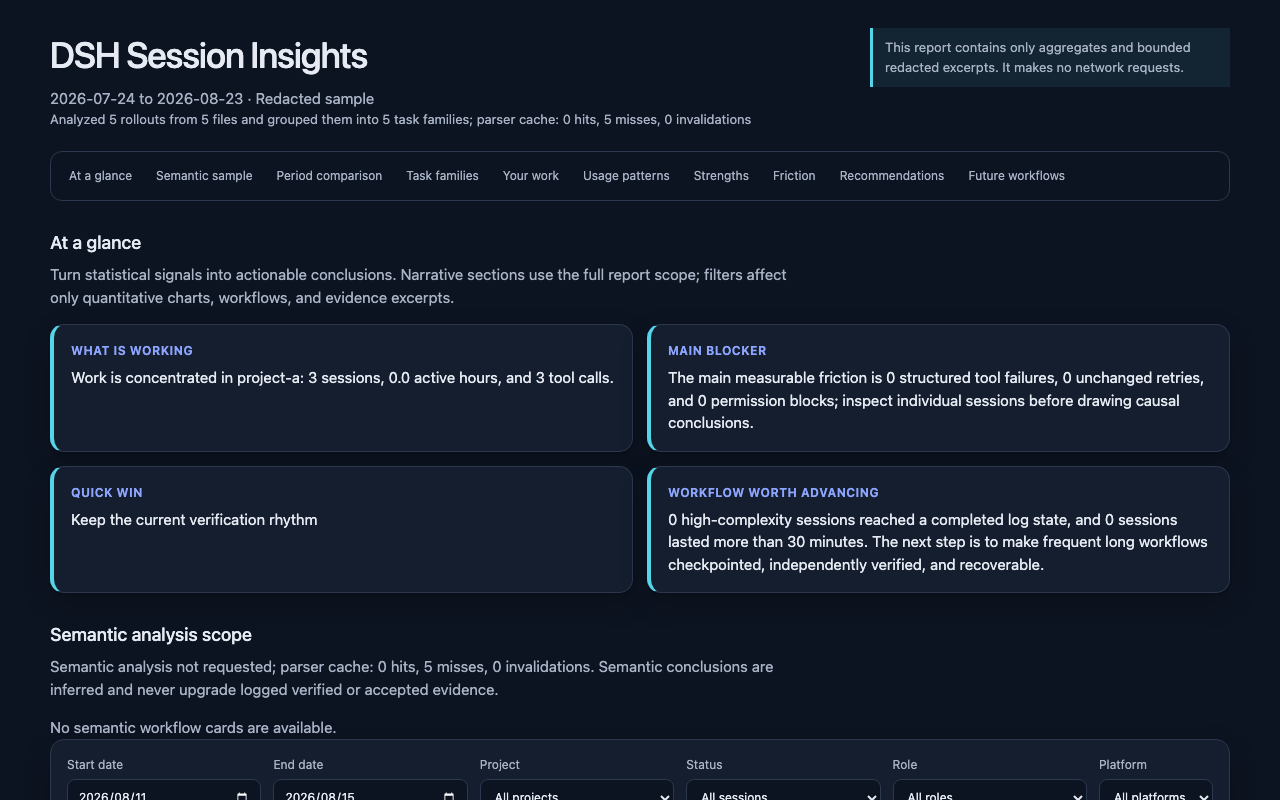
The HTML file contains its own styles and data, so you can keep it locally and open it without a server. A machine-readable JSON report is written beside it.
Install the Bundle
The 0.5.2 Bundle requires DSH >=0.2.0-rc.2 and Node.js ^22.19.0 || >=24.0.0, without Python. The optional file-log CLI still requires Python 3.11+.
DSH compatibility: The package requires >=0.2.0-rc.2; DSH 0.2.0-rc.1 is below the supported floor and later releases are admitted by the declared range, not by static version tables. Contract and service tests cover synthetic V4 input. Consult the acceptance record for artifact-specific host, model, platform and browser results. See DSH compatibility.
The registry command below requires 0.5.2 to be published. When testing a candidate, install its reviewed tarball or source revision instead. Check the version on GitHub Releases before using the registry command:
dsh plugin --profile web add dsh-session-insights@0.5.2
dsh web
To install from source, replace REVIEWED_REF with v0.5.2 after publication, or with the full candidate commit recorded in its artifact manifest. Select that revision before installing; cloning alone checks out the default branch, which may contain another version:
git clone https://github.com/GreenLv/dsh-session-insights.git
cd dsh-session-insights
git checkout --detach REVIEWED_REF
dsh plugin --profile web add .
dsh web
Then run this in the DSH composer:
/session-insights --days 30 --locale en
The command prepares bounded semantic batches, queues the current DSH agent to analyze them serially, and writes the final HTML/JSON under $DSH_HOME/insights/runs/<run-id>. Add --deterministic to skip the model-assisted stage. The command name intentionally differs from /insights, so this Bundle can coexist with dsh-insights.
The npm package has no install or build lifecycle script. The registry command installs the published Bundle; dsh plugin ... add . installs the current local checkout.
Official Desktop
Desktop uses the same Node analysis implementation. Its plugin profile is managed by the official Electron application; the npm CLI rejects --profile desktop. Use the app's plugin controls or its bundled command carrier to manage the Bundle. On macOS that carrier is /Applications/DeepSeek Harness.app/Contents/Resources/runtime/cli/bin/dsh; invoke it with plugin --profile desktop add <package>. Check the candidate acceptance record for the observed results on each platform before using an unpublished candidate. On Windows, close the main app and its child host before reinstalling when files are in use (EPERM). Report viewing uses the HTML path returned by the command; open it in your local browser, or pass --no-open for a path without the viewing hint.
Availability
- Install the published Bundle from npm.
- Download versioned artifacts from GitHub Releases.
- Find the public directory entry on dsh.pub.
- Other verified community listings are recorded in the distribution ledger.
Permissions and dependencies
The Bundle analyzes sessionQuery snapshots in a Node.js worker. It does not start Python or a shell, and the worker receives an empty environment and no inherited Node startup arguments. DSH_SESSION_INSIGHTS_PYTHON, PYTHONPATH and Python startup files no longer affect native analysis. The optional Python CLI remains a separate workflow.
| Capability | Scope |
|---|---|
| Sessions and files | Reads selected snapshots in memory. Writes reports, bounded evidence and validated model outputs into marked directories under $DSH_HOME/insights/runs. It does not persist raw snapshots or create a shared semantic cache. |
| Path protection | Requires a direct, marked run directory; checks every artifact path and rejects links and special files. Batch IDs must belong to the run manifest. New directories/files use owner-only POSIX modes; Windows access follows the parent ACL. |
| Environment and credentials | The host uses DSH_HOME or the OS home directory to locate storage. No interpreter discovery, environment forwarding, separate API key or credential-store calls are used by native analysis. Session content can still contain secrets; redaction is not a disclosure guarantee. |
| Network and models | Deterministic analysis runs offline. The default semantic workflow sends bounded, sanitized evidence through the current DSH agent to its configured model provider, with that provider's data handling and costs. Use --deterministic to skip it. |
The Bundle requires Node.js ^22.19.0 || >=24.0.0 and DSH's commands, tools and sessionQuery services. The Bundle uses the declared >=0.2.0-rc.2 DSH peers, including the official message helper. Missing services, worker failure, unsafe paths or invalid semantic output stop the affected operation. Model output is validated before writing; a rejected replacement preserves any previously valid result. Explicit fallback produces a deterministic report marked as degraded.
A run accepts at most 2,000 selected snapshots and 64 MiB of serialized snapshot input. Reduce --days or filter --project when that limit is exceeded. At most two analyses collect and analyze concurrently per plugin instance and further requests wait in a cancellable queue, so concurrent slash-command and tool calls cannot multiply Workers without bound; the per-Worker maxOldGenerationSizeMb limit caps one Worker's V8 old space and is not a host RSS guarantee. Native runs record their full selection scope (normalized project, window length, privacy pair, depth and locale); resume binds an explicit run and requires the same scope, so a resume request can never select another project or a wider privacy range. Runs whose manifest lacks a recorded scope, or whose format or analyzer semantics differ, are refused; growth of the host version alone does not invalidate a semantically identical run. Native runs retain their own validated outputs for resumption, but do not reuse a cross-run semantic cache.
Retention and cleanup
Reports and evidence remain on disk until explicitly deleted. Ask the agent to call session_insights_cleanup with a run's workdir to preview its files and bytes, then request deletion of that specific run to use confirm: true. Cleanup removes the whole marked run, including its report, and cannot be undone. It refuses unmarked legacy directories and linked entries. Other runs, source logs and the optional CLI's shared caches are preserved. Review old CLI artifacts separately before removing them.
The optional CLI still requires Python 3.11+ and zstandard>=0.23,<1 for compressed logs; jsonschema>=4.23,<5 is used only by development tests. Its bootstrap installer runs pip and manages its own skill/runtime directories. See Security Policy for the separate boundaries and STORE policy limits.
Privacy modes
Deterministic reports run offline. In native mode, complete raw snapshots are analyzed in memory and are not copied into the run directory. Choose how much session content the report and optional model stage may retain:
| Mode | Report content | Semantic analysis |
|---|---|---|
redacted (default) | Keeps bounded excerpts after anonymizing identity and paths and filtering secrets | Uses bounded, redacted evidence in the default semantic workflow; --deterministic skips it |
metrics | Omits excerpts and keeps aggregate measurements | Disabled; no semantic batches are created |
local | Keeps bounded local paths and text after secret filtering | Explicit opt-in for a trusted local destination and configured model provider |
The tool itself does not add an upload channel. If you use the optional semantic workflow, bounded evidence cleaned according to --analysis-privacy is analyzed by the model provider currently configured in DSH.
Reports are refused inside $DSH_HOME/sessions, so generated files cannot be mixed into the source log tree.
Native command
/session-insights [--days N] [--project PATH] [--privacy MODE]
  [--analysis-privacy MODE] [--analysis-depth LEVEL]
  [--locale zh-CN|en] [--deterministic] [--resume] [--workdir RUN] [--no-open]
Project filters use the host operating system's path syntax. On Windows, pass a native path such as /session-insights --project C:/path/to/project; a POSIX-rooted path such as /path/to/project is rejected instead of silently matching no sessions.
The semantic workflow is the default. Invalid model output gets one repair opportunity and can then fall back explicitly to the deterministic report. The current session is counted for coverage but excluded from recommendations as meta-analysis.
--no-open is the explicit statement that the command must only report the artifact path: the output stays a plain path line with no view hint, no file is opened, no server is started and nothing is uploaded. Without it, the command output appends one view hint naming the report file. The plugin itself never opens files, spawns viewers or serves HTTP; in the Web runtime and in the official Desktop, open the reported HTML path with your local browser or system viewer — the file is self-contained and works offline. The --resume flow accepts an explicit --workdir run directory; without it, a resumable run is selected only when its recorded scope matches the request exactly, and ambiguity between multiple matching runs is reported with their paths instead of guessed.
Compatible CLI and Skill workflow
The V4 file-log CLI and Skill remain available for automation and environments that do not mount the Bundle:
DSH_HOME="${DSH_HOME:-$HOME/.dsh}"
python3 scripts/bootstrap.py install --dsh-home "$DSH_HOME"
CLI="$DSH_HOME/tools/dsh-session-insights/venv/bin/dsh-session-insights"

# Review the last 30 days and open an English dashboard
"$CLI" report --dsh-home "$DSH_HOME" --days 30 --locale en \
  --format html --output ./dsh-insights.html --open

# Limit the report to one project on macOS or Linux
"$CLI" report --dsh-home "$DSH_HOME" \
  --project /path/to/project --format html --output ./project-insights.html

# Produce aggregate metrics without excerpts or semantic batches
"$CLI" report --dsh-home "$DSH_HOME" --privacy metrics \
  --format json --output ./dsh-metrics.json

# Check the installation
"$CLI" doctor --dsh-home "$DSH_HOME"
The Windows PowerShell equivalent uses the managed Windows launcher and a Windows-native project path:
$Cli = Join-Path $env:DSH_HOME 'tools\dsh-session-insights\venv\Scripts\dsh-session-insights.exe'
& $Cli report --dsh-home $env:DSH_HOME --project 'C:\path\to\project' --format html --output .\project-insights.html
To remove only this project's managed directories:
python3 scripts/bootstrap.py uninstall --dsh-home "$DSH_HOME"
The installer manages only:
$DSH_HOME/skills/dsh-session-insights$DSH_HOME/tools/dsh-session-insights
It refuses symbolic-link targets, overlapping roots, and existing unmarked directories. It does not overwrite another Skill.
Manual semantic review
The native command orchestrates semantic review by default. The CLI exposes each phase for debugging or automation:
dsh-session-insights semantic prepare --dsh-home "$DSH_HOME" --days 30 --workdir /safe/workdir
dsh-session-insights semantic validate-batch --workdir /safe/workdir --batch batch-001
dsh-session-insights semantic prepare-aggregate --workdir /safe/workdir
dsh-session-insights semantic validate-aggregate --workdir /safe/workdir
dsh-session-insights semantic finalize --workdir /safe/workdir --output report.html
Each model-produced JSON file is validated before it can enter the final report. Unknown evidence IDs, prohibited completion claims, malformed enums, and privacy leakage fail closed. If the semantic stage cannot finish, finalize --fallback records the degradation and preserves the deterministic report.
Current scope and limitations
- Native input is the trusted DSH
sessionQueryservice; the CLI reads onlysession.v4.jsonl.zstdorsession.v4.jsonlunder$DSH_HOME/sessions. Older raw logs require upstream migration. - Output follows
dsh-session-insights/1. - Token counts are deduplicated per
(turn, step)and are usage measurements, not billing or quota figures. - The Dashboard and semantic prompt contract support
zh-CNandenfrom the same report schema. - Reports infer patterns from available evidence; they do not prove intent, quality, task acceptance, or security.
Historical 0.2.0 package, CI, native macOS, and focused native Windows evidence is kept in the v0.2.0 release acceptance record. Those historical results do not describe the current release. The historical v0.1 CLI/Skill evidence remains in the v0.1.0 acceptance record. Historical released-runtime compatibility evidence and its platform limits are recorded in the 0.1.5-rc.2 acceptance record.
DSH compatibility
The minimum supported host is fixed separately from the versions actually tested. The declared range admits DSH releases at or above RC.2, including later prereleases. Input-format and API checks still reject incompatible operations; admission is not evidence that a future host has been tested.
This version requires DSH >=0.2.0-rc.2 and refuses older hosts; input remains V4. Native analysis uses host-restored V4 snapshots; the optional Python CLI reads only session.v4.jsonl and session.v4.jsonl.zstd. Migrate older raw logs with upstream DSH before using the CLI. It never falls back to an older generation when the current file is corrupt or newer than V4.
Start a new analysis run after upgrading: earlier manifests and caches have a different input contract. Existing HTML, JSON and Markdown reports are retained. Update a separately installed CLI/Skill from this same version; installing the Bundle does not update it.
Tool workload includes recorded programmatic tool calling (PTC) inner calls. The JSON tool_execution fields separate outer transport calls, inner executions, failures and unsettled inner calls; each recorded failed call outcome is counted once. If both an inner call and its outer program fail, both outcomes remain visible; the report does not infer whether they share one root cause. Permission denials are distinct from failed verification commands. Developer tool-registration messages and scheduled injections do not count as human requests.
DSH writes scheduled prompts as user-role messages with source kind schedule, and RC.2 adds asynchronous question replies with source kind user-question-reply. Neither is treated as user work: both are counted separately as injected context, excluded from conversation evidence, corrections, acceptance signals and completion inference, and can never authorize an action. Only human user messages with source kind user contribute body evidence. Official recovery results with the structured error codes TOOL_OUTCOME_UNKNOWN and TOOL_NOT_STARTED are classified separately from confirmed failures: tool_recovery counts {outcome_unknown, not_started} per session and in totals. TOOL_OUTCOME_UNKNOWN means a recorded call's completed outcome was not durably recorded, so the tool may have produced side effects; TOOL_NOT_STARTED means the log has no record of the call starting. Neither state is counted as a tool failure or a failed verification, and neither proves that a tool executed or that it did nothing. Text that merely mentions a recovery code is classified by the ordinary result rules. Verify external state before retrying an operation that can change data.
The 0.5.2 independent review and pending gates are recorded in docs/acceptance/v0.5.2-candidate.md. The 0.5.1 candidate review scope is recorded in docs/acceptance/v0.5.1-candidate.md. The 0.5.0 release acceptance and the frozen 0.5.0 candidate record apply only to that 0.5.0 implementation and its named host. Historical acceptance records apply only to their named implementations.
Session log generations
One logical session can hold several immutable log generations. The reader selects exactly one, using the canonical filename rather than file timestamps.
| Situation | Behavior |
|---|---|
| Several canonical generations in one session directory | The highest version wins; the session is counted once, and a migrated session is never summed twice |
| Only generations 0–3 | Refuse analysis and report migration required; migrate with upstream DSH |
Noncanonical names (temporary, uppercase, leading-zero, .v0, session.lock) | Never selected; an in-flight write cannot be mistaken for a committed generation |
| Newer than the supported generation | Reported and skipped, with a warning; the session is not silently reported from an older generation |
| Corrupt or undecompressable current generation | Reported as unreadable; the reader does not fall back to an older generation |
| Both compression encodings in one directory | Reported as ambiguous; the session is not read |
| Several project directories claim one session id | Each session directory is counted independently |
Tool and usage counts retain historical events, while semantic evidence excludes replaced messages. DSH derives an ordered model-visible conversation (the surface) from its event log. Replacement endpoints refer to positions in that conversation, not a numeric range of event sequence numbers.
| Event | Behavior |
|---|---|
system/message | Counted as system content; never user work, never excerpted, never leaked into titles or semantic evidence |
user/message with source.kind == "user" | A direct human prompt: counts as user work and may seed the title |
user/message with any other source.kind | Synthetic injected context (plugin, goal, skill catalog, subagent report, …): counted separately, excluded from user work and semantic evidence |
assistant/attempt | Counted as an attempt that committed no visible reply; never materialized as an assistant message, and its token usage is reported unavailable rather than estimated |
assistant/message | Carries its step usage; usage is deduplicated per (turn, step) so a stream field cannot double-count |
surfaceOp: "append" | Normal surface growth |
surfaceOp: {op: "replace", startSeq, endSeq} | Compacted conversation leaves the semantic summary; historical tool and token event statistics are retained |
session/end-seed with data.inherited: true | Records the fork cut; untagged markers establish nothing |
| Unknown event type | Reject required events; retain coverage diagnostics for explicitly ignorable extensions |
npm download history
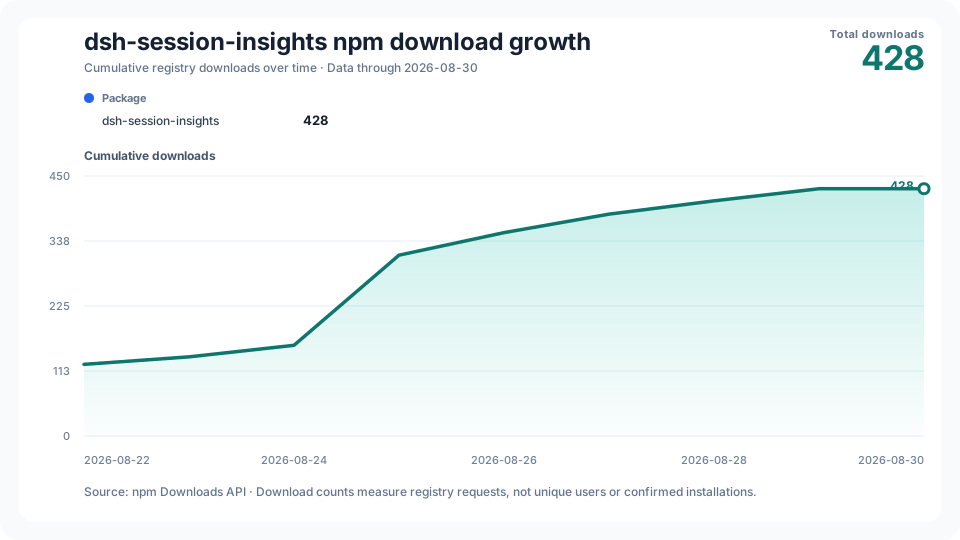
The cumulative chart is generated daily from the npm Downloads API. npm download counts measure registry requests; they are not counts of unique users or confirmed installations. The workflow can also be run manually if GitHub delays or disables a scheduled run.
Development and project docs
python3 -m pip install -e '.[dev]'
npm ci --ignore-scripts
npm ci --prefix tests/dsh-runtime --ignore-scripts
DSH_RUNTIME="$PWD/tests/dsh-runtime" python3 -m unittest discover -s tests -v
python3 scripts/build_native_rules.py --check
npm test
python3 scripts/build_fixture.py --check
python3 scripts/audit_public_tree.py --root .
The test fixture is fully synthetic and reproducibly compressed.
License
Plugins relacionados
dsh-web-ui (dsh-chat-recovery)
zhu1090093659/dsh-web-ui
billion-context
ranxianglei/billion-context
dsh-synapse
liangmianya/dsh-synapse
dsh-chat-import
nwflower/dsh-chat-import