dsh-campus-net
guanui/dsh-campus-net
Campus-network auto-login for DeepSeek Harness: status, one-click login, a local settings page, and an optional autostart watchdog. Includes a Nanjing Audit University preset and a configurable JSON-portal mode.
Instalar
dsh plugin --profile web add github:guanui/dsh-campus-netREADME
dsh-campus-net
Campus network auto-login for DeepSeek Harness (DSH). Check whether you are online, log in on demand, and optionally run a small background daemon that reconnects after sleep, reboot, or a portal timeout — even when DSH is closed.
Ships a preset for Nanjing Audit University (南京审计大学) and a configurable JSON-portal mode for similar portals.
Features
- Status at a glance — online/offline, Wi-Fi SSID, daemon state, last action and last error.
- On-demand login — one tool call, using credentials encrypted on disk.
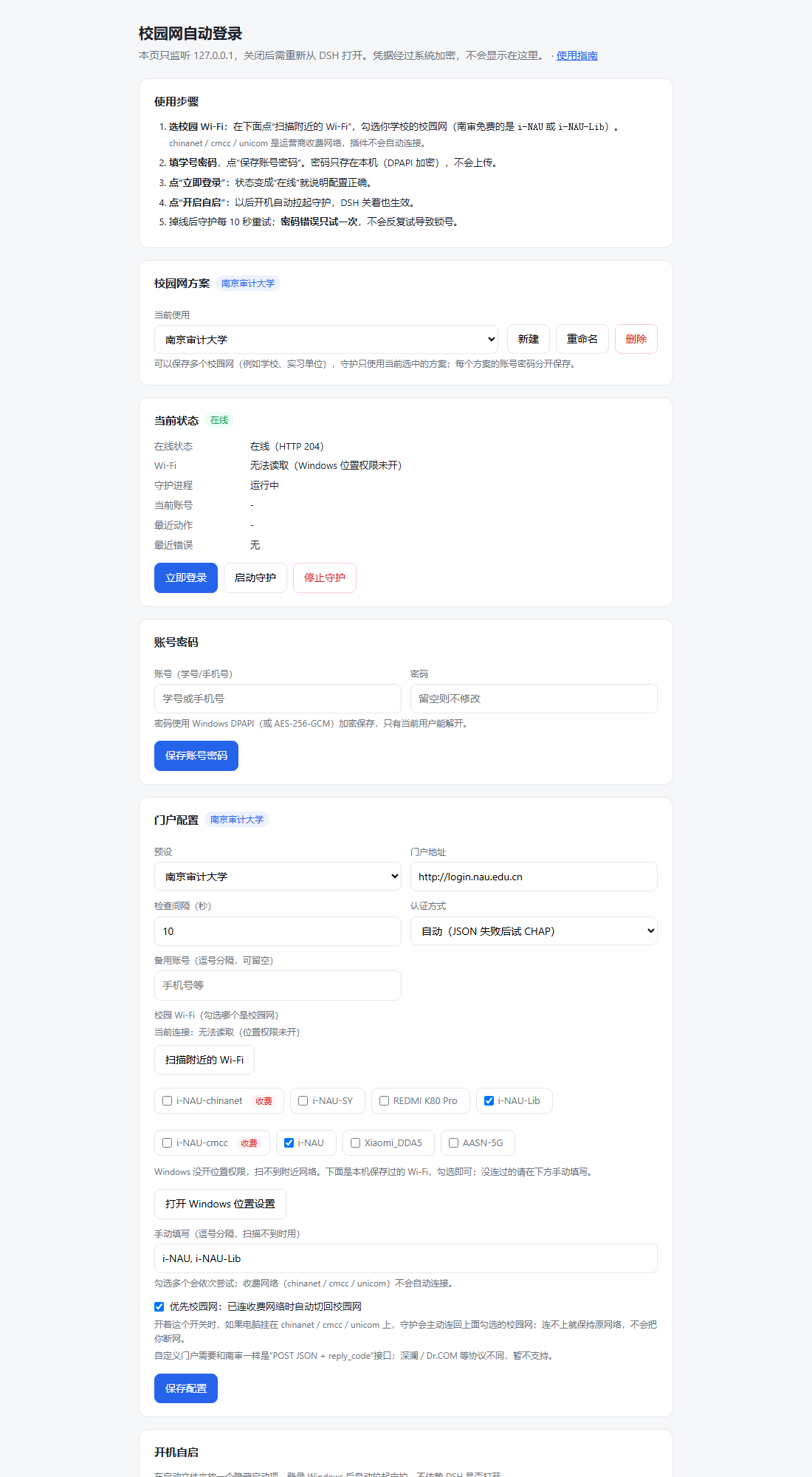
- Local settings page — scan and pick campus Wi-Fi, account/password, portal address, check interval, autostart. Bound to
127.0.0.1with a per-run token. - Multiple campus profiles — save several setups (your university, an internship campus, a second school), each with its own portal, Wi-Fi and credentials; the daemon uses the selected one.
- Prefers campus Wi-Fi — if the laptop is online through a paid carrier network (
chinanet/cmcc/unicom), the daemon switches back only after a scan confirms a configured campus SSID is actually in range; otherwise it leaves the current connection alone. On startup it also sets savedcmcc/unicomprofiles to manual connection so Windows does not fall back to them when the campus network is not reachable. Turn it off with the “Prefer campus Wi-Fi” checkbox. - First-run guide — on first load the plugin opens the user guide (five steps, how to find the page again, troubleshooting). It only opens once (
autoOpenGuide: falsedisables it). DSH has no install-time popup hook, so this is the closest thing. - Optional background daemon — a separate Node process, not a child of DSH, so it keeps running after DSH exits.
installalso registers a hidden Startup entry so it comes back after reboot. - No account lockout — a wrong password is never retried; it stops and reports the portal message.
Requirements
- DSH
>= 0.2.0-rc.1 < 0.3.0 - Node.js 20+ (DSH bundles one)
- Windows 10/11 for the full feature set (DPAPI credentials,
netshWi-Fi switching, Startup autostart). On macOS/Linux the portal login and daemon work, but automatic Wi-Fi switching is skipped and autostart must be configured manually.
Install
From the DSH plugin market: search for dsh-campus-net and install.
Manual (from a checkout):
dsh plugin add link:/absolute/path/to/dsh-campus-net
Restart DSH if the four tools do not appear immediately.
Guide
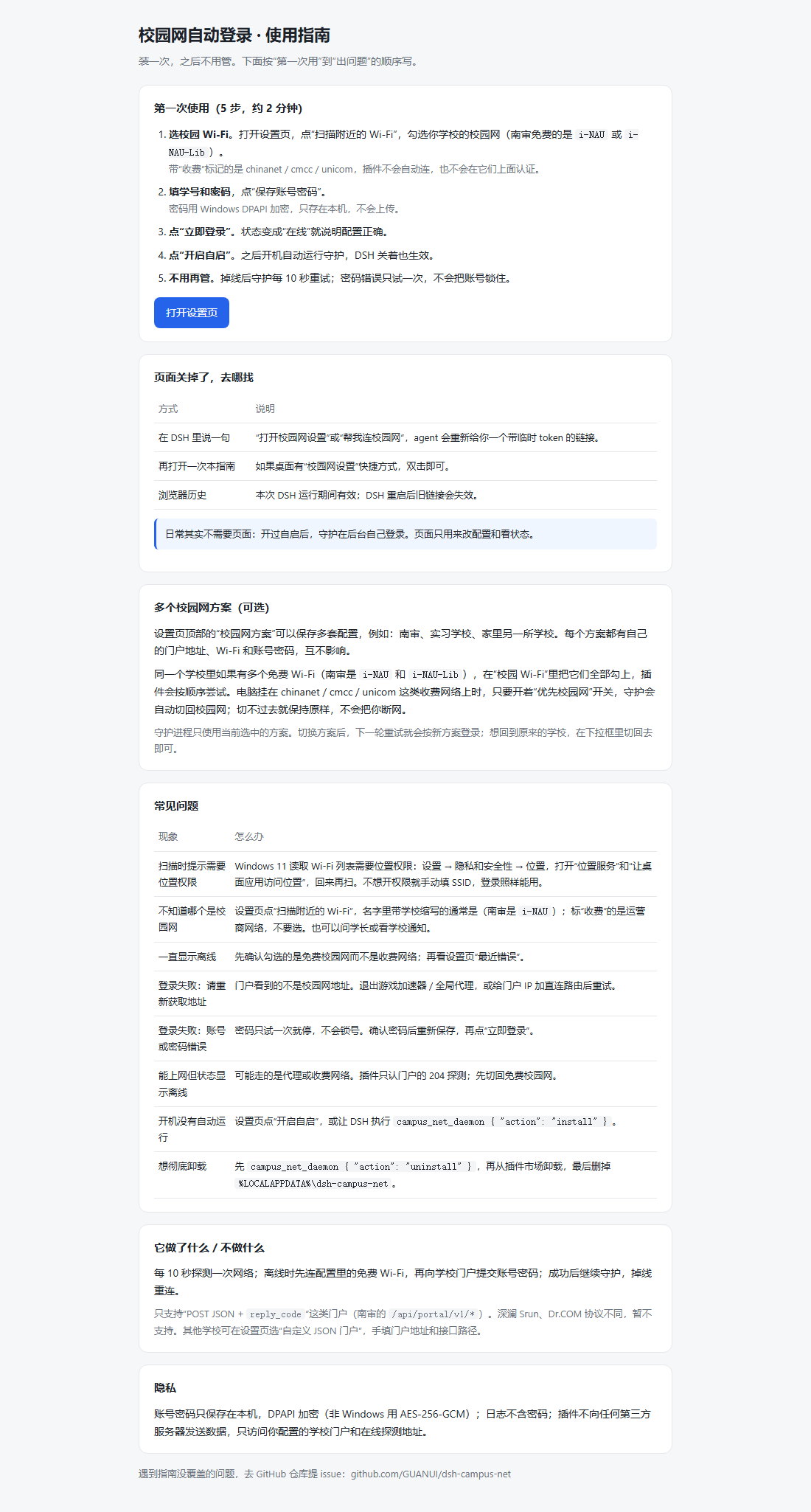
The plugin opens this guide on first load. You can also run campus_net_setup and click User guide at the top of the settings page.
Setup
- Ask DSH to run
campus_net_setup. It returns ahttp://127.0.0.1:<port>/?token=…URL. - In Campus Wi-Fi, press Scan nearby Wi-Fi and tick your campus network (at NAU the free ones are
i-NAUandi-NAU-Lib;chinanet/cmcc/unicomare paid carrier networks and are never auto-connected). - Fill in your campus account and password, then Save.
- Press Login now to verify.
- Press Enable autostart (or run
campus_net_daemon { "action": "install" }) if you want it to survive reboot.
Scanning needs Windows location permission: Settings → Privacy & security → Location, enable location services and desktop app access. You can also type the SSID manually; login still works without the permission.
With a global proxy or game accelerator running, the portal sees a non-campus source address and login fails with
请重新获取地址!(please obtain the address again). Quit those tools, or add a direct route to the portal IP, before logging in.
The settings link is valid only while the plugin process is alive. Re-run campus_net_setup after restarting DSH.
Multiple campus profiles
The Campus profile card stores several setups side by side — for example your own university and a campus you visit occasionally. Each profile keeps its own portal, Wi-Fi list, usernames and saved credentials; switch with the dropdown, use New to clone the current one, and Rename/Delete to manage them. The daemon always uses the selected profile, and switching applies from the next retry.
Nanjing Audit University
The nau preset is pre-filled:
| Field | Value |
|---|---|
| Portal | http://login.nau.edu.cn |
| Login API | /api/portal/v1/login |
| Success | reply_code === 0 |
| Wi-Fi | i-NAU, i-NAU-Lib (both free, tried in order). Carrier networks chinanet / cmcc / unicom are paid and never auto-joined |
| Online probe | http://connect.rom.miui.com/generate_204 → HTTP 204 |
Your account is your student ID. The phone number is not accepted by this portal.
Other portals
Choose Custom JSON portal if your portal behaves like the NAU one: JSON over HTTP, a reply_code field, and the four endpoints getinfo / login / logout / challenge. Adjust the portal URL in the settings page.
This plugin does not implement Srun (深澜) or Dr.COM protocols. Please do not list it as supporting them.
Tools
| Tool | What it does |
|---|---|
campus_net_status | Online state, SSID, daemon state, last error. quick: true reads cached state only. |
campus_net_login | Logs in now; tries the configured Wi-Fi first. |
campus_net_setup | Starts the local settings page and returns its tokenized URL. |
campus_net_daemon | status / start / stop / install / uninstall / logs. |
How it works
- Online check: only HTTP 204 from the probe URL counts as online. Many campus gateways answer any request with
200plus a login page, so200is deliberately treated as offline. - Wi-Fi:
netsh wlan connectto the configured SSIDs in order, then re-check the interface. - Portal: POST JSON to the login path. If the JSON login fails and
authisauto, it retries once with CHAP (md5(ident_byte + password + challenge_hex)). - Accounts: the saved username, then any aliases in
usernames. It only tries the next account when the portal says the account does not exist (E012/E027orio_reply_code12/27). A wrong password stops immediately. - Already online elsewhere (
E013/E002/E028): logs out the current session and retries once. - Daemon: a single Node process listens on
127.0.0.1:47215as its single-instance lock. On Windows it is launched through WMIWin32_Process.Createso it is not tied to DSH's job object. Astop.flagfile makes it exit within ~2 seconds.
Data and privacy
Everything stays on your machine. There is no telemetry and no third-party service.
| Path | Contents |
|---|---|
%LOCALAPPDATA%\dsh-campus-net\config.json | Portal, SSIDs, interval, usernames |
%LOCALAPPDATA%\dsh-campus-net\cred.dat | Encrypted username + password |
%LOCALAPPDATA%\dsh-campus-net\campus-net.log | Append-only log (rotated at 512 KB) |
%LOCALAPPDATA%\dsh-campus-net\state.json | Last check/login result, current account, PID |
On Windows the credentials are encrypted with DPAPI (CurrentUser). On other platforms they use AES-256-GCM with a 0600 key file. The password is never written to logs, tool output, or the settings page. It is passed to PowerShell through an environment variable for the DPAPI call, so it does not appear on a command line.
Set DSH_CAMPUS_NET_HOME to use a different data directory.
Uninstall
campus_net_daemon { "action": "uninstall" }— removes autostart and stops the daemon.- Remove the plugin in DSH.
- Optionally delete
%LOCALAPPDATA%\dsh-campus-net.
Troubleshooting
- “没有保存账号密码” — open
campus_net_setupand save the account first. - Password error — the plugin will not retry. Fix the password in the settings page; repeated failures can lock some portals.
- Portal changed — update the portal URL/paths via the custom JSON mode, or open an issue.
- Daemon not running after reboot — Windows only; check that autostart is enabled and that the Startup entry
dsh-campus-net.vbsexists. - Port 47215 already in use — another copy is running, or change
lockPortinconfig.json. - DSH closed and network dropped — install the daemon; the plugin itself only runs while DSH is open.
Development
node test/smoke.mjs
The smoke test uses a temporary data directory and covers config normalization, tool shapes, DPAPI round-trip, and the settings server (including token rejection).
License
MIT
Plugins relacionados
archify (deepseek-harness)
tt-a1i/archify
WeKnora (dsh-weknora)
tencent/weknora
next-ai-draw-io (dsh-plugin)
dayuanjiang/next-ai-draw-io
weknora
tencent/weknora