dsh-update-all
haotian-lu-prog/dsh-update-all
Plugin DSH Web para comprobar y actualizar el CLI de DeepSeek Harness y todos los plugins de perfil desde Settings → General.
Instalar
dsh plugin --profile web add github:haotian-lu-prog/dsh-update-allREADME
dsh-update-all




Update DeepSeek Harness (DSH), its bundled @deepseek-ai/dsh-* packages and
all profile plugins with one command.
中文说明 · Changelog · Contributing
Why
DSH is updated in at least two places:
- the global CLI package (
@deepseek-ai/dsh) — it also ships all@deepseek-ai/dsh-*bundles; - every profile under
~/.dsh/profiles/<name>— community plugins are normalpnpmdependencies of each profile.
Doing this by hand means remembering npm install -g @deepseek-ai/dsh@next,
then dsh plugin --profile web update, and so on for every profile. This tool
does all of it, discovers new profiles and new plugins automatically, and knows
that npm's latest dist-tag is not always the newest DSH release.
Features
- One command:
dsh-update-all. - CLI + plugins: updates the global CLI and every profile's plugins.
- Always actually latest: compares all npm dist-tags (
latest,next,alpha, …) instead of trustinglatest. - Future proof: profiles are discovered from
$DSH_HOME/profiles/*/package.json, so new profiles and new plugins work without editing this script. - Installer aware: uses
npmorpnpm, depending on how DSH is installed. - Safe by default: automatic backup before every update, plus a
--rollbackcommand. - Preview mode:
--dry-runshows exactly what would change. - Tunable channels:
--channel stable|next|alpha|autoand--min-age <minutes>for pnpm'sminimumReleaseAgesupply-chain delay. - Small: a single Bash script; works with macOS's default Bash 3.2.
DSH Web plugin
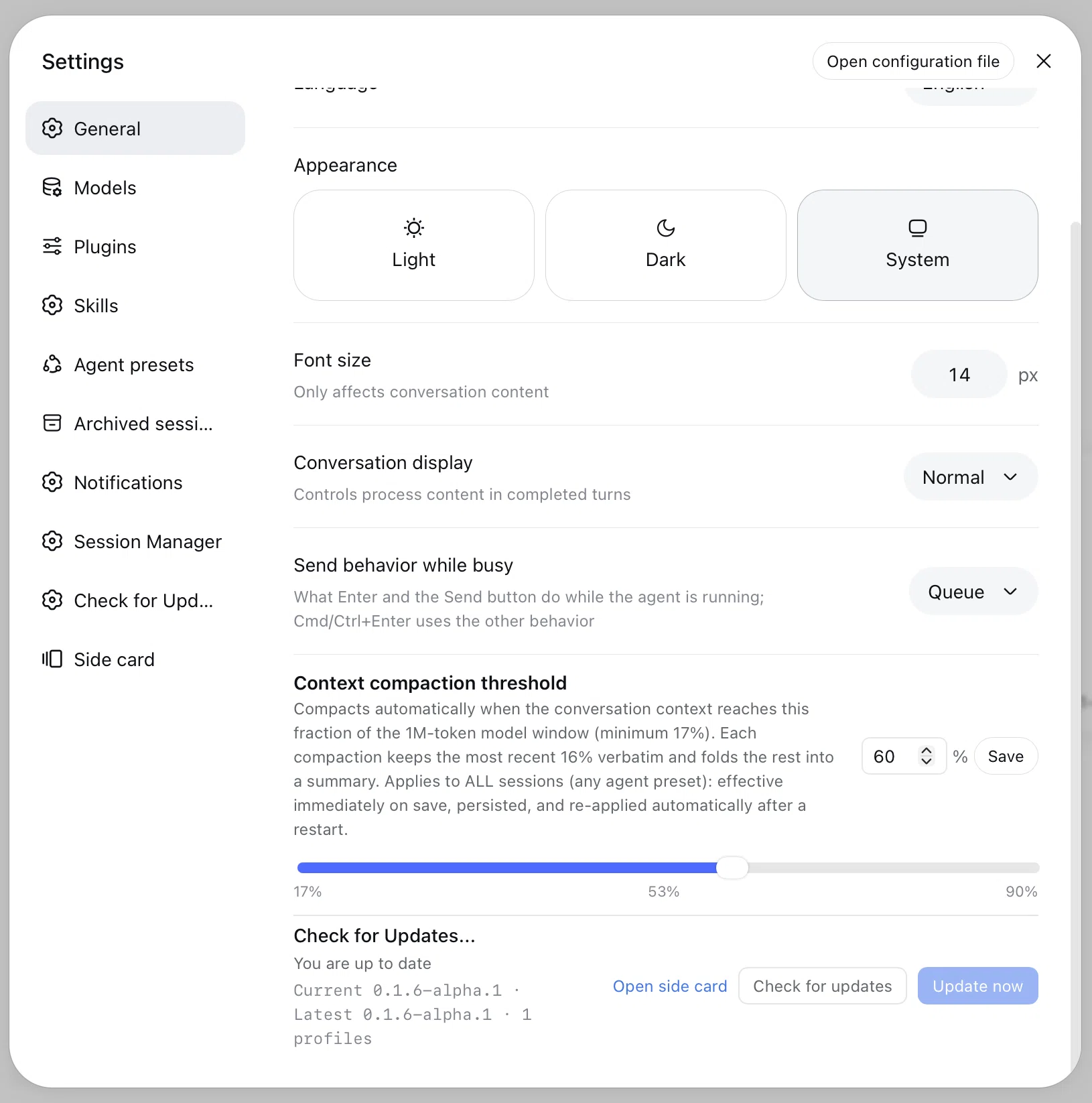
dsh-update-plugin adds Check for Updates... /「检查更新」to DSH Web's
Settings → General, next to Permission, Language, Appearance and Font Size.
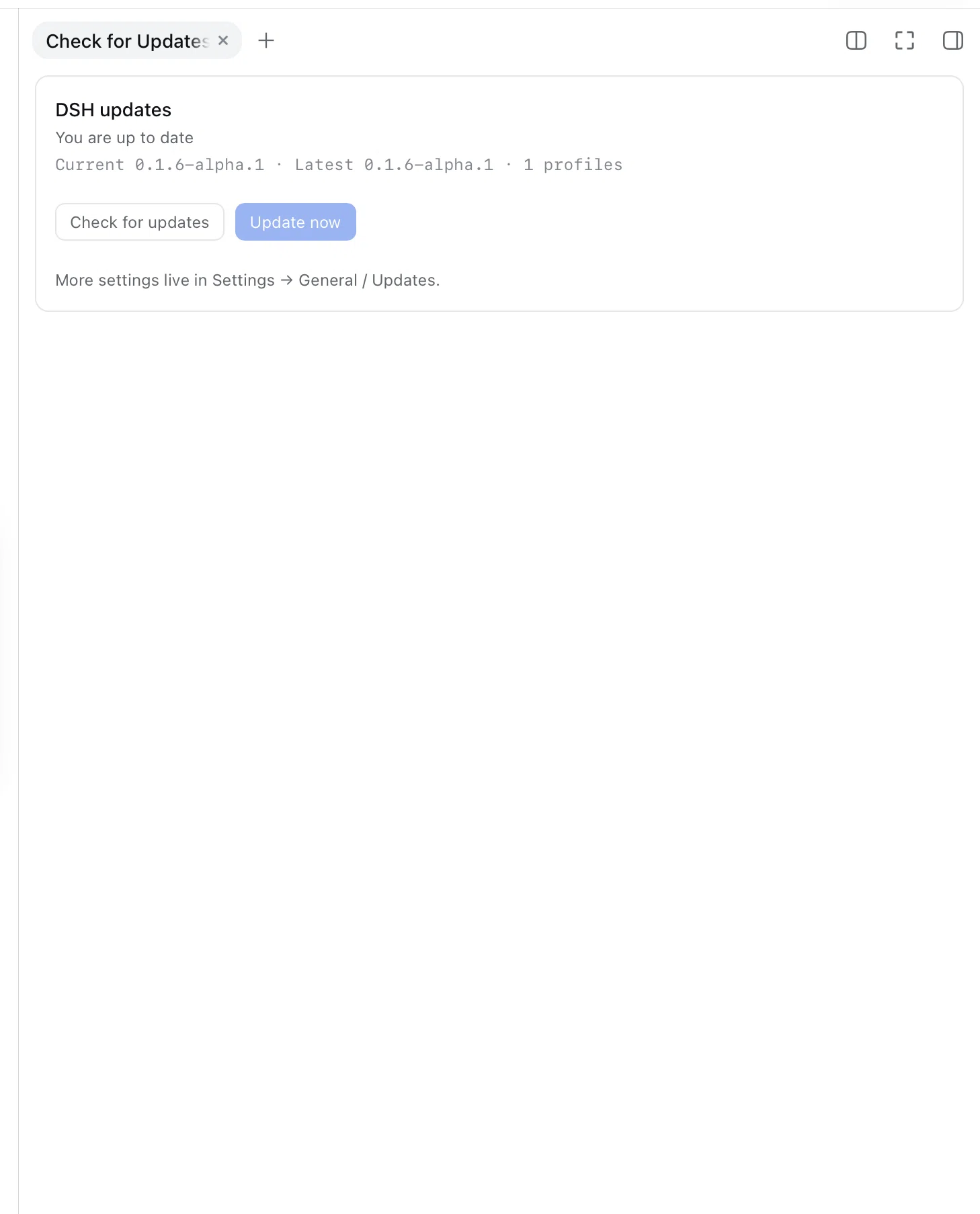
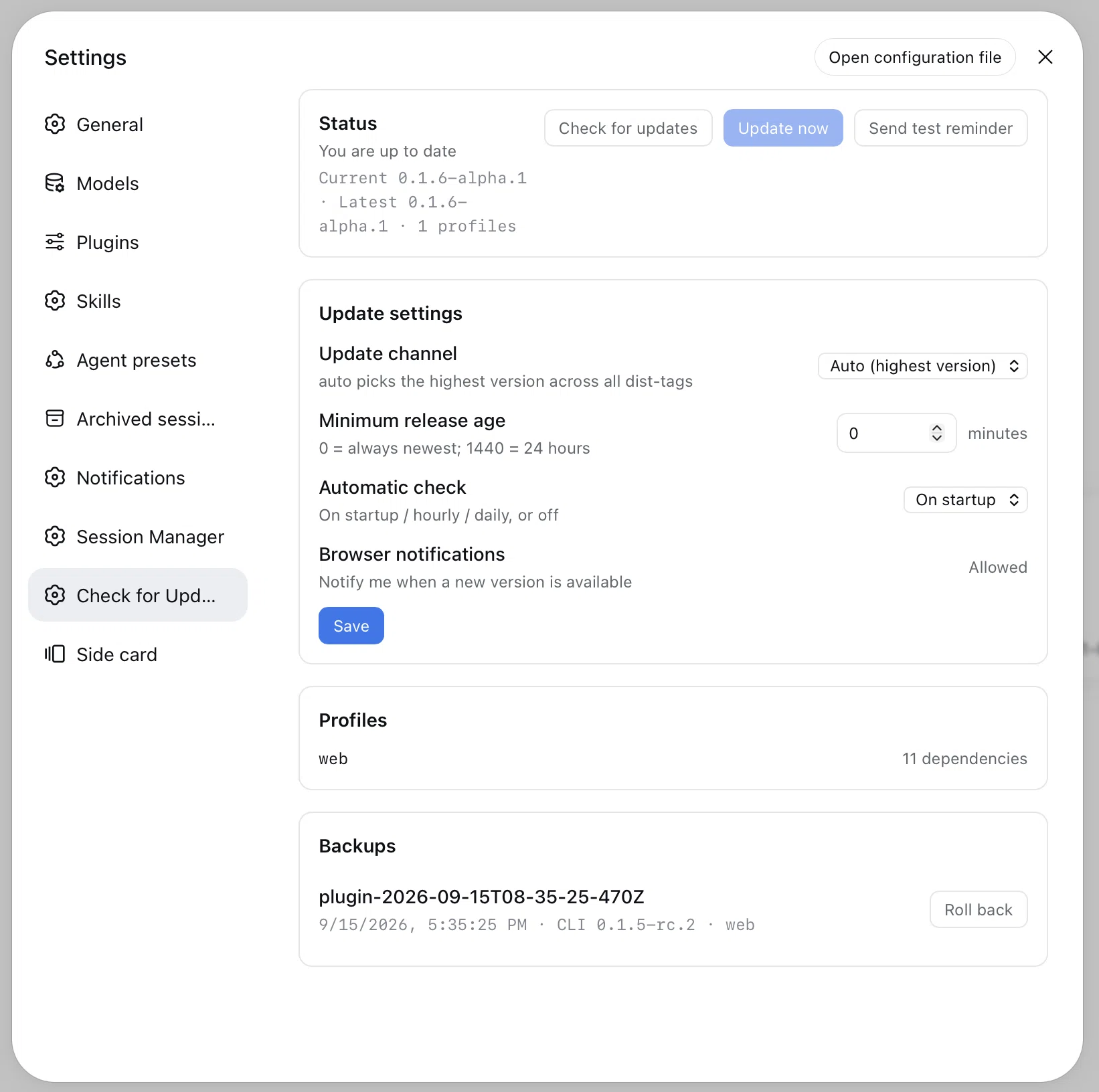
It also adds a full Settings → Check for Updates... page (channels,
--min-age, profiles, backups and rollback) and a native right-sidebar tab
with an update badge. The update logic is built in — no Homebrew and no
separately installed shell script required.
# from npm
dsh plugin --profile web add dsh-update-plugin

# from a local checkout (development)
dsh plugin --profile web add /path/to/dsh-update-all/plugin
See plugin/ for installation, compatibility, fallbacks and
development notes. Community announcement copy is available in
docs/announcement.md. If pnpm's minimumReleaseAge policy blocks the install,
add --config.minimum-release-age=0 to the dsh plugin add command.
Always mount the plugin with dsh plugin add (not plain pnpm add) so it
joins dsh.profile.bundles.
Requirements
- macOS or Linux (WSL works)
bash3.2 or newernode(DSH itself requires Node.js)npm(to query the registry; also used to update DSH when it was installed with npm)pnpmis used throughdsh plugin, so it only needs to be available if your DSH installation already uses it- DSH installed — although the script can also bootstrap a missing CLI
Install
One-liner
curl -fsSL https://github.com/haotian-lu-prog/dsh-update-all/releases/latest/download/install.sh | bash
The installer downloads the updater script from refs/heads/main, so you always get the newest code. To run the installer itself from the main branch instead of the latest release:
curl -fsSL https://raw.githubusercontent.com/haotian-lu-prog/dsh-update-all/refs/heads/main/install.sh | bash
Homebrew
brew tap haotian-lu-prog/dsh-update-all https://github.com/haotian-lu-prog/dsh-update-all
brew trust haotian-lu-prog/dsh-update-all
brew install dsh-update-all
Homebrew 6+ requires third-party taps to be trusted explicitly; the
brew trust line is a one-time step. On older Homebrew versions without the
trust command, skip that line.
The formula lives in this repository (Formula/dsh-update-all.rb). Every release
updates its url and sha256 automatically, so brew upgrade dsh-update-all
always has the newest updater. No extra tap repository is required.
Manual
git clone https://github.com/haotian-lu-prog/dsh-update-all.git
cd dsh-update-all
./install.sh --local dsh-update-all.sh
From a local checkout (without installing)
bash ./dsh-update-all.sh --dry-run
If ~/.local/bin is not in your PATH, the installer prints the line to add.
Usage
# Update everything to the newest release (default)
dsh-update-all

# Preview only
dsh-update-all --dry-run

# Follow the stable dist-tag only
dsh-update-all --channel stable

# Be conservative: only accept packages published at least 24h ago
dsh-update-all --min-age 1440

# Only one profile
dsh-update-all --profile web

# CLI only / plugins only
dsh-update-all --no-plugins
dsh-update-all --no-cli

# No confirmation prompt (for scripts / cron)
dsh-update-all --yes

# List backups and roll back
dsh-update-all --list-backups
dsh-update-all --rollback
dsh-update-all --rollback 20260911T211500
Restart any running dsh web / DSH session afterwards to load the new code.
Options
| Option | Description |
|---|---|
--channel <auto|stable|next|alpha> | Which npm dist-tag to follow. auto (default) picks the highest version across all tags. stable means latest. |
--min-age <minutes> | Only accept versions published at least N minutes ago. 0 (default) always takes the newest; 1440 = 24h. |
--profile <name> | Update only this profile. Repeatable. |
--no-cli | Do not update the global dsh CLI. |
--no-plugins | Do not update profile plugins. |
--no-backup | Skip the automatic pre-update backup. |
-n, --dry-run, --check | Print the plan without changing anything. |
-y, --yes | Do not ask for confirmation. |
--list-backups | List available backups. |
--rollback [id] | Restore a backup (latest by default). |
--install | Install this script into ~/.local/bin. |
--target-version | Print the newest version that would be installed and exit (useful in scripts / CI). |
-h, --help | Show help. |
-V, --version | Show the updater version. |
Environment variables
| Variable | Default | Meaning |
|---|---|---|
DSH_HOME | ~/.dsh | DSH home directory. |
DSH_UPDATE_CHANNEL | auto | Same as --channel. |
DSH_UPDATE_MIN_AGE | 0 | Same as --min-age. |
DSH_NPM_CACHE | ~/.cache/dsh-update/npm | npm cache used for metadata and installs. |
DSH_UPDATE_BACKUP_DIR | $DSH_HOME/update-backups | Where backups are stored. |
DSH_UPDATE_INSTALL_DIR | ~/.local/bin | Install target for --install / install.sh. |
NO_COLOR | unset | Disable colored output. |
How it works
- Resolve the target version. The script asks npm for the
dist-tagsof@deepseek-ai/dshand compares them with semver rules. With the default--channel auto, the highest version wins — which is how it findsnextreleases that are newer thanlatest. - Detect how DSH was installed. It resolves the real path behind
dshand choosesnpmorpnpmglobal install accordingly. - Back up. Each selected profile's
package.jsonandpnpm-lock.yamlplus the current CLI version are copied to$DSH_HOME/update-backups/<timestamp>/, with amanifest.json. - Update the CLI and bundles. One global install updates
@deepseek-ai/dshand all of its bundled@deepseek-ai/dsh-*dependencies. - Update the profiles. For each profile with dependencies it runs
dsh plugin --profile <name> update --latest, falling back topnpm update --latestin the profile directory. - Summarize. Finally it prints the new CLI version and reminds you to restart DSH.
Safety and rollback
-
Always preview first:
dsh-update-all --dry-run. -
Every real run creates a backup by default. Backups live in
~/.dsh/update-backups/. -
To roll back everything — profile manifests, lockfiles, reinstall of dependencies and the previous CLI version:
dsh-update-all --rollback -
By default the script passes
--config.minimum-release-age=0to pnpm, so plugin updates are not held back by the 24h supply-chain delay. Usedsh-update-all --min-age 1440(orDSH_UPDATE_MIN_AGE=1440) if you prefer the safer behaviour. -
This tool only ever writes inside your DSH home and your global npm/pnpm prefix. It never sends your data anywhere; npm/pnpm talk to their registries.
FAQ
Homebrew says the tap is untrusted. What do I do?
Homebrew 6+ does not load formulae from third-party taps until you trust them.
Run brew trust haotian-lu-prog/dsh-update-all (or
brew trust --formula haotian-lu-prog/dsh-update-all/dsh-update-all) once, then
run brew install dsh-update-all again.
Why is latest not the newest version?
DSH is still releasing prereleases. At the time of writing,
latest pointed to 0.1.5-rc.1 while next was 0.1.5-rc.2. --channel auto
compares all dist-tags and picks the actual highest version.
Will it update my plugins to a version that is younger than 24h?
With the default --min-age 0, yes. Pass --min-age 1440 to opt into a delay.
I installed DSH with pnpm. Does it still work?
Yes. The script inspects where the dsh binary really lives and updates it with
the matching package manager.
Does it update DSH Desktop? No. This project updates the CLI and the profile plugins. The desktop app has its own updater.
Does it work on Windows? Use WSL, or Git Bash. The script is tested on macOS and Linux. Native Windows PowerShell is not supported.
I don't have any profiles. That is fine — the profile update step is simply skipped. The CLI and its bundled packages are still updated.
Releases and automation
- Pushing a tag like
v0.1.1triggers the Release workflow: it verifies the tag againstUPDATER_VERSION, creates the GitHub release with generated notes and attachesdsh-update-all.shandinstall.sh. make release VERSION=0.1.1bumpsUPDATER_VERSION, commits, tags and pushes in one step. Add theCHANGELOG.mdentry first.- The same workflow also updates
Formula/dsh-update-all.rbin this repository, so Homebrew points at the new version immediately after a release — no secret and no second repository required. - The Upstream check workflow runs daily, resolves the newest
@deepseek-ai/dshversion and opens an issue when DSH has moved ahead of the version this repository last tracked.
Contributing
Issues and pull requests are very welcome. See CONTRIBUTING.md for local development and test instructions.
License
Plugins relacionados
deepseek-harness
deepseek-ai/deepseek-harness
dsh-market
dsh-market/dsh-market
dsh-web (dsh-plugin-manager)
zhu1090093659/dsh-web
dsh-web
zhu1090093659/dsh-web