deepseek-harness-background
haoyueqin/deepseek-harness-background
Imagen de fondo personalizada para la UI web de DSH: sube una imagen o pega una URL de imagen detrás de toda la superficie de la app, con opacidad, velo adaptable al tema, transparencia de paneles, desenfoque tipo vidrio esmerilado y de fondo de pantalla, vista previa en vivo y ajustes persistidos, además de una guía de línea de tiempo opcional al estilo DeepSeek con marcadores por pregunta para conversaciones largas.
Instalar
dsh plugin --profile web add github:haoyueqin/deepseek-harness-backgroundREADME

DeepSeek Harness Background












A custom background image plugin for the DeepSeek Harness Web GUI (dsh web): upload a local picture, or paste an image URL, and render it behind the whole app surface with adjustable opacity, readability scrim, panel transparency and frosted-glass blur — everything live-previewed inside the settings panel and committed automatically on release.
The look (fixed wallpaper layer + theme-aware scrim + translucent glass panels driven by --dsw-* design tokens) is modeled on the community dsh-wallpaper-engine implementation.
Screenshots
| Home | 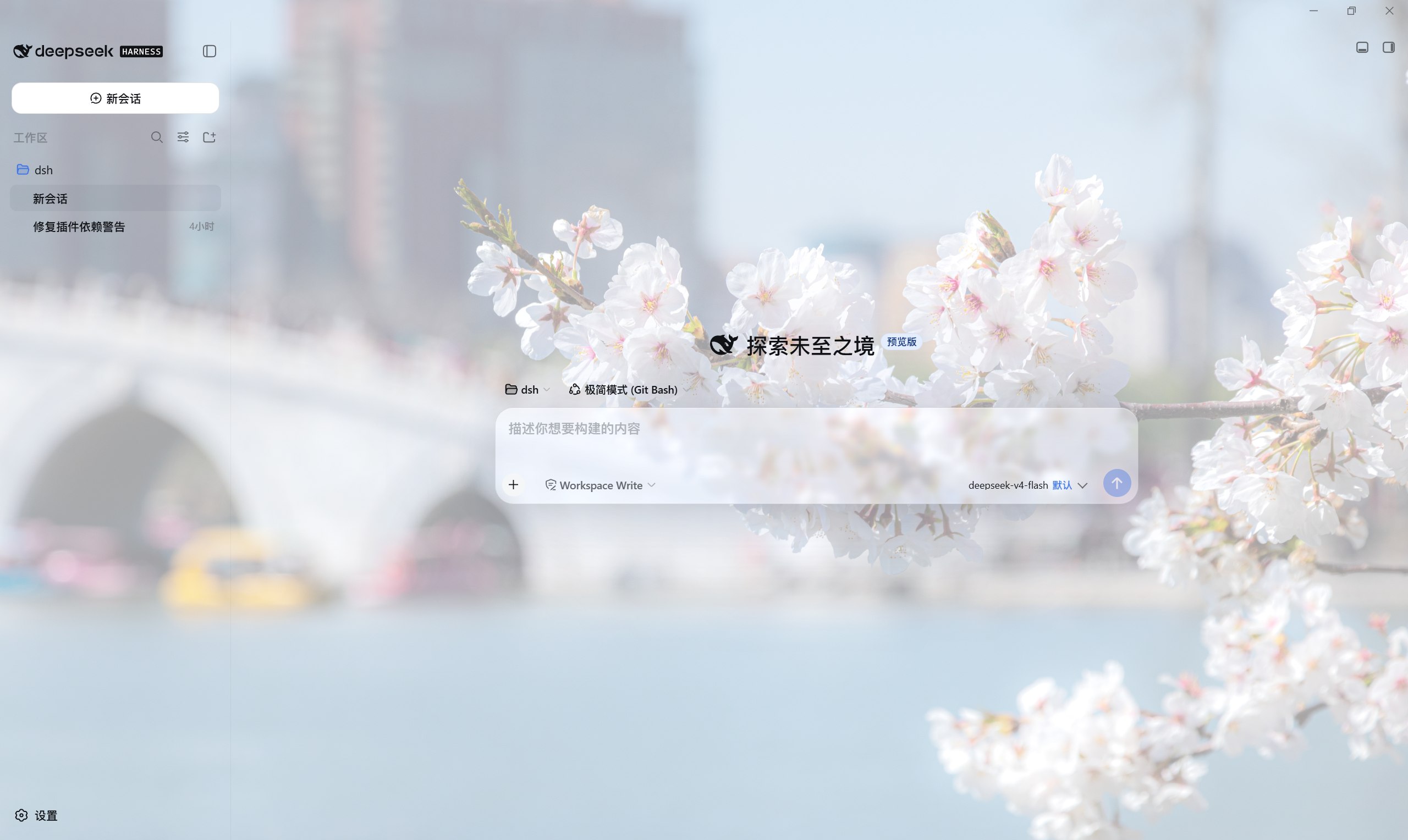 |
| Conversation | 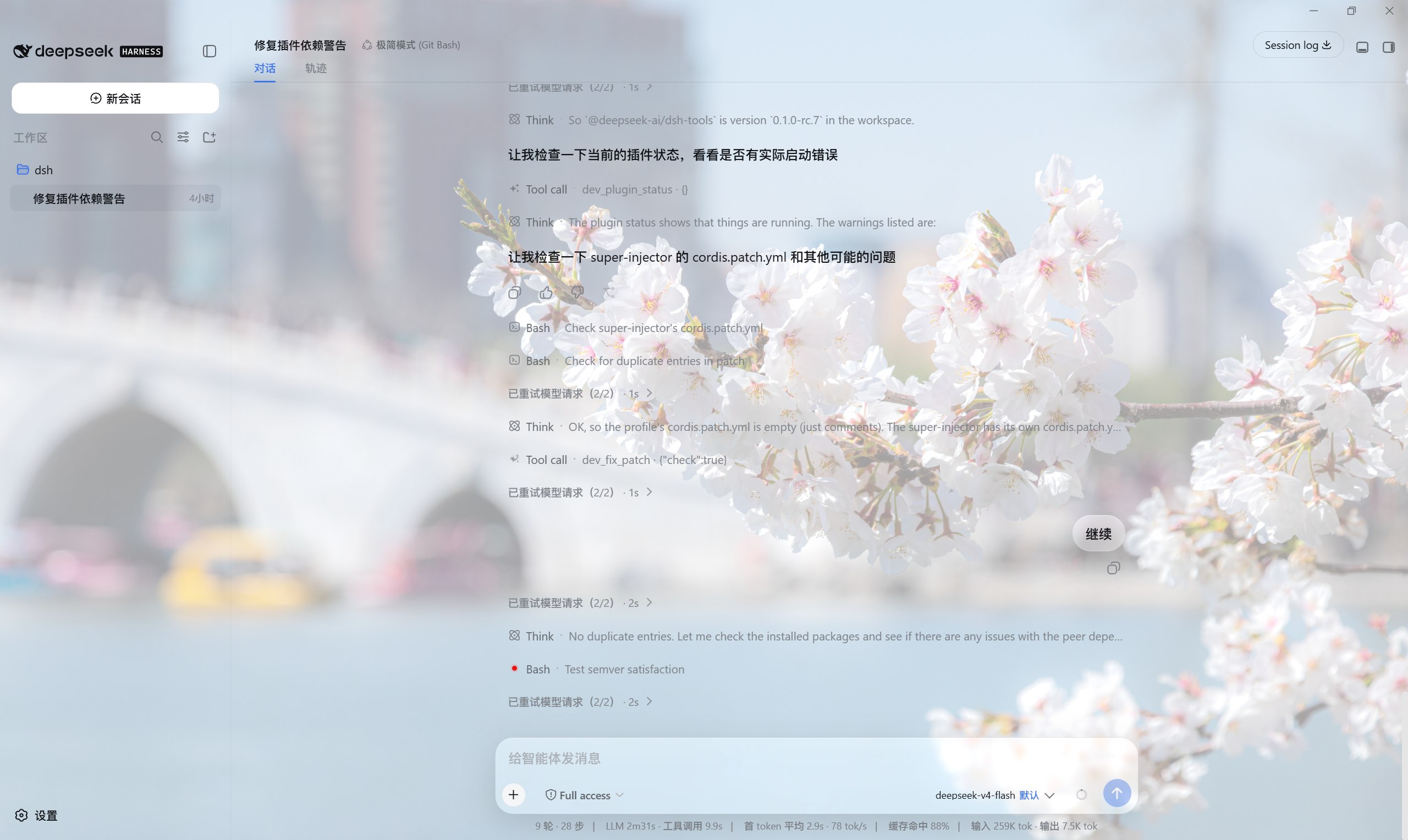 |
| Settings | 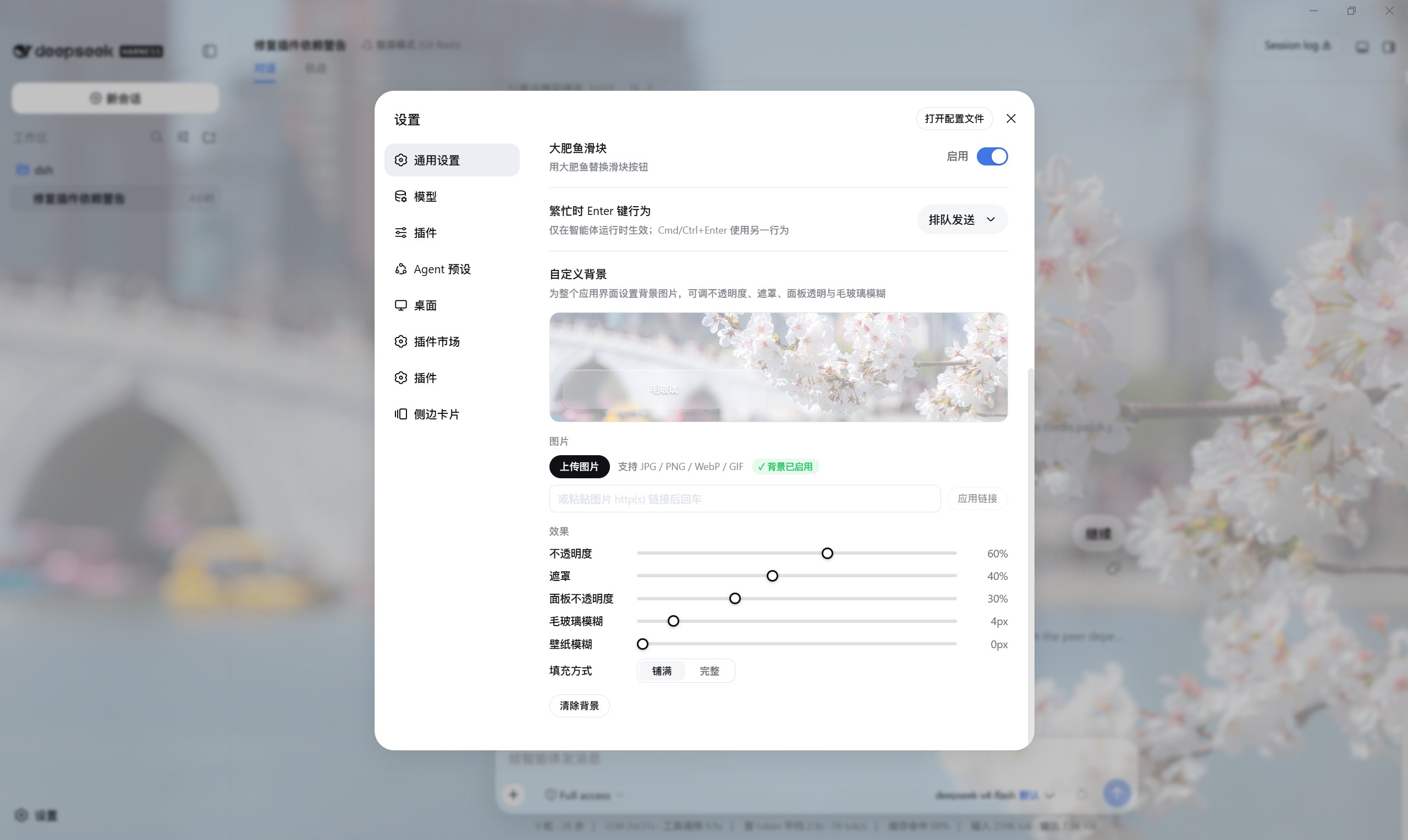 |
Features
- Local upload — pick a JPG / PNG / WebP / GIF from your computer; the plugin stores it under the harness home and serves it over a same-origin route (admitted only when the declared MIME, detected signature and extension all agree).
- Paste a URL — drop an
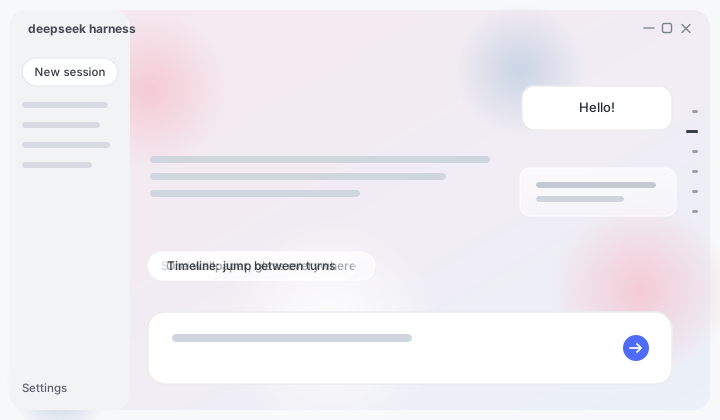
http(s)image link and press Enter. - In-panel live preview — a preview surface at the top of the row renders the image + scrim + a frosted glass bubble; dragging any slider repaints it instantly. The card's box tracks the live window ratio, so the crop it shows is the crop the backdrop paints.
- Stepped sliders — ratio controls snap in 5% steps, blur radii in 1/2px steps; dragging only repaints, release commits (one write per gesture, no jank).
- Five controls — wallpaper opacity, readability scrim, panel opacity, frosted-glass blur, and wallpaper blur.
- Fit modes & framing —
cover(fill, crop) orcontain(whole image). Undercoverthe preview card is a pan surface: it can move the image along the crop's slack axis (up/down when the art fills the width, left/right when it fills the height) with a four-way move cursor — drag, arrow keys (Shift for a coarse step), double-click or the recenter chip.containletterboxes and offers no pan; either way the card keeps tracking the window ratio. - Theme-aware scrim — the light theme uses a white veil (lifts the art so dark text keeps contrast); the dark theme automatically switches to a black veil (dims the art so light text keeps contrast).
- Frosted glass (whitelisted) — while a background is active, only the surfaces that float as small cards over the wallpaper turn into translucent glass (specular sheen +
backdrop-filter): the composer card and message bubbles, code blocks / terminal / diff / tool-IO cards / skill & MCP call cards and inline code, the agent task strips and their takeover panels (approval / question / plan review), the chrome buttons (new session, composer plus, scroll-to-bottom), the load-earlier history button, the subagent lineage popover, the sidebar build badge, and the home hero "preview" badge — every glassed surface carries the full recipe (fill + sheen + blur), never translucency without frost. Reading surfaces — dialogs, the settings UI, menus, tooltips, toasts, hover fills and every accent (the send button stays blue) — keep their official opaque paints so nothing legible turns washy (the one documented exception: the turn rail's hover preview, which is rail chrome over the art and joins the glass sheet). The blur radius is driven by the glass-blur slider;panelOpacityat 100% restores the official paints on the whitelisted list too. - Third-party glass registry — any plugin can register its own panels into the same frosted-glass system through the published bridge (
window.__DSH_BACKGROUND_GLASS__global + thedsh-background-glass:readyevent): token mode adds the missing sheen + blur chain when the panel already fills with an overridden--dsw-*token, fill mode takes the fill over as well; every rule sits under thedata-dsh-bg-glassgate so it toggles with the glass automatically. Consumers take zero dependencies and degrade gracefully when this plugin is absent; the whole bridge tears down with it. See docs/GLASS_API.md. - Conversation timeline — the DeepSeek-web turn-navigation rail at the right edge of long conversations, one tick per question, with a hover/focus preview of that turn's prompt. Two frontends, one backend, chosen by what the running kernel supports:
- dsh ≥ 0.1.2-rc.1 (enhancement) — the kernel ships this rail already, so the plugin renders nothing of its own and only fixes its behaviour (a capability check on the rail's own published metrics, never a version compare). Clicks on a loaded mark become a smooth glide instead of the stock instant jump (ease-in-out, distance-paced, cancelled the moment the reader scrolls,
prefers-reduced-motionplaces directly). The rail's full ladder (turnOutlineoutline + loaded window) leaves unloaded marks to the kernel's own loadThrough jump — and while one of those kernel jumps is still paging (the mark pulsesaria-busy) the plugin stands down entirely. Because the official hover preview card paints an opaque fill, it joins the glass sheet under the wallpaper gate instead (same explicit-fill recipe as the composer card, driven by the glass-blur slider); the tick column carries the DeepSeek-web edge dissolve (paint layer only, hit-testing untouched). The rail's active-mark state stays the kernel's own — the glide scrolls the real scrollport, so the stock scroll handler keeps updating it and the persisted scroll position. The bottom-follow state is detached one frame before the glide (streaming growth / turn-end re-renders cannot yank it back to the floor). Toggle it off with the timeline switch in the row.
- dsh ≥ 0.1.2-rc.1 (enhancement) — the kernel ships this rail already, so the plugin renders nothing of its own and only fixes its behaviour (a capability check on the rail's own published metrics, never a version compare). Clicks on a loaded mark become a smooth glide instead of the stock instant jump (ease-in-out, distance-paced, cancelled the moment the reader scrolls,
- Persisted in the official settings document, waits out restarts — the
ui-backgroundnamespace in$DSH_HOME/settings.yamlon dsh ≤ 0.1.6, and this plugin's profile entry in the active profile's patch from dsh 0.1.7 on (a pre-0.1.7 section is adopted once, and the settings row says so). - Clean teardown — disabling, clearing or uninstalling restores the original background exactly; the plugin only ever removes what it wrote.
Version compatibility
| Plugin release | Supported dsh versions |
|---|---|
| 0.6.1 | dsh 0.1.2-rc.1 and 0.1.3-alpha.x (verified on alpha.2), plus 0.1.5-alpha.1/alpha.2/rc.1/rc.2 (verified on rc.2), 0.1.6-alpha.1/alpha.2, 0.1.7-alpha.1/alpha.2/rc.1/rc.2 (verified on rc.2), 0.2.0-rc.1 (verified on rc.1) and 0.2.0-rc.2 (verified on rc.2) |
| 0.6.0 | dsh 0.1.2-rc.1 and 0.1.3-alpha.x, plus 0.1.5-alpha.1/alpha.2/rc.1/rc.2 and 0.1.6-alpha.1/alpha.2, 0.1.7-alpha.1/alpha.2/rc.1/rc.2 and 0.2.0-rc.1 |
| 0.5.6 | dsh 0.1.2-rc.1 and 0.1.3-alpha.x, plus 0.1.5-alpha.1/alpha.2/rc.1/rc.2 and 0.1.6-alpha.1/alpha.2, 0.1.7-alpha.1/alpha.2/rc.1/rc.2 |
| 0.5.5 | dsh 0.1.2-rc.1 and 0.1.3-alpha.x, plus 0.1.5-alpha.1/alpha.2/rc.1/rc.2 and 0.1.6-alpha.1/alpha.2, 0.1.7-alpha.1 |
| 0.5.3 – 0.5.4 | dsh 0.1.2-rc.1 and 0.1.3-alpha.x, plus 0.1.5-alpha.1/alpha.2/rc.1/rc.2 and 0.1.6-alpha.1/alpha.2 |
| 0.5.2 | dsh 0.1.1-rc.2 and 0.1.2-alpha.1 ~ alpha.5 |
⚠️ On older dsh (0.1.1-rc.2, 0.1.2-alpha.x or earlier) install an older
plugin release (dsh plugin --profile web add deepseek-harness-background@0.5.2);
this plugin no longer adapts to the pre-rc.1 kernels.
Install
The plugin is a standard out-of-tree dsh bundle, published on npm:
dsh plugin --profile web add deepseek-harness-background
From a local checkout (development):
dsh plugin --profile web add /path/to/deepseek-harness-background
From a source checkout:
pnpm dsh plugin --profile web add /path/to/deepseek-harness-background
Or from git:
dsh plugin --profile web add github:<you>/deepseek-harness-background#<commit>
Restart to load it:
dsh --profile web
Usage
- Start the Web UI (
dsh --profile web) and open it in a browser. - Open Settings (bottom-left) → General → the Custom Background row (in the same area as the Appearance row).
- Upload an image or paste a URL — the background applies immediately and the preview surface above updates in sync.
- Tune the controls — sliders snap in steps and commit on release:
| Control | Meaning |
|---|---|
| 不透明度 / Opacity | 0..100% image opacity (5% steps); lowering it fades the wallpaper toward the surface. |
| 遮罩 / Scrim | 0..95% readability veil over the image (5% steps); white in light mode, black in dark mode. |
| 面板不透明度 / Panel opacity | 0..100% surface transparency (5% steps); at 100% the official panels stay opaque (no glass). |
| 毛玻璃模糊 / Glass blur | 0..40px backdrop-filter blur on the translucent surfaces (1px steps). |
| 壁纸模糊 / Wallpaper blur | 0..60px blur of the wallpaper image itself (2px steps). |
| 填充方式 / Fit | cover (fill, crop) or contain (whole image); under cover the preview drags the image along the crop's slack axis (arrow keys nudge, double-click or the recenter chip recenters). |
| 会话时间线 / Timeline | on/off switch for the conversation timeline (default on). On dsh ≥ 0.1.2-rc.1 the row is labelled 会话时间线增强 / enhancement: the official rail stays and this only improves its behaviour (smooth jumps for loaded turns); turning it off restores stock behaviour. |
- 清除背景 removes the background and restores the stock look.
How it works
- The settings row lives in the official General settings section (
settings.general.itemslot), next to the Appearance row. Its chrome uses only--dsw-alias-*design tokens (buttons / pills / segmented control / slider track match the official shell); sliders are nativeinput[type=range]with 5% / 1–2px steps and release-commit. The preview card's box is computed from the live window ratio (shrinking and centering as a whole past a height cap), and the wallpaper framing is stored as normalized 0..1 offsets mapped ontoobject-position— so one stored framing holds across every window size and source. - The plugin's own host routes (
/api/bg-wallpaper/*:settings,upload,image/<id>) read/write the section and serve uploads with same-origin + size caps + MIME/signature checks + a path-escape fence. A custom route family is used because the api-proxy settings allowlist does not expose third-party namespaces over the settings RPC. - The background is drawn as a fixed
z-index:-2wallpaper layer plus az-index:-1scrim onbody, toggled by thedata-dsh-bgattribute; the scrim switches white/black bydata-ds-dark-themein the injected stylesheet. Frosted glass is whitelist-scoped: only the whitelisted surfaces get--dsw-*surface-token overrides, while everything else is painted by explicitdata-dsh-bg-glass-gated rules carrying the FULL recipe (fill + sheen + blur chain): the three chrome buttons, the load-earlier history button, the composer dock family (agent task strips TodoPanel / GoalBar / QueueDock and their takeover panels — approval, question, plan review — whose tokens turn translucent and need the blur added), the subagent lineage popover, the home hero preview badge and the sidebar build badge — every other official token and reading surface (menus, dialogs, tooltips, toasts) stays untouched. - The timeline is registered into the
conversation.input.dockslot (per-session lifecycle). Detection is a capability check on the slot props rather than a version compare: the official rail is rendered from the very indexui-chatpublishes as a session hook (useChat(s => s.navigation.items()), dsh >= 0.1.2), so the presence of that hook is the presence of the official rail — and it survives pre-releases, forks and deployments that mount a different conversation target. With the hook the plugin renders nothing and intercepts clicks on the official rail's loaded marks in the capture phase (React 18 dispatchesonClickfrom the root container during the bubble phase, so a capture listener on the rail runs first andstopImmediatePropagation()keeps the stock handler from ever firing) — resolving the click index against the merged ladder the kernel actually renders (turnOutlineoutline + loaded window, mirroringmergeTurnRailItemsin ui-chat), with marks outside the loaded window (no anchor key) left to the kernel's own load-through jump — and while one of those kernel jumps is still paging (a mark pulsesaria-busy) the plugin stands down entirely, because the kernel's loaded branch cancels its own pending jump before landing and an interception would bypass that cancellation. The official hover preview joins the glass sheet under the wallpaper gate (same explicit fill recipe as the composer card), and the tick column carries the DeepSeek-web edge dissolve. Two rail generations are handled by capability, never by version compare: the frame-style rail (dsh 0.1.2-rc.1 … 0.1.6), whose marks are mapped by geometry over the metrics it publishes inline, and the virtualized rail (dsh 0.1.7+), whose rendered marks carry their own ladder index and which mounts only a window of them at a time. Supported baseline: dsh >=0.1.2-rc.1; older dsh (0.1.2-alpha.x and 0.1.1-rc.2 or earlier) installs an older plugin release (see Version compatibility). - The third-party glass registry (
src/client/glass-registry.ts) publishes its bridge on client apply — before any repaint can race it:register({ plugin, selectors, mode })is idempotent per (plugin, mode, selector) triple and synthesizes explicitbody[data-dsh-bg-glass]-gated recipe rules into a dedicated<style data-plugin-css>tag; selectors are structurally validated first (no{ } ; @ < > ,, no backslashes, 500-char cap) with per-selector warn-and-drop that never blocks valid siblings; disposing the client fiber retracts the whole bridge (stylesheet, entries, window key). Contract docs indocs/GLASS_API.md/GLASS_API.zh.md; behavior locked bytests/glass-registry.spec.ts. - Uploads live under
$DSH_HOME/deepseek-harness-background/(content-addressed ids). Switching to a new image or clearing the background deletes the superseded upload file, so the directory does not accumulate dead images in normal use. (An upload that is never saved into the section — e.g. the tab closes right after an upload — can leave one orphaned file behind.) Disable / uninstall leaves nothing behind.
Development
pnpm install          # first time; runs prepare (build)
pnpm run typecheck    # tsc
pnpm test             # vitest contract tests
pnpm run build        # tsdown: lib/index.js (host) + lib/client.js (browser bundle)
deepseek-harness-background/          # the plugin repo (package name stays the npm-style id)
├── package.json          # dsh.bundle.patch + dsh.client.inject declarations
├── cordis.patch.yml      # inserts the deepseek-harness-background row into the web roster
├── tsdown.config.ts      # official clientBundle preset
├── src/
│   ├── index.ts          # host half: settings namespace + API routes
│   ├── routes.ts         # /api/bg-wallpaper/{settings,upload,image/<id>}
│   ├── migrate.ts        # one-shot adoption of a pre-0.1.7 settings section
│   ├── schema.ts         # host-side schemastery schema (+ the volatile Config)
│   ├── settings.ts       # constants/types shared with the client
│   ├── harness-home.ts   # $DSH_HOME / ~/.dsh resolution
│   └── client/
│       ├── index.ts          # painter lifecycle + settings row registration
│       ├── backdrop.ts       # fixed wallpaper layer + scrim + glass surface + preview vars
│       ├── background-css.ts # injected stylesheet (layers, glass, light/dark scrim, variables, read_image card)
│       ├── glass-registry.ts # third-party glass registry (window bridge + gated rule synthesis)
│       ├── timeline/
│       │   ├── index.tsx            # dock entry: official-rail capability probe + re-exports
│       │   ├── official-enhance.tsx # dsh>=0.1.2-rc.1: smooth-jump interception for loaded marks
│       │   ├── jump.ts              # shared jump engine (paging + glide)
│       │   ├── rail-pointer.ts      # rail tick resolution (data-index / frame geometry) & full-ladder merge
│       │   └── types.ts             # shared shapes
│       ├── SettingsRow.tsx   # the General-settings row (preview surface + stepped sliders)
│       ├── SettingsRow.module.css # row styles (official tokens)
│       ├── settings-client.ts# fetch transport (read/write/upload)
│       └── locales.ts        # zh/en copy
└── tests/                  # schema, routes, apply (painter), settings-row contracts
Activity

License
MIT
Plugins relacionados
dsh-deep-whale (maid-atelier)
small-tailqwq/dsh-deep-whale
dsh-deep-whale
small-tailqwq/dsh-deep-whale
dsh-wallpaper-engine
elysia395/dsh-wallpaper-engine
open-sea-skin
d-dev0101/open-sea-skin