dsh-chat-locator
hawkongz/dsh-chat-locator
Ajustes de la guía de turnos del localizador de conversaciones DSH: grosor de marcas, lado izquierdo/derecho, degradado curvo de longitud en la marca señalada y número de líneas, tamaño de fuente y ancho de la vista previa de texto al pasar el cursor.
Instalar
dsh plugin --profile web add github:hawkongz/dsh-chat-locatorREADME
dsh-chat-locator · 对话定位条
DSH 轮次轨道的配置插件:刻度粗细、轨道左右侧、锚在悬停那根的曲线长度渐变,以及行数 / 字号 / 宽度都可调的纯文本悬停预览。




语言: 简体中文 | English
📋 目录
DSH 会沿对话区边缘画一条轮次轨道:每轮对话一枚刻度,让你在长会话里看得见位置、跳得动轮次。这条轨道做得不错,但它把三个主张钉死在代码里 —— 刻度永远是 2px;轨道永远在右侧;把指针搁在刻度上,它不会告诉你那一轮讲了什么。于是想在一次长对话里找回某一轮,只能一根一根地悬停过去。
这三件事都没有开关。轨道由 @deepseek-ai/dsh-client-ui-chat 的 ChatView 直接渲染,Slot 系统没有给它留座位,界面上也没有任何地方暴露粗细与轨道侧的设置。
dsh-chat-locator 是一个持久插件,把这些钉死的主张变成设置项。它不替换轨道 —— 而是在运行时认领轨道的样式,所以内置的跳转轮次、未加载轮分页与活跃轮跟随全都照旧工作。
✨ 功能特性
-
横线粗细: 1–8px,不再是固定的 2px。只改线宽,10px 的刻度间距原样不动。
-
轨道位置: 左侧或右侧。悬停预览会自动改到另一侧展开,所以永远不会遮住你正在读的正文。
-
悬停预览: 内置的那张纯文本卡片,显示该轮的提示词与回复。卡片不是本插件拼的,正文它也不读 —— 它只改这张卡的样式:显示几行、字号多大、多宽、最多长多高、往哪一侧展开。内置的纯文本呈现(思考内容本来就进不去)原样不动。
-
预览正文行数: 1–6 行。卡片真的会跟着变高 —— 只有超出的部分被裁掉。
-
预览字号与预览框宽度: 10–18px 与 200–420px。字号与行高成对放大,所以放大文字既不会挤在一起,也不会被裁掉。
-
曲线长度渐变: 指针下那根长到 32px,两侧沿曲线收回 ——
21 / 14 / 12—— 整条轨道读起来是一个指向你所在位置的弯钩,而不是一截直斜线。悬停那根就是锚点,当前轮被指着时也一样;邻居规则会跳过当前轮,所以当前轮即使落在指针旁边一两格也保持内置宽度。它有独立的开关:关掉后刻度回到各自的内置长度(普通 12px,悬停那根 18px),其余一切不变。
-
恢复默认: 七项一键回到出厂值。用户层里只存与出厂值不同的字段,所以「按钮置灰」恰好等于「没有东西可清」;清空只需一次写入,历史版本留下的字段也会一并清掉。
-
独立设置页: 设置 → 对话定位条(英文界面为 Conversation locator),页内带一条实时小样轨道与示例预览卡,改哪一项它就变哪一项。
-
无内置依赖、无构建步骤。 两个半侧都是纯 ESM,由 Node 与浏览器直接加载;React、Cordis 与 DSH 客户端模块都由宿主提供,唯一的依赖声明是可选的 peer 依赖。
🚀 快速开始
先选一种:网页端走命令行,桌面端在应用里点。
网页端
需要:装有
dsh命令的 DSH、一个 profile,以及 Node.js 20+。
第一步 — 打开终端
- macOS / Linux:打开终端(Terminal)。
- Windows:按
Win + R,输入powershell,回车。
第二步 — 把 bundle 装进你的 profile
dsh plugin 会把参数转发给 profile 目录里的 pnpm,于是这个包会从 npm 装上,DSH 自动读到它的 patch。如果你的 profile 不叫 web,换成你自己的名字。
dsh plugin --profile web add dsh-chat-locator
想锁死某个版本、不跟新版本走,就带上版本号:dsh plugin --profile web add dsh-chat-locator@1.5.1
装完就完了。DSH 插件 bundle 就是四个文件:
| 文件 | 作用 |
|---|---|
package.json | 声明 bundle 与浏览器半侧 |
index.js | 宿主半侧 —— 1.4.0 起是空桩 |
client.js | 浏览器半侧 —— 所有行为都在这里 |
cordis.patch.yml | 把插件行插进配置树的 patch |
没有东西要编译,也没有内置依赖要装。发布出去的包里还带这份中文 README 与 README.en.md 英文版、docs/design-notes.md 与 zh-CN/docs/design-notes.md、docs/images/ 里的截图、CONTRIBUTING.md、SECURITY.md 与 test/。
第三步 — 重启宿主
dsh web
宿主进程会缓存已导入的模块,所以新装或卸载的 bundle 要等宿主重启一次才会挂载 —— 重启是最可靠的方式。当前的 DSH 版本能热合成客户端条目,所以重新启用一个已装好的 bundle 有时刷新页面就生效;但新装仍然需要重启。
第四步 — 完成。 打开 DSH(http://127.0.0.1:3080),满足下面两条就算装好了:
- 设置侧栏里出现了 对话定位条(英文界面为 Conversation locator);
- 在一个至少两轮的对话里,浏览器控制台执行下面这行返回
railFound: true:
__dshChatLocator.state()
打开任意对话,把指针沿轨道上下滑一次:指针下那根会变长,两侧依次收回。
以后想更新:执行
dsh plugin --profile web update dsh-chat-locator,再重启宿主。卸载:dsh plugin --profile web remove dsh-chat-locator,然后重启宿主。想跟仓库最新代码、要一份能自己改的本地副本,或者要离线安装? 见安装方式。
桌面端
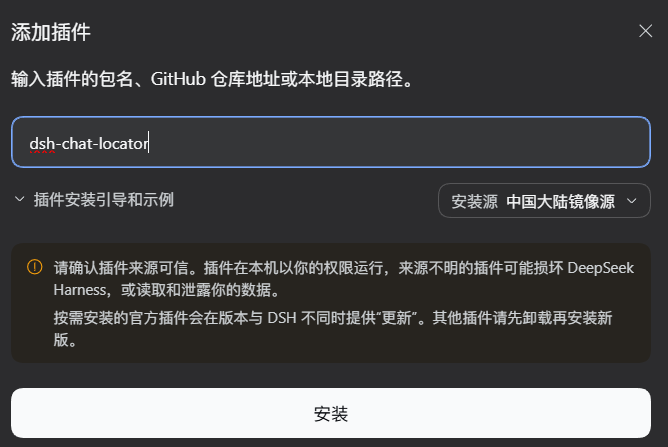
侧栏 插件 → 添加插件,输入 dsh-chat-locator,点安装,然后彻底退出应用再打开。
也可以装了插件市场后在「发现」里搜 dsh-chat-locator 直接装:
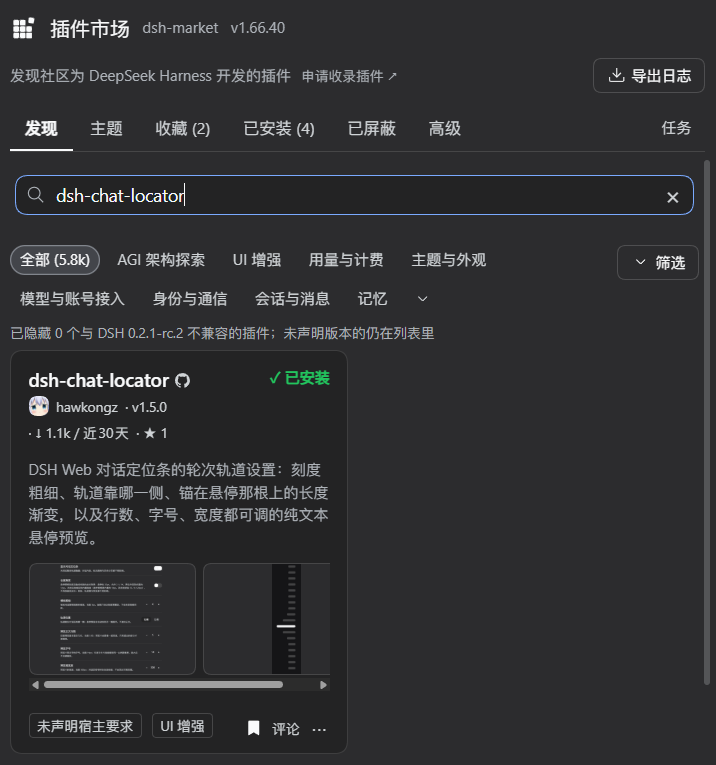
卸载:侧栏 插件 → 已安装插件 → 卸载,再退出重开。
📦 安装
环境要求
| 项目 | 版本 | 说明 |
|---|---|---|
| DSH | 0.2.x(已在 0.2.1-rc.2 上验证) | 提供 dsh 命令,以及你要装进去的那个 profile。轨道选择器约定自 0.1.7 起没有变过,但 1.5.0 是在 DSH 0.2.1-rc.2 上开发并验证的。浏览器半侧需要宿主提供的 @deepseek-ai/dsh-client-store(已在 dsh.client 里声明)。 |
| Node.js | 20 或更新 | 宿主半侧与测试套件用它。 |
| 现代浏览器 | 当前版本的 Chromium / Firefox / Safari | 渐变用 CSS :is() 与 :has()。没有 :has() 时只有指针上方那一半收拢失效 —— 悬停那根照样会变长,指针下方的刻度也照样收拢。其余功能照常。 |
安装方式
| 方式 | 适合谁 |
|---|---|
网页端:dsh plugin --profile web add dsh-chat-locator | 大多数人。从 npm 装已发布的版本;带 @1.5.1 可以锁死具体版本。 |
| 桌面端:应用内 插件 → 添加插件 | 桌面版用户。用不到命令行与 pnpm,见桌面端。 |
dsh plugin --profile web add github:hawkongz/dsh-chat-locator | 想直接跟 main 上最新提交、又不想手动 clone。锁的是 commit,不是版本号。 |
| 用 git clone 安装 | 要改这个插件本身。 |
| 下载四个文件后安装 | 访问不到 npm 或 GitHub,或者要离线安装。 |
用 git clone 安装
如果你想用 git pull 更新,而不是每次重下文件,走这条路。
git clone https://github.com/hawkongz/dsh-chat-locator.git
cd dsh-chat-locator
dsh plugin --profile web add "$(pwd)"
dsh web
不用 git 安装
一个 bundle 就是四个文件。把它们下到一个文件夹里、装这个文件夹、重启宿主,除此之外没有别的步骤。
macOS / Linux:
mkdir -p ~/.dsh/plugin-src/dsh-chat-locator
cd ~/.dsh/plugin-src/dsh-chat-locator
curl -fsSLO https://raw.githubusercontent.com/hawkongz/dsh-chat-locator/main/package.json
curl -fsSLO https://raw.githubusercontent.com/hawkongz/dsh-chat-locator/main/index.js
curl -fsSLO https://raw.githubusercontent.com/hawkongz/dsh-chat-locator/main/client.js
curl -fsSLO https://raw.githubusercontent.com/hawkongz/dsh-chat-locator/main/cordis.patch.yml
dsh plugin --profile web add ~/.dsh/plugin-src/dsh-chat-locator
Windows(PowerShell):
$dir  = "$env:USERPROFILE\.dsh\plugin-src\dsh-chat-locator"
$base = "https://raw.githubusercontent.com/hawkongz/dsh-chat-locator/main"
New-Item -ItemType Directory -Force -Path $dir | Out-Null
foreach ($file in "package.json", "index.js", "client.js", "cordis.patch.yml") {
  Invoke-WebRequest -Uri "$base/$file" -OutFile "$dir\$file"
}
dsh plugin --profile web add "$dir"
然后重启宿主:
dsh web
安装说明
- DSH 会自动登记 bundle。 声明了
dsh.bundle.patch的包会被写进 profile 的dsh.profile.bundles列表,所以dsh plugin add就是全部步骤。 - 没有构建步骤。 从 git 托管地址安装时 pnpm 可能提示构建脚本被拦;本插件既没有
prepare脚本也没有内置依赖,所以没有任何需要放行的东西。 - 安装或卸载之后要重启宿主。 重启是最可靠的方式;当前 DSH 版本能热合成客户端条目,重新启用已装好的 bundle 有时刷新页面就生效。原因见实现要点。
- 安装是按 profile 生效的。
--profile web是这个插件开发时用的 profile,换成你自己的即可。
📖 使用方法
所有配置都在一个页面里:设置 → 对话定位条(英文界面为 Conversation locator)。下表列出每个控件、默认值与可选范围。
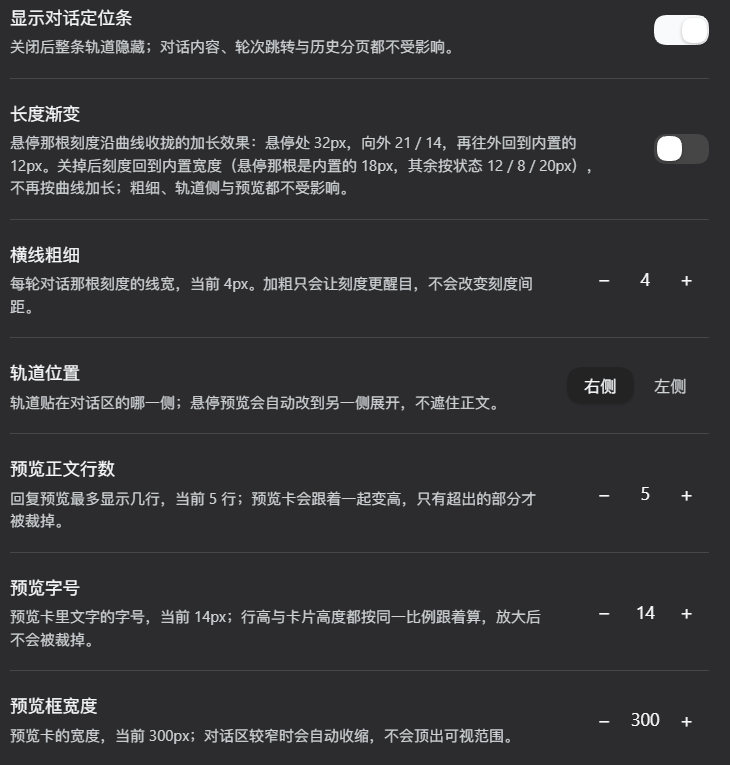
设置 → 对话定位条。 每一行都是实时的:页面上的示例轨道与预览卡会跟着改。图中数字是某位用户的调法,默认值见下表。
设置存在哪里
设置保存在此浏览器的本地存储里(键 dsh.chat-locator.settings),改动的当场写入:
- 关闭再重启浏览器、刷新 DSH,都在。
- 不会跨浏览器、跨 profile、跨设备同步 —— 每个浏览器各存一份。
- 清除站点数据、用隐私窗口、或换一个浏览器,都会回到出厂值。
- 1.4.0 起插件不再读 DSH 设置文档,1.3.0 及更早版本写在设置文档里的
chat-locator:段会被忽略。升级后首次打开看到的是出厂值。
| 配置项 | 默认 | 范围 | 作用 |
|---|---|---|---|
| 显示对话定位条 | 开 | 开 / 关 | 隐藏整条轨道。跳转轮次与未加载轮分页不受影响。 |
| 长度渐变 | 开 | 开 / 关 | 悬停那根刻度与邻居沿曲线收拢的加长效果。关掉后刻度回到各自的内置长度(普通 12px,悬停那根 18px)—— 轨道、跳转、分页与预览都不受影响。 |
| 横线粗细 | 2px | 1–8px | 每轮那根刻度的线宽。刻度间距固定 10px,所以 8px 是实际上限。 |
| 轨道位置 | 右侧 | 左侧 / 右侧 | 轨道贴对话区哪一侧。悬停预览会自动改到另一侧展开。 |
| 预览正文行数 | 3 | 1–6 | 回复预览最多显示几行。卡片跟着内容变高,只有超出的部分被裁掉。 |
| 预览字号 | 12px | 10–18px | 卡片文字的字号。行高按 1.5 倍同步放大,卡片高度同时计入提示词与正文的行高 —— 12px / 3 行 100px、16px / 4 行 148px、18px / 6 行 217px —— 所以放大不会被裁掉。 |
| 预览框宽度 | 300px | 200–420px | 卡片宽度。沿用内置的容器夹取,窗口窄时自动收缩。 |
| 恢复默认 | — | — | 各项退回出厂值。用户层里只会存与出厂值不同的字段,所以「按钮置灰」恰好等于「没有东西可清」;清空只需一次写入,历史版本留下的字段也会一并清掉。 |
长度渐变
你指向的那根最长,两侧沿曲线依次收回:
| 距悬停处 | 0 | ±1 | ±2 | ≥3 |
|---|---|---|---|---|
| 宽度 | 32px | 21px | 14px | 12px |
| 每格递减 | — | 11px | 7px | 2px |

指针停在某根刻度上:白色尖端是 32px 的峰值,左右两根依次退到 21px / 14px,其余保持内置宽度。
紧挨悬停那格掉得最多,之后越来越缓,最后贴着轨道收尾。宽度表由 12 + 20 * (1 - d/3)^2 算出;幂次是怎么调出来的记在设计说明里(2.5 像断崖,1.5 邻居偏长,2.0 是现在用的折中)。
有两个细节值得知道:
- 当前轮也能当锚点。 规则是
:is(.<前缀>_markPreview, .<前缀>_mark:hover),而内置轨道给一根刻度加的是「当前轮」或「悬停」其中之一,不会同时有 —— 少了:hover那一半,指着当前轮时整段渐变都会消失。 - 当前轮不会被当作邻居改短。 每条邻居选择器都带
:not(.P_markActive),所以哪怕当前轮就在指针旁边一两格,它仍保持内置宽度。
指针移开即恢复。与悬停预览不同(预览没有开关:不能预览的轨道就不是轨道了),长度渐变纯属装饰,设置页里有它独立的一行;关掉它同时也会撤掉框架加宽 —— 没有 32px 尖端要画,就不该白添那条隐形交互带。
排障
插件只带一个排障钩子,在浏览器控制台执行:
__dshChatLocator.state()
// {
//   railPrefix: 'xpvNua', railFound: true, rules: '…',
//   config: { … }
// }
前缀是你这份 DSH 构建的 CSS Module 哈希 —— xpvNua 是 DSH 0.2.1-rc.2 上的实测值 —— 没有任何东西依赖这个具体值。轨道卸载后钩子会报 railPrefix: null。
| 看到什么 | 说明 |
|---|---|
railPrefix: null | 当前视图还没渲染轨道 —— 不足两轮,或不是会话视图。没有出错。 |
| 设置撑不过重启浏览器 | 设置只存在这个浏览器的本地存储里。换浏览器、用隐私窗口、或清除了站点数据,都会回到出厂值 —— 没有跨设备同步。 |
| 桌面端装完没看到设置页 | 彻底退出应用再打开(关窗口不算),再到侧栏 插件 → 「已安装插件」确认它在列表里。 |
| 1.3.0 及更早版本设置的值不见了 | 1.4.0 起设置只落浏览器,DSH 设置文档里的 chat-locator: 段不再被读取。在设置页里再设一次即可。 |
🧠 实现要点
三条约束决定了实现方式,每一条的完整推演 —— 连同背后的实验 —— 都记在 设计说明 里。
-
认领轨道,而不是重画。 它不在任何 Slot 里,重画一条就得重新实现跳转轮次、未加载轮分页与活跃轮跟随。所以插件在运行时找到轨道的 CSS Module 前缀,只注入一张属于自己的
!important覆盖样式表。上游若改掉这些类名,插件会安静失效,而不是把轨道弄坏。怎么找:按空白切分 class 令牌,找以
_frame结尾、且前缀是合法 CSS 标识符的那个,再要求它有<前缀>_mark子节点。具体值不做任何依赖。 -
设置住在浏览器里,不住在宿主半侧。 1.3.0 及以前,宿主半侧在 DSH 设置文档里注册
chat-locator命名空间,浏览器半侧再绑定上去。DSH 0.1.7 移除了客户端settingsScope服务,所以 1.4.0 起浏览器半侧自己用@deepseek-ai/dsh-client-store的createSnapshotStore建 store,落在本地存储的dsh.chat-locator.settings键上。这个取舍是刻意的:设置撑得过重启浏览器,但不再跨浏览器 / 跨设备同步,旧版本写在 DSH 设置文档里的值会被忽略。
index.js作为空桩保留下来,因为 patch 行解析到它 —— 见设计说明。 -
预览保持纯文本。 卡片是内置那张,正文来自内置轮次大纲且只取文本块,所以思考内容进不去,空白串也被折叠。
本插件不读也不改写那份正文。它的 CSS 只决定显示几行、字号、宽度、高度,以及卡片往哪一侧展开。
已知边界 —— 与上游的类名约定、900px 的容器门槛、加宽裁剪盒带来的 8px 隐形交互带 —— 也都列在同一份文档里。
📌 标签
dsh dsh-plugin deepseek-harness cordis cordis-plugin web-ui conversation-navigation css-injection
🤝 贡献指南
见 CONTRIBUTING.md。没有任何东西需要安装:克隆仓库后直接跑 node test/verify-client.mjs,就能拿到全部 151 项断言,或者跑 npm test 先对两个半侧做语法检查再跑自检。
欢迎提 Bug 与需求 —— 模板里会要 __dshChatLocator.state() 的输出,一次粘贴就能回答大部分排查问题。
本插件收录于社区精选列表 Awesome DSH Plugin:hawkongz/dsh-chat-locator(列表源仓库 awesome-dsh-plugin,条目文件 data/plugins/hawkongz__dsh-chat-locator.yml)。
📄 许可证
本项目基于 MIT 协议开源。