HwFee-dsh (cds-theme)
hwfee/hwfee-dsh/plugins/cds-theme
Claude Design System theme for DeepSeek Harness — remaps the host's tokens onto CDS warm-grey surfaces and the clay accent, and refines the composer, sidebar, message rows, code blocks and markdown body.
Instalar
dsh plugin --profile web add github:hwfee/hwfee-dshEste plugin se encuentra en el subdirectorio plugins/cds-theme del repositorio.
README
English | 简体中文
HwFee-dsh
Six plugins for DeepSeek Harness (DSH): a Claude Design System theme, font and size settings, a usage panel, generative UI cards, next-prompt prediction, and Git Bash behind a run_shell tool.
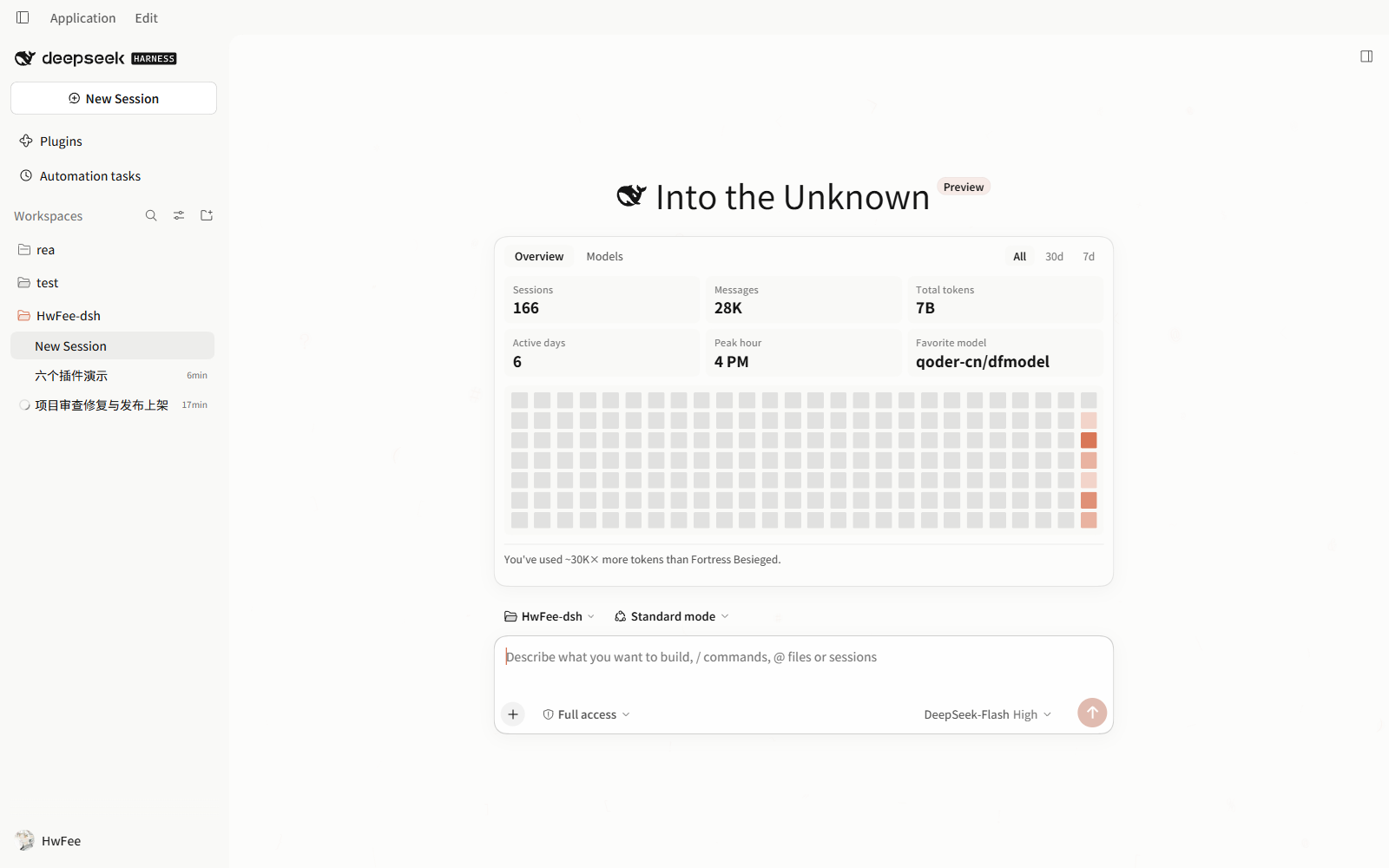
Chinese UI: assets/screenshot-home-zh.png.
The six plugins
| Package | What it does | Install as |
|---|---|---|
dsh-cds-theme | Replaces the host's look: palette, typography, radii, shadows, and component styling for code blocks, tables and tool cards | dsh-cds-theme |
dsh-system-fonts | Font pickers for content, code, terminal and interface, plus inline-code and interface sizes, line height and tracking | dsh-system-fonts |
@hwfee/dsh-usage-stats | Usage panel on the new-session page, aggregated from local session logs | @hwfee/dsh-usage-stats |
@hwfee/dsh-genui | render_ui: the model answers with an interactive card instead of prose | @hwfee/dsh-genui |
@hwfee/dsh-git-bash | Routes run_shell through Git Bash on Windows, with a shell setting | @hwfee/dsh-git-bash |
@hwfee/dsh-predict | Faint suggestion of your next message in the composer; Tab fills it in | @hwfee/dsh-predict |
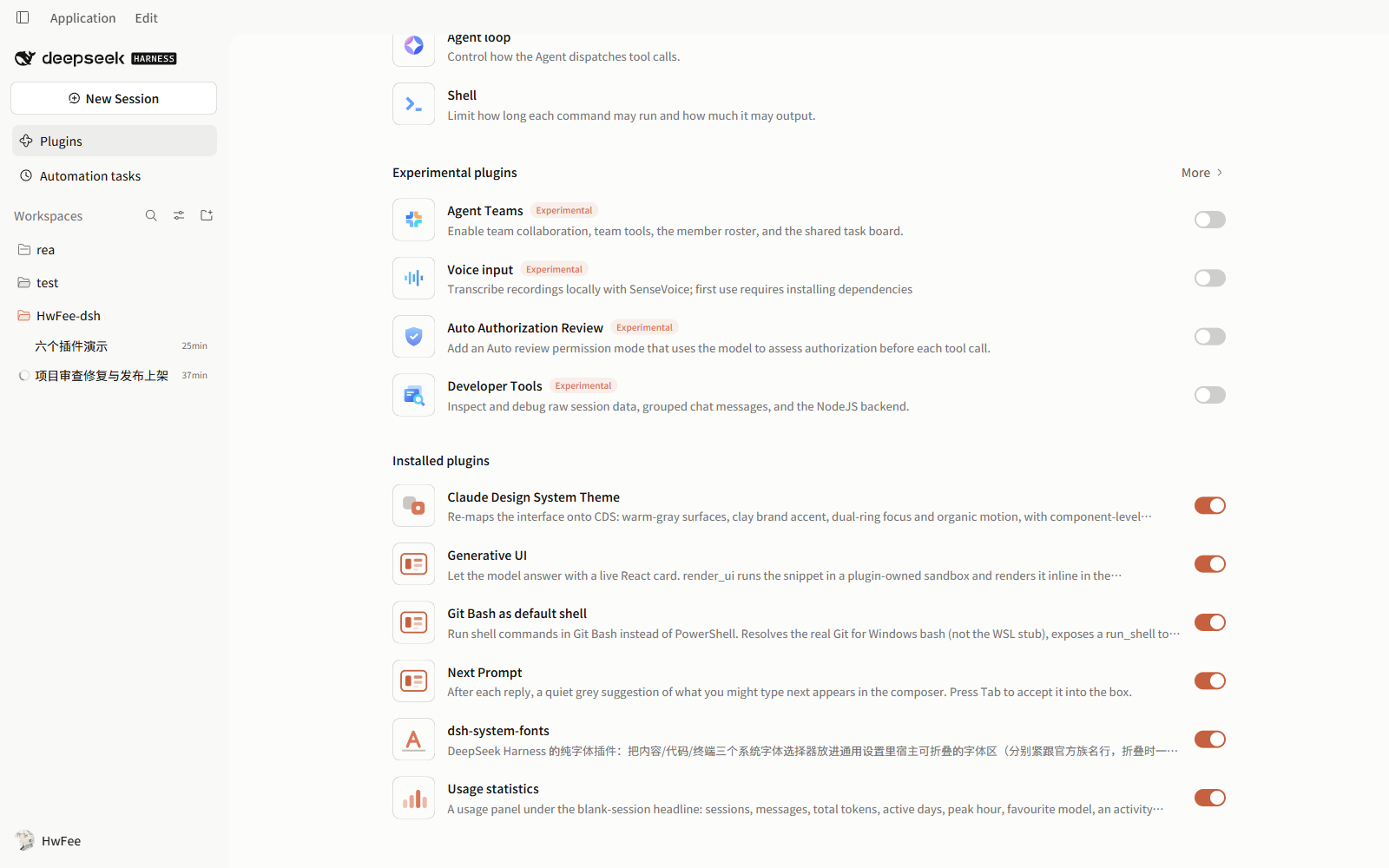
Each plugin is a separate package with its own manifest, prebuilt client bundle and test suite. Install one or all six; disabling any of them restores the host.
What each plugin does
dsh-cds-theme — Claude-style theme
319 design tokens through the host's overrideTokens path (173 colour, 133 typography, 13 radius/shadow/motion, light and dark), plus component rules layered on stable data-* hooks rather than the host's hashed class names.
- Component work: serif display greeting on the blank page; framed Markdown tables with tinted headers and tabular numerals; white code blocks in light mode,
#1a1a19in dark; a unified single-card layout for tool calls; theme-rendered diff and write cards with per-language syntax colour and word-level change highlighting. - A "Theme" settings page beside General: light/dark/system, four accents, surface warmth, radius scale, shadow intensity, component-polish toggle, CJK font priority, long-paste-to-file, and an ASCII ocean on the blank page. Whale colours can be black, DeepSeek blue or changing; reduced motion freezes the scene.
- Code blocks wrap by default, and the host's "no wrap" toggle is removed — no-wrap is not a state this theme offers.
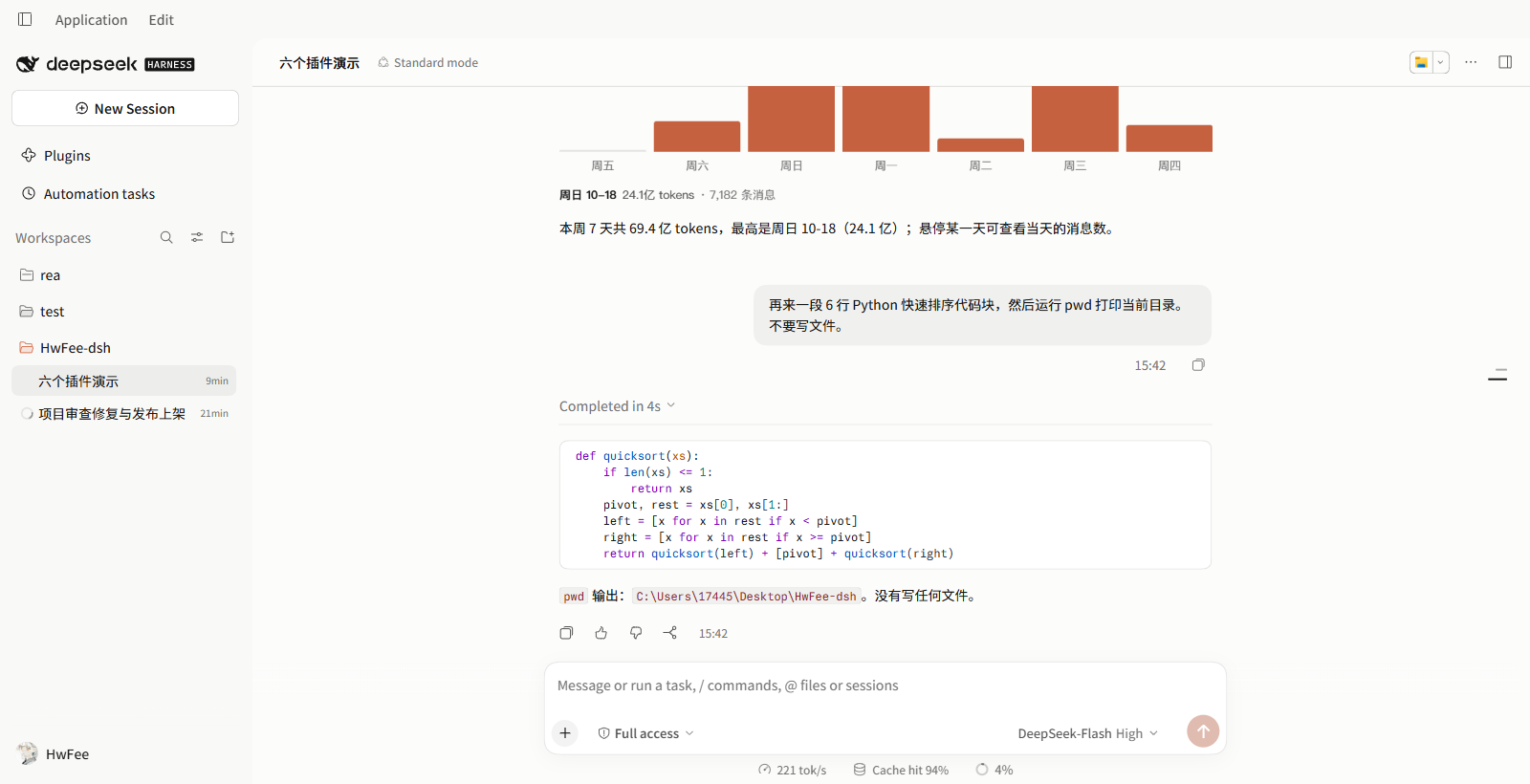
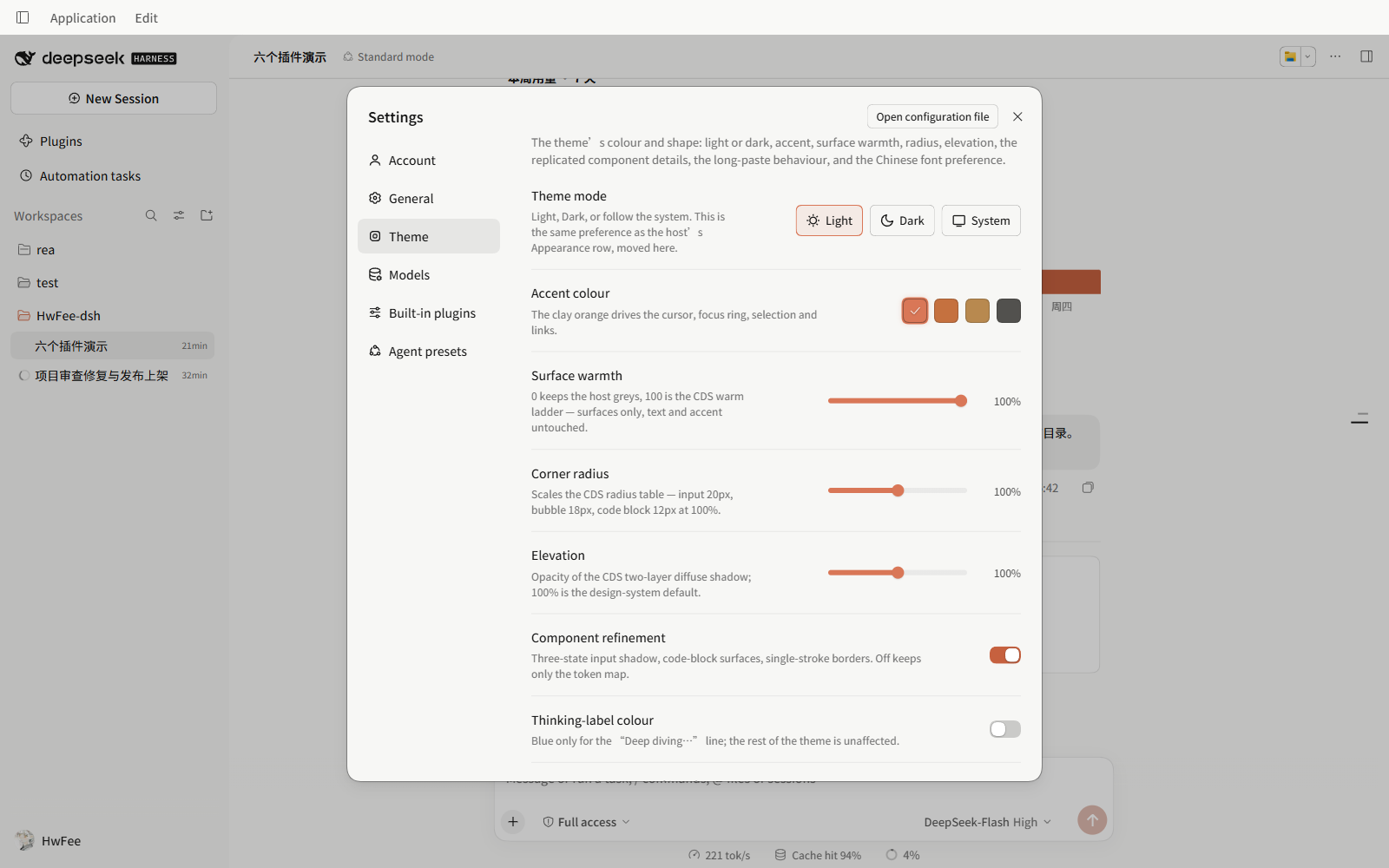
Limit: the theme targets specific host hooks and slots; a host change to those hooks can leave a component rule matching nothing until the plugin is updated. "Component polish" can be turned off to fall back to token-only theming.
Full settings list and implementation notes: plugins/cds-theme/README.md.
dsh-system-fonts — fonts and spacing
- Four font slots: content, code, terminal, and an interface family that follows the body until you set it. The host's three rows are replaced in place rather than duplicated.
- Two pixel steppers: interface size (10–20px, 14px when unset) scales interface text without moving layout; inline-code size (10–20px, 12px when unset) affects inline code only.
- Line height and tracking sliders, applied live.
- Windows font discovery merges GDI families, the registry and per-file OpenType names, so
PingFang SCand苹方-简land in one entry.
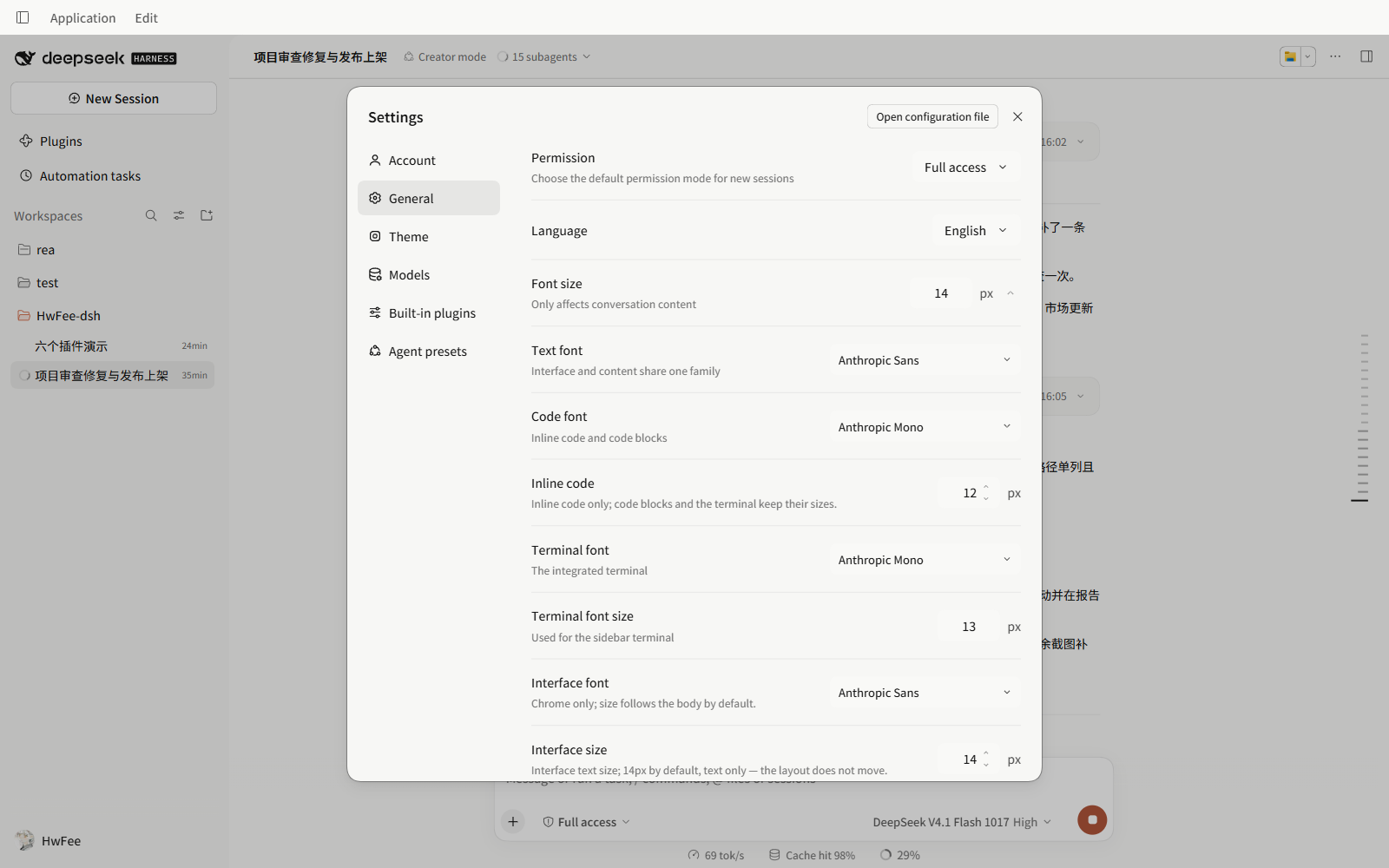
Limit: it changes family and spacing only — no font-weight, no colour. Sizes hardcoded in the host's own CSS modules (sidebar and settings-row text) are not reachable from CSS; interface size reaches text nodes, not every fixed px.
Row order and font discovery: plugins/system-fonts/README.md.
@hwfee/dsh-usage-stats — local usage panel
A card under the greeting on the blank page, computed entirely from ~/.dsh/sessions with no network request:
- Six counters — sessions, messages, tokens, active days, peak hour, top model — plus a Models tab with token shares, switchable between all time, 30 days and 7 days.
- Activity heatmap whose last cell is always today, and a comparison against a classic novel's word count.
- Persistent ledger: first cold scan takes seconds, later starts read a cache in
~/.dsh/cache/usage-stats/. Counts only grow — deleting a session's log does not remove it from the totals; delete the ledger file to rebuild.
The panel is the card under the greeting in the screenshot at the top of this page.
Limit: it reads local logs, so a fresh machine starts at zero; the totals are a ledger, not a snapshot of what is on disk.
Cache, ledger and height setting: plugins/usage-stats/README.md.
@hwfee/dsh-genui — generative UI cards
The model calls render_ui and the result is a live React card in the conversation: charts, comparison tables, forms, toggles. Buttons change card state.
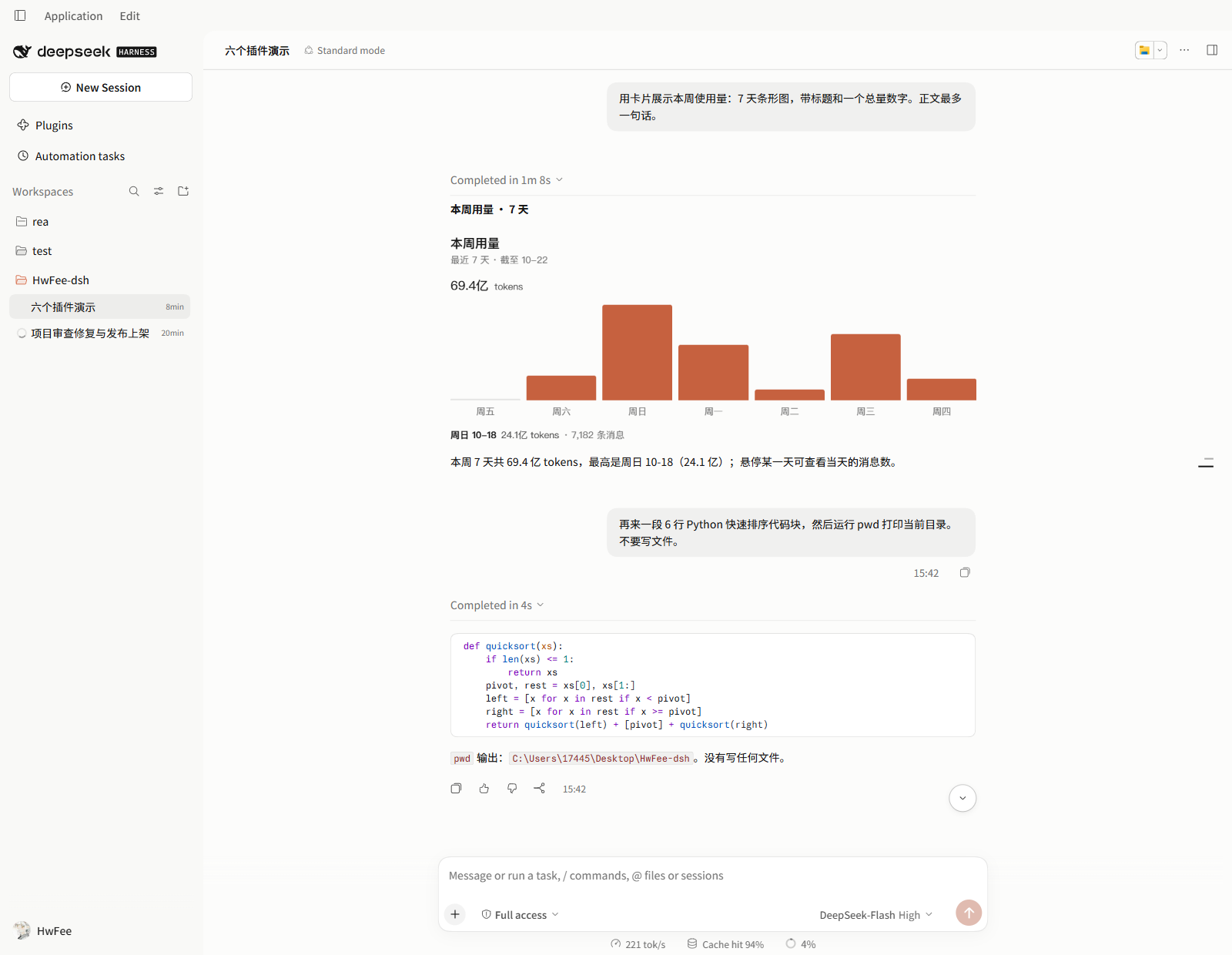
- Card code runs in a sandboxed iframe with
sandbox="allow-scripts"and noallow-same-origin, so its document has an opaque origin; a CSP inside it removes the documented network APIs, navigation, nested frames and forms. interact()is a request, not a send. The host draws a confirmation row outside the frame with the exact sentence and send/discard buttons; only a click sends.- Own React: React, ReactDOM and Scheduler are compiled into the frame at build time, so the card never touches the host's React or module table.
- Errors show in the card's place, with the source one click away.
Limit: it guarantees that card code cannot read the host page, storage or cookies, and cannot speak for you. It does not guarantee that model-written code is harmless — that code still runs, inside its own frame.
Exact CSP, message validation and what a card can do: plugins/genui/README.md.
@hwfee/dsh-git-bash — Git Bash as the shell
Adds a run_shell tool and a Default shell row with three modes: Automatic, Windows PowerShell, Git Bash.
- Finds real Git for Windows bash, not the WSL stub at
C:\Windows\System32\bash.exe:DSH_GIT_BASH, thengit --exec-path, then known install paths. - Says where each command ran:
· hostthrough the host'sctx.shellwith the session's sandbox mode attached,· directspawned by the plugin. - Fails closed: Git Bash cannot run inside the Windows sandbox, so read-only,
workspace-write, and undeterminable sessions are refused before spawning. The refusal points at Windows PowerShell; it never tells the caller to widen the sandbox. Only an explicitdanger-full-accesssession runs Git Bash directly. - Cancellation, timeout and output overrun stop the real process tree, not just the shell the plugin started.
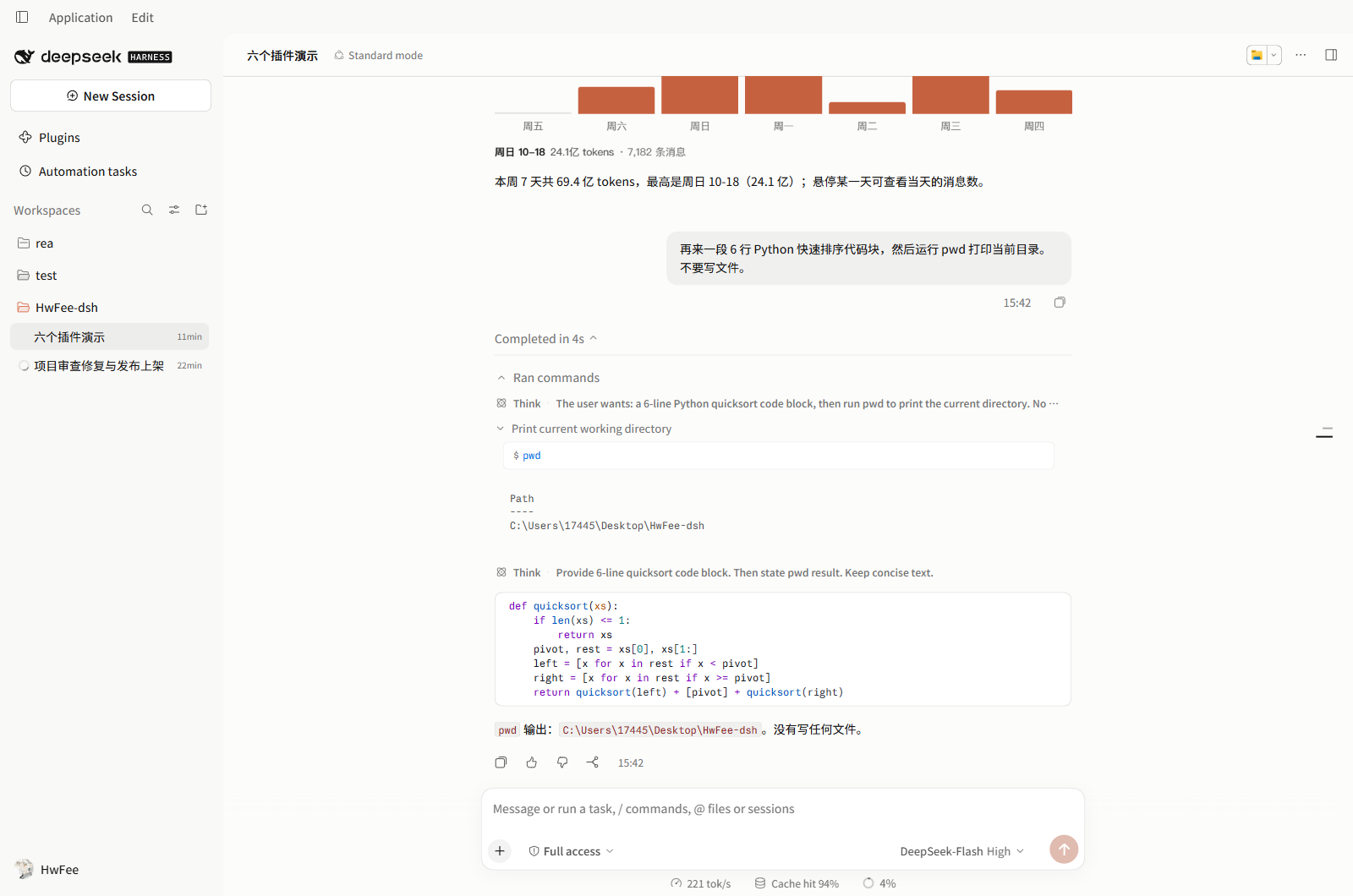
Limit: on Windows, POSIX commands are only available in sessions that permit direct execution. In a restricted session the same request returns an error, by design.
Shell resolution and the sandbox decision table: plugins/git-bash/README.md.
@hwfee/dsh-predict — next-prompt suggestion
After each reply, a grey suggestion of your next message appears in the composer. Tab fills it in without sending.
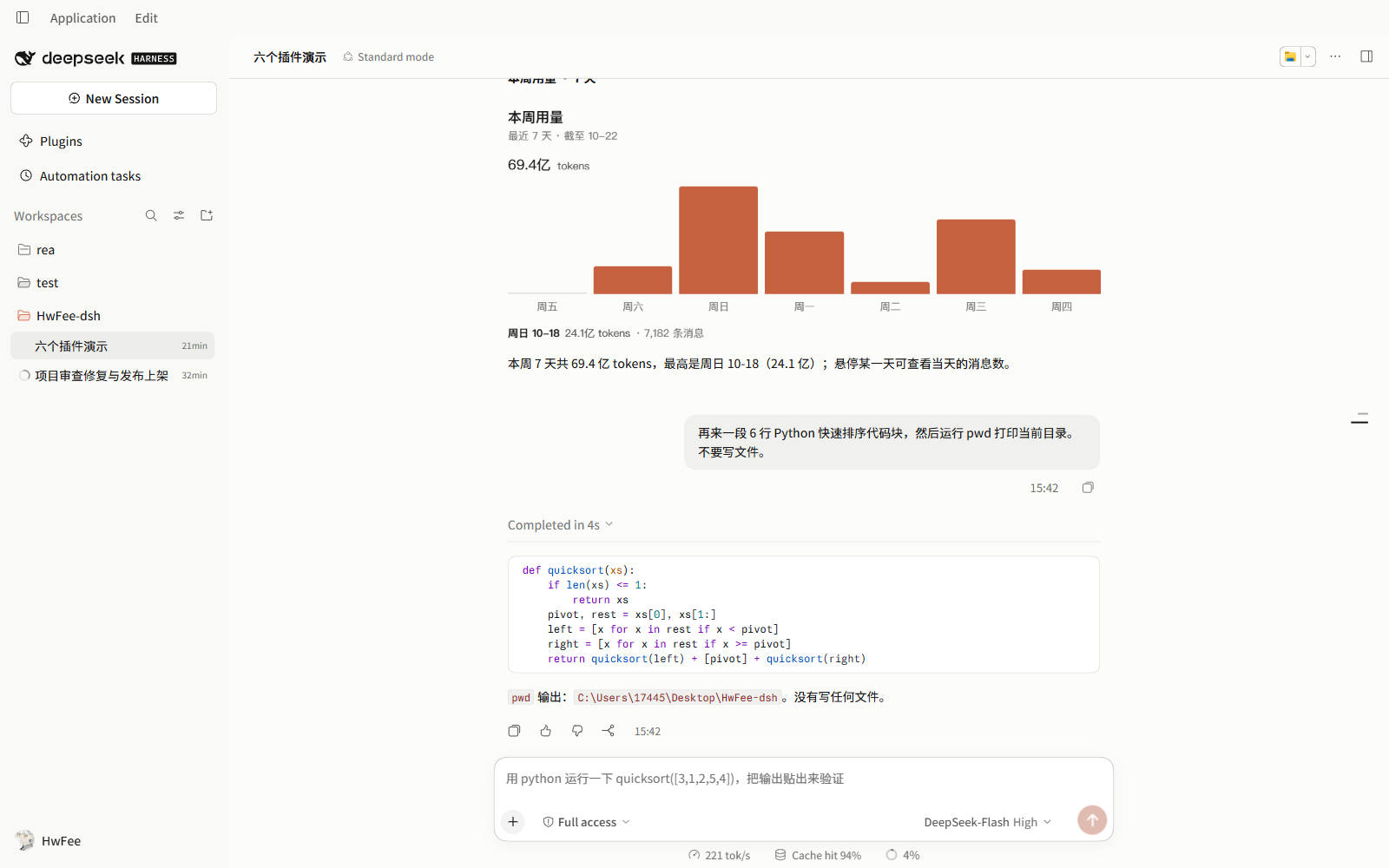
- Side channel: runs after
turn/endthrough the host's LLM service with reasoning off. It writes no session log, opens no turn, and a failure leaves nothing in the conversation. - Sends excerpts to your provider: each prediction is one short request carrying the last few turns, on the same provider, credentials and billing as a normal reply. The plugin opens no connection of its own; turn the row off to stop those excerpts leaving the machine.
- Backs off: three consecutive failures silence it for ten turns; a prediction over 20 seconds is dropped.
Limit: no prediction on the first turn of a session, and none when the model returns nothing — that is a normal empty result, not an error.
Settings, timing table and data flow: plugins/predict/README.md.
Install
From a terminal:
dsh plugin --profile desktop add dsh-cds-theme@0.1.8 --registry=https://registry.npmjs.org
dsh plugin --profile desktop add dsh-system-fonts@0.1.3 --registry=https://registry.npmjs.org
dsh plugin --profile desktop add @hwfee/dsh-usage-stats@0.1.4 --registry=https://registry.npmjs.org
dsh plugin --profile desktop add @hwfee/dsh-genui@0.1.2 --registry=https://registry.npmjs.org
dsh plugin --profile desktop add @hwfee/dsh-predict@0.1.2 --registry=https://registry.npmjs.org
dsh plugin --profile desktop add @hwfee/dsh-git-bash@0.1.2 --registry=https://registry.npmjs.org
Or paste the same package name into Settings → Plugins → Add Plugin.
Quit and restart DSH after adding or removing a plugin. Bundles load when the app starts; a page refresh is not enough. Remove with the same command and remove:
dsh plugin --profile desktop remove dsh-cds-theme
These versions were verified on 2026-10-24 with DSH 0.2.1-rc.3. An unpinned predict install still resolved to 0.1.1 and was rejected for requiring rc.2; use the pinned command above or the market index. See the install matrix.
Without an npm account: GitHub Releases
Every package also ships as a .tgz asset on Releases, one tag per package because the six version independently:
| Tag | <plugin>-v<version>, e.g. cds-theme-v<version> |
| Asset name | the npm pack filename; scoped packages drop the scope, so @hwfee/dsh-genui is hwfee-dsh-genui-<version>.tgz |
| Install | dsh plugin --profile desktop add <asset URL or local .tgz path> |
Open the release page and click the asset instead of building the URL — a missing hwfee- prefix or a kept @scope/ is a 404.
Two install paths that do not work: a git subdirectory (git+https://…#…&path:/plugins/… — pnpm installs the repository root and ignores the path), and the old shared tag, whose assets are the first release only. Use the per-package tags.
From source
Prebuilt client/client.js bundles are committed, so a clone can be linked directly:
git clone https://github.com/HwFee/HwFee-dsh.git
cd HwFee-dsh/plugins/cds-theme
npm ci && npm run build
dsh plugin --profile desktop add link:.
If a version is missing
The default registry on many machines is registry.npmmirror.com, a read-only mirror that syncs late. When a version is missing or an install fails with Unexpected end of TAR archive, pin the version and use the official registry:
dsh plugin --profile desktop add dsh-cds-theme@<version> --config.registry=https://registry.npmjs.org
An unpinned install can still land on the previous version — we measured this on a machine with no minimumReleaseAge configured, so the cause is not identified. Pin the version, or use a Release asset, when you need the new build.
One consequence is worth knowing before you upgrade. Once a plugin is an npm/Release package rather than a link:, the profile no longer points at the workspace, so editing sources and rebuilding the bundle there has no effect until you install it with link: again; and a materialized install first clears the contents the link: pointed at, so doing this while the sources are not committed and pushed deletes workspace files.
Fonts and licensing
The theme carries two kinds of font faces, with different licence terms:
Inlined as data:font/woff2 | 2 — subsetted Source Han Sans / Serif (Noto), SIL OFL, with avar weight calibration so Chinese strokes match the Latin weight steps. These are the only font bytes in the package |
| The six Anthropic faces (Sans / Serif / Mono × Roman / Italic) | commercial, no redistribution licence: declared as local() only, zero bytes shipped |
| What that means | with the families installed, local() resolves to them; otherwise the stack falls back to system families |
| Those six source files | removed from git tracking and blocked by .gitignore; a fresh clone does not contain them |
| Enforcement | the build refuses restricted bytes in the artifact, the package tests re-check the committed bundle and that the files stay untracked, the repo audit covers every artifact, and the release-asset gate opens the real tarball. Faces are identified by hashes and 96-byte prefixes in tools/font-licences.mjs, so all four gates work without the files |
Releases built before this change still carry the eight inlined faces and are not retroactively fixed; install a build from after it. Details and the re-check commands are in market/PUBLISHING.md.
Security boundaries
Short version, no absolutes:
| Plugin | Boundary |
|---|---|
genui | Card code runs in an iframe without allow-same-origin, so the host DOM, localStorage and cookies are unreadable to it, not merely hidden. Sending needs a click on the host's confirmation row. This does not make model-written code harmless, and the CSP covers the documented network APIs — extensions and proxies are outside it |
git-bash | On Windows, Git Bash cannot enter the host sandbox, so restricted or undetermined sessions are refused before any process starts; only danger-full-access runs directly. Cancellation, timeout and output overrun stop the process tree |
predict | Sends the last few turns to the provider you configured, as a normal model request |
usage-stats | Reads ~/.dsh/sessions and writes a count ledger; no network |
Upgrading from an earlier version
Four changes a returning user will notice:
- Sending from a card takes one extra click.
interactnow creates a pending request; the card cannot put text into the conversation by itself. - Git Bash is refused in restricted Windows sessions. Read-only and
workspace-writesessions that used to run commands through it now get an error pointing at Windows PowerShell. - Latin text renders in system fonts on machines without the Anthropic families installed, because those faces are no longer embedded. Chinese is unaffected: the Noto subsets are still inline.
- New font rows start unset and show their default values (interface and inline-code size) until you step them; nothing moves before that.
Repository layout
HwFee-dsh/
├── plugins/
│   ├── cds-theme/        # theme tokens + component rules
│   ├── system-fonts/     # font family and spacing rows
│   ├── usage-stats/      # local usage panel
│   ├── genui/            # render_ui cards
│   ├── predict/          # next-prompt ghost text
│   └── git-bash/         # run_shell through Git Bash
├── assets/               # screenshots used by these READMEs
├── market/               # market index, catalog entries, publish scripts
├── docs/                 # evidence docs (specs, host hooks, audits)
├── patches/              # optional host patches
└── tools/audit.mjs       # repo-wide static audit
Each plugin directory has its own npm test: build-freshness check first, manifest contract second, then the suites. Totals change with every fix, so read the output instead of a number here.
npm run build         # rebuild every plugin from the repository root
npm test              # run every plugin's freshness, manifest and behaviour checks
npm run audit         # unsafe DOM, observer lifecycle, token pairs and font assets
npm run verify        # theme-specific checks
Maintainer rules, including why a rebuilt bundle needs a full app restart rather than a refresh, are in AGENTS.md.
Plugins relacionados
dsh-deep-whale (maid-atelier)
small-tailqwq/dsh-deep-whale
dsh-wallpaper-engine
elysia395/dsh-wallpaper-engine
dsh-deep-whale
small-tailqwq/dsh-deep-whale
open-sea-skin
d-dev0101/open-sea-skin