dsh-sidebar-icons
inks-jynne/dsh-sidebar-icons
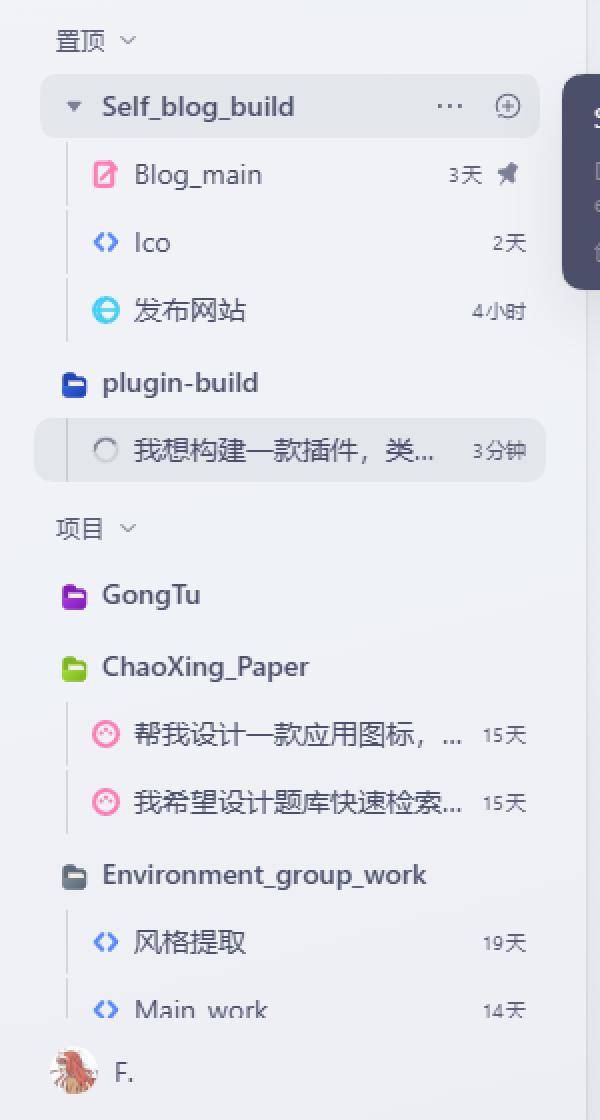
给 DeepSeek Harness 侧栏的黏土质感 3D 图标主题:21 个项目文件夹 + 28 个会话图标,按名称自动匹配、也可逐行自定义,会话相对项目缩进成层级。Claymorphism 3D icon theme for the DeepSeek Harness sidebar: 21 clay folders for projects, 28 clay objects for sessions — matched from names, overridable per row, with hierarchy indentation.
Instalar
dsh plugin --profile web add github:inks-jynne/dsh-sidebar-iconsREADME
Sidebar icons for DeepSeek Harness
一套给 DeepSeek Harness 左侧栏用的黏土质感(Claymorphism)3D 图标插件:21 个项目文件夹图标 +
28 个会话图标,同一套光影;每一行都能从它自己的 ⋯ 菜单换成任意一个图标。当前版本 v1.0.3。
只想装上用?看 INSTALL.md(解压 → 放进 node_modules → 插件管理里启用)。
功能
| 21 个项目图标 | 黏土文件夹(大圆角本体 + 左上标签页 + 奶油白纸页),按项目名自动匹配色相,色相环上排开,21 种互不撞色 |
| 28 个会话图标 | 面板里是黏土小物体(烧瓶、地球、盾牌、手柄、气泡…),侧栏 16px 行里换成同一套语义的粗线字形,按会话标题自动匹配,分 6 个功能色系 |
| 逐行自定义 | 项目/会话的 ⋯ 菜单里都有 自定义图标…,面板里 3×7 / 4×7 直接点选,立即生效并记在本机 |
| 层级缩进 | 会话行相对所属项目右移 16px,并有一条跟随主题的细引导线;多层嵌套按层级递增 |
| 不打扰宿主 | 只往行里追加自己的节点 / 属性,关掉插件时全部还原;不改官方文案、类名和事件 |
悬停时左侧图标照常显示,右侧出现 ⋯ / 归档 / 置顶 三个操作;收藏入口在 ⋯ 菜单第一项。
安装
这是 DeepSeek Harness 的 bundle 插件(含 cordis.patch.yml 与 package.json 的 dsh.bundle +
dsh.client 字段),把整个目录挂到你的 profile 即可。
方式一:链接到 profile(开发时推荐)
# 1. 把本目录放到任意位置,然后建立软链(Windows 需管理员或开发者模式)
New-Item -ItemType SymbolicLink `
  -Path   "$env:USERPROFILE\.dsh\profiles\desktop\node_modules\dsh-sidebar-icons" `
  -Target "<本目录的绝对路径>"

# 2. 在 profile 的 cordis.patch.yml 里插入一行
#    - insert:
#        - id: sidebar-icons
#          name: dsh-sidebar-icons
方式二:复制进 profile
Copy-Item "<本目录>" "$env:USERPROFILE\.dsh\profiles\desktop\node_modules\dsh-sidebar-icons" -Recurse
然后在 DSH 的设置 → 插件里启用 dsh-sidebar-icons(或对 bundle 开关一次),
侧栏会立刻换成黏土图标。
改动
client.js之后,插件管理里把 bundle 关 → 开 一次即可热重载; 若样式看着没更新,刷新一次窗口(Ctrl+R)。
使用
完整使用说明(自动匹配表、恢复默认、故障排查、卸载)见 docs/USAGE.md。
- 自动:新建项目 / 会话,图标按名称自动匹配(
api-*→ 接口、fix-*→ 修复、release-*→ 发布…),规则见docs/DETAIL.md的「The kind table」。 - 手动:项目或会话行
⋯→ 自定义图标… → 点一个 → 完成。- 项目面板是 21 个纯色块(3×7,名称在悬停提示里);
- 会话面板是 28 个带英文名的小图标(4×7)。
- 恢复默认:面板左下角 Use default(有自定义时才出现),回到按名称匹配。
- 选择存在浏览器
localStorage的dsh-sidebar-icons:overrides,不随会话同步、不影响会话日志。
设计规范(想自己加图标时看这段)
画布 128 × 128,图标本身就是一块物体,没有外层容器或底板;主体占 70–78%,所有转角大圆角 (≈ 主体宽度的 18–20%)。
光影 全套共用一套,改一处即全变:地面椭圆投影(深色 25% + 模糊 7)→ 三段渐变主体 (亮 → 主色 35% → 暗)→ 轮廓内下移 6 的深色内阴影 38% → 左上白色径向亮面 40% → 轮廓内缘 3 宽的 浅色反光 45%。尺寸分档:会话图标 ≤20px 走 16 画布的粗线字形(笔画 2.2、2–4 段路径、占 86% 画布、用所属色系主色), ≥21px 画完整黏土五层;项目文件夹在行里固定 16px,走「渐变主体 + 内缘反光 + 奶油白纸页」的简化档。
会话 6 个色系(项目则用 kind 自己的色相,亮暗由色相推出,保证 21 色不撞):
| 色系 | 成员 | main / light / dark |
|---|---|---|
| dev | Code · API · Git · Terminal · Deploy | #5B8CFF / #7FA3FF / #3A5FD9 |
| smart | AI · Research · Lab · Study | #A06BFF / #B78CFF / #7A45E0 |
| quality | Test · Security · Perf | #3DDC97 / #63E7AE / #1FAF72 |
| alert | Bug | #FF6B7A / #FF8A96 / #D94456 |
| create | Design · Media · Blog · Docs · Note | #FF7EB6 / #FF9BC7 / #E0518C |
| ops | Business · Plan · Data · Infra · Sync | #FFB347 / #FFC46B / #E8862A |
| sky | Web · Mobile · Game · Chat | #43CFF2 / #6FDCF7 / #1FA5CC |
| neutral | Other | #B9C2D0 / #C9D0DC / #8E98A8 |
完整的几何、分类规则表、限制清单在 docs/DETAIL.md(英文);这一节只留概述。
加一个会话图标(三步)
CLAY里加一条:foo: { fam: 'dev', parts: [{ d: '<path>' }], accent: [{ d: '<path>' }] };SESSION_KINDS里加'foo'(位置即面板里的顺序,注意与相邻色相拉开);KIND_LABELS里加foo: ['中文', 'Foo'],需要自动匹配的话再往SESSION_RULES加关键词。
路径一律画在 128 格内、用填充(w 是描边宽度,留空就是填充),不要加外描边——
体积感全部交给上面那套光影。
目录结构
dsh-sidebar-icons/
├─ client.js            # 全部客户端逻辑:图标几何、渲染、选图面板、菜单注册、装饰 CSS
├─ index.js             # Host 半边(本插件不注册 host 能力,留空实现)
├─ package.json         # dsh.bundle / dsh.client 声明、版本、npm run check
├─ cordis.patch.yml     # bundle 往 profile 里插入自己
├─ icon.svg             # 插件列表里显示的那个图标
├─ README.md            # 本文档
├─ INSTALL.md           # 三步安装说明(下载安装包的人先看这个)
├─ LICENSE              # MIT
├─ .gitignore
├─ locale/
│  ├─ zh.json           # 插件列表用的中文元数据(title / description / detail)
│  └─ en.json
├─ scripts/
│  └─ check.mjs         # 零依赖自检:三表一致 / 规则重复 / 渲染冒烟 / 版本与文案
├─ .github/workflows/
│  └─ check.yml         # 每次 push 跑 scripts/check.mjs + node --check
└─ docs/
   ├─ USAGE.md          # 使用文档:自动匹配表、自定义流程、故障排查、卸载
   ├─ DETAIL.md         # 设计文档(英文):几何、光影参数、色板、分类规则、限制
   ├─ CHANGELOG.md      # 版本记录
   └─ images/
      └─ sidebar.png    # README 顶部的截图
运行时只需要这些:package.json、index.js、client.js、cordis.patch.yml、icon.svg、locale/*.json。
其余的文档、自检脚本、CI 配置都不参与运行 —— Release 里的 -install.zip 就是「运行所需 + 文档」的精简版,
-source.zip / GitHub 自动生成的 Source code 则是完整仓库。
自检
node scripts/check.mjs # 或 npm run check
零依赖,检查:三张表(CLAY / SESSION_KINDS / KIND_LABELS)是否一一对应、规则表有没有重复 kind、
每种会话图标是否有 16px 专用字形、两个尺寸下能否渲染(以及尺寸分档对不对)、
package.json 与 CHANGELOG 版本是否一致、WORDS 中英是否同键、locale 元数据是否完整。
CI(.github/workflows/check.yml)在每次 push 时跑同一套。
已知限制
- 会话图标只在该行状态为 idle 时显示:运行中 / 等待回答 / 未读完成 时,那个格子仍是官方的 状态点;已归档行保持空白(官方行为)。
- 16px 行里用的是为小尺寸单独画的粗线字形,不是把面板里那套黏土物体缩下来 —— 所以行内的图标与面板里的预览"同语义但不同形",这是有意的取舍。
- 自定义图标存在本机
localStorage,不跟随会话同步到别的设备。 - 项目行的文件夹图标依赖官方行结构(
[data-sidebar-list-area]+[data-row-key^="workspace:"]); 若未来的 DSH 改了行结构,装饰会找不到锚点、在控制台告警一次并退回官方图标(不会弄坏行)。 - 缩进 / 引导线 / 隐藏收藏星标这三段 CSS 是针对当前官方行结构与
@michengai/dsh-archive-manager的 DOM 写的;对应宿主或该插件大改时需要复核对位。 package.json里的"private": true是为了防止误npm publish—— 不影响按目录安装进 DSH。 如果你希望别人能npm install,删掉这个字段再发布即可。
版本
当前 v1.0.3。版本记录见 docs/CHANGELOG.md。
English
What it is
A Claymorphism icon set for the DeepSeek Harness sidebar: 21 clay folders for Workspace rows and 28 clay objects for Session rows, all sharing one light source, one shadow height and one rounding rule.
In the picker a Session icon is a 128-canvas clay object; in the 16px sidebar row it is replaced by a bold glyph of the same meaning, drawn for that size (2–4 paths, 2.2 stroke, 86% of the canvas) — a clay object scaled to 16px just reads as a coloured dot.
Install
- Download
dsh-sidebar-icons-v1.0.0-install.zipfrom the Releases page and unzip it. - Move the
dsh-sidebar-iconsfolder into your profile'snode_modules:- Windows
C:\Users\<you>\.dsh\profiles\desktop\node_modules\ - macOS / Linux
~/.dsh/profiles/desktop/node_modules/
- Windows
- In DSH open Settings → Plugins, enable
dsh-sidebar-icons. Refresh (Ctrl+R) if the sidebar looks unchanged.
More detail, including troubleshooting and uninstall, in INSTALL.md.
Use
- Icons are matched from names automatically (see the rules table in docs/DETAIL.md).
- Override any single row: its
⋯menu → Custom icon… → pick one. The choice is stored per row inlocalStorageand never touches your session log or the Workspace registry. - A new project never repeats the colour of the project above it.
- Session rows are indented 16px under their project with a theme-aware hairline guide; nested Workspaces add the host's own per-level indent on top of that.
- The archive plugin's favourite star is hidden from the row (it stays available in the
⋯menu), so the leading icon is always visible.
Limitations
- A Session row shows its icon only while that row is idle; running / awaiting / unread-complete rows keep the official status dot, and archived rows keep the cell empty.
- Custom choices live in this browser's
localStorage— they do not travel with the Session. - The folder mark depends on the shipped row markup (
[data-sidebar-list-area],[data-row-key^="workspace:"]). If a future DSH release changes it, the decoration warns once in the console and leaves the official icon in place. - Indent, guide line and the hidden favourite star are CSS written against the current row markup and
@michengai/dsh-archive-manager's DOM; a major change on either side needs a re-check.
Design notes
Body occupies 70–78% of a 128 canvas, every corner is rounded (≈18–20% of the body width), and the same five layers are used everywhere: ground shadow → three-stop body gradient → inner shadow → top light → rim light, plus at most one cream accent. Full parameters and the colour table are in docs/DETAIL.md.
License
MIT — see LICENSE.
Plugins relacionados
dsh-wallpaper-engine
elysia395/dsh-wallpaper-engine
dsh-deep-whale (maid-atelier)
small-tailqwq/dsh-deep-whale
dsh-claude-style
nwflower/dsh-claude-style
dsh-deep-whale
small-tailqwq/dsh-deep-whale