dsh-archived-sessions
jxy-hy/dsh-archived-sessions
Plugin web de DSH: gestiona las sesiones archivadas desde la página de Ajustes: desarchiva para restaurar una sesión, o elimínala de forma permanente (registro y archivos adjuntos relacionados) tras un diálogo de confirmación.
Instalar
dsh plugin --profile web add github:jxy-hy/dsh-archived-sessionsREADME
dsh-archived-sessions
English | 中文
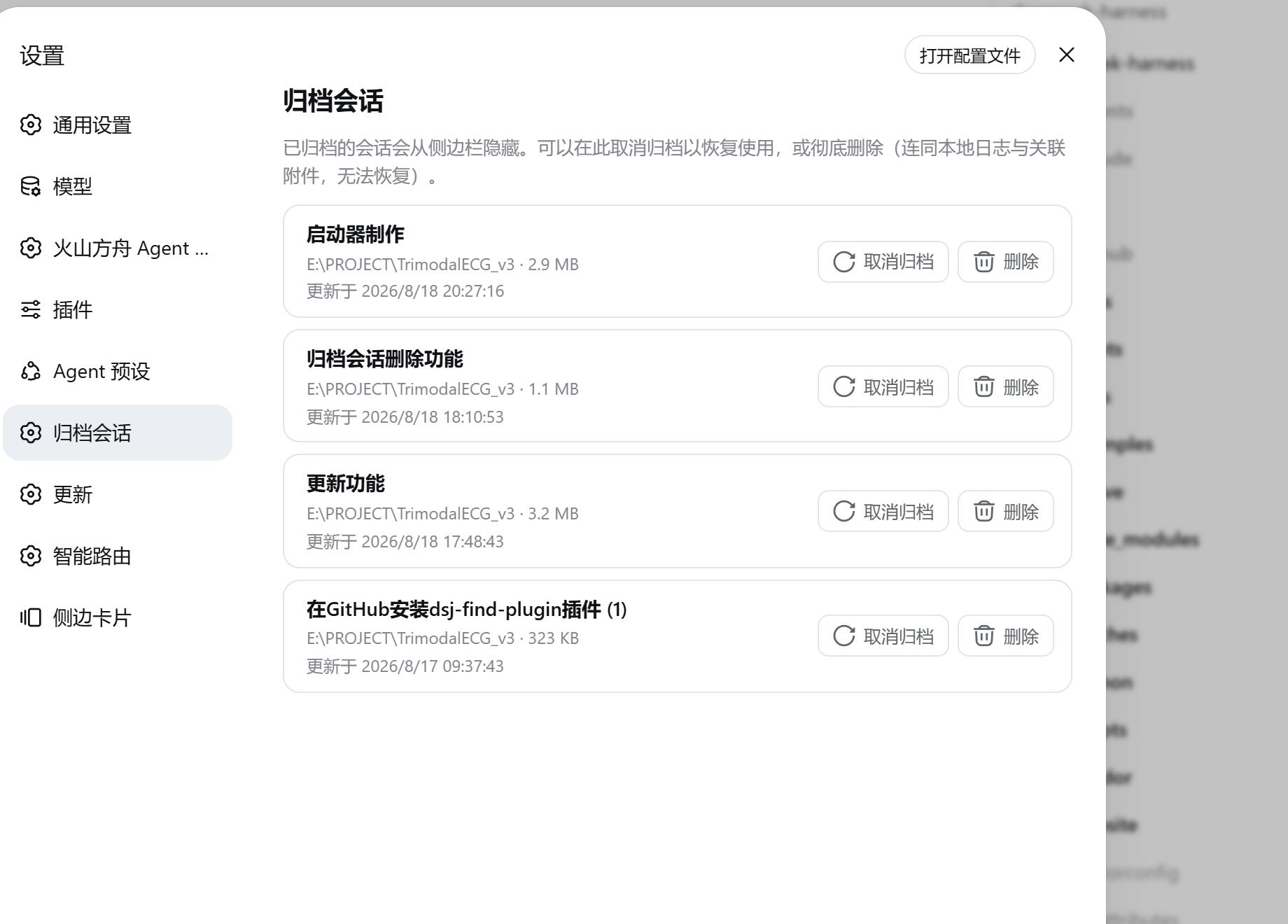
A DeepSeek Harness (dsh) web plugin that adds an Archived Sessions section to the Settings page for managing archived conversations.
Official source: this repository is the official source of the npm package
dsh-archived-sessions—dsh plugin add dsh-archived-sessionsinstalls exactly this code.
Features
- List archived sessions — each row shows the session's own name (the same title the sidebar uses), working directory, log size, and last update time.
- Unarchive — restore a session to the sidebar with one click; its original position in the workspace is kept.
- Permanently delete — removes the session's local log directory (
~/.dsh/sessions/...) plus the attachment objects its log references that no other remaining session still uses, then drops the session from workspace accounting. A confirmation dialog must be acknowledged first. - Native look & feel — built on the same UI primitives and design tokens as the built-in Settings sections.
Requirements
- DeepSeek Harness with the workspace archive feature (the
archivedSessionIds/archiveSessionsurface). - Full unarchive/delete functionality requires the core
WorkspaceRegistry.unarchiveSession/deleteSessionmethods. Until they ship in a released core, the plugin degrades gracefully: it still lists archived sessions and can still remove on-disk files, while unarchive reports a clear "restartdsh web" hint.
Installation
Install from npm:
dsh plugin add dsh-archived-sessions
The plugin is then mounted automatically (its dsh.bundle patch joins the profile's bundle stack). Refresh the page (hard refresh) to load the client half, then open Settings → Archived Sessions.
Alternatively, install from source:
git clone https://github.com/Jxy-hy/dsh-archived-sessions.git
cd dsh-archived-sessions
pnpm install
pnpm run build
dsh plugin --profile web add link:./dsh-archived-sessions
Then mount it by appending to ~/.dsh/profiles/web/cordis.patch.yml (or via your preferred bundle mechanism):
- insert:
    - id: dsh-archived-sessions
      name: 'dsh-archived-sessions'
The host half hot-mounts through the profile's config HMR; refresh the page (hard refresh) to load the client half. Open Settings → Archived Sessions.
Usage
- Archive a session from the sidebar session menu (it hides from the sidebar).
- Open Settings → Archived Sessions:
- Unarchive — restores the session to its original sidebar position.
- Delete — opens a confirmation dialog; confirming permanently deletes the local log and related attachments (objects still referenced by other sessions are kept) and removes the session from workspace accounting.
Architecture
- Host half (
src/index.ts) — registersGET/POST /__dsh-archived-sessions/{list,unarchive,delete}on the shared web server. The delete flow: dispose the live session first if it is open (so the in-memory store drops it and persistence retires its state) → wait for the write-behind flush to materialize the log → remove the session log directory → parse attachment references (sha256:) from the log → delete only the objects no other remaining session references → drop workspace accounting viaWorkspaceRegistry.deleteSession. - Client half (
src/client/) — registers thesettings.sectionentry "Archived Sessions"; the list mergessession.list(including the projection title) with the plugin's host surface (creation time, log size); both mutations go through the host surface because the core RPC map offers neither operation. After a successful delete the client re-pulls thesession.listbaseline: deleting a cold (persisted, not-open) session emits nosession/disposed, so the sidebar would otherwise keep the stale row under Ungrouped until the next reconnect.
Community & Support
- Welcome to submit feedback or bug reports via GitHub Discussions.
- This repository carries the
dsh-plugintopic so it can be discovered.
License
Plugins relacionados
dsh-web-ui (dsh-chat-recovery)
zhu1090093659/dsh-web-ui
dsh-synapse
liangmianya/dsh-synapse
billion-context
ranxianglei/billion-context
dsh-chat-import
nwflower/dsh-chat-import