dsh-whale-particles-bg
kviiinh/dsh-whale-particles-bg
Animated whale particle background for the DeepSeek Harness (dsh) Web UI - assembling from its scattered shell, breathing at idle, and being pushed around by the pointer
Install
dsh plugin --profile web add github:kviiinh/dsh-whale-particles-bgREADME
dsh-whale-particles-bg
Animated whale particle background for the DeepSeek Harness (dsh) Web UI — the WHALE-silhouette particle field plus the official dot-grid layer, registered into the frame-wide shell.overlay seat.
Topics: dsh-plugin · deepseek-harness · cordis-plugin
English
Preview
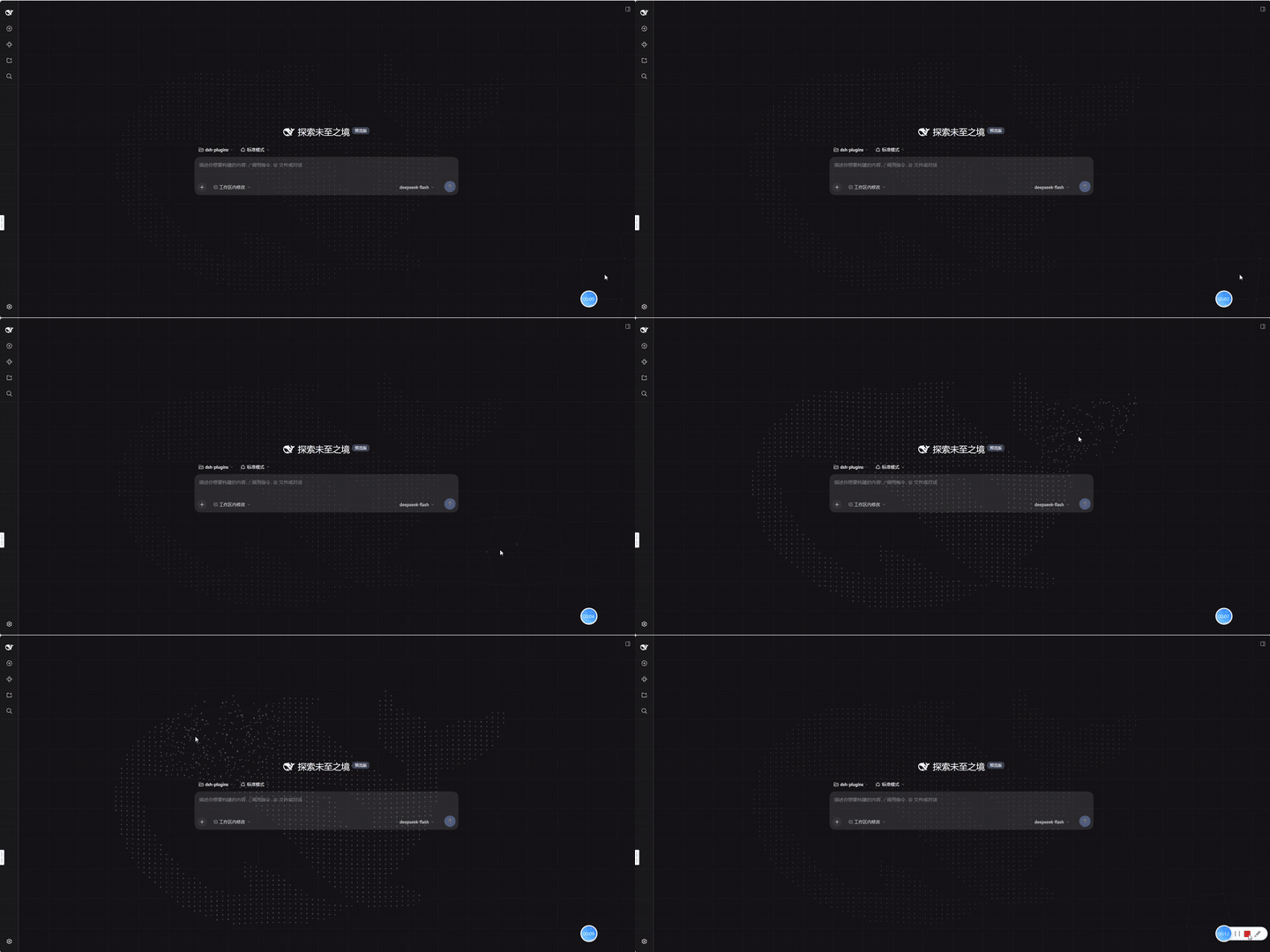
12-second capture of the whale field assembling from its scattered shell, breathing at idle, and being pushed around by the pointer (src/preview.gif, animated GIF, 720×360, 10fps, 12.6s, 2.8 MB):
What it is
| Layer | Content |
|---|---|
| Whale (z-index 1) | Particle field sampled from the WHALE SVG path (24×18 viewBox, 6× offscreen rasterization, sampled every 2px). Particles assemble from a scattered shell, breathe when idle, and are pushed away from the pointer inside a 4.9-world-unit radius along a rotating per-particle angle. |
| Dot grid (z-index 0) | 90px square lattice with neighbour lines and a 140px pointer attraction that swells the dots. |
Both layers are fixed, full-viewport, click-through canvases. The theme is read from body[data-ds-dark-theme] on every frame (dark: rgb(215,232,255), light: rgb(50,82,135)), so light/dark follows with no subscription. Animation runs on requestAnimationFrame throttled to ~30fps, which also suspends it while the tab is hidden.
Install
Prerequisites: a dsh deployment with the dsh CLI on PATH (or a source checkout, where pnpm dsh … works).
dsh plugin --profile web add git+https://github.com/kviiinh/dsh-whale-particles-bg.git

#    other sources:
#      local path : dsh plugin --profile web add /abs/path/to/this/repo
#      npm        : dsh plugin --profile web add dsh-whale-particles-bg   (if published)
This package is a bundle: it declares dsh.bundle, so the install appends it to the profile's dsh.profile.bundles and the package's own cordis.patch.yml inserts the plugin row (id: whale-particles-bg). There is nothing to hand-edit, and dsh plugin --profile web remove dsh-whale-particles-bg removes both the dependency and the layer.
Restart the harness (dsh web). Settings → Plugins → Plugin list → Global plugins then lists whale-particles-bg as running, and the whale background appears behind the UI.
lib/is committed on purpose. The browser half must be awindow.__ModuleLoader__.load({ id, factory })bundle produced by dsh's own tsdown preset (packages/client/tsdown.client.ts), which only exists inside a dsh checkout. Shipping the built artifact is what makes a git-installed copy loadable without a build step, and it keeps installs free of anyprepare-script permission prompt. There is deliberately nopreparescript.
Rebuild after a dsh upgrade
scripts/build.sh /path/to/deepseek-harness # or: DSH_CHECKOUT=/path/to/deepseek-harness scripts/build.sh
The checkout is always named explicitly — the script assumes no personal directory layout. It stages the sources into <checkout>/packages/client/dsh-whale-particles-bg/, runs pnpm install → tsc -b → tsdown --env.DSH_BUILD_FACE client, copies lib/ back here, then removes the staged copy and restores pnpm-lock.yaml and pnpm-workspace.yaml from a snapshot taken up front — including when the build fails.
The last step is scripts/sanitize-artifacts.mjs, which scrubs machine-specific content out of the built artifacts and fails the build if any survives. It exists because the client preset writes virtual module ids containing the absolute source path (for example \0dsh-global-css:<virtual>/global.css.mjs) into a //#region comment inside lib/client.js — a string every browser loading the plugin downloads, which would leak the host user name, home layout and checkout location. The scrub also rewrites the sourcemap's sources so they resolve from lib/ into this package instead of naming the build staging path.
Layout
| Path | Purpose |
|---|---|
src/client/index.tsx | Browser half: the two canvas components and the shell.overlay registration |
src/client/whale-path.ts | The WHALE path constant |
src/client/global.css | Page background color/gradient (injected as a tagged <style> at factory execution) |
src/preview.gif | Animated GIF preview (720×360, 10fps) embedded by the Preview section above |
src/index.ts | Node half: an empty apply (a pure UI plugin only needs to exist in the Loader) |
cordis.patch.yml | The bundle layer: inserts the whale-particles-bg row |
lib/ | Built artifacts: index.js (node half) + client.js + client.js.map |
scripts/build.sh | Rebuild against a checkout, copy the artifacts back, then sanitize them |
scripts/sanitize-artifacts.mjs | Strip machine-specific content from lib/ and fail the build if any survives |
Listing in the plugin market
The community market (dsh-market) is served by the curated awesome-dsh-plugin registry, so being in that registry is what makes a plugin installable from Settings → Plugin Market. Three things get a plugin there:
- the repository carries the
dsh-pluginGitHub topic; - the package declares a
dsh.bundlemanifest (this one does); - one entry is submitted by pull request into the registry's UI Enhancements category.
Notes and limits
global.cssoverrides thebodybackground with!important, so it affects the whole page. Making it configurable means registering a settings namespace and shipping a card in the Plugins settings tab.- No settings namespace and no host-side behavior, so no per-package approval is required. Disable it with
dsh plugin --profile web remove dsh-whale-particles-bg, or setdisabled: trueon the row in the profile patch. - Out-of-tree plugins carry a
@deepseek-ai/cordispeer dependency; after a major dsh upgrade, rebuild the package if the peer no longer matches.
中文
鲸鱼粒子背景 —— dsh web 客户端的正式插件包(bundle 形态,可 dsh plugin add 一键安装,替代只在进程内存里存活的动态 Cordis 插件)。
- 鲸鱼层(z-index 1):从 WHALE 路径栅格化采样的粒子场(24×18 viewBox,6 倍离屏栅格化、每 2px 采样),入场从散点聚合、空闲呼吸与尾部波浪、指针 4.9 世界单位半径内的旋转斥力
- 点线网格层(z-index 0):90px 点阵 + 邻居连线 + 指针 140px 吸引/放大
- 主题适配:每帧读
body[data-ds-dark-theme];深色rgb(215,232,255)/ 浅色rgb(50,82,135) - 挂载点:
shell.overlay(由@deepseek-ai/dsh-client-ui-layout声明的 root 作用域 list 槽位),两个全屏 fixed canvas、pointer-events: none - 帧率:
requestAnimationFrame限 30fps(FRAME_MS = 33);页面隐藏时浏览器自动暂停 rAF
预览
12 秒录屏:粒子从散点聚合、空闲呼吸,以及指针进入时的旋转斥力(动图 src/preview.gif,720×360,10fps,12.6s,2.8 MB):
目录
| 文件 | 说明 |
|---|---|
src/client/index.tsx | 浏览器半边:两个 canvas 组件 + shell.overlay 注册 |
src/client/whale-path.ts | WHALE 路径常量(从原动态插件备份机械提取,md5 一致) |
src/client/global.css | 页面背景色/渐变(构建时以带标记的 <style> 注入) |
src/preview.gif | 上方「预览」内嵌的动图(720×360,10fps) |
src/index.ts | Node 半边:空 apply(纯 UI 插件只需在 Loader 里出现) |
cordis.patch.yml | bundle 层:插入 whale-particles-bg 这一行 |
lib/ | 构建产物:index.js(node 半)+ client.js(__ModuleLoader__ 工厂 bundle)+ sourcemap |
scripts/build.sh | 在指定 checkout 中重新构建、拷回产物,并做脱敏 + 校验 |
scripts/sanitize-artifacts.mjs | 清除 lib/ 里的本机信息,若有残留则让构建失败 |
安装
dsh plugin --profile web add git+https://github.com/kviiinh/dsh-whale-particles-bg.git
# 或本地路径:dsh plugin --profile web add /绝对路径/dsh-whale-particles-bg
本包是 bundle(声明了 dsh.bundle):安装时会自动把包追加进 profile 的 dsh.profile.bundles,并由包内自带的 cordis.patch.yml 插入插件行(id: whale-particles-bg)。不需要手改任何补丁文件;dsh plugin --profile web remove dsh-whale-particles-bg 会同时移除依赖与这一层。
重启 dsh web 后生效,插件会出现在 设置 → 插件 → 插件列表 的「全局插件」分组。
若
dsh不在 PATH 上(源码方式运行),用pnpm dsh plugin --profile web add <路径>。
上架插件市场
社区市场 dsh-market 的数据来自精选注册表 awesome-dsh-plugin——进了该注册表,才能在 设置 → 插件市场 里一键安装。三个条件:
- 仓库带
dsh-pluginGitHub 话题; - 包声明
dsh.bundle(本包已满足); - 向注册表的 UI Enhancements 分类提一个 PR 条目。
重新构建(DSH 升级后)
scripts/build.sh /path/to/deepseek-harness # 或:DSH_CHECKOUT=/path/to/deepseek-harness scripts/build.sh
checkout 必须显式给出——脚本不假设任何个人目录布局。流程:把源码暂存到 <checkout>/packages/client/dsh-whale-particles-bg/ → pnpm install → tsc -b → tsdown --env.DSH_BUILD_FACE client → 把 lib/ 拷回本目录 → 删除暂存目录,并从开头的快照恢复 pnpm-lock.yaml 与 pnpm-workspace.yaml(失败时同样会还原)。
最后一步跑 scripts/sanitize-artifacts.mjs:把产物里的本机相关信息脱敏,只要还有残留就让构建失败。之所以需要它:客户端预设会把绝对源码路径写进虚拟模块 id(例如 \0dsh-global-css:<virtual>/global.css.mjs),出现在 lib/client.js 的 //#region 注释里——而这是每个加载插件的浏览器都会下载的字符串,会泄漏宿主用户名、家目录布局与 checkout 位置。脱敏同时会把 sourcemap 的 sources 改写成从 lib/ 指向本包 src/,不再出现构建暂存路径。
为什么必须暂存进 checkout:共享 tsdown 预设 packages/client/tsdown.client.ts 会按名字在 packages/*/* 下查找包清单,工作区之外的包会直接抛错(no packages/*/*/package.json declares the name ...)。
从动态插件移植时的差异
| 项 | 动态插件(whale-bg) | 本包 |
|---|---|---|
| 外形 | cordis_define 的 JS 函数体字符串 | npm 包(TS/TSX + 构建产物) |
| 槽位 API | ctx.get('slots').inject/register | ctx.slots.inject/register(相同契约) |
| 样式 | styles.insert(...) | import './global.css'(构建时注入带标记 <style>) |
| 定时器 | ctx.timer.interval(draw, 33) | requestAnimationFrame + 33ms 累加器 |
| 隐藏暂停 | visibilitychange 监听 | 不需要(rAF 自动暂停) |
| 生效范围 | 当前会话、需授权、重启即失 | 全局、随部署启动、无需授权 |
已知限制
global.css用!important覆盖body背景,影响整个页面。如需可配置,可再注册一个 settings 命名空间并在「插件配置」里出卡片。- 未注册 settings、无 host 半逻辑,因此不需要逐次授权。停用方式:
dsh plugin --profile web remove dsh-whale-particles-bg,或在 profile 补丁里给该行加disabled: true。 - 外部插件对
@deepseek-ai/cordis有 peer 依赖;DSH 大版本升级后若 peer 不匹配,需要重新构建本包。
License
MIT — see LICENSE.
Related plugins
dsh-web (dsh-task-board)
zhu1090093659/dsh-web
dsh-web (dsh-web-all)
zhu1090093659/dsh-web
dsh-web-ui (dsh-task-board)
zhu1090093659/dsh-web-ui
dsh-web-ui (dsh-web-ui-all)
zhu1090093659/dsh-web-ui