dsh-rich-ui
kyoukisu/dsh-rich-ui
Renders rich answers in DSH from a strict JSON contract: entity lists with detail panels, KPI cards, series charts, sortable tables, nested layers, flow diagrams and local controls.
Instalar
dsh plugin --profile web add github:kyoukisu/dsh-rich-uiREADME
DSH Rich UI
Answers that behave like an interface, not a wall of Markdown.
Entity collections with detail panels, KPI cards, multi-series charts, sortable tables, flow and layered architecture diagrams, calculators that recompute as you drag — rendered inside DeepSeek Harness from a strict JSON contract.


Live demo · Install · Quick start · Contract · Parity · Safety

What this is, and why
A model can describe a comparison, but a wall of Markdown makes the reader do the layout work. This plugin gives the model a small declarative language for the cases where structure carries the answer: side-by-side options, an object you want to inspect, a number the reader will change.
The renderer is a real React tree behind a strict schema. There is no generated HTML, no eval, no shell access, and no page-level JavaScript from the model. Local controls recompute in the browser; the model is only called again when the reader explicitly asks.
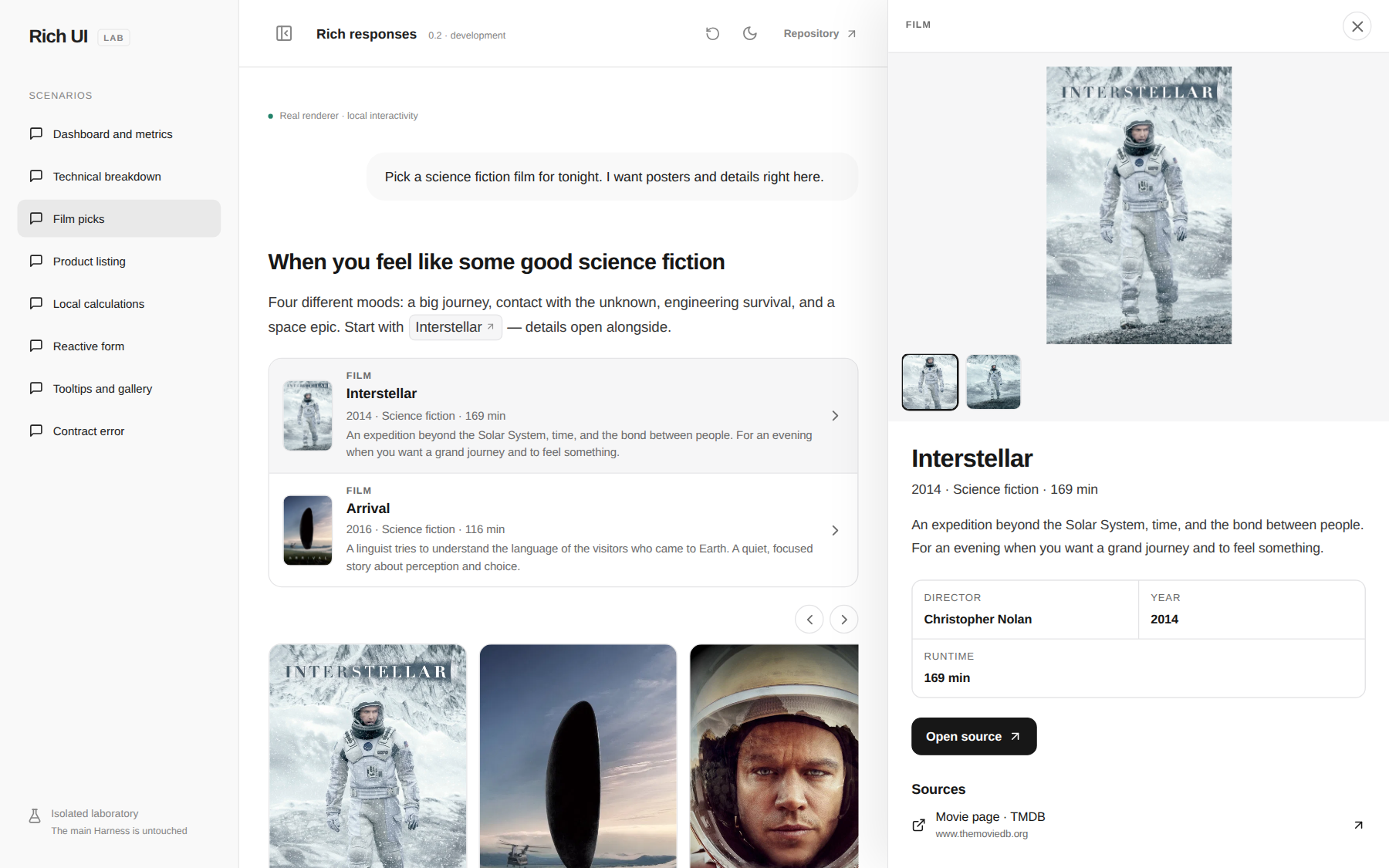
In the lab the answer reflows beside the open panel. In Harness the same entity opens as a native right-column tab, so the conversation narrows instead of being covered — see the integration notes.

Metrics, a two-series chart with units and hover, a filterable table with status pills and an ordered flow — one document.
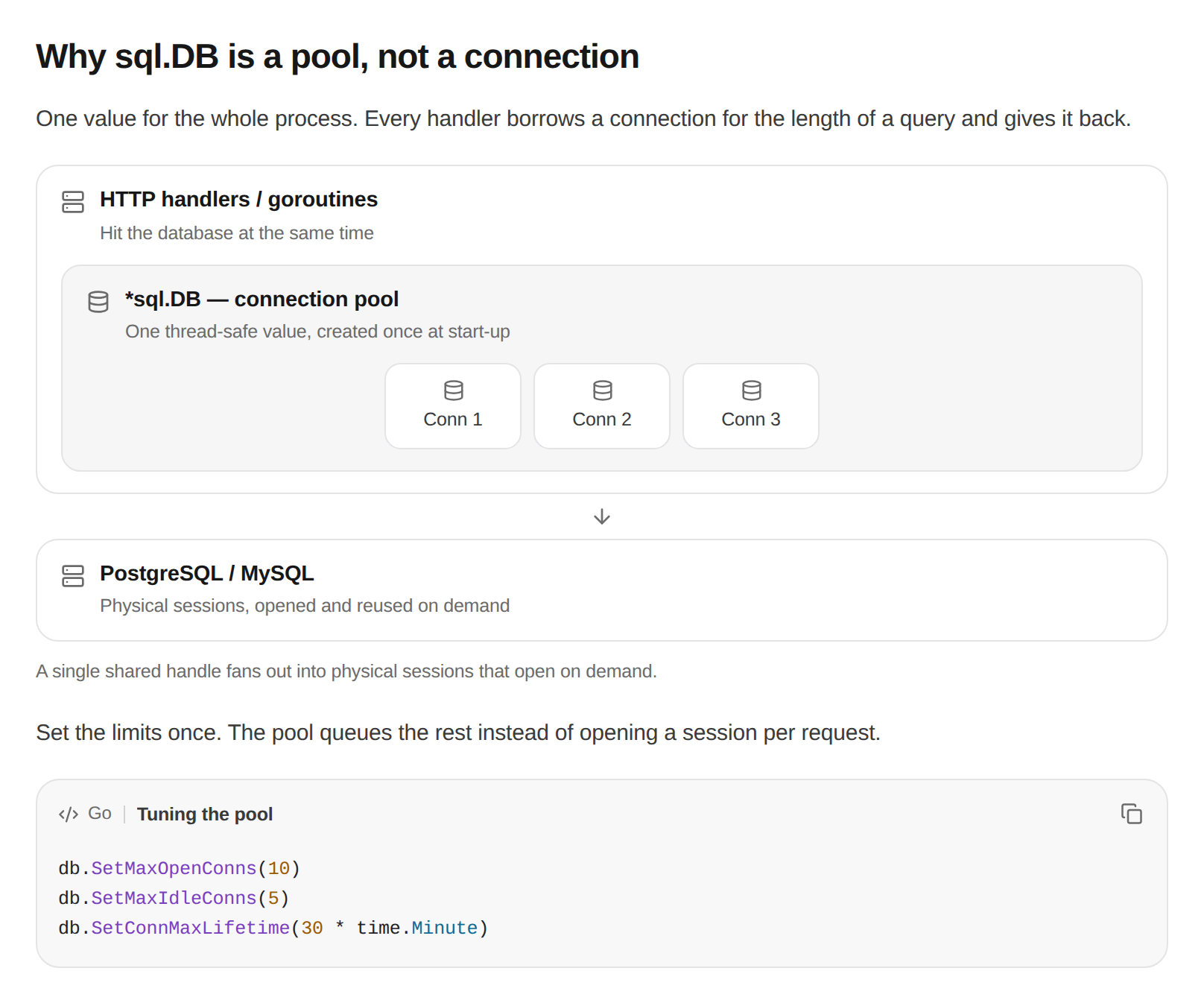
Boxes inside boxes: the pool holds connections, the arrow shows what it talks to. The code block keeps language label, syntax colour and copy.
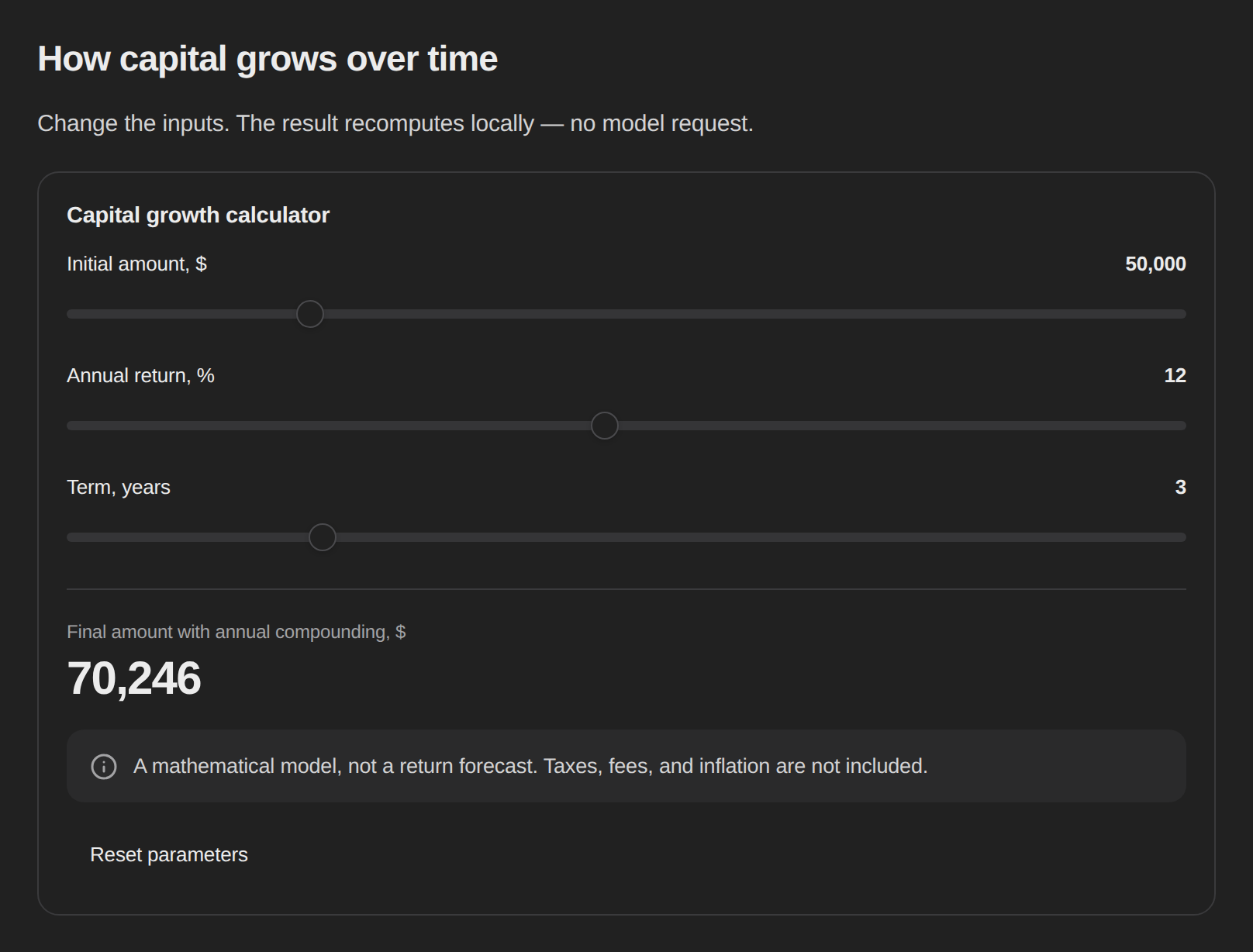
Sliders recompute the number in the browser; the model is not called again.
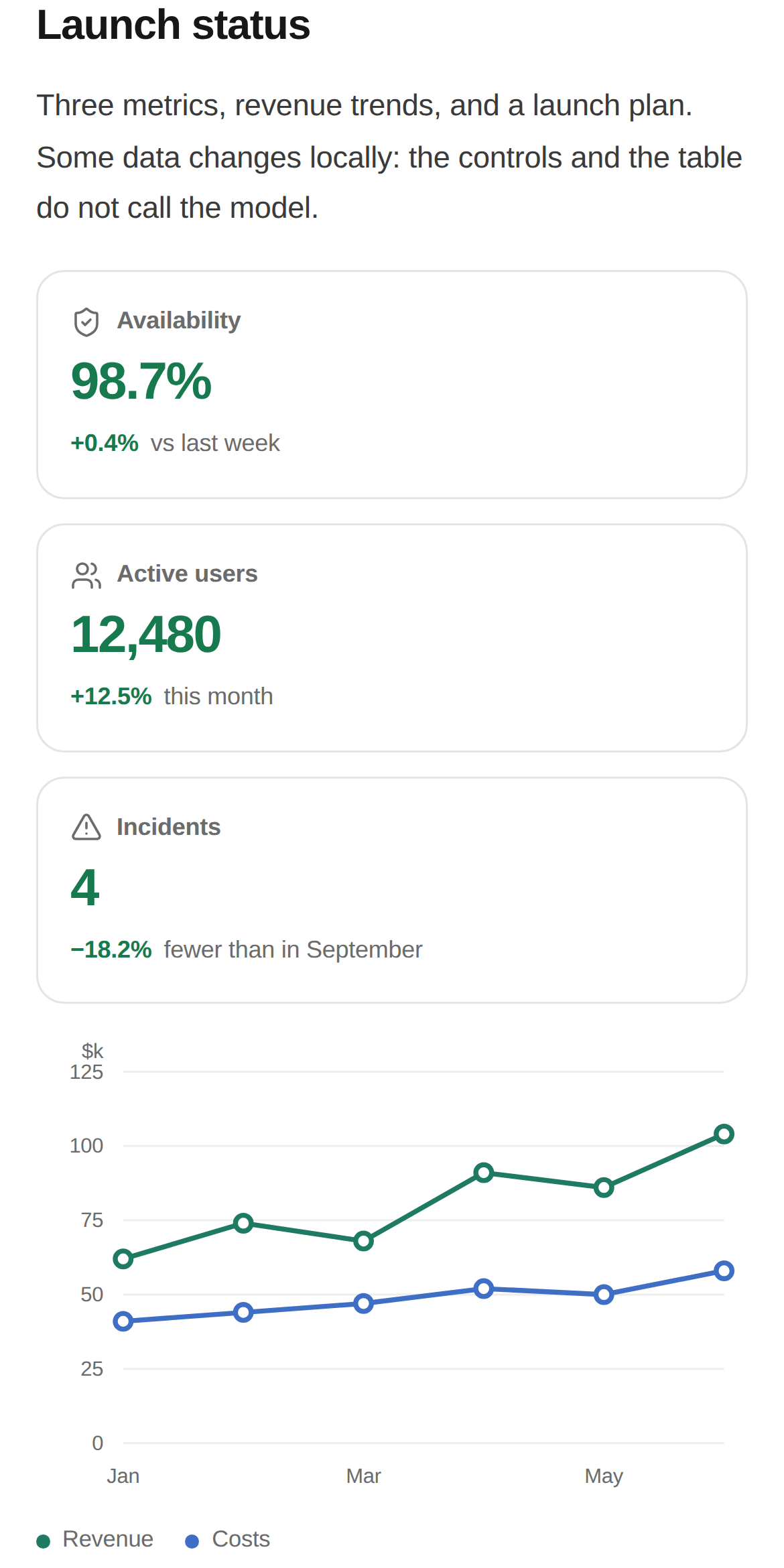
390 px: cards stack, the chart gets its own coordinate system, the table still fits.
Live demo
rich-ui.beako.best — the real renderer in laboratory conditions, no install. Scenarios: dashboard, films, listing, calculator, configurator, technical breakdown and the rejected-block diagnostic; add &theme=dark for the dark theme. Demo data is illustrative.
Install
Requires DeepSeek Harness 0.2.x and Node 22.19+. No NixOS change, no patched Harness.
dsh plugin --profile web add @kyoukisu/dsh-rich-ui
systemctl --user restart deepseek-harness   # or restart however your Harness runs
From a checkout — this is the loop the author uses:
git clone https://github.com/kyoukisu/dsh-rich-ui && cd dsh-rich-ui
npm ci && npm run build:plugin
dsh plugin --profile web add link:$PWD
Unreleased commits: dsh plugin --profile web add github:kyoukisu/dsh-rich-ui.
The plugin registers itself as a bundle; the fence language is rich-ui.
Quick start
Ask for something that benefits from structure, in a new session:
Compare three electric kettles by price, volume and features. Make it clickable.
The reply arrives as an interface: a summary strip, rows with photos, and a green highlight on the cheapest option. Opening a row shows facts, sources and related items without leaving the conversation.
Things worth trying: "build a budget calculator with three sliders", "show this quarter as a chart and a table", "make a configurator with tabs and conditional warnings".
What it can render
| Group | Nodes |
|---|---|
| Layout | stack, row, grid, card, divider, meta |
| Text | text with inline code, bold, links and [[entityId]] chips; callout with optional title; code with syntax colour, language label, line numbers and copy |
| Objects | entity-ref, ``entity-list` with poster or square row thumbnails; entity details dock in the native right column or fall back to an in-page drawer |
| Data | stat (KPI card), progress, status, table (sortable, filterable, status and progress columns), chart (bar / line / area / donut, 1–6 series, units, tooltips), computed |
| Flow | diagram with ordered steps, connector labels and branch depth; layers for boxes-inside-boxes architecture with member chips |
| Media | image, image-group, gallery lightbox, popover, tooltip |
| Controls | input (text / number / date), select, slider, switch, checkbox, radio, segmented, tabs |
| Logic | expressions (add, mul, round, comparisons…), conditional, local actions, send-message |
Roughly 150 Lucide icons resolve by name, with semantic tones (success, warning, danger, muted) so colour means something. Light and dark themes follow the host palette and font.
The contract in ten lines
```rich-ui
{"version":1,"title":"Budget","initialState":{"spend":1200},
 "nodes":[
  {"type":"slider","stateKey":"spend","label":"Monthly spend, €","min":100,"max":5000,"step":100},
  {"type":"computed","label":"Per year, €","expr":{"op":"mul","args":[{"state":"spend"},12]}},
  {"type":"callout","tone":"info","content":"Recomputed locally — no model call."}
 ]}
```
Entities, tables, charts and actions — one complete document
{"version":1,"title":"Films for tonight",
 "entities":[{"id":"a","kind":"Film","title":"Arrival","subtitle":"2016 · science fiction",
   "image":"https://example.org/poster.jpg",
   "facts":[{"label":"Director","value":"Denis Villeneuve"}],
   "sources":[{"title":"TMDB","url":"https://www.themoviedb.org/movie/329865-arrival"}],
   "badge":{"label":"Editors' pick","tone":"success"}}],
 "nodes":[
  {"type":"meta","items":[{"icon":"film","text":"3 films"},{"icon":"clock","text":"2 hours"}]},
  {"type":"entity-list","entityIds":["a"]},
  {"type":"table","columns":[{"key":"k","label":"What"},{"key":"v","label":"How many"}],
   "rows":[{"k":"Screenings","v":3}]},
  {"type":"chart","kind":"bar","data":[{"label":"Mon","value":2},{"label":"Tue","value":5}]}]}
The authoritative text is prompt-rich-ui/prompt.md; exact fields, enums and budgets live in references/schema.md, and working documents in references/examples.md.
How it works
flowchart LR
  A["Model writes a rich-ui fence"] --> B["Adapter finds the code block"]
  B --> C{Strict JSON schema}
  C -- invalid --> D["Stays a normal code block"]
  C -- valid --> E["React renderer mounts"]
  E --> F["Local state, no model call"]
  F -- explicit button --> G["rich-ui action message"]
- Node half registers one always-on system-prompt section with the whole contract and the absolute path of the reference files. No skill, no tool call: the model can answer on the first attempt, and opens references only after a rejected block.
- Browser half validates the fence and mounts into a plugin-owned root. While the model is still writing, closed nodes render in an inert preview and become interactive when the block settles.
- Malformed documents are never repaired silently: a claimed block shows a diagnostic card with the exact error, the rejected JSON and a one-click request for a corrected block. Unfinished streams stay code until the model closes them.
Safety
| Risk | Mitigation |
|---|---|
| Arbitrary code execution | Declarative JSON only; no HTML, CSS, JS, eval or property paths |
| Prompt-injected actions | Local actions cannot call tools; send-message needs an explicit click and is delivered as ordinary user text |
| Secrets in the UI | Password/secret state keys are rejected; no secret input components exist |
| Hostile URLs | http(s) only, credentials in URLs rejected |
| Resource exhaustion | Bounded depth, node count, string size and expression budget |
| Stored data | Persistence is opt-in, per session, and never stores text or date inputs |
Parity with the reference
Measured, not claimed: 17 of 27 reference scenarios reproduced, 2 partial, 8 missing — with an itemised deviation list in docs/PARITY.md. Missing today: automatic same-turn repair, scatter plots, Mermaid/ER graphs, math, maps, media, artifacts, persistent panels and mini-apps.
Known limitation: the fence label is not preserved by Harness, so an unlabelled block is claimed only when its payload looks like a spec document and passes the strict parser. A json-labelled block is never claimed.
Troubleshooting
The block stayed as code. The JSON did not pass the schema — usually an unknown field (title inside a node that has none, or items from another plugin's syntax). A claimed fence now shows the exact error, the rejected source and a button that sends both back to the model for a corrected block. Nothing is repaired or executed silently.

A rejected block explains itself and offers a one-click repair request instead of raw JSON.
Images show a placeholder. The URL is wrong, blocked by the remote host, or not http(s). Ozon/WB CDNs reject hotlinks; use a permitted source or your own media host.
Old dsh-ui messages stopped rendering. That is a different plugin's syntax. This one claims rich-ui only.
Development
npm ci
npm run dev            # lab at http://127.0.0.1:4173, HMR, no Harness needed
npm run build          # typecheck + lab build
npm run build:plugin   # the two real bundle artifacts
npm test               # 121 unit, schema and DOM tests
npm run test:browser   # Playwright desktop + mobile (goldens never auto-update)
Browser tests run in a pinned container so no system libraries are required:
docker run --rm --network host --ipc host --user "$(id -u):$(id -g)" \
  -e HOME=/tmp -v "$PWD:/work" -w /work \
  mcr.microsoft.com/playwright:v1.64.1-noble npx playwright test
Scenarios in the lab: ?demo=dashboard, films, listing, calculator, configurator, technical, primitives, plus &theme=dark.
Screenshots in this README are captures of that lab, not mockups. Golden images under tests/ are regression baselines and say nothing about fidelity to another product.
License
MIT — see LICENSE. Demo photography comes from Wikimedia Commons under free licences; prices and metadata are illustrative. DeepSeek Harness is a separate project by DeepSeek; this plugin is unaffiliated.
Plugins relacionados
dsh-web (dsh-task-board)
zhu1090093659/dsh-web
dsh-web (dsh-web-all)
zhu1090093659/dsh-web
dsh-web-ui (dsh-task-board)
zhu1090093659/dsh-web-ui
dsh-TUI
ccch1mneyyy/dsh-tui