dsh-agent-theater
lim1202/dsh-agent-theater
A conversation view beside Chat and Trajectory that turns a DSH session into a character stage, with Codex Pet sprites, comic bubbles and a completion report listing the files and attachments the turn produced.
Instalar
dsh plugin --profile web add github:lim1202/dsh-agent-theaterREADME
Agent Theater
English | 简体中文

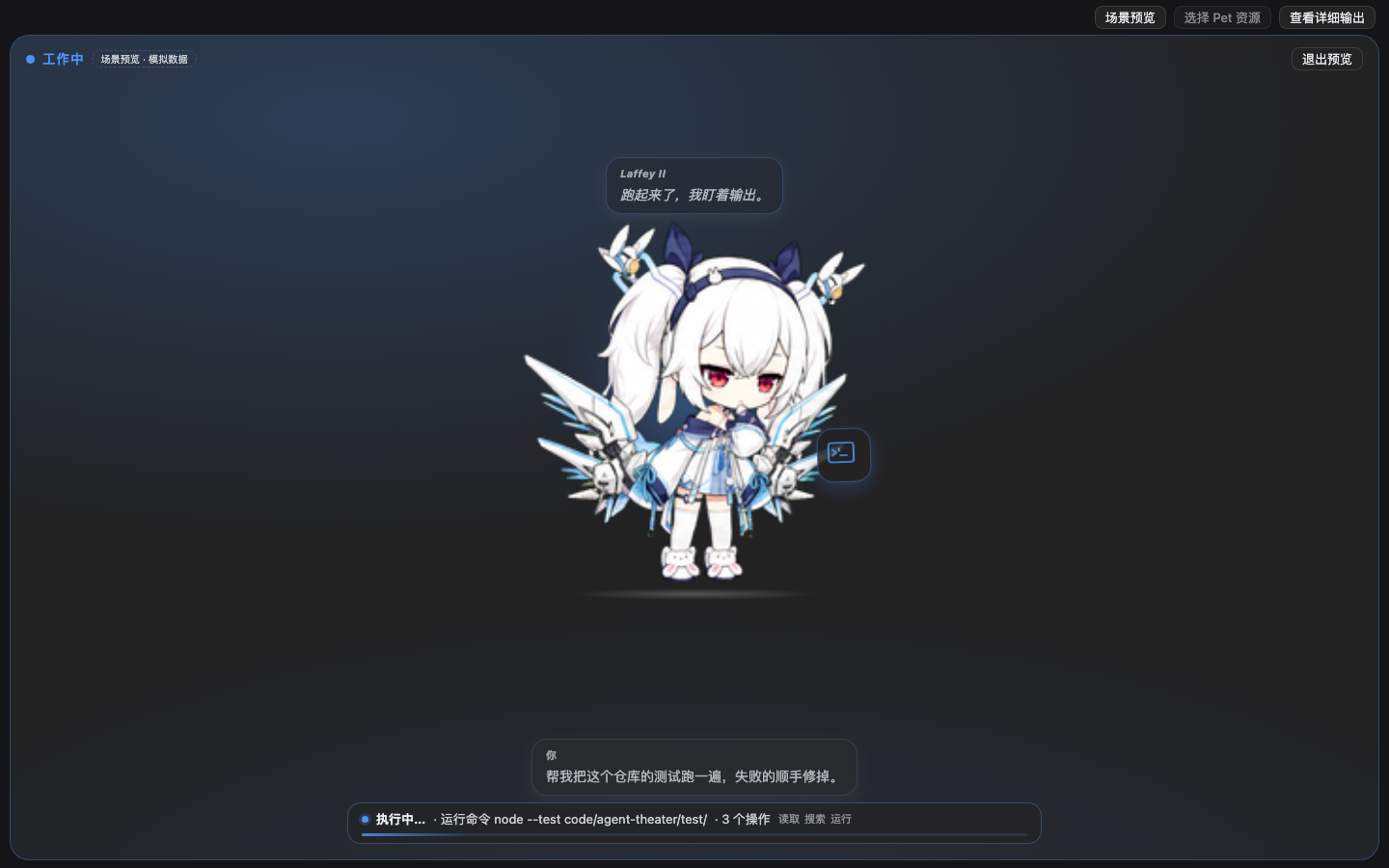
Turns a DSH session into a character stage: a conversation.view called Theater sits beside Chat and Trajectory. The character reacts to real tool events, your message becomes a short comic bubble, the agent's output becomes a subtitle, and when a turn ends she presents the result and its deliverables on stage.
- No fork, no changes to DSH core; only public extension points (
conversation.viewslot, standard Client hooks, thectx.sidebarRight/ctx.uiConversationservices). - No extra model calls: every line comes from the Chat data the Conversation layer already assembled.
- Chat and Trajectory stay intact and are one click away; uninstalling the plugin restores the default UI.
Features
- One stage, not a chat list: the whole view is the stage — scene label, a large character (props, halo, badge), and a bottom deck for comic bubbles, subtitles and a shared status bar.
- Four scenes driven by real session state: Idle · Working (live tool + operation count + timer) · Completion (report card) · Attention (request card).
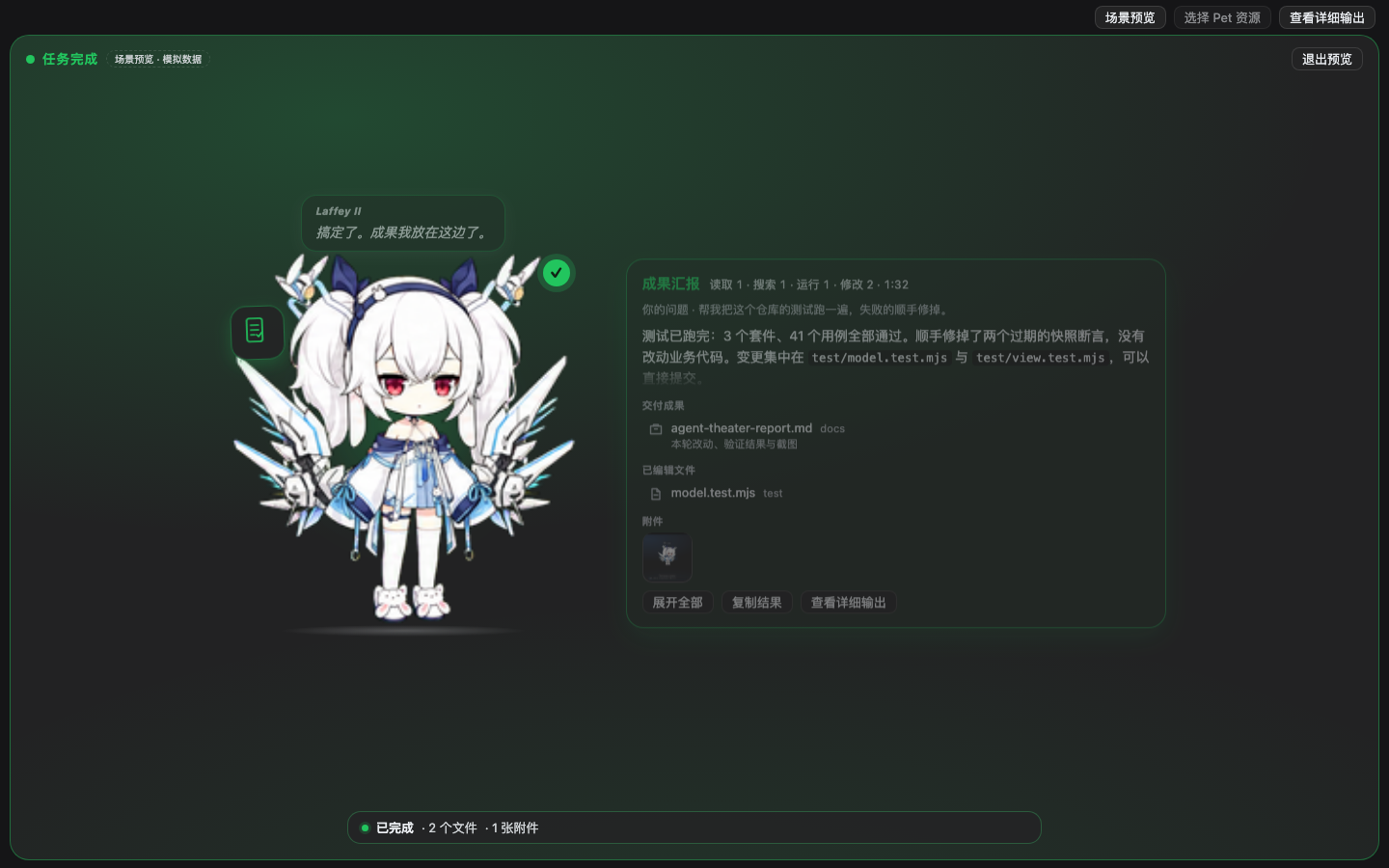
- Completion report: the turn's real final answer (Markdown, collapsed by default, expandable, copyable) + real statistics (read/search/run/edit, elapsed time) + delivered files, edited files and attachments;
presentdescriptions render under the file name, a file row opens in the right Sidebar and a thumbnail opens an in-stage lightbox. - Attention: shows the real approval reason or the real question and options (read-only). Acting still happens in the native approval UI / composer — the plugin never approves for you.
- Codex Pet: import a
pet.json+spritesheet.webpfolder and the character becomes a frame-by-frame sprite animation; without a Pet it uses a built-in placeholder character. - Restrained: tool calls never enter the narrative; they only show up in the status bar and props. There is no history list — the full log stays in Chat.
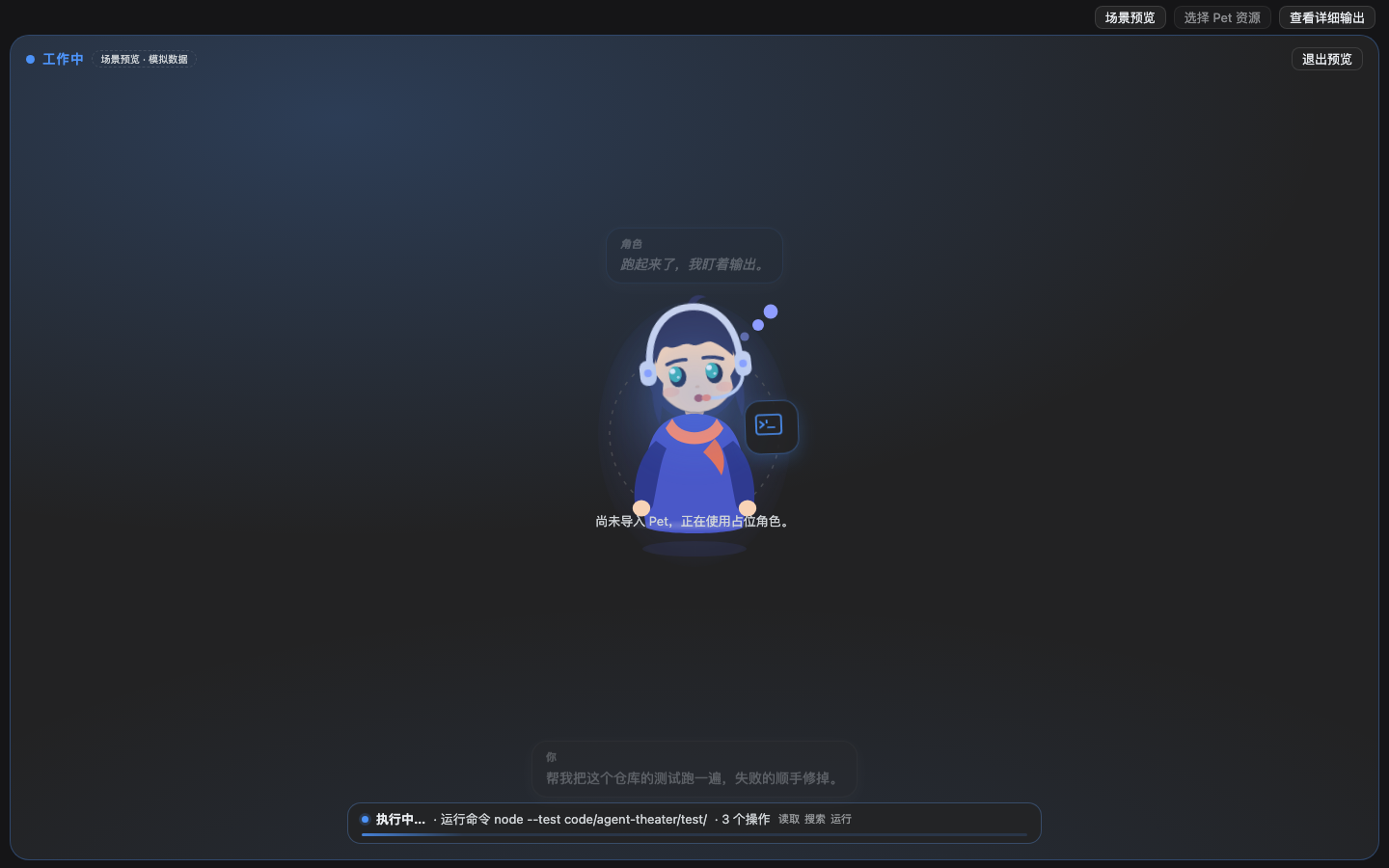
| Working (with an imported Pet) | Completion |
|---|---|
 |  |
| Attention | No Pet (built-in placeholder) |
|---|---|
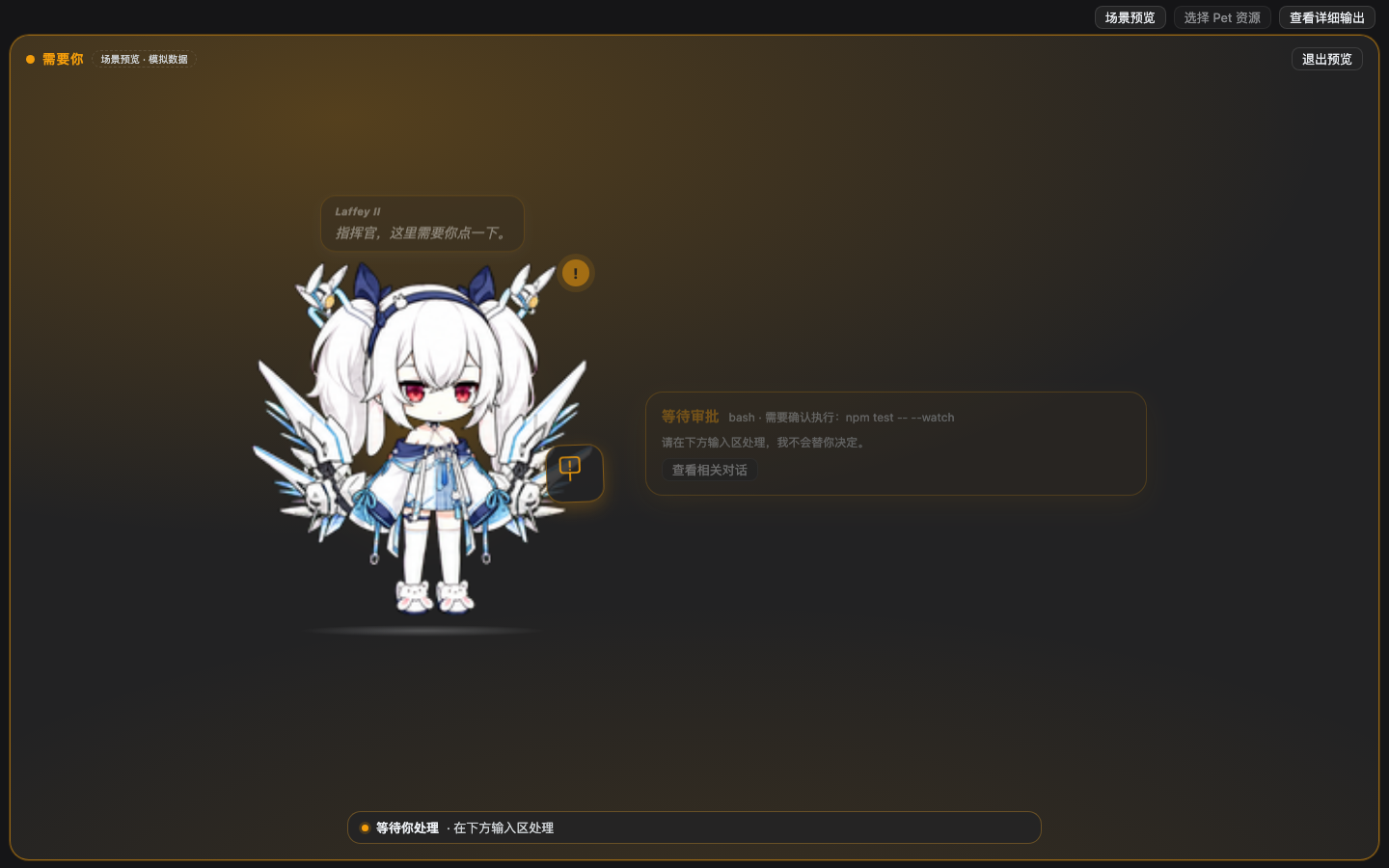 | 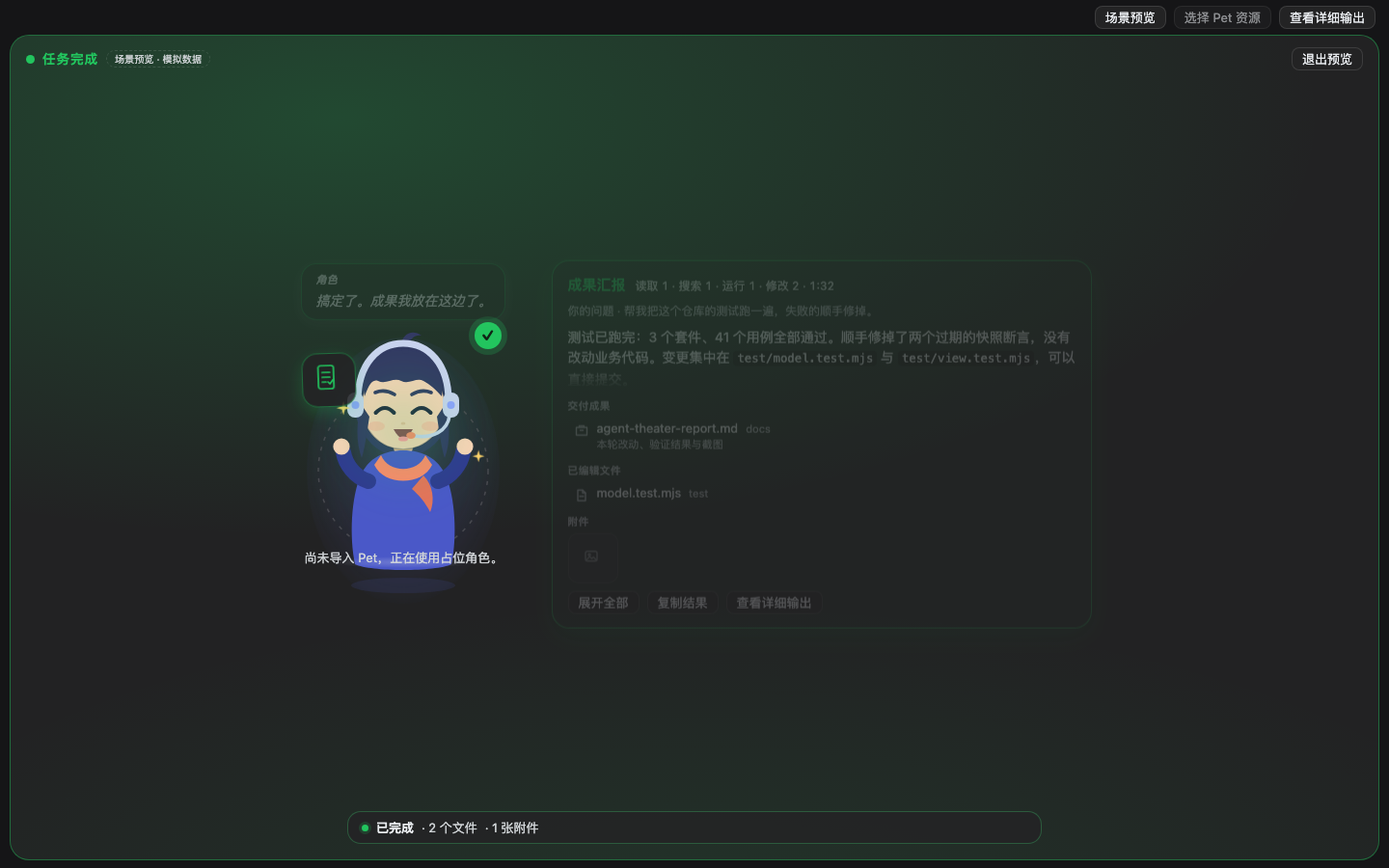 |
The character in these screenshots is a locally imported Codex Pet; no character art ships with this repository. Without a Pet the built-in placeholder is used.
Install
Requires DSH Desktop 0.2.1-rc.x (tested on 0.2.1-rc.5; the package declares engines.dsh). After installing, refresh the page once (Client modules are read at page load) and the view switcher above the conversation will offer Theater.
Option A: install from GitHub (recommended)
In DSH's Plugins page choose install and paste:
github:lim1202/dsh-agent-theater
Or from the command line (install the app's command-line tool first; the desktop profile requires an initialized profile and the app fully quit):
dsh plugin --profile desktop add github:lim1202/dsh-agent-theater
Option B: release tarball or a local directory
# tarball from the GitHub Release
dsh plugin --profile desktop add https://github.com/lim1202/dsh-agent-theater/releases/download/v0.1.1/dsh-agent-theater-0.1.1.tgz

# or a directory you cloned/copied locally
dsh plugin --profile desktop add /path/to/dsh-agent-theater
The Plugins page also accepts a local directory path.
Option C: a Discover index source
DSH 0.2.1+ can read plugin-market indexes (JSON, format 1) under Plugins → Discover → Index sources. This repository ships one; add this URL to search and install it from Discover:
https://cdn.jsdelivr.net/gh/lim1202/dsh-agent-theater@v0.1.1/index.json
Fallback (not a CDN; on some networks it can exceed the 15-second budget DSH gives an index source):
https://raw.githubusercontent.com/lim1202/dsh-agent-theater/v0.1.1/index.json
After installing
- Refresh the page, then use the view switcher above the conversation → Theater.
- Import a Codex Pet if you want one (see below); it is optional.
- To turn it off, disable the bundle on the Plugins page (you are back to plain Chat immediately); see uninstall at the end.
The character: Codex Pet
Import
Click Select Pet assets in the Theater toolbar → the native folder picker → choose a folder containing pet.json. The assets are copied into a dedicated directory; the source folder stays read-only and untouched:
$DSH_HOME/agent-theater/            # defaults to ~/.dsh/agent-theater
├── config.json                     # {"active": "laffey-ii"}
└── pets/<id>/
    ├── pet.json                    # normalized manifest written on import
    └── spritesheet.webp            # copied from the source folder
pet.json fields: id, displayName, description, spriteVersionNumber (only 2 is accepted) and spritesheetPath (a relative path inside the Pet folder; .. and absolute paths are rejected). Sheets may be up to 24MB, webp/png/jpeg/avif, and their pixel size must be a multiple of the frame grid.
Grid and row mapping (calibrated against laffey-ii v2)
One frame is 192x208, 8 columns × 11 rows = 1536x2288 (frames per row are determined from transparent pixels and start at column 0):
| Row | Frames | Content | Used for |
|---|---|---|---|
| 0 | 7 | Idle: breathing, blinking | idle |
| 4 | 5 | Crouch, jump, land | success |
| 5 | 8 | Head down, sigh | error |
| 6 | 6 | Arms crossed, waiting | waiting |
| 7 | 6 | Quick busy fidget | working |
| 8 | 6 | Hands folded, thinking | thinking / research |
| 1/2/3/9/10 | — | Run left/right, wave, turn | Reserved, unused |
Without an imported Pet the built-in placeholder from src/art.js (SVG + CSS animation) is used, with identical scenes and bubble behaviour.
Usage
The four scenes
| Scene | Stage | Bottom status bar |
|---|---|---|
| Idle | Character rests, occasionally a line | ● Idle |
| Working | Character acts + prop, live tool and timer | ● Working… · run node --test · 3 ops · 00:42 |
| Completion | Character + report card | ● Done · 2 files · 1 attachment |
| Attention | Character + request card | ● Waiting for you · handle it below |
Your latest message appears as a comic bubble (fades after 9s); the agent's live output shows as a subtitle; only one text beat is kept at a time — earlier history is in Chat.
The completion report
- Answer: the turn's last real reply, Markdown-rendered, collapsed by default (~5 lines + fade), Expand all scrolls inside the card, Copy result copies it verbatim.
- Statistics: real tool-category counts and wall-clock duration; agent claims are never parsed or paraphrased.
- Deliverables: Delivered (files sent by
present), Edited files (successfulwrite/edit/ mutatingstr_replace_editor, deduplicated, failures excluded) and Attachments (the turn's real image references).- A
presentdescriptionrenders under the file name. - A file row opens in the right Sidebar (
dsh-resource://file/session/<sid>/<path>); a thumbnail opens an in-stage lightbox. - Both degrade quietly when the services are unavailable: nothing is faked and no extra Host requests are made.
- A
- The scene lasts until the next turn or until you press
×; afterwards the stage returns to idle and the footer keeps the turn's deliverable counts.
Attention
The request card shows the real type (waiting for approval / waiting for your answer), tool · reason, and for questions the real prompts and options (read-only). The plugin never renders its own approval buttons and never auto-approves — you always act in the native composer / approval UI.
Design boundaries
- Read-only session data: no requests, no writes to the session, no injected messages.
- Tool calls never enter the narrative; they appear only in the status bar, props and completion statistics.
- No rewriting of other plugins, no DOM reads, no covering the native composer or approval controls.
- Character lines are original text shipped with the plugin (zh/en); they are not agent output and are never written to the session log.
- Animations respect
prefers-reduced-motion.
Compatibility
- Built and tested against DSH
0.2.1-rc.5(macOS; CI runs Ubuntu + macOS). Public interfaces used:- View registration:
ctx.slots.inject('conversation.view', () => ctx.slots.register({ name, id, order, label, locale }, Component)) - Data: slot props
useChat({order, nodes}),useSessionStatus(running/pendingInteraction),openView('chat', focus) - Deliverables:
ctx.sidebarRight.openResource,ctx.uiConversation.imageUrl/peekImageUrl - Pet store: Host routes authenticated through
ctx.connection.admit, plusuiWorkspace.pickDirectory - Text:
ctx.locale.register/bind; styling uses theme tokens only (--dsw-alias-*)
- View registration:
- DSH is still in rc: slot and service signatures may change. If the view is blank after a DSH upgrade, report the browser console line
slot entry crashed in 'conversation.view'in an issue.
Development
No third-party dependencies (Node 20+):
node build.mjs              # rebuild client.js from src/*.js
node build.mjs --check      # verify the artifact is current
node --test test/*.test.mjs # unit tests (130)
node tools/scene-preview.mjs --help   # offline scene screenshots (needs a local Chrome)
- Client half (
src/*.js): runnode build.mjs, then refresh the page. - Host half (
index.js): the Loader does not hot-reload Host plugins; remove and reinstall the bundle on the Plugins page, or restart DSH.
Uninstall / cleanup
- Remove the bundle on the Plugins page, or
dsh plugin --profile desktop remove dsh-agent-theater. - Pet assets live separately; deleting this directory removes them completely (the original Pet folder is untouched):
rm -rf ~/.dsh/agent-theater.
Known limitations
- Without a Pet the character is an SVG + CSS placeholder; with one it is a frame-by-frame sprite animation (not Live2D).
- Only the latest text beat is visible on stage; earlier conversation lives in Chat / Trajectory (by design).
- Attachments list image references only; non-image attachments (PDF, code files, …) are not listed in the report yet.
- Markdown is a practical subset: no tables, images, task lists or inline HTML, and no syntax highlighting.
- Props map from tool names (
theaterPoseForTool); unknown tools fall back to the generic working pose. - Very narrow windows (<520px) squeeze the character and the cards; there is no "character only" fallback yet.
- The sprite sheet is downloaded whole on first paint and reused through ETag 304; rows are not fetched separately.
- The Host side only stores and validates assets; it never decodes images — the browser measures the grid.
Licence and disclaimers
- MIT.
- Unofficial plugin, not affiliated with DeepSeek; DSH itself and any Codex Pet art remain the property of their respective owners.
- This repository contains no character art; the Pet in the screenshots was imported locally by the author. Check the licence of third-party character art before using it.
Plugins relacionados
dsh-web (dsh-task-board)
zhu1090093659/dsh-web
dsh-web (dsh-web-all)
zhu1090093659/dsh-web
dsh-TUI
ccch1mneyyy/dsh-tui
dsh-web-ui (dsh-task-board)
zhu1090093659/dsh-web-ui