ds-bot-control
lininn/ds-bot-control
DS Bot: a team of long-lived Bots for DeepSeek Harness, with Main Bots, Bot-to-Bot messages and group chats
Instalar
dsh plugin --profile web add github:lininn/ds-bot-controlREADME

DS Bot
English | 中文



DS Bot is a bot plugin for DeepSeek Harness (DSH). It turns DSH into bots. You create your own bots, then talk and work with them.
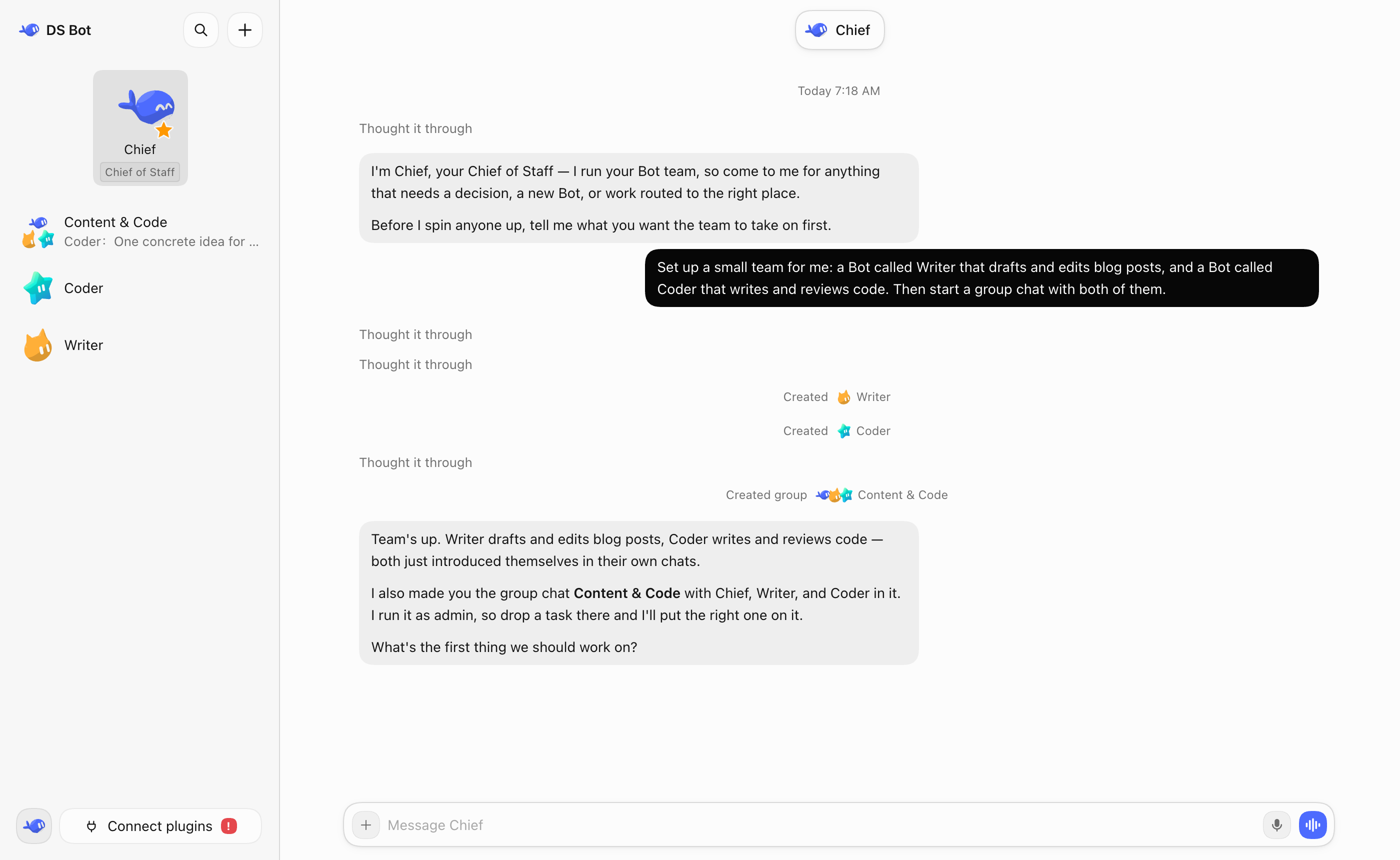
Quick start
The shortest way to get a team running, and to drive it from your phone:
npm install -g @lininn/ds-bot
ds-bot start          # starts DSH Web in the background and prints its address
Open the address it prints. ds-bot status, ds-bot stop and ds-bot restart manage it; the team keeps running after the terminal closes.
Now connect the phone:
- In the web UI, open Settings → Remote control.
- Follow the WeChat official account html5开发分享 to get an invite code, register with it, then sign in on that page with the same account.
- On the phone, open https://ds.d-1.top, sign in, and pick this computer from the device list.
The computer keeps one outbound WebSocket to the relay and opens no port; the phone reaches only the phone-safe part of the Bot API.
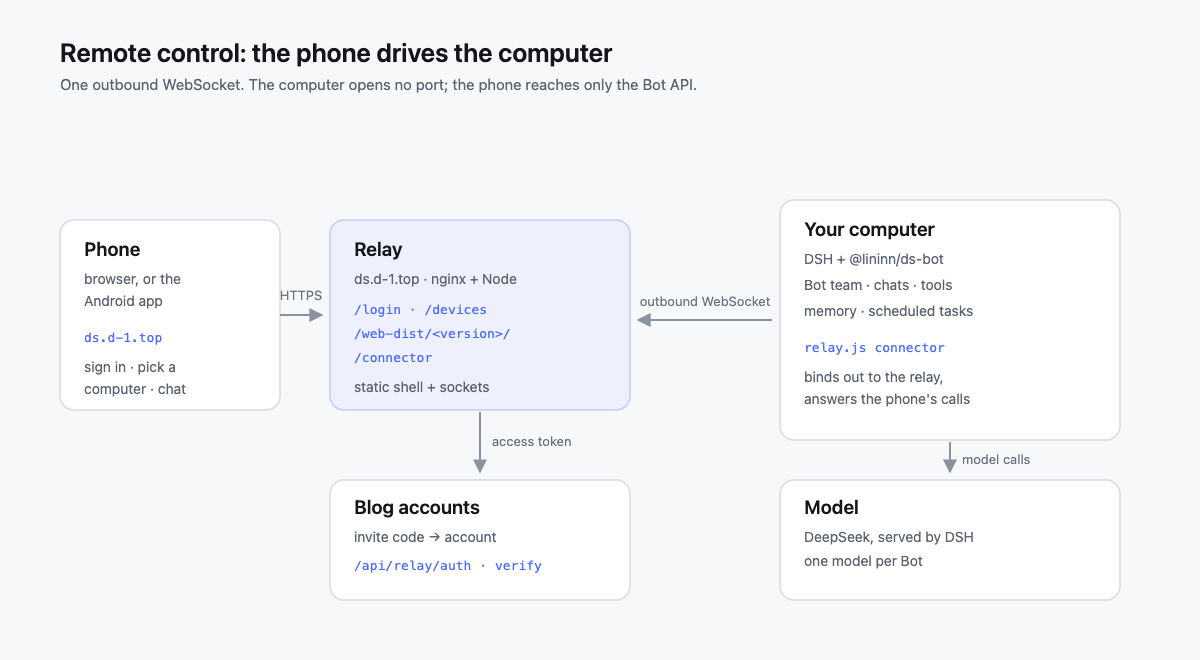
Prefer the desktop app? Download it from Releases; the same remote-control steps apply.
Install
Desktop app (Windows, macOS, Linux)
The desktop app brings its own DSH, so you don't need to install DSH first. Download it from Releases:
- Windows (x64):
DeepSeek-Bot-<version>-win-x64.exe. Run it; it installs for your user only, without administrator rights. If Windows shows "Windows protected your PC", select More info → Run anyway. - macOS:
DeepSeek-Bot-<version>-mac-arm64.zipfor an Apple chip,DeepSeek-Bot-<version>-mac-x64.zipfor Intel. Safari unzips it by itself; open DeepSeek Bot where it was unzipped. Its first start copies it into Applications and opens that copy, so the zip and the unzipped folder can be deleted afterwards. When macOS says it cannot check the app, open System Settings → Privacy & Security and select Open Anyway. - Linux (x64):
DeepSeek-Bot-<version>-linux-x86_64.AppImageruns on every distribution — make it executable and open it. It mounts through FUSE 2, which you may need to install first (sudo apt install libfuse2t64on Ubuntu 24.04+,sudo dnf install fuse-libson Fedora,sudo pacman -S fuse2on Arch). On Ubuntu 24.04 and later an AppImage can refuse to start (Ubuntu restricts the sandbox it needs); theDeepSeek-Bot-<version>-linux-amd64.debon Debian/Ubuntu does not have this problem and adds a menu entry.
At the first start the app asks where to keep its data and the Bots' files, and offers to copy a Bot team from your DSH (it only reads your DSH). Set up a model in its settings. The Windows app and the Linux AppImage update themselves; the macOS app and the Linux deb tell you when a new version is ready to download.
macOS: opening the app for the first time. The macOS build is not signed with an Apple Developer ID and is not notarized, so Gatekeeper reports "Apple cannot verify whether 'DeepSeek Bot' contains malware…" and refuses to open it straight from Downloads. To open it once:
- Open System Settings → Privacy & Security, scroll down to the message about DeepSeek Bot, and select Open Anyway, then confirm.
- Or Control-click DeepSeek Bot in Finder and choose Open → Open.
If macOS still refuses, clear the download quarantine flag on a build downloaded from this project's Releases:
xattr -dr com.apple.quarantine "/Applications/DeepSeek Bot.app"
Only download the app from this project's Releases; the command merely tells macOS you have checked it yourself.
As a plugin in DSH
First install DSH and set up at least one model in it. DS Bot uses the models from DSH.
DSH Desktop (Windows, macOS)
- In the sidebar, select Plugins → Add plugin.
- In Package name or address, enter
@lininn/ds-bot. In mainland China, set Registry to Mainland China mirror. - Select Install, then Enable now. If DSH says the change takes effect at the next start, quit DSH completely and open it again.
If npm is not reachable, in step 2 you can also enter the full path of lininn-ds-bot-0.2.11.tgz downloaded from Releases, or github:lininn/ds-bot-control#v0.2.11&path:/ds-bot (needs Git).
Coming from the older ds-bot package: on the Plugins page, remove ds-bot and add @lininn/ds-bot again. The Bots, chats and memory stay.
DSH Web (Windows, macOS, Linux)
Needs Node.js 22.19 or later, and pnpm.
npx @deepseek-ai/dsh@0.2.1-rc.5 plugin --profile web add @lininn/ds-bot
npx @deepseek-ai/dsh@0.2.1-rc.5 web
To keep that web UI running in the background — so the team stays reachable from a phone — the package also ships a small ds-bot command:
npm install -g @lininn/ds-bot          # then: ds-bot start
npx -p @lininn/ds-bot ds-bot start     # or without a global install

ds-bot status    # whether it runs, with the pid, url and log
ds-bot stop      # stop it
ds-bot restart   # stop, then start
It boots dsh --profile web --no-open; --port and --host choose the listener, and --json prints status as JSON. When dsh is not installed, start runs this package's pinned DSH release through npx and adds the plugin to the profile, so the global install above is all you need. See Command line.
Docker (NAS, Linux server)
The docker/ directory builds an image with DSH Web and DS Bot, for a NAS or any always-on machine. CI is configured to publish a prebuilt linux/amd64 image to GHCR. The container is the Bots' sandbox: they get full access to what you mount into it, and nothing else. See docker/README.md.
Setup
I strongly recommend that you set up your other bots and group chats by just talking to a bot.
Web search
DS Bot selects its auto search provider for the whole profile. If you disable web-search-auto, also select another registered search provider in that profile. See Web search and the recovery steps.
Features
Bot
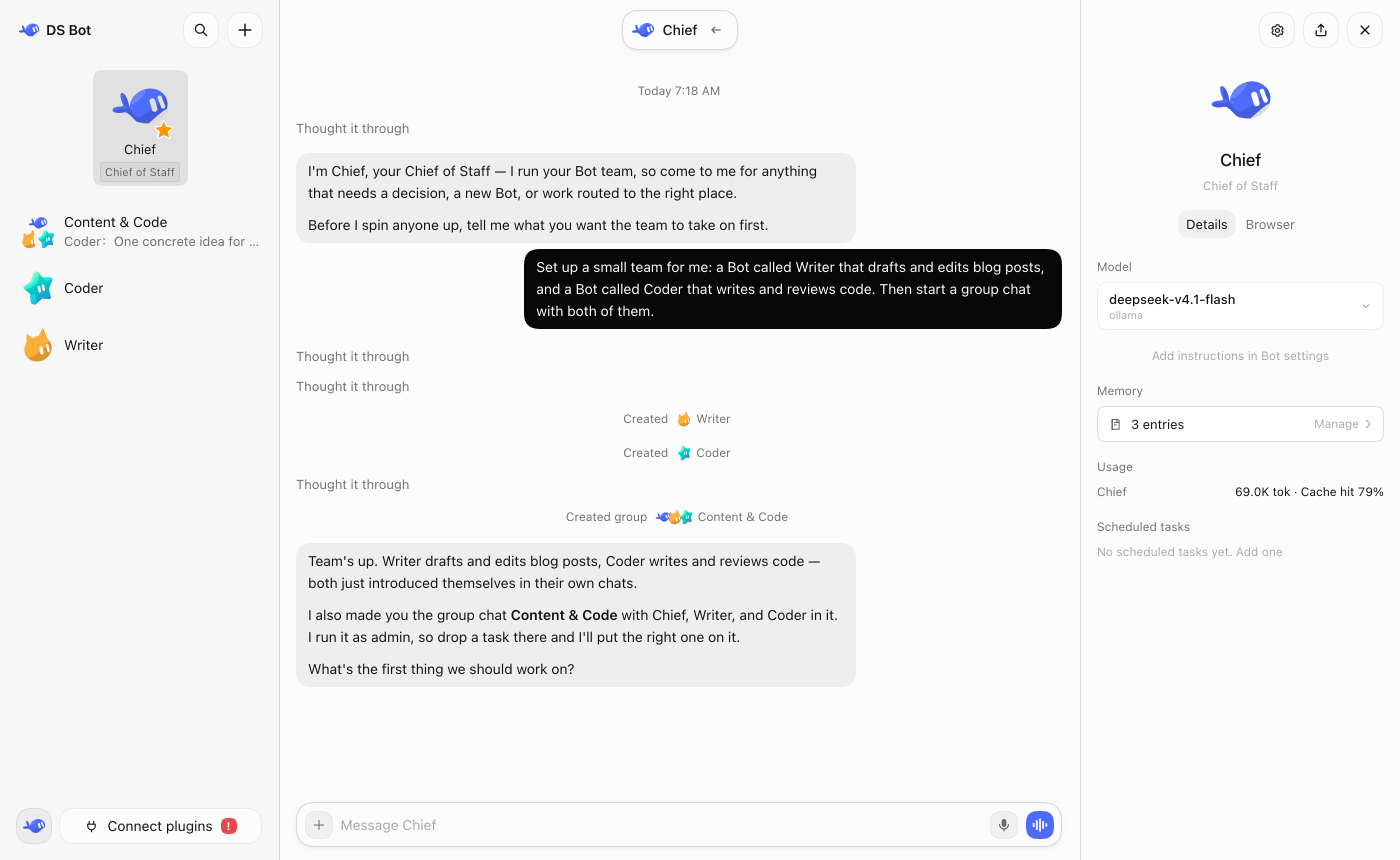
You can do all your talking and work with one bot, in one window. You don't need to worry about the context behind it. The bot's details page shows its info, and there you can pick the model you want it to use. You can switch models at any time, but I still recommend that you keep one model for a bot for a long time, and switch only when you really need to.
Bots also have memory. A bot remembers what you like and uses it in later work. You can manage its memory on the bot's details page, or just tell the bot.
Main bot
The main bot is your chief. It has very high rights: it manages the other bots and the group chats. The first time you open DS Bot, there is already a main bot called Chief. Talk to it, and it walks you through the setup.
In short: have a question? Ask the main bot.
Group chats
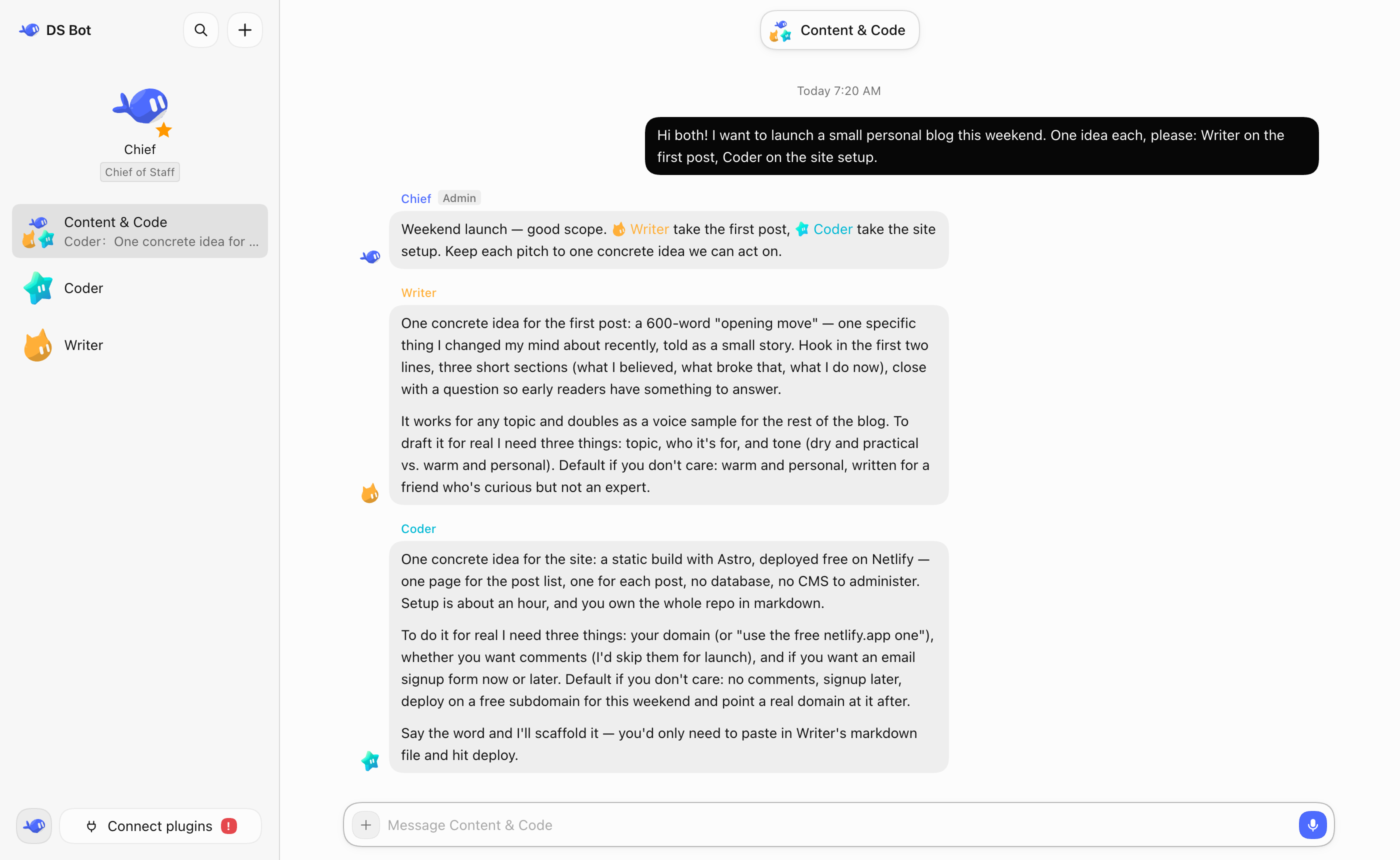
DS Bot has group chats. A group chat is a great way to get several bots to work together, but it clearly costs more. So DS Bot does this: every group chat has an admin. The admin answers your messages by default and calls in the other bots for you. You can also @ a bot directly, and it answers you directly: type @ and pick the bot from the list. To give the bots another chat as context, use + → Reference a chat in the message box.
Any bot can hand work to another bot with @. That bot does the work on its own, and the group goes on. While it works, it keeps the group posted, and the group, the sidebar and its own chat show what it is doing. When it is done, it posts the result in the group, and the bot that asked for the work answers. To stop the work, open the group's details.
A group chat has its own memory. What you tell the group stays in the group: its members use it there, and your other chats and the bots outside the group do not see it. You can manage it in the group's details.
Capabilities
Settings → Capabilities is a shared library of MCP servers, skills and packs. Add a capability to a Bot in its settings; it is available from that Bot's next message in its own chat and group chats. A local MCP command that a Bot adds needs your approval before it can run. While other Bots use a capability, only you or a Main Bot can change or delete it.
Usage
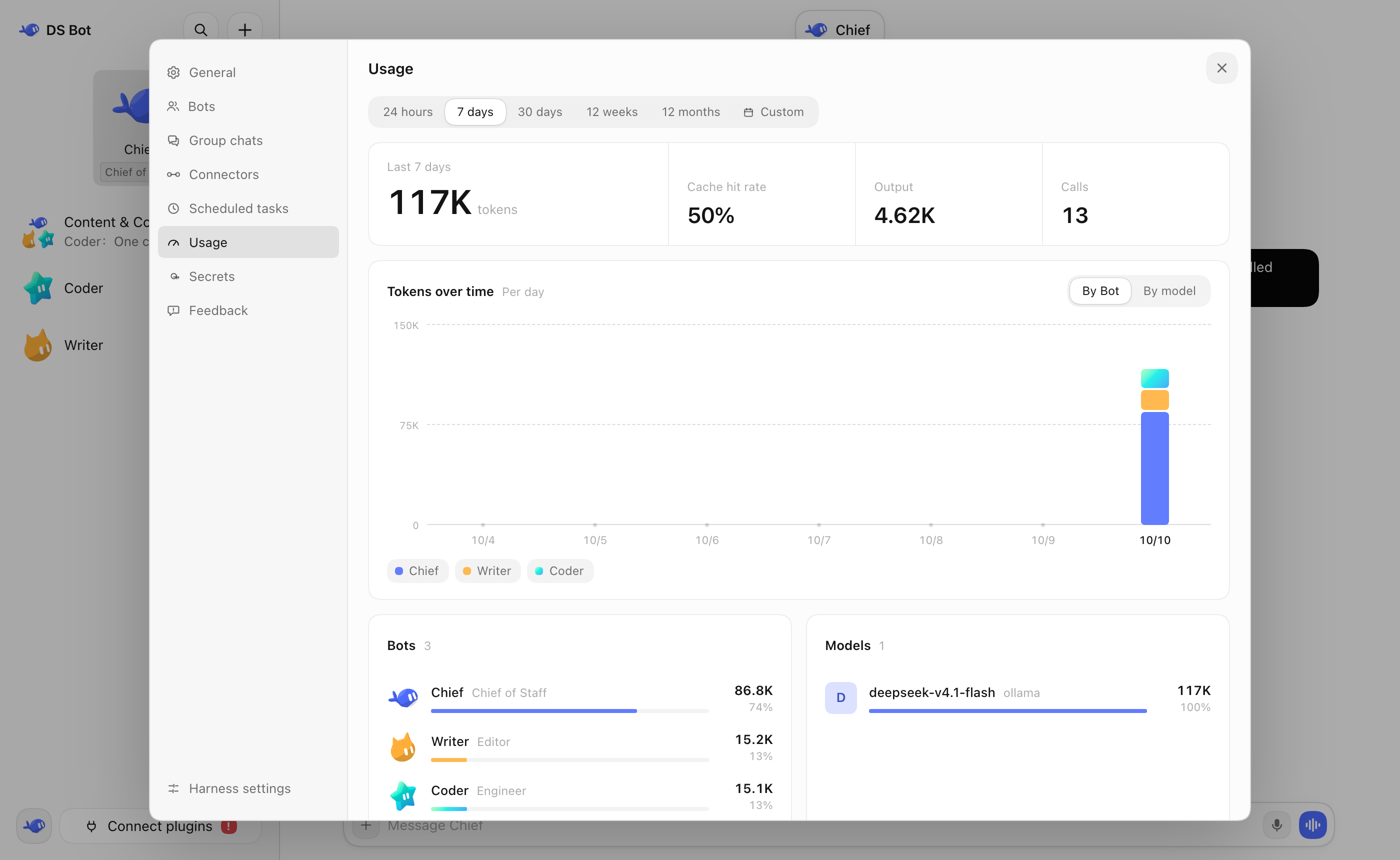
In Settings → Usage, you can see token usage by time, by bot and by model.
Remote control
Settings → Remote control lets a phone drive this team. The computer keeps one outbound WebSocket to a relay, so no port is opened here. Sign in on the settings page with a blog account (follow the WeChat official account html5开发分享 for an invite code), then open the relay's website on the phone and pick this computer. One account can bind several computers: the phone shows a device list when more than one is online, and Switch device in the shell's header returns to it. The public relay is https://ds.d-1.top, used when no other address is set; a deployment with its own relay sets relay.url or DS_BOT_RELAY_URL. Only the phone-safe part of the Bot API is reachable. See Remote control and relay/.
Data
All data stays on your own computer, in bot/ and sessions/ in the DSH home folder (~/.dsh by default). Uninstalling the plugin does not delete this data.
Development
The plugin source is in ds-bot/. For options and internals, see ds-bot/README.md. For development, tests and how the team works, see CONTRIBUTING.md. For changes between versions, see CHANGELOG.md.
Acknowledgments
- DeepSeek Harness: DS Bot is built on the DSH plugin system. Every bot works in DSH sessions and uses the DSH tools and models.
- esbuild: bundles the plugin's interface code.
- Thanks to these projects for the ideas they published. DS Bot learned from their designs and does not contain their code:
- AgentMemoryRepo: the Markdown format of Bot memory.
- OpenAI Codex: checkpoints that keep the user's messages next to the summary, and message anchors for chat search.
- OpenMausBot: group chat rounds and @mention relays.
- Hermes Agent and Hermes Bot Mode: one session per member per group chat, and handoffs that carry the earlier user messages.
- OpenCode, goose, pi and Gemini CLI: when to condense a long chat, and what a handoff note holds.
- obelisk: chat search with a SQLite full-text index.
- Everyone who tries DS Bot, asks questions and reports bugs.
License
Apache License 2.0. Provided "as is", without any warranty. Third-party code and its license are listed in NOTICE.
Disclaimer
DS Bot is an independent community project. It is not an official DeepSeek product, and it is not affiliated with, endorsed by or sponsored by DeepSeek. "DeepSeek", "DeepSeek Harness" and the other names are trademarks of their owners. They are used here only to say what this plugin works with.
Bots use your own model quota, and they read and write files and run commands when you ask them to. Check important actions yourself.
Plugins relacionados
webnovel-writer
lingfengqaq/webnovel-writer
loopx (dsh-loopx-plugin)
loopx-project/loopx
ouroboros (dsh-plugin)
q00/ouroboros
loopx (dsh-loopx-plugin)
huangruiteng/loopx