dsh-custom-provider
linziyanleo/dsh-custom-provider
DSH plugin for static OpenAI Chat Completions, OpenAI Responses, and Anthropic Messages providers
Instalar
dsh plugin --profile web add github:linziyanleo/dsh-custom-providerREADME
dsh-custom-provider
A DSH plugin for configuring static provider routes and model catalogs from the Web settings UI or settings.yaml. Each route can use OpenAI Chat Completions, OpenAI Responses, or Anthropic Messages.
The problem it solves
A model endpoint may need more than a base URL and an API key: its wire protocol must be selected, its model catalog may be known in advance, model capacities may need to be declared explicitly, and request fields for reasoning or message replay may differ between providers.
dsh-custom-provider turns that information into provider routes that DeepSeek Harness (DSH) can use directly. Configured models appear in DSH's native model picker and continue through its standard streaming, tool-call, usage, finish-reason, cancellation, and reasoning-effort flows.
What the plugin provides
- A bilingual Web settings page for adding, editing, and removing custom providers.
- Per-route protocol selection for
openai-completions,openai-responses, andanthropic-messages. - A declarative
llm-custom.providersconfiguration forsettings.yaml. - A static model catalog; the plugin does not depend on a provider's
/modelsendpoint. - Per-request credential resolution through the DSH credentials service. API keys are not stored in
settings.yaml. - Provider-level defaults and per-model overrides for OpenAI Chat Completions compatibility fields.
- Reuse of DSH's pi-ai streaming adapters for protocol-specific request serialization, streamed text and tool calls, usage, finish reasons, cancellation, and replay.
- Full-config validation before route registrations are replaced, so an invalid edit does not partially activate.
Installation
Install the published package directly into the DSH Web profile:
npx @deepseek-ai/dsh plugin --profile web add @linziyanleo/dsh-custom-provider
Verify that DSH loads the bundle and its configuration namespace:
npx @deepseek-ai/dsh --profile web --dump-config
Pin a package version for reproducible installations, for example @linziyanleo/dsh-custom-provider@0.1.1.
Requirements
- Node.js
^22.19.0or>=24.0.0(minimum verified version:22.19.0) - DeepSeek Harness with the Web profile
- DSH
0.1.0-rc.7compatible packages; seepeerDependenciesfor the complete contract
Screenshots
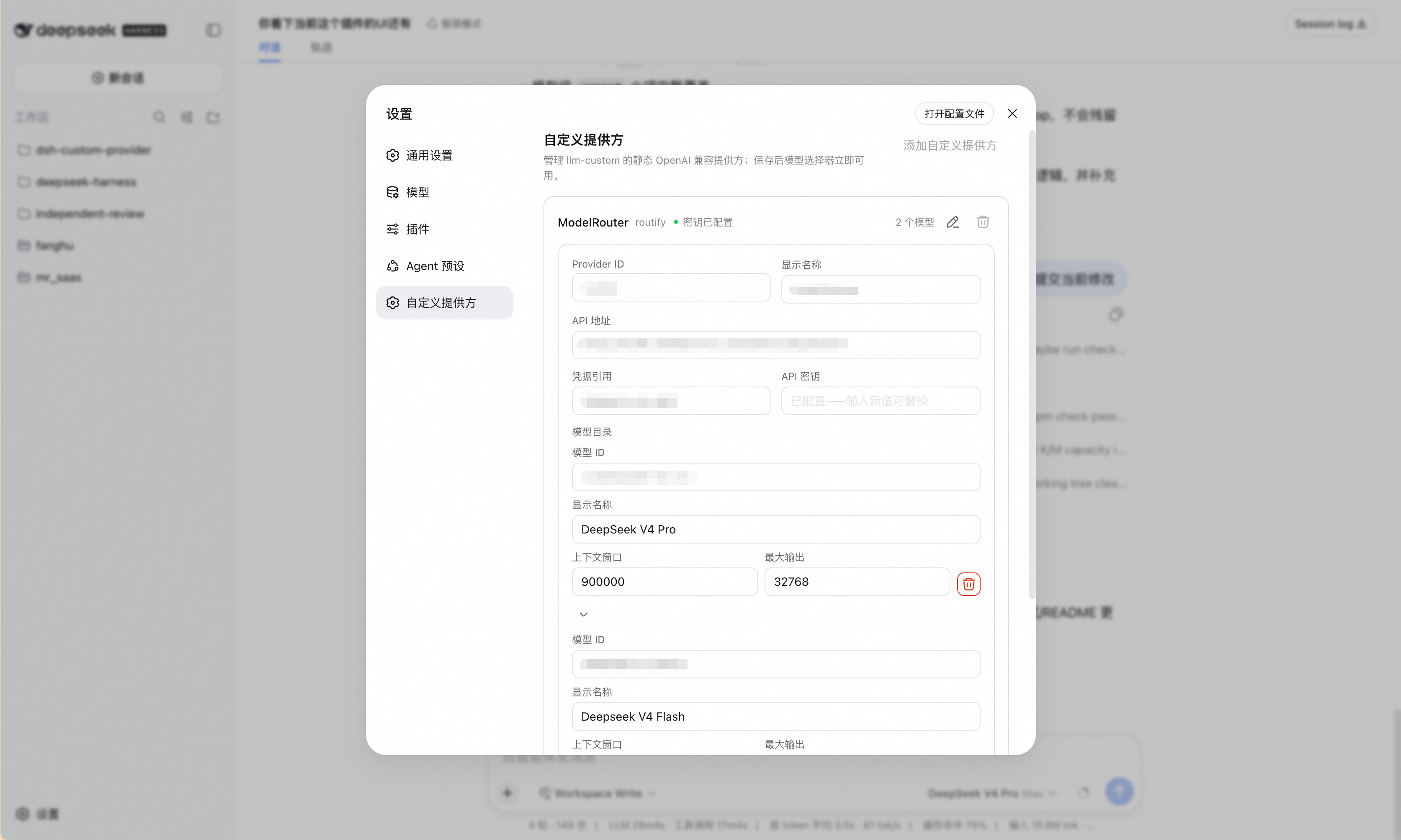
Web settings
Provider credentials, endpoints, models, capacities, and advanced compatibility fields can be managed in DSH Web.
YAML configuration
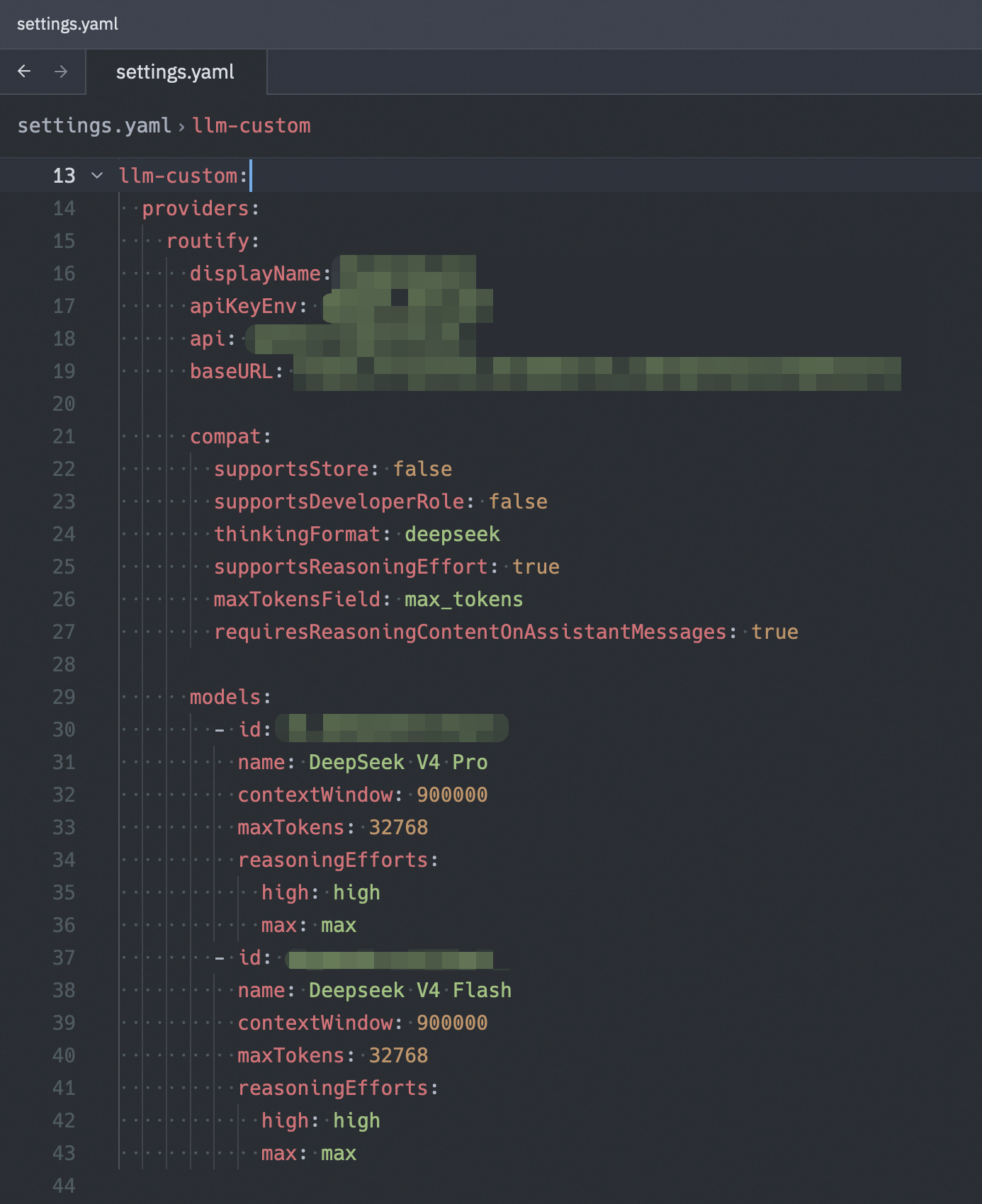
The same provider and model catalog can be managed directly in settings.yaml.
Configuration
Web settings
Open Settings → Custom Providers in DSH Web, then:
- Add a provider ID and display name, then select the endpoint's wire protocol.
- Enter the protocol-appropriate API base URL and credential reference. See Protocol and base URL.
- Enter the API key. The field is write-only and stores the value through the DSH credentials service.
- Add one or more models with their model IDs, display names, context windows, and maximum outputs. Capacity inputs accept integers and
K/Msuffixes such as200Kor1m. - Expand a model's advanced fields only when it needs custom reasoning-effort mappings. Chat Completions routes also expose request compatibility overrides.
- Save the provider. Its models become available to the model picker immediately after the settings change is applied.
settings.yaml
llm-custom:
  providers:
    example:
      displayName: Example Provider
      apiKeyEnv: EXAMPLE_API_KEY
      api: openai-completions
      baseURL: https://api.example.com/v1
      compat:
        supportsStore: false
        supportsDeveloperRole: false
        thinkingFormat: deepseek
        supportsReasoningEffort: true
        maxTokensField: max_tokens
        requiresReasoningContentOnAssistantMessages: true
      models:
        - id: example-model
          name: Example Model
          contextWindow: 262144
          maxTokens: 32768
          reasoningEfforts:
            off:
            high: high
            max: max
apiKeyEnv is a credential reference, not the secret itself. Configure its value through DSH's credentials service or the Web settings page.
Protocol and base URL
The plugin passes baseURL to the selected protocol adapter. Configure the URL at the level expected by that adapter:
api | Request path appended by the adapter | Typical baseURL |
|---|---|---|
openai-completions | /chat/completions | https://api.example.com/v1 |
openai-responses | /responses | https://api.example.com/v1 |
anthropic-messages | /v1/messages | https://api.example.com |
For a compatible gateway, choose the base URL that makes the resulting request path resolve on that gateway. The plugin normalizes trailing slashes but does not probe or rewrite endpoints.
To use OpenAI Responses, change the route protocol while keeping an OpenAI-style /v1 base:
api: openai-responses
baseURL: https://api.example.com/v1
To use Anthropic Messages, use the endpoint root before /v1/messages:
api: anthropic-messages
baseURL: https://api.example.com
Configuration reference
Each key below is relative to llm-custom.providers.<provider-id>.
In the Web UI, a provider ID must start with a lowercase letter and contain only lowercase letters, digits, and dashes.
Provider fields
| Field | Required | Description |
|---|---|---|
displayName | No | Name shown in the model picker. Defaults to the provider ID. |
apiKeyEnv | Yes | DSH credential reference resolved before every request. |
api | Yes | Wire protocol: openai-completions, openai-responses, or anthropic-messages. |
baseURL | Yes | Absolute HTTP(S) base URL at the level expected by the selected protocol. Trailing slashes are normalized. |
compat | No | Chat Completions compatibility defaults inherited by every model on the route; rejected for other protocols. |
models | Yes | Static model catalog containing at least one model. Model IDs must be unique within the provider. |
Model fields
| Field | Required | Description |
|---|---|---|
id | Yes | Model ID sent to the provider. |
name | No | Name shown in the model picker. Defaults to id. |
contextWindow | Yes | Positive integer context-window size in tokens. |
maxTokens | Yes | Positive integer maximum output size in tokens. |
reasoningEfforts | No | Selectable DSH reasoning levels mapped to provider wire values. Set to false to disable the reasoning control. |
compat | No | Per-model Chat Completions compatibility values; rejected for other protocols. Each declared field overrides the provider-level value. |
Compatibility fields
For openai-completions, compat accepts the same fields at provider and model level. These fields are not part of OpenAI Responses or Anthropic Messages routes, and the Web UI removes them when a route switches away from Chat Completions.
| Field | Values | Effect |
|---|---|---|
supportsStore | true / false | Whether the request may send the OpenAI store parameter. |
supportsDeveloperRole | true / false | Whether system prompts may use the developer role. |
thinkingFormat | openai, deepseek, openrouter, together, zai, qwen, string-thinking, ant-ling | Reasoning-content format understood by the endpoint. |
supportsReasoningEffort | true / false | Whether the request may send a reasoning-effort parameter. |
maxTokensField | max_completion_tokens / max_tokens | Request field used for the maximum output limit. |
requiresReasoningContentOnAssistantMessages | true / false | Whether replayed assistant messages retain reasoning_content. |
Only declare compatibility fields required by the endpoint; omitted model fields inherit the provider-level values.
Reasoning-effort mappings
The supported DSH levels are off, minimal, low, medium, high, xhigh, and max. A mapping value is the exact string expected by the provider. Only off may be empty (null in YAML), and a mapping must expose at least one non-off level. Omitted levels are unavailable in the picker.
reasoningEfforts:
  off:
  medium: medium
  high: high
Use reasoningEfforts: false when the model does not provide a reasoning control.
Security and lifecycle notes
- When a configured model is used, DSH sends its model request and the resolved API credential to that route's user-configured
baseURLusing the selected protocol. - The plugin itself adds no telemetry and does not request workspace-file, shell, or browser access. Its Web UI only manages the
llm-customsettings and referenced DSH credentials. - API keys are resolved for each request and are never written into the
llm-customsettings section. - Replacing a key in the Web UI updates the referenced credential without displaying the stored value.
- Deleting a provider or uninstalling the plugin does not delete its credential or the
llm-customsection. Remove those separately when they are no longer needed.
Current scope
- OpenAI Chat Completions, OpenAI Responses, and Anthropic Messages endpoints
- Static, text-input model catalogs only
- No remote model discovery
- No automatic provider-specific defaults; Chat Completions compatibility fields are explicit configuration
Uninstall
npx @deepseek-ai/dsh plugin --profile web remove @linziyanleo/dsh-custom-provider
The uninstall command removes the plugin bundle only. See the lifecycle notes above for settings and credential cleanup.
Development
pnpm install --frozen-lockfile
pnpm check
pnpm check runs the offline test suite, server and client type checks, the production build, and a client-bundle assertion. Live-provider acceptance is intentionally opt-in and is not part of the default check.
Pushes to main are published only after the matching CI run succeeds. The publish workflow treats the version declared in package.json as a minimum: it uses that version when it is newer than npm, otherwise it increments the latest published patch version. prepublishOnly repeats the complete check and validates the package contents before npm accepts the release.
License
Plugins relacionados
dsh-routing-suite
yjh051108/dsh-routing-suite
dsh-plugin-subscriptions
v1ki/dsh-plugin-subscriptions
dsh-commandcode-provider
mars-sea/dsh-commandcode-provider
dsh-workbuddy-connect
corrinehu/dsh-workbuddy-connect