LiveCode
liyu6969/livecode
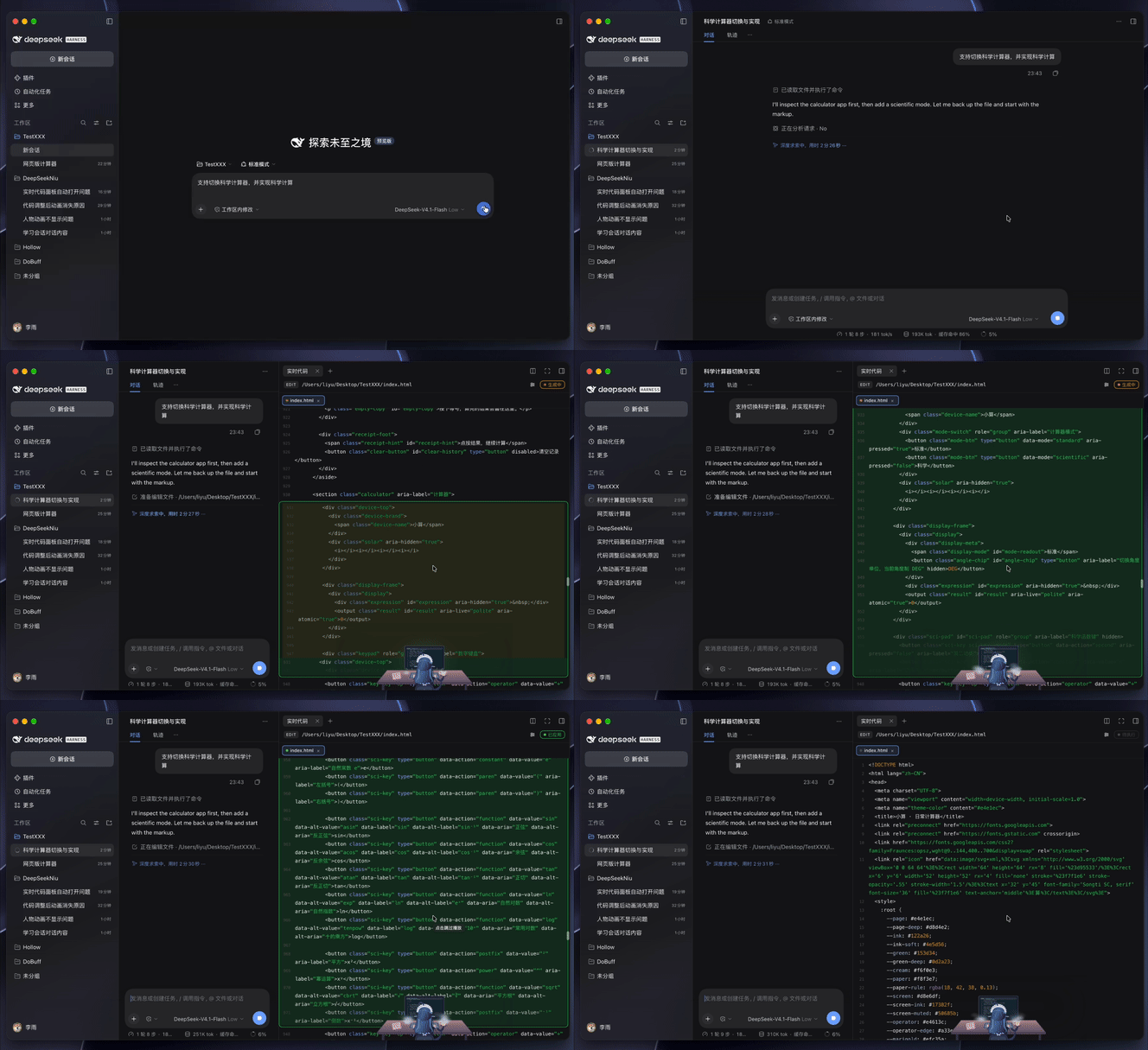
Right-sidebar panel that replays a file write or edit line by line as the agent produces it, with per-file tabs, a diff gutter and an optional animated character scene.
Instalar
dsh plugin --profile web add github:liyu6969/livecodeREADME
LiveCode · 实时代码
English | 中文
Watch the AI write the code.
Most of the time an agent finishes, hands you a diff, and you read it after the fact. LiveCode plays that moment instead — for the feeling of watching it happen, the thing a finished diff never gives you.
It does not make the agent faster. It makes the process something you can watch, and that is the point: a small, steady dose of "something is being built right now" while you wait.
The invisible AI given a body: doing the emotional labour for you, and keeping you company while you wait.
Features
- Watch the code being typed. The change happens on the file's real text, line by line — not in a diff you read afterwards.
- The AI, personified.
- Your character, your drink. Switch between 大肥鱼 and 小绿, coffee and tea, and show or hide the scene, from the gear.
- Works in code mode. When the agent writes through a
run_codeprogram, the nestedwrite/editcalls open the panel too.
Install
LiveCode is a DeepSeek Harness (DSH) bundle: no build step, no dependencies.
In DeepSeek: Settings → Plugins → Add plugin, and paste the repository address:
https://github.com/liyu6969/LiveCode
(github:liyu6969/LiveCode works too.) Then enable 实时代码 / LiveCode and ask
the agent to change a file — the panel opens on its own.
A local directory works the same way: paste its absolute path there, or from an
agent session run plugin_manager install_bundle target=/absolute/path. A local
directory is linked, so code changes reload in place; the repository address
installs a snapshot, which needs reinstalling to update.
Typing just
LiveCodedoes not work yet: that form is for a package published to npm, and this one is not published. Use the repository address or a local path.
Use
The panel opens itself on the next write / edit. Click a tab to revisit a
file, × to close one, right-click for close others / close all. The gear in
the corner switches the character, the drink, and whether the scene shows at all.
Settings
The gear popover remembers your choices. A profile can set defaults in
cordis.patch.yml:
- id: dsh-code-live
  name: '@local/dsh-code-live'
  config:
    scene: true       # show the character
    sceneHeight: 168  # 120–280 px
    character: maid   # maid = 大肥鱼, mint = 小绿
    drink: coffee     # coffee | tea
Development
node dev/render-probe.cjs          # headless render: empty / settled / streaming
OPEN=1 node dev/render-probe.cjs   # also render popovers and held frames
HANDOFF.md has the architecture and the decisions behind it.
Contact me
WeChat — scan to add me:

X: @liyust11
License
MIT © 2026 liyu — see LICENSE.
Plugins relacionados
dsh-web (dsh-task-board)
zhu1090093659/dsh-web
dsh-web (dsh-web-all)
zhu1090093659/dsh-web
dsh-TUI
ccch1mneyyy/dsh-tui
dsh-web-ui (dsh-task-board)
zhu1090093659/dsh-web-ui