dsh-agent-skills
minivv/dsh-agent-skills
Explora, activa, desactiva y gestiona Agent Skills de Claude Code, Codex, OpenCode, Gemini y directorios personalizados en el panel de configuración de DSH.
Instalar
dsh plugin --profile web add github:minivv/dsh-agent-skillsREADME
dsh-agent-skills





在 DeepSeek Harness 的设置页中查看、启停和管理本地 Agent Skills。
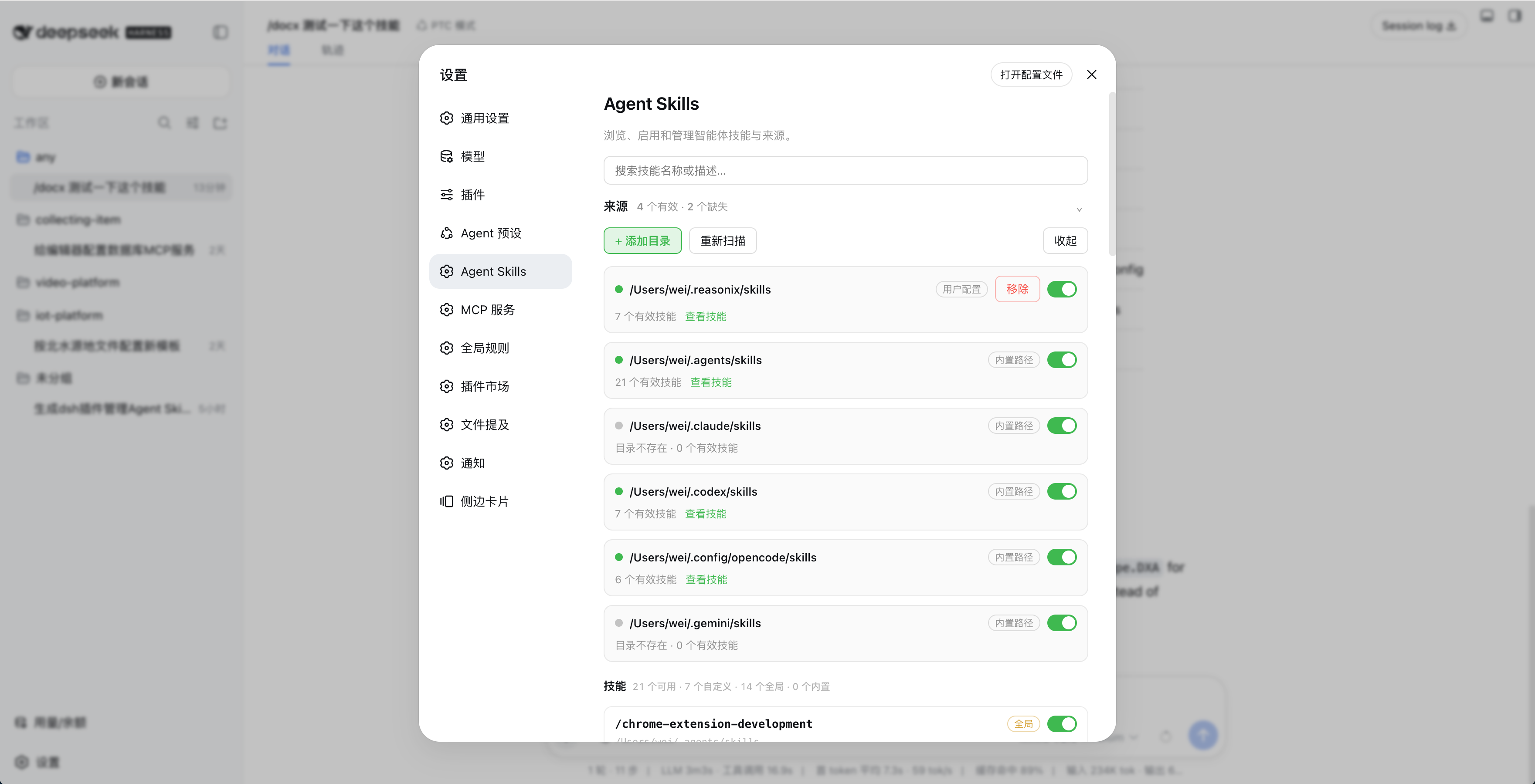
功能
- 自动扫描
~/.agents/skills、~/.claude/skills、~/.codex/skills、~/.config/opencode/skills和~/.gemini/skills - 支持自定义技能目录
- 按目录或单个技能启停
- 搜索、查看描述并监听技能文件变化
- 不修改原始
SKILL.md
安装
npm(推荐)
dsh plugin --profile web add dsh-agent-skills
安装后打开「设置 → Agent Skills」,点击「开启接管 DSH 技能」,再点击「重启 DSH」。
兼容性:dsh
0.1.x(含 0.1.7-rc)与0.2.0-rc.1起的 0.2.x 都可以用。
DSH 插件市场
在「设置 → 插件市场」中搜索 Agent Skills,或查看 DSH 插件市场。
GitHub
dsh plugin --profile web add github:minivv/dsh-agent-skills
Git 安装可能需要授权 pnpm 执行构建脚本。
使用
- 在「设置 → Agent Skills」中检查自动发现的目录,或点击「+ 添加目录」。
- 使用目录和技能开关控制可用技能。
- 出现技能变更提示后,点击「刷新页面」。
- 修改技能文件后,点击「重新扫描」或等待自动刷新。
点击「取消接管」并重启 DSH,可恢复 DSH 原来的技能来源。
设置保存在 $DSH_HOME/agent-skills/state.json。
技能格式
skills/
├── my-skill/
│   └── SKILL.md
└── another-skill.md
SKILL.md 需要 YAML frontmatter,name 使用小写 kebab-case:
---
name: my-skill
description: Explain when this skill should be used.
---

# Instructions
卸载
先在设置页点击「取消接管」和「重启 DSH」,再运行:
dsh plugin --profile web remove dsh-agent-skills
如果设置页无法打开,先恢复 DSH 技能来源:
DSH_INSTALL_ROOT="$(npm root -g)/@deepseek-ai/dsh" \
  node ~/.dsh/profiles/web/node_modules/dsh-agent-skills/scripts/uninstall-preset.mjs

dsh plugin --profile web remove dsh-agent-skills
开发
要求 Node.js 20+。
npm install
npm run typecheck
npm run build
npm test
npm pack --dry-run
兼容性
同一个版本同时支持 DSH 的两条发布线(0.1.5-rc.* 与 0.1.6-alpha.*,以及更早的 0.1.0-rc.*):
- wire codec 同时提供旧版读取的
schema和新版要求的create(),客户端与宿主两面共用同一张描述表; - 宿主提供的
@deepseek-ai/*依赖按名字解析,peerDependencies只是兼容区间声明,不会把旧版依赖装进你的 profile。
DSH 升级到新发布线后无需重新安装插件;只有 DSH 改 preset 文件时会丢失技能接管,重新点一次「开启接管 DSH 技能」即可。
注意
- 技能名必须匹配
[a-z0-9]+(?:-[a-z0-9]+)* - DSH 升级后如果开关失效,重新开启接管并重启 DSH
链接
相关插件
- dsh-activity-bell —— 侧边栏活动铃铛:会话跑完后铃铛显示红色角标,点一下把工作区列表换成按天分组的最近活动列表,没看过的完成项带绿点。
License
Plugins relacionados
deepseek-harness
deepseek-ai/deepseek-harness
dsh-web (dsh-plugin-manager)
zhu1090093659/dsh-web
dsh-web
zhu1090093659/dsh-web
dsh-web-ui (dsh-plugin-manager)
zhu1090093659/dsh-web-ui